
Microsoft PL-500 Practice Exams
Last updated on Nov 16,2026- Exam Code: PL-500
- Exam Name: Microsoft Power Automate RPA Developer (beta)
- Certification Provider: Microsoft
- Latest update: Nov 16,2026
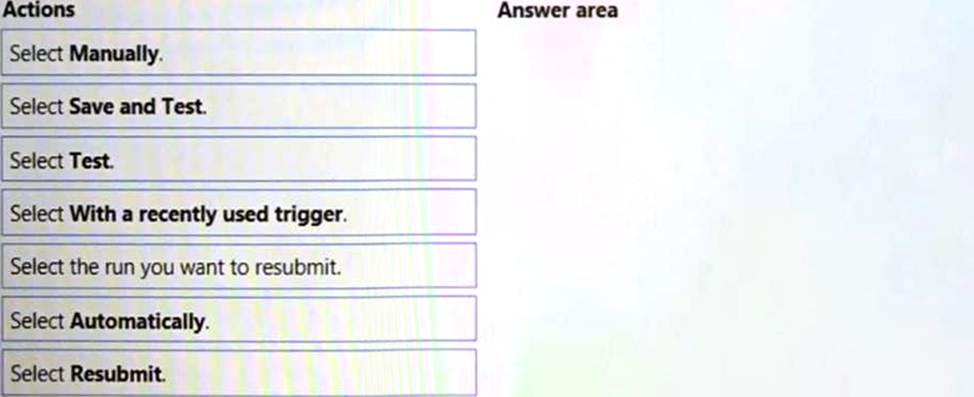
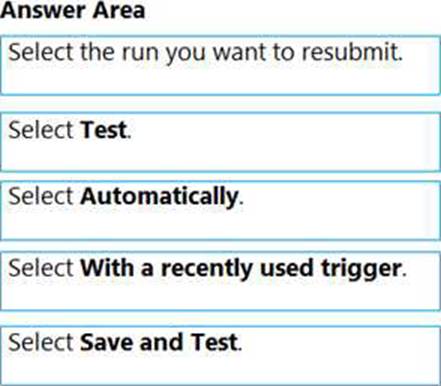
DRAG DROP
You are editing a cloud flow in the Power Automate flow designer.
You need to resubmit the most recent trigger.
Which five actions should you perform in sequence? To answer, move the appropriate actions from the list of actions to the answer area and arrange them in the correct order.
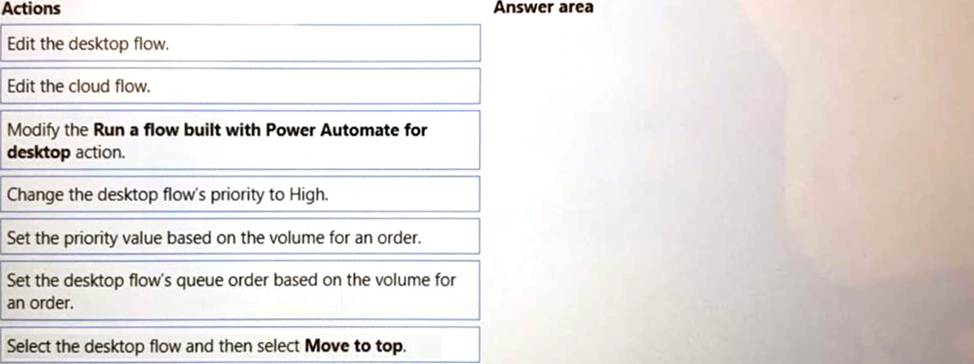
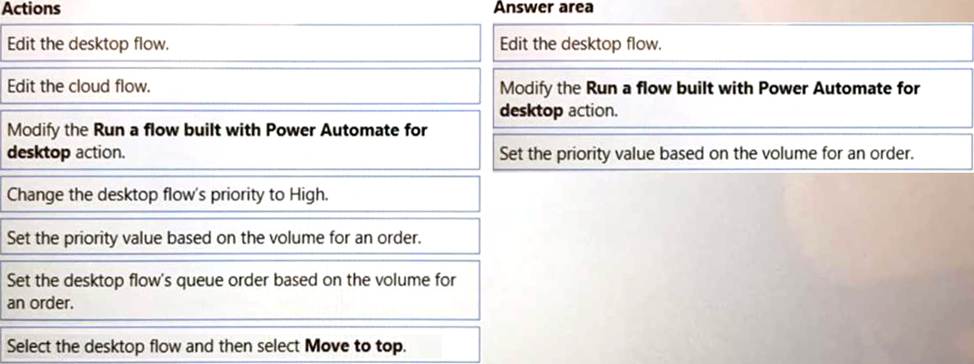
DRAG DROP
You need to implement a solution to manage the priority of incoming orders.
Which three actions should you perform in sequence? To answer, move the appropriate actions from the list of actions to the answer area and arrange them in the correct order.
You need to choose the two optical character recognition (OCR) engines that are able to extract text from the members’ secondary identification.
Which two OCR technologies achieve this goal? Each correct answer presents a complete solution. NOTE: Each correct selection is worth one point.
- A . Windows engine
- B . IBM Cognitive Services
- C . Google Tesseract engine
- D . Azure Cognitive Services
HOTSPOT
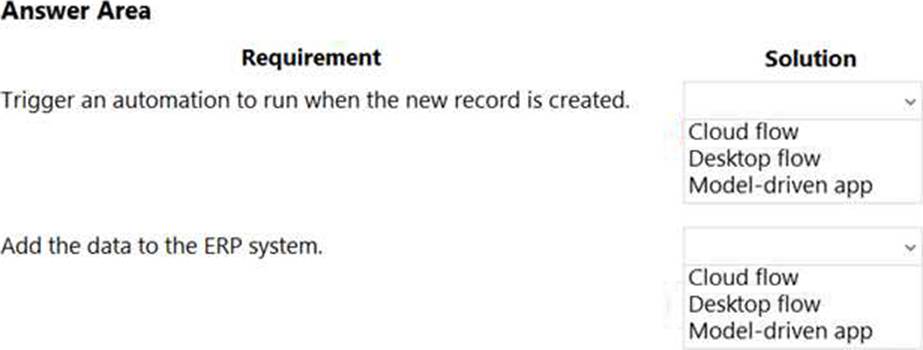
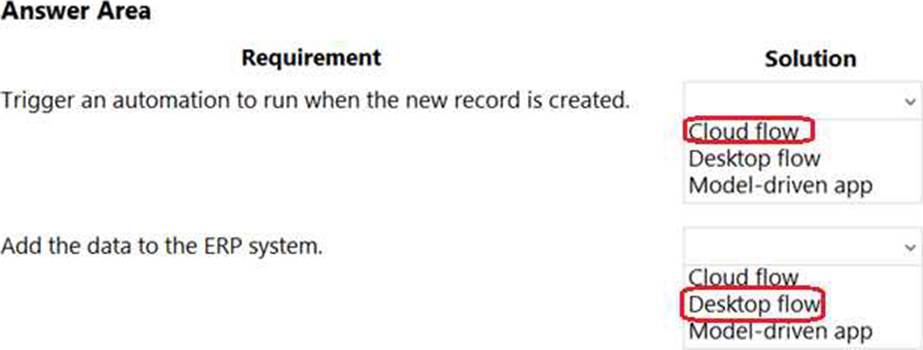
You are creating an automation for a company. When a new record is created in a Microsoft Dataverse table, the automation must add the same data to an enterprise resource planning (ERP) system. The ERP system does not have an API.
You need to create the automation solution.
What should you use? To answer, select the appropriate options in the answer area. NOTE: Each correct selection is worth one point.
You are developing a desktop flow that reads data from a table in a Microsoft Excel workbook. You need to read the cell in the fourth row and first column of the table.
Which two expressions can you use? Each correct answer presents a complete solution. NOTE: Each correct answer is worth one point.
- A . %ExcelData[1][4]%
- B . %ExcelData[4][0]%
- C . %ExcelData[‘Column1’][4]%
- D . %ExcelData[4][‘Column1’]%
HOTSPOT
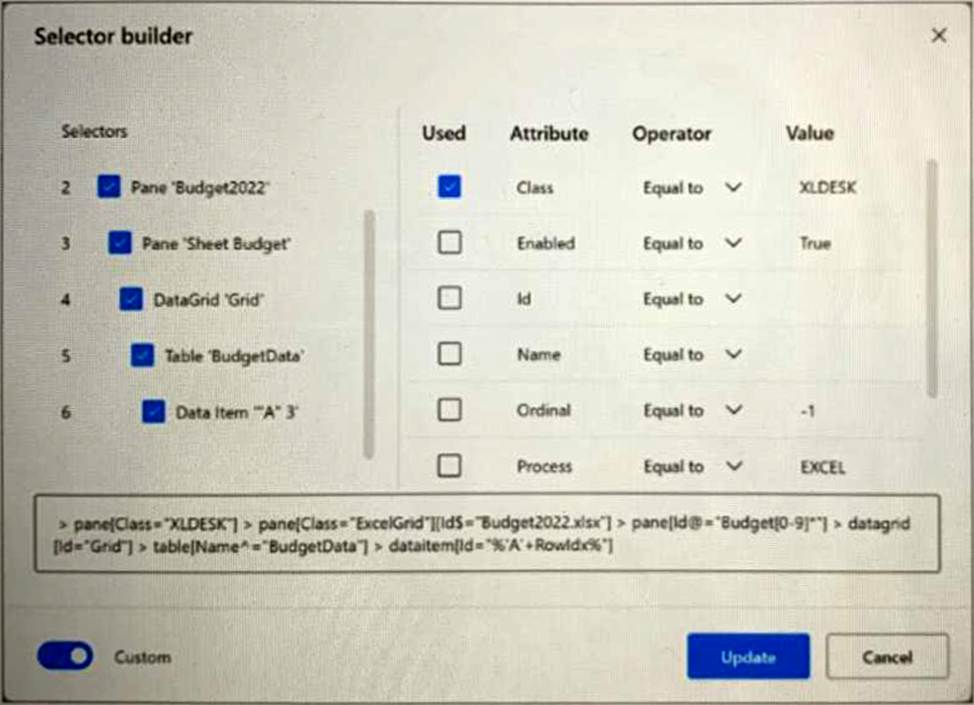
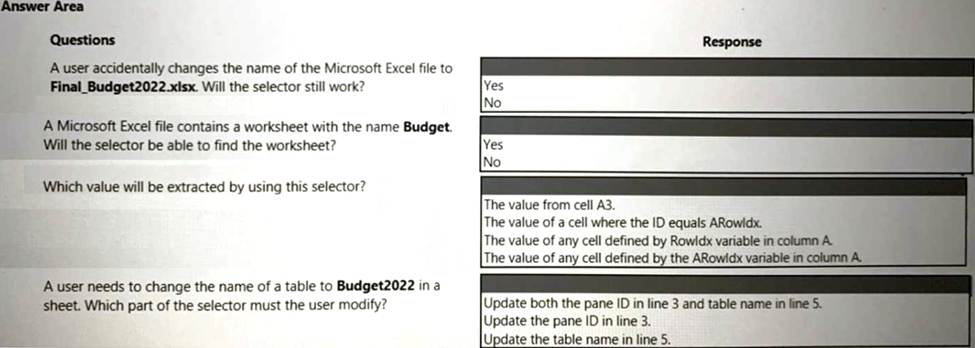
You are creating a custo A company uses activity logging to measure performance for invoice processing.
Users report that the data analytics department takes too long to manually analyze data. The company requires an automatic process to speed up activity log analysis and provide insights.
You need to select the Microsoft Power Platform feature to meet the company requirement.
Which feature should you select?
- A . Power Automate for cloud
- B . Process mining
- C . Task mining
- D . Power Automate for desktopm selector for a Microsoft Excel workbook by using a Power Automate desktop flow.
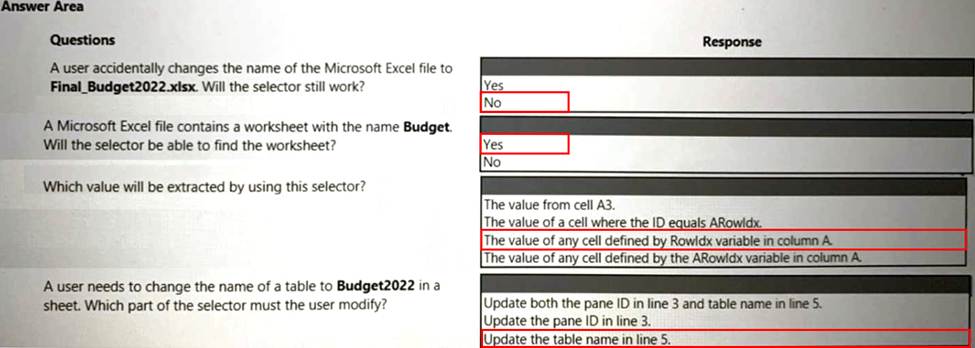
You develop a desktop flow.
You need to debug the flow.
Which three tools can you use? Each correct answer presents a complete solution. NOTE: Each correct selection is worth one point.
- A . Static results
- B . Run from here
- C . Breakpoints
- D . Configure run after
- E . Run next action
You need to resolve the issue reported with the RailStatusUpdater flow.
What are two possible ways to achieve the goal? Each correct answer presents a complete solution. NOTE: Each correct selection is worth one point.
- A . Put the desktop flow action into a Do until loop. Run until the desktop flow is successful.
- B . Call a separate child cloud flow to perform the desktop flow a second time.
- C . Create a duplicate action for the desktop flow and configure the duplicate action to run if the first desktop flow action fails.
- D . Create a duplicate action for the desktop flow to run after the first desktop flow.
The AP team monitors the shared mailbox to confirm that the customer has paid the invoice.
Requirements
Functional requirements
• Large volume orders must be processed before other orders.
• Invoices must be cross-checked with received items against packing slip for shipments.
• The finance team must be able to analyze patterns in transactional data to conduct fraud prevention activities.
• You must automate the process of entering data about incoming orders into SMSApp.
• The solution must follow the principle of least privilege.
Purchase Order Quantity flow
• You must create an unmanaged solution to update purchase order details in SMSApp. The flow must use a manual trigger.
• Members of Accounts Payable team will be testers for the solution. They must be able to access
the Purchase Order Quantity flow.
Flow for processing invoice data
• You must create a flow to monitor the AP mailbox. When an invoice arrives as an attachment in the inbox, the flow must automatically process the invoice data by using a form processing model. The flow must cross-check the received items against the packing slip.
• You must use different Accounts Payable email addresses for development user acceptance testing (UAT), and production environments.
• You must use an environment variable to represent the Accounts Payable mailbox for the environment in use.
• You must be able to use the environment variable across multiple cloud flows, a custom connector, and a canvas app.
Technical requirements
• Users must only be allowed to connect to and access systems that are required for the employee to perform required job tasks.
• All automation flows must be either co-owned or shared between staff.
• All employees must be able to access the new environment to build personal productivity automations.
• You must distribute the workload for desktop flows to optimize productivity.
Monitor flows
• All data extracted from Invoices should be stored in a custom Dataverse entity. Only employees who are part of Finance role should be able to edit all Invoice data but must be prevented from creating or deleting one.
Issues
Invoice data
All users report that they can see and modify invoice data.
New environment
•The IT department creates a new environment. A user creates a cloud flow named FlowA in the environment that triggers a desktop flow. A user reports that the cloud flow does not trigger the desktop flow to run.
• Microsoft Dataverse is not provisioned in the new environment. You attempt to create a Desktop flow in the default environment but receive a Dataverse error message and cannot proceed.
Data entry automation flow
An administrator runs a new desktop flow in the development environment to automate data entry into SMSApp. The flow automatically reverts to a suspended state.
Order fulfillment flow
You must automate the customer communication process by using an unattended desktop flow. The flow must check the fulfillment status of each active order in SMSApp. If an order is fulfilled, the flow must send the customer an email that includes tracking information for their orde
You need to identify the cause for the SMSApp data entry issue.
What is the root cause?
- A . The DLP policy that contains the desktop flow connector was deleted.
- B . The default policy group is set to Blocked.
- C . The desktop flow was not shared with the finance clerk.
- D . The Power Automate Management connector is assigned to the Business category.
The AP team monitors the shared mailbox to confirm that the customer has paid the invoice.
Requirements
Functional requirements
• Large volume orders must be processed before other orders.
• Invoices must be cross-checked with received items against packing slip for shipments.
• The finance team must be able to analyze patterns in transactional data to conduct fraud prevention activities.
• You must automate the process of entering data about incoming orders into SMSApp.
• The solution must follow the principle of least privilege.
Purchase Order Quantity flow
• You must create an unmanaged solution to update purchase order details in SMSApp. The flow must use a manual trigger.
• Members of Accounts Payable team will be testers for the solution. They must be able to access
the Purchase Order Quantity flow.
Flow for processing invoice data
• You must create a flow to monitor the AP mailbox. When an invoice arrives as an attachment in the inbox, the flow must automatically process the invoice data by using a form processing model. The flow must cross-check the received items against the packing slip.
• You must use different Accounts Payable email addresses for development user acceptance testing (UAT), and production environments.
• You must use an environment variable to represent the Accounts Payable mailbox for the environment in use.
• You must be able to use the environment variable across multiple cloud flows, a custom connector, and a canvas app.
Technical requirements
• Users must only be allowed to connect to and access systems that are required for the employee to perform required job tasks.
• All automation flows must be either co-owned or shared between staff.
• All employees must be able to access the new environment to build personal productivity automations.
• You must distribute the workload for desktop flows to optimize productivity.
Monitor flows
• All data extracted from Invoices should be stored in a custom Dataverse entity. Only employees who are part of Finance role should be able to edit all Invoice data but must be prevented from creating or deleting one.
Issues
Invoice data
All users report that they can see and modify invoice data.
New environment
•The IT department creates a new environment. A user creates a cloud flow named FlowA in the environment that triggers a desktop flow. A user reports that the cloud flow does not trigger the desktop flow to run.
• Microsoft Dataverse is not provisioned in the new environment. You attempt to create a Desktop flow in the default environment but receive a Dataverse error message and cannot proceed.
Data entry automation flow
An administrator runs a new desktop flow in the development environment to automate data entry into SMSApp. The flow automatically reverts to a suspended state.
Order fulfillment flow
You must automate the customer communication process by using an unattended desktop flow. The flow must check the fulfillment status of each active order in SMSApp. If an order is fulfilled, the flow must send the customer an email that includes tracking information for their orde
You need to identify the cause for the SMSApp data entry issue.
What is the root cause?
- A . The DLP policy that contains the desktop flow connector was deleted.
- B . The default policy group is set to Blocked.
- C . The desktop flow was not shared with the finance clerk.
- D . The Power Automate Management connector is assigned to the Business category.