
Microsoft MS-700 Practice Exams
Last updated on Nov 16,2026- Exam Code: MS-700
- Exam Name: Managing Microsoft Teams
- Certification Provider: Microsoft
- Latest update: Nov 16,2026
You need to ensure that file sharing during Teams chats meets the technical requirements of the marketing department.
What should you do?
- A . Create a retention policy for Teams chats.
- B . Create a data loss prevention (DIP) policy for Teams chat and channel messages.
- C . Enable Customer Lockbox.
- D . Create a retention policy for the OneDrive accounts location.
- E . Create a retention policy for the SharePoint sites location.
SIMULATION
Task 8
You need to prevent guest users from calling your company’s Teams users.
SIMULATION
Task 4
You need to ensure that the Approvals app is pinned to the top of the app bar of the Teams client for all members of the Retail team. The solution must NOT affect other users.
SIMULATION
Task 9
You need to prevent unauthenticated users from joining Teams meetings.
Users report poor quality during Microsoft Teams audio conferences.
You run a network trace during an audio conference from a user’s device as shown in the following exhibit.
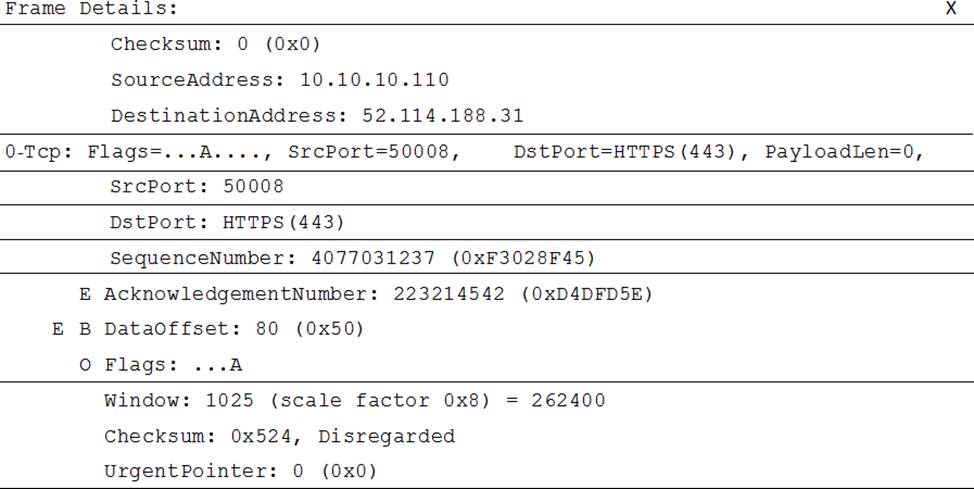
What causes the poor quality of the audio conferences?
- A . The source port range for audio is too narrow.
- B . The source port for audio is above 50,000.
- C . The UDP traffic is being limited.
- D . The TLS traffic is being limited.
Note: This question is part of a series of questions that present the same scenario. Each question in
the series contains a unique solution that might meet the stated goals. Some question sets might have more than one correct solution, while others might not have a correct solution.
After you answer a question in this section, you will NOT be able to return to it. As a result, these questions will not appear in the review screen.
You company has a Microsoft 365 subscription and a Virtual Desktop Infrastructure (VDI) solution.
The company’s Microsoft Teams upgrade policy is set to Teams only coexistence mode.
You deploy the Microsoft Installer (MSI) package for Microsoft Teams to the VDI solution.
Several months later, users of the VDI solution report that their workstation is missing several new Microsoft Teams features.
You need to ensure that the VDI solution users can use the new Microsoft Teams features.
Solution: You run the Grant-CsTeamsUpgradePolicy cmdlet and specify the -PolicyName parameter.
Does this meet the goal?
- A . Yes
- B . No
SIMULATION
Task 7
You need to acquire a dedicated Microsoft dial-in bridge number from either 431 or 343 area codes in Canada.
You need to resolve the issue reported by the project management department users.
What should you do?
- A . Uninstall the current Teams client and then reinstall the latest version of the client.
- B . From the Microsoft Teams admin center, modify the Meeting settings.
- C . From the Microsoft Teams admin center, create and assign a new meeting policy.
- D . Instruct the users to launch Teams and select Check for updates.
Your company has a Microsoft 365 E5 subscription.
The company uses Microsoft Skype for Business Online and plans to upgrade to Microsoft Teams.
The network contains the following devices:
✑ 100 computers that run Windows 10
✑ 50 Android devices
✑ 50 iPhone devices
All the devices have the Skype for Business app installed.
You need to deploy Microsoft Teams to all the devices.
What should you do?
- A . From the Microsoft Teams admin center, set Download the Teams app in the background for Skype for
Business users to On. - B . Create a Group Policy Object (GPO) that contains an app package, and then link the GPO.
- C . From the Microsoft Teams admin center, create an app setup policy that includes the Microsoft Teams
app, and then assign the policy to all users. - D . From the Microsoft Intune, push Microsoft Teams to all the devices.
Your company has a Microsoft 365 E5 subscription.
The company uses Microsoft Skype for Business Online and plans to upgrade to Microsoft Teams.
The network contains the following devices:
✑ 100 computers that run Windows 10
✑ 50 Android devices
✑ 50 iPhone devices
All the devices have the Skype for Business app installed.
You need to deploy Microsoft Teams to all the devices.
What should you do?
- A . From the Microsoft Teams admin center, set Download the Teams app in the background for Skype for
Business users to On. - B . Create a Group Policy Object (GPO) that contains an app package, and then link the GPO.
- C . From the Microsoft Teams admin center, create an app setup policy that includes the Microsoft Teams
app, and then assign the policy to all users. - D . From the Microsoft Intune, push Microsoft Teams to all the devices.