
Microsoft MB-240 Practice Exams
Last updated on Nov 16,2026- Exam Code: MB-240
- Exam Name: Microsoft Dynamics 365 Field Service Functional Consultant
- Certification Provider: Microsoft
- Latest update: Nov 16,2026
DRAG DROP
LitWare has requirements for configuring the Field Service mobile app. and you are responsible for setting up the system to meet those requirements.
You need to set up help documents related to the requirements as per the case study.
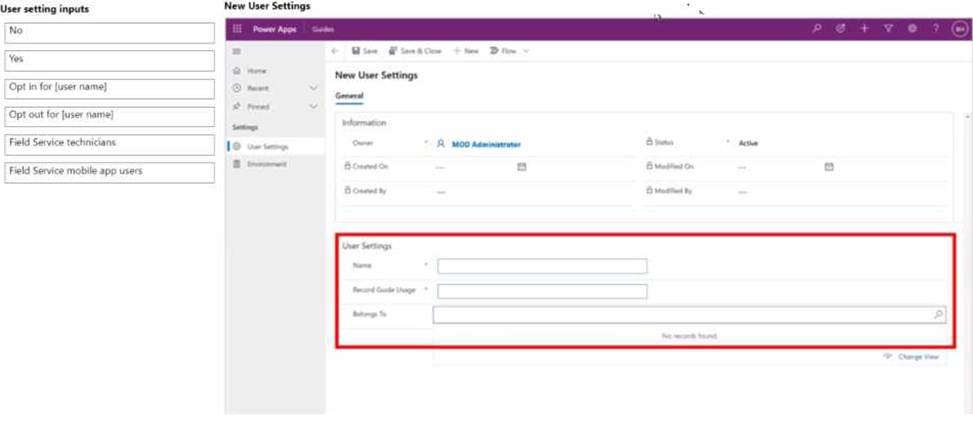
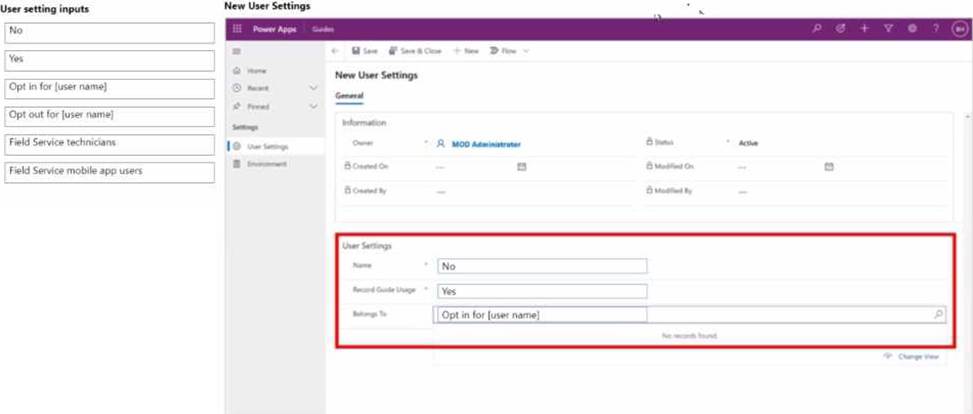
How should you configure the user settings? To answer, move the appropriate configurations to the correct location. You may use each configuration once or not at all. You may need to drag the split bar between panes or scroll to view content. NOTE: Each correct match is worth one point.
DRAG DROP
LitWare has requirements for configuring the Field Service mobile app. and you are responsible for setting up the system to meet those requirements.
You need to set up help documents related to the requirements as per the case study.
How should you configure the user settings? To answer, move the appropriate configurations to the correct location. You may use each configuration once or not at all. You may need to drag the split bar between panes or scroll to view content. NOTE: Each correct match is worth one point.
You are a Dynamics 365 for Field Service Administrator.
You install and configure Connected Field Service with Azure IoT Central. Several of your connected devices sent alerts back to Dynamics 365 and work orders were created. However, the work orders were not sent backto Azure IoT Central.
You need to resolve the issue.
Which Action should you take to resolve the issue?
- A . Configure the Microsoft Flow When a work order is created in Connected Field Service, update IoT Central.
- B . Create an IoT Command in Dynamics 365 to trigger an update in IoT Central.
- C . Configure the Dynamics 365 workflow When a work order is created in Connected Field Service, update IoT Central.
- D . Create an IoT action in Dynamics 365 to trigger an update in IoT Central.
You are a Dynamics 365 for Field Service Administrator.
You install and configure Connected Field Service with Azure IoT Central. Several of your connected devices sent alerts back to Dynamics 365 and work orders were created. However, the work orders were not sent backto Azure IoT Central.
You need to resolve the issue.
Which Action should you take to resolve the issue?
- A . Configure the Microsoft Flow When a work order is created in Connected Field Service, update IoT Central.
- B . Create an IoT Command in Dynamics 365 to trigger an update in IoT Central.
- C . Configure the Dynamics 365 workflow When a work order is created in Connected Field Service, update IoT Central.
- D . Create an IoT action in Dynamics 365 to trigger an update in IoT Central.
You are scheduling a customer for preventative maintenance performed on a predictable schedule. The customer wants the work performed within two (2) days of the 15th of each month, and an Agreement has already been created.
Which three elements of the booking setup are valid? Each correct answer presents part of the solution. NOTE: Each correct selection is worth one point.
- A . Auto Generate Work Order = Yes
- B . Preferred Resource contains data
- C . Pre-Booking Flexibility = 2 and Post Booking Flexibility = 2
- D . Preferred Resource either contains data or is blank
- E . Auto Generate Work Order = No
Dispatchers at Contoso have access to a wide range of information because they often cover for each other within the region. However, for their normal dairy operations, they only need to be able to see resources in their territory.
The dispatcher needs to customize their schedule board to filter resources to their territory.
What should the dispatcher do?
- A . On the Filter & Map View window, select a Service Territory, then select Save Current Filters as Default.
- B . On the Filter & Map View window, select a Resource Type, then select Save Current Filters as Default.
- C . In the Scheduler Settings, select one Territory.
- D . Add a Booking Requirements tab.
DRAG DROP
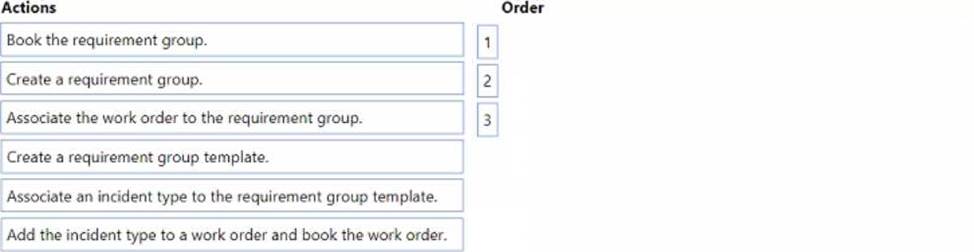
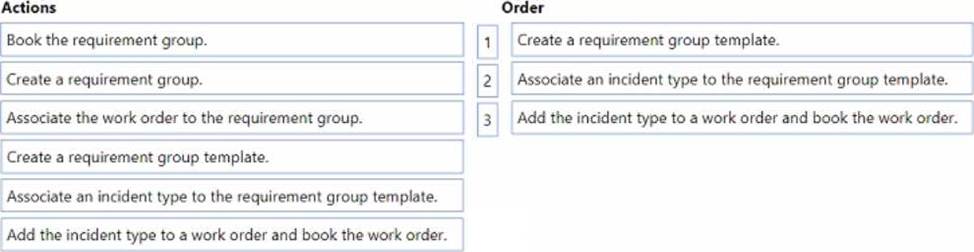
You need to create a requirement group for a work order.
Which three actions should you perform in sequence? To answer, move the appropriate actions from the list of actions to the answer area and arrange them in the correct order.
DRAG DROP
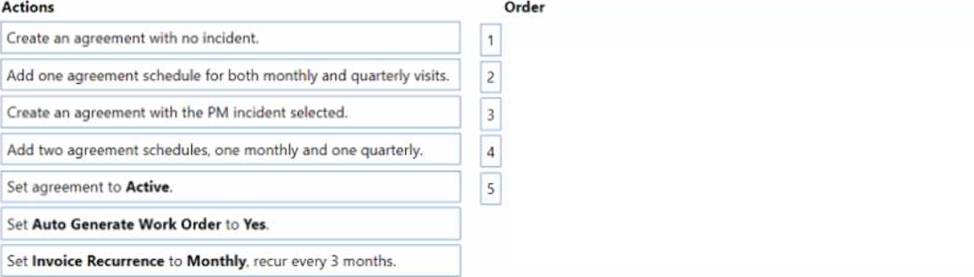
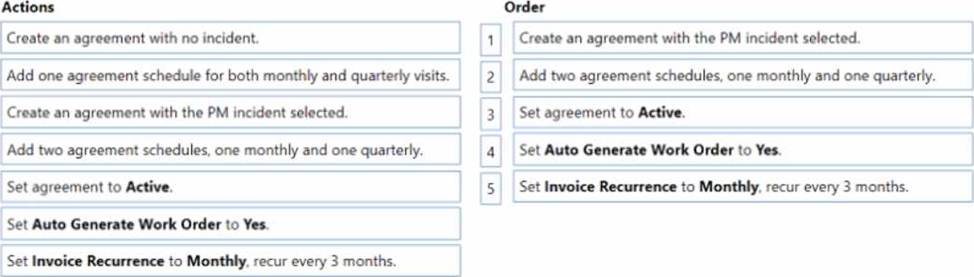
You need to create a Preventative Maintenance Agreement that meets Contoso standards and requirements.
Which five actions should you perform in sequence? To answer, move the appropriate actions from the list of actions to the answer area and arrange them in the correct order.
You are working with your customer to define their schedule board.
Your customer needs you to add or create additional views for their scheduling team.
Solution: Create a new view in the Resource Requirements Views. Edit the Scheduler Settings, and add the new view.
Does this meet the goal?
- A . Yes
- B . No
You are working with your customer to define their schedule board.
Your customer needs you to add or create additional views for their scheduling team.
Solution: Create a new view in the Resource Requirements Views. Edit the Scheduler Settings, and add the new view.
Does this meet the goal?
- A . Yes
- B . No