
Microsoft MB-230 Practice Exams
Last updated on Nov 16,2026- Exam Code: MB-230
- Exam Name: Microsoft Dynamics 365 Customer Service Functional Consultant
- Certification Provider: Microsoft
- Latest update: Nov 16,2026
HOTSPOT
A client wants to use the knowledge base in Dynamics 365 Customer Service.
You need to identify the state of a knowledge base article when an event occurs.
What are the states of the articles? To answer, select the appropriate options in the answer area. NOTE: Each correct selection is worth one point.
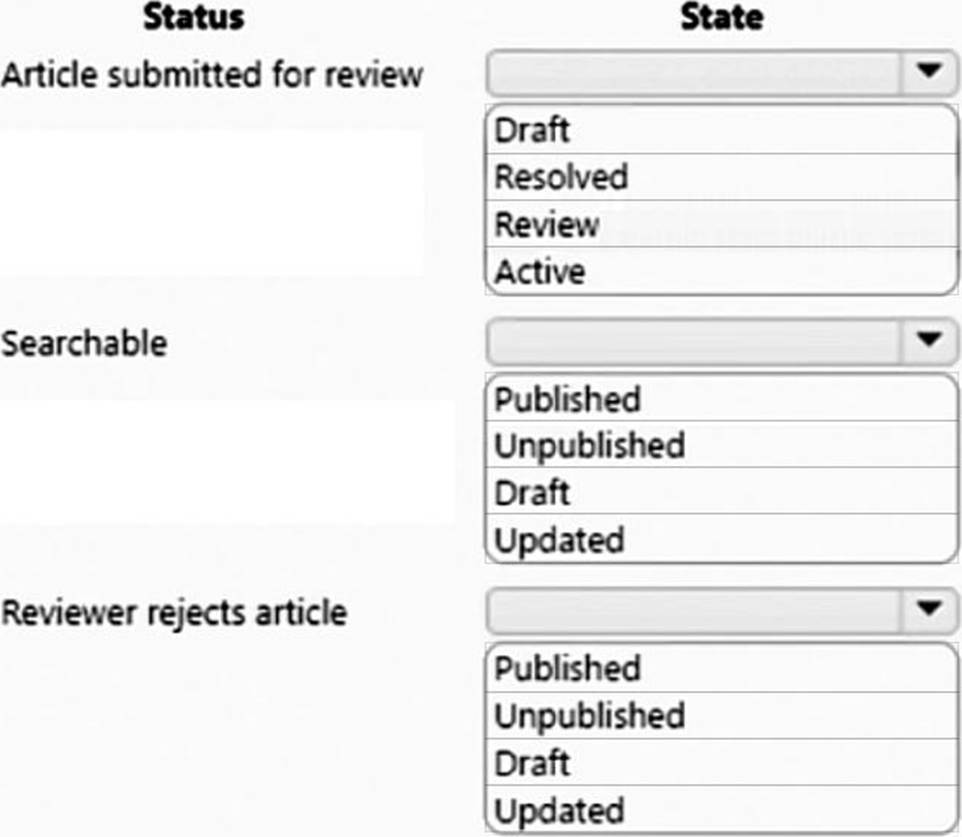
Explanation:
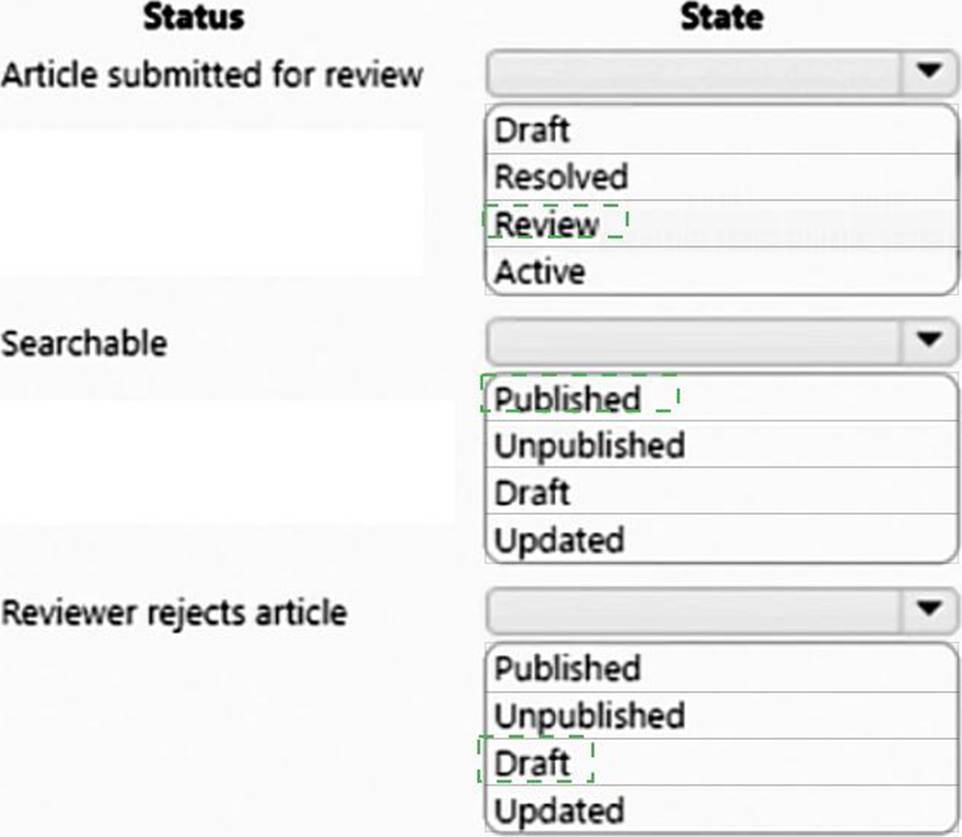
Box 1: Review
Review – The draft version of the article is sent to reviewers to approve or reject.
Mark a knowledge article for review
To ensure that the content you’ve created is accurate, have someone review it.
You can mark an article for review or directly assign it to a specific person or queue. When you mark an article for review, it starts appearing in the knowledge manager’s dashboard. The knowledge manager can then assign the article to specific team members or a queue for review.
Box 2: Published
When you approve the content of an article, it means that the content is ready to be consumed by other customer service reps, and also ready to be published.
On the Business process bar, in the Review stage, in the Review field, select Approve.
The article is now ready to be published.
Box 3: Draft
Draft – The article is in the process of being created.
Note: A versioned knowledge article in the Draft state can be modified only by the author or reviser with the contribute access to the knowledge base, owner of a knowledge base, users with the admin and knowledge_admin role, and ownership group members, if ownership group is added to the article.
Reference: https://docs.microsoft.com/en-us/dynamics365/customer-service/customer-service-hub-user-guide-knowledge-article
HOTSPOT
A credit card company uses Dynamics 365 Customer Service. Agents receive conversations through Omnichannel for Customer Service.
A browser-based internal application Drawees, a history of a customer’s payments and credit scores, Vou create an application tab template for the internal application.
if a customer requests a credit limit increase, the agent must use the internal application within Omnichannel for Customer Service to determine eligibility.
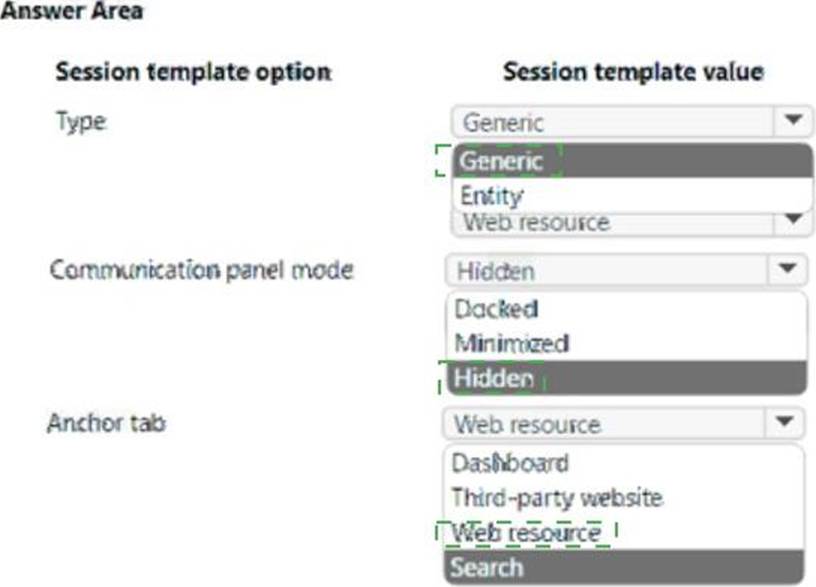
Because the internal application requires; maximum) screen space, communications with customers must remain hidden. The internal application must be displayed on the anchor tab.
Once an eligibility check is performed the agent must be able To- chat with the customer again.
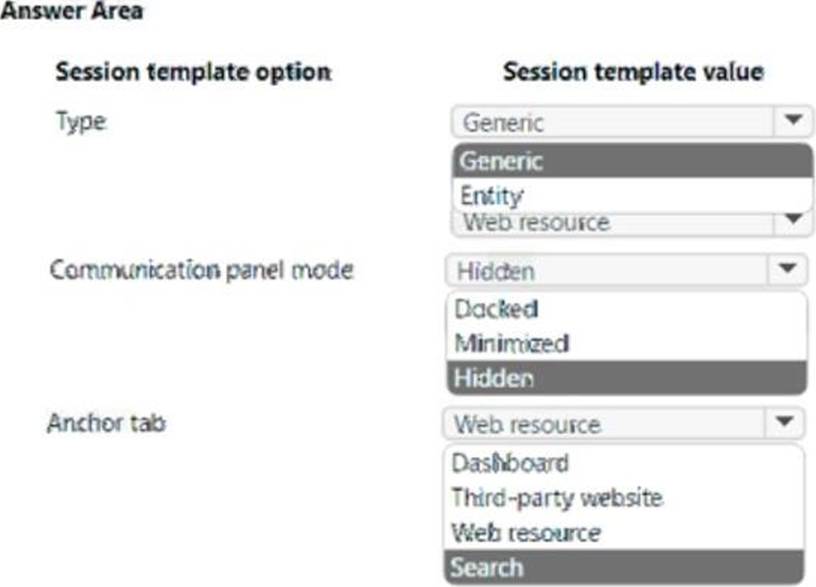
You need to create a session template for the company.
How should you configure each area at the template? To answer., select the appropriate options in the answer area. NOTE: Each correct selection is worth one point.
You implement Dynamics 365 Customer Service for a company. Support representatives use the Customer Service workspace. Support representatives must begin working on existing cases in their queues when they open the workspace.
Which screen should the representatives use to perform this task?
- A . Customer service multiple customer sessions
- B . Customer Service Agent Dashboard
- C . Power Bl dashboard
- D . Next available case record
You manage a Dynamics 365 for Customer Service environment. You create and activate a routing rule.
You need to modify the routing rule to a target a queue instead of a user. You navigate to routing rule sets.
What should you do first?
- A . Use Lookup to specify the Add to queue value.
- B . Select Edit to the command bar.
- C . Toggle the radio button for Route from user/team to queue.
- D . Deactivate the routing rule.
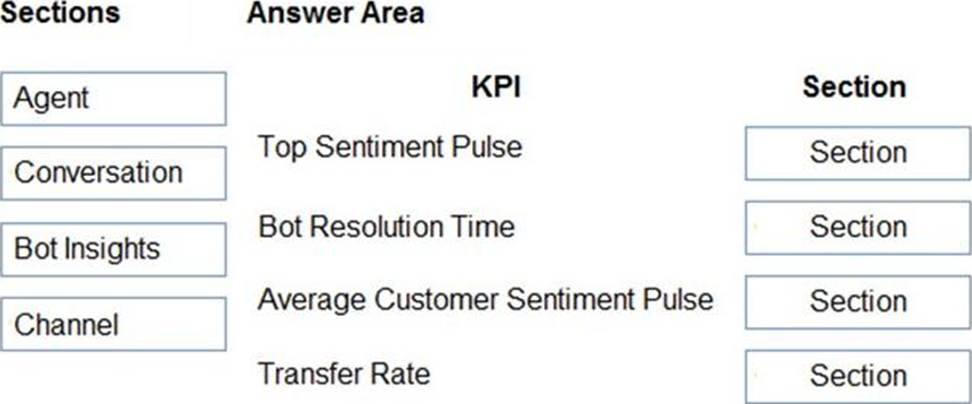
DRAG DROP
You are an Omnichannel supervisor for a company.
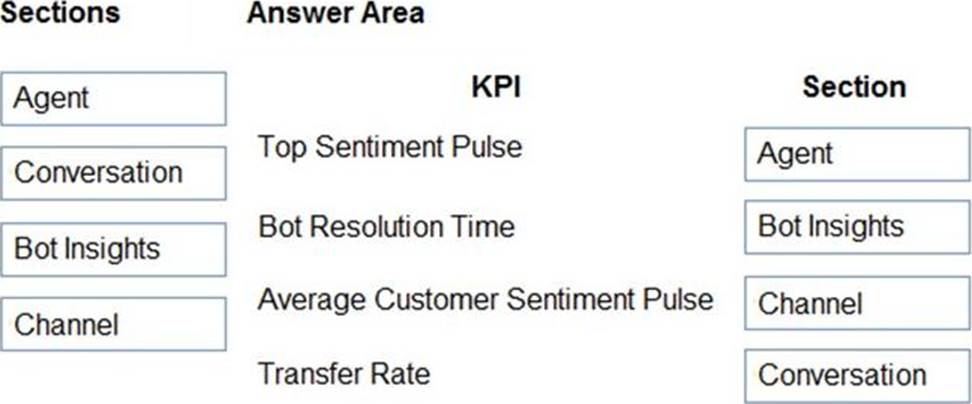
The company wants to deploy an Omnichannel Insights dashboard.
You need to set up and monitor KPIs.
In which section is each KPI located? To answer, drag the appropriate sections to the correct KPIs. Each section may be used once, more than once, of not at all. You may need to drag the split bar between panes or scroll to view content. NOTE: Each correct selection is worth one point.
Explanation:
Reference: https://docs.microsoft.com/en-us/dynamics365/customer-service/omnichannel-insights-dashboard
You are customizing an Omnichannel for Customer Service implementation for a call center.
The call center manager wants to create a new quick response for agents to save time typing a greeting message.
You need to create a quick response that includes a customer’s full name.
How should you create the quick response?
- A . Hi {CusComeI{FuIIname}}, How may I help
- B . Hi Customer {Full name), How may I help
- C . Hi Full Name {Customer}, How may I help
- D . Hi {Full Name {Customer}}, How may I help
D
Explanation:
Reference: https://docs.microsoft.com/en-us/dynamics365/customer-service/create-quick-replies
Topic 3, The Phone Company
Case study
Overview
This is a case study. Case studies are not timed separately. You can use as much exam time as you would like to complete each case. However, there may be additional case studies and sections on this exam. You must manage your time to ensure that you are able to complete all questions included on this exam in the time provided.
To answer the questions included in a case study, you will need to reference information that is provided in the case study. Case studies might contain exhibits and other resources that provide more information about the scenario that is described in the case study. Each question is independent of the other questions in this case study.
At the end of this case study, a review screen will appear. This screen allows you to review your answers and to make changes before you move to the next section of the exam. After you begin a new section, you cannot return to this section.
To start the case study
To display the first question in this case study, click the Next button. Use the buttons in the left pane to explore the content of the case study before you answer the questions. Clicking these buttons displays information such as business requirements, existing environment, and problem statements. If the case study has an All Information tab, note that the information displayed is identical to the information displayed on the subsequent tabs. When you are ready to answer a question, click the Question button to return to the question.
Overview
The Phone Company provides mobile devices and services to corporate clients. Each client corporation has different agreements and service level agreements (SLAs) in place. Most clients have agreements that last one year and have 30 cases available. Half the cases may be opened by phone. The other half may be opened by email. The company has an existing on-premises software system. The current system no longer meets the company’s needs.
The support desk is open 8:00 am to 8:00 pm Eastern Standard Time.
Requirements
Support desk
The company plans to implement Dynamics 365. The solution will include a custom entity that needs to be search enabled.
You must configure the system to ensure that you can determine how many support tickets and new orders tickets are received. You must be able to determine which device types have the most tickets opened for issues. Business hours in the system must reflect the hours support staff is scheduled.
Case handling
✑ New cases must automatically route to the correct support group by phone type or new purchase group without requiring custom code.
✑ The system must automatically create a case when email is received by companies that are not in the system.
✑ The system must automatically send a response to an email sender upon case creation for new orders, but not for service records.
✑ Users must be able to initiate routing for manually created cases.
✑ The system must create sub-cases from one customer with different cases and also if the same issue is reported by several customers. Subcases must inherit the following fields: customer name, contact email address and case title.
✑ Main cases must not be closed until all the sub-cases are closed.
✑ Separate groups must be created for each type of service and each phone type. Access to the groups must be restricted to team members that support that service or phone type.
✑ When importing from the old system, old cases do not need to be routed to the correct support group.
Knowledge base
✑ Users must be able to search the knowledge base when opening a new case form or when checking on cases.
✑ Users must be able to use relevant searches and include any customer entities.
Dashboards
✑ Managers must be able to see a real-time list of open cases, open activities, and expiring entitlements all on one page.
✑ Managers must also be able to see all open cases, escalated cases and cases by representatives on one screen. Managers must be able to drill down within each area.
✑ Managers need a dashboard that displays weekly statistics for cases and representatives.
✑ Each representative needs to see their own tickets that are opened for the day, week, and month as well as their closed tickets.
Service-level agreements
✑ Most customers must be contacted within 90 minutes of their case being opened.
✑ Some customers can purchase faster service on call backs.
✑ Emails must be sent to support managers when service-level agreements (SLAs) are missed.
✑ Support representatives must be able to see a timer on each case form to ensure they are adhering to their SLAs.
✑ SLA KPIs must be tracked in the system.
✑ SLA KPIs must appear on the case form.
✑ Cases must be able to be placed on hold if issues arise with related contracts.
Issues
Users report they are not able to search the Knowledge Base.
You need to enable relevance search for the custom entity.
Which two actions should you perform? Each correct answer presents part of the solution. NOTE: Each correct selection is worth one point.
- A . Add Quick Find to the case form.
- B . Add custom entities to Configure Relevance Search in Customizations and Entities.
- C . Add Knowledge Base Search control to the forms case.
- D . Enable Relevance Search in System Settings.
B
Explanation:
Reference: https://carldesouza.com/how-to-use-relevance-search-in-dynamics-365/
You are helping a company implement Power Virtual Agents with Omnichannel for Customer Service. The company has a chatbot that escalates to a manager if a customer wants to escalate from a chatbot.
You need to configure a prerequisite before you can implement the chatbot.
Which prerequisite should you configure?
- A . Configure context variables for a chatbot.
- B . Create one chatbot in one queue with a human having a higher capacity over the chatbot.
- C . Create one chatbot in one queue with the chatbot having the highest capacity over human capacity.
- D . Configure a Microsoft Teams support channel for the chatbot.
- E . Configure an SMS channel for a chatbot.
A
Explanation:
Reference: https://docs.microsoft.com/en-us/dynamics365/customer-service/configure-bot-virtual-agent
HOTSPOT
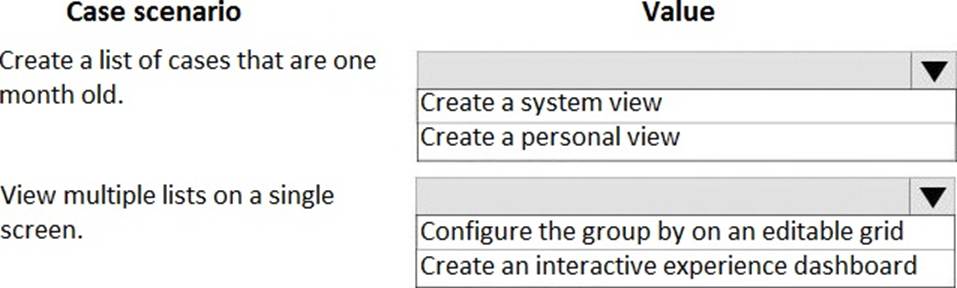
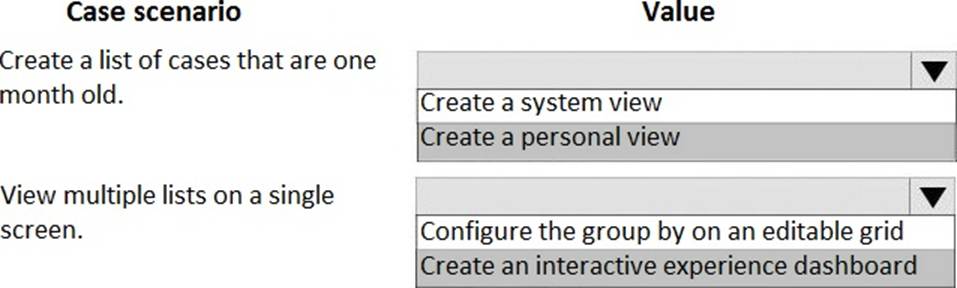
You are a customer service representative working with cases in Dynamics 365 for Customer Service.
You need to manage multiple lists of cases.
Which actions should you perform? To answer, select the appropriate configuration in the answer area. NOTE: Each correct selection is worth one point.
You are configuring a queue in Omnichannel for Customer Service for a call center.
You need to complete the queue configuration using the minimal number of actions.
Which two actions should you perform? Each correct answer presents part of the solution. NOTE: Each correct selection is worth one point.
- A . Configure the mailbox for the queue
- B . Set the record creation and update rules for the queue
- C . Set the queue priority for the queue
- D . Enable the queue for auto work distribution
A, B
Explanation:
Reference: https://docs.microsoft.com/en-us/dynamics365/customer-service/queues-omnichannel