
Microsoft MB-230 Practice Exams
Last updated on Nov 16,2026- Exam Code: MB-230
- Exam Name: Microsoft Dynamics 365 Customer Service Functional Consultant
- Certification Provider: Microsoft
- Latest update: Nov 16,2026
HOTSPOT
You are a help desk support representative using Dynamics 365 Customer Service Hub case management with limited permissions.
You need to create a personal chart that meets the following requirements:
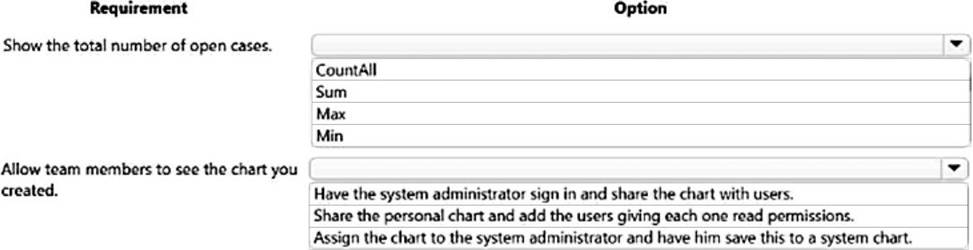
Show the number of open cases assigned to you for each customer.
Ensure that specific team members can view the chart and view any changes as you update the chart.
Which options should you use? To answer, select the appropriate options in the answer area. NOTE: Each correct selection is worth one point.
Explanation:
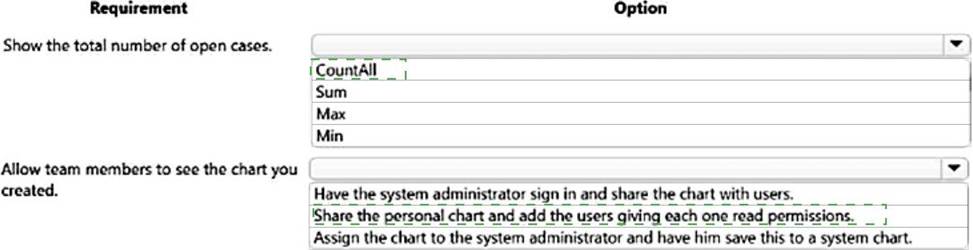
Box 1: Countall
COUNT (Azure Stream Analytics) returns the number of items in a group. COUNT always returns a bigint data type value.
Syntax:
— Aggregate Function Syntax
COUNT ( { [ [ALL | DISTINCT] expression ] | * } )
Arguments:
ALL – Applies the aggregate function to all values. ALL is the default.
Box 2: Share the personal chart and add the user giving each one read permission
Reference: https://docs.microsoft.com/en-us/stream-analytics-query/count-azure-stream-analytics
A customer service manager wants to find out how agents describe the reasons that customers call in for support. The manager also wants topics to be automated. You need to ensure that the manager’s requirements are met.
What should you configure?
- A . Case age for data mapping and automation of topic by using Power Virtual Agents.
- B . Last interaction for data mapping and automation of topic by using a bot.
- C . Last interaction for data mapping and automation of topic by using Power Virtual Agents.
- D . Case title for data mapping and automation of topic by using a bot.
HOTSPOT
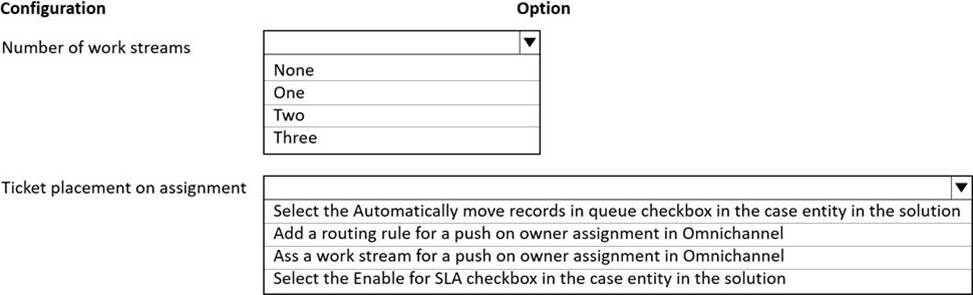
You need to configure OmniChannel to route correctly.
Which options should you use? To answer, select the appropriate options in the answer area. NOTE: Each correct selection is worth one point.
Explanation:
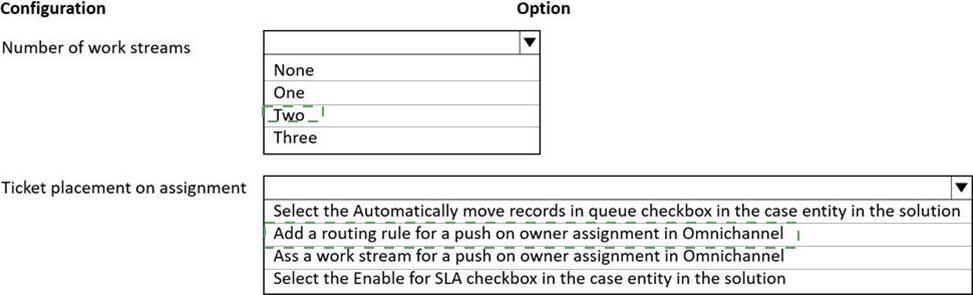
Box 1: Two
You must create two types of Omnichannel queues: regular and escalated.
Box 2: Add a routing rule for a push on owner assignment in Omnichannel
Tickets assigned to a representative must be automatically placed in that representative’s queue.
A customer initiates a conversation from the portal, and the conversation reaches the Omnichannel system. Now, based on the routing rules condition defined in the routing system, it starts routing the conversation to the appropriate queues.
When the conversation reaches to the queues, the work assignment system assigns the conversation based on triggers.
Reference: https://docs.microsoft.com/en-us/dynamics365/customer-service/routing-work-distribution-oca
DRAG DROP
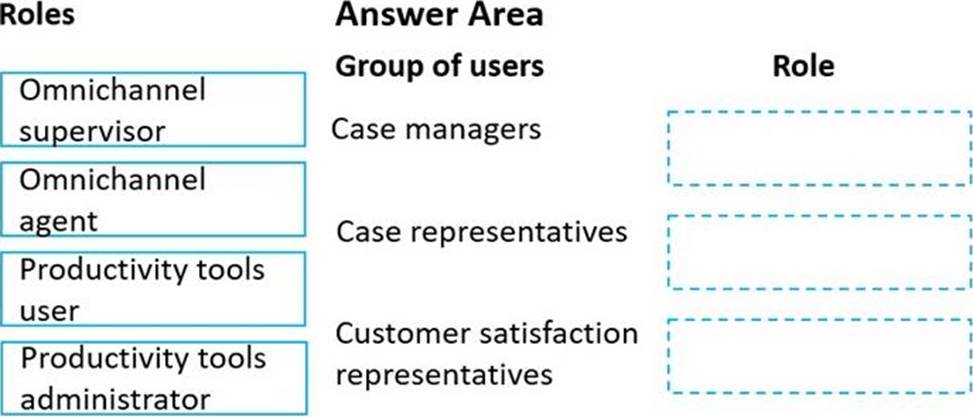
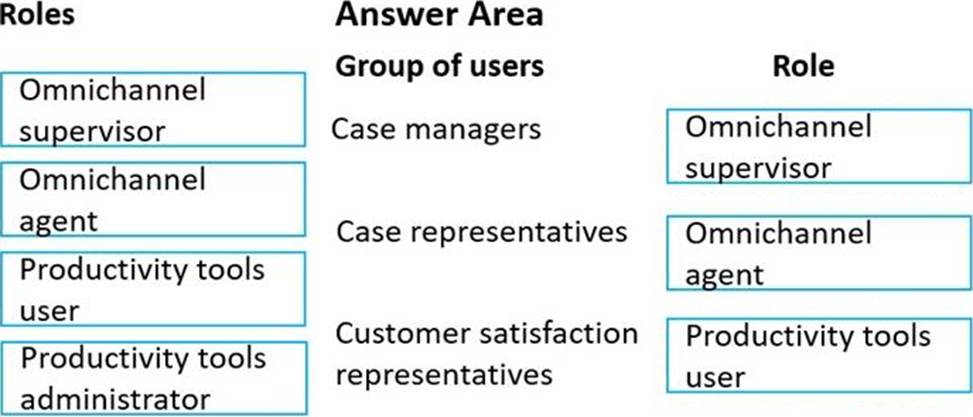
You need to set up users with permissions to use the digital messaging channels.
Which role should you assign to each user? To answer, drag the appropriate roles to the correct groups of users. Each role may be used once, more than once, or not at all. You may need to drag the split bar between panes or scroll to view content.
Explanation:
Box 1: Omnichannel supervisor
Case managers schedule shifts and are a point of escalation.
Omnichannel supervisor: Required for performing supervisor tasks.
Businesses need to monitor and manage the efficiency levels of agents in their ongoing conversations with customers. The enhanced supervisor experience provides supervisors with timely insights and metrics on the efficiency of the service delivery of agents and opportunities to help agents deliver better support to customers.
In this enhancement to the supervisor experience in Omnichannel for Customer Service, supervisors can:
Drill down to specific agents and look at their operational metrics.
Manage agent availability remotely.
Box 2: Omnichannel agent
Case representatives handle incoming calls, provide information to patients for appointments, and schedule follow-up calls with doctors. Case representatives can also help with people who want to chat online.
Omnichannel agent: Required for performing agent tasks.
As an Omnichannel agent, you can use queues to manage the work items that are assigned to you via queues. Therefore, you can focus on the tasks at hand and ensure better customer service. The application empowers you to work on simultaneous conversations with multiple customers. You get a holistic view of a customer’s data and can see the details of the customer’s previous interactions. In this way, you can be sure that you have all the available information that you might need to resolve the customer’s issue.
Box 3: Productive tools user
Customer satisfaction representatives monitor all activity and ensure that there is a uniform process
for all calls.
Productivity tools user: Required by users of Dynamics 365 Productivity Tools.
Agent productivity tools use intelligence and automation to enable agents to find answers to customer questions and help resolve customer issues quickly, thereby improving satisfaction in service delivery.
Incorrect:
Not Productivity tools administrator:
Productivity tools administrator: Required by administrator users of Dynamics 365 Productivity Tools.
Reference: https://docs.microsoft.com/en-us/dynamics365/customer-service/omnichannel-agent-overview
https://docs.microsoft.com/en-us/dynamics365-release-plan/2020wave1/dynamics365-customer-service/omnichannel-supervisor-experience-enhancements
https://docs.microsoft.com/en-us/dynamics365-release-plan/2021wave1/service/dynamics365-customer-service/agent-productivity
HOTSPOT
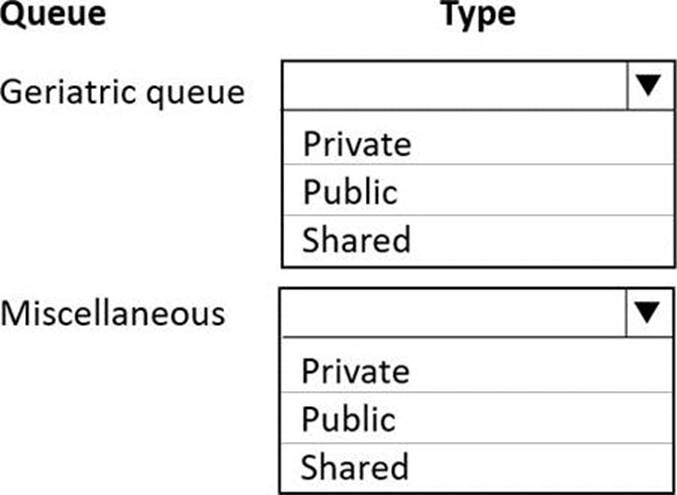
You need to determine the type of queues to create.
How should access to the queues be configured? To answer, select the appropriate options in the answer area. NOTE: Each correct selection is worth one point.
Explanation:
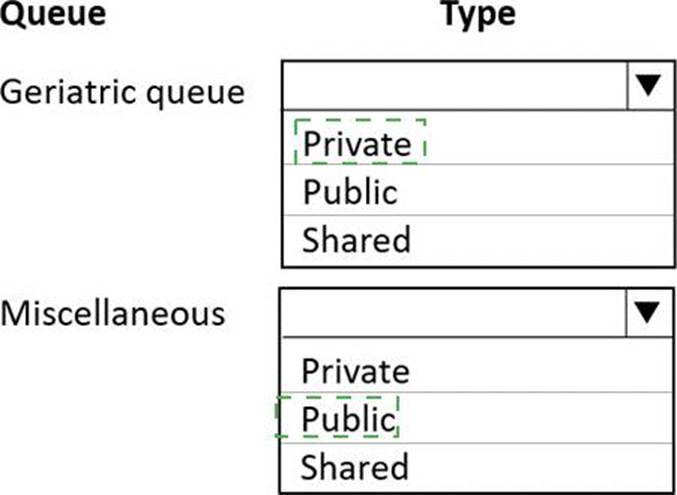
Box 1: Private
Miscellaneous queues must be visible to everyone
The other queues must be visible only to the appropriate department.
In Customer Service, you can create two types of queues:
Private queues: Create with limited set of members to help those members easily view the queue
items in that queue. Private queues streamline queue items for the members of that queue only and help to remove clutter from other user’s views.
Public queues: Create to let everyone in the organization view the queue and all of its items.
Box 2: Public
Miscellaneous queues must be visible to everyone.
Reference: https://docs.microsoft.com/en-us/dynamics365/customer-service/set-up-queues-manage-activities-
cases
Note: This question is part of a series of questions that present the same scenario. Each question in the series contains a unique solution that might meet the stated goals. Some question sets might have more than one correct solution, while others might not have a correct solution.
After you answer a question in this section, you will NOT be able to return to it. As a result, these questions will not appear in the review screen.
Your company provides clients with Dynamics 365 for Customer Service Voice of the Customer employee satisfaction surveys. The company has a standardized set of survey questions named Satisfaction Survey.
You need to customize the survey for each client.
Solution: Clone the satisfaction survey and customize the questions.
Does the solution meet the goal?
- A . Yes
- B . No
A
Explanation:
Reference: https://docs.microsoft.com/en-us/dynamics365/customer-engagement/voice-of-customer/design-basicsurvey#clone-or-import-an-existing-survey
HOTSPOT
You are modifying the phone-to-case process in Dynamics 365 Customer Service.
You create a flow by using PowerApps as shown in the exhibit. (Click the Exhibit tab.)
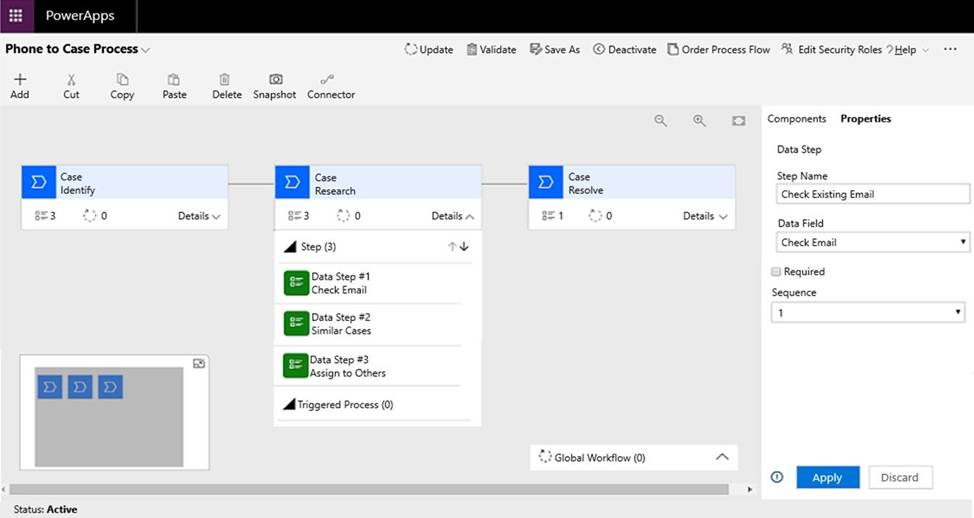
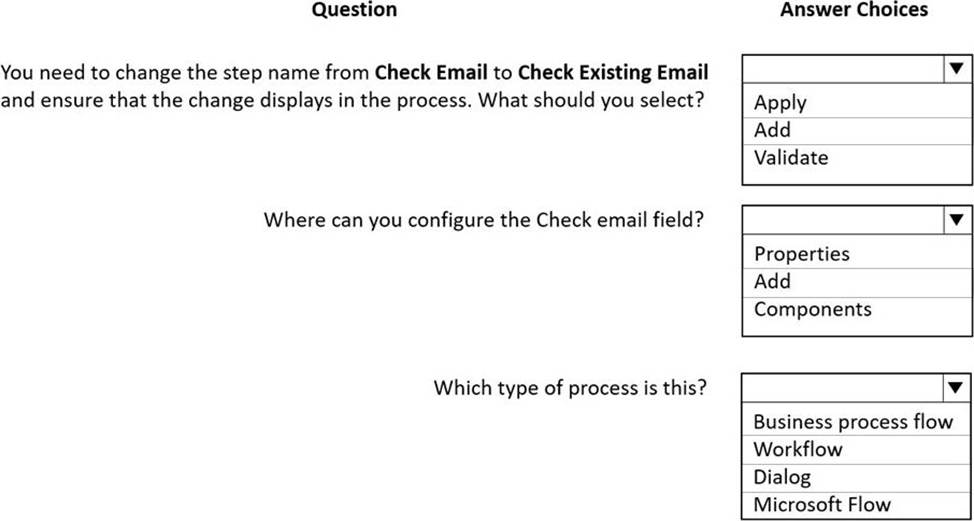
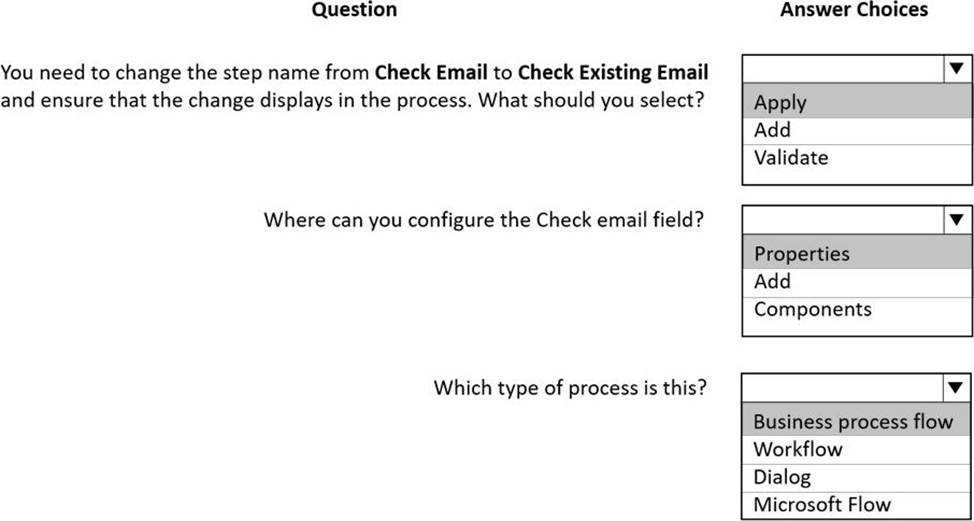
You must modify the business process flow to include the check-email step at the beginning of the research stage.
Use the drop-down menus to select the answer choice that answers each question based on the information presented in the graphic. NOTE: Each correct selection is worth one point.
Explanation:
Reference: https://docs.microsoft.com/en-us/power-automate/create-business-process-flow?context=/dynamics365/context/sales-context#edit-a-business-process-flow
HOTSPOT
A company is implementing Dynamics 365 Customer Service. The company installs and services air filtering units for industrial manufacturing plants.
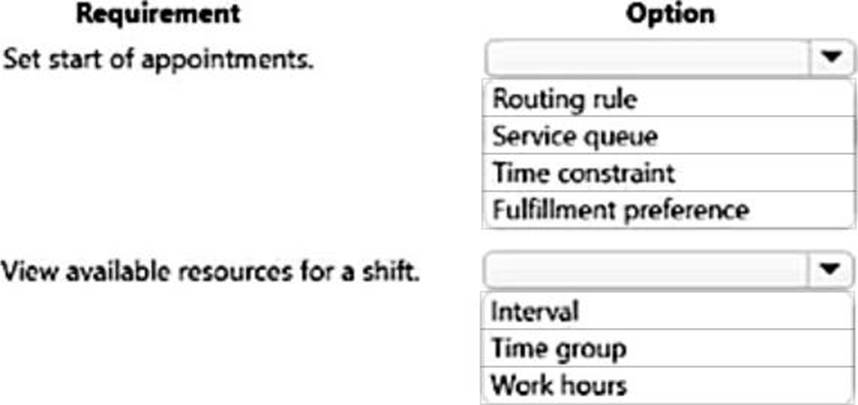
Schedulers must be able to do the following:
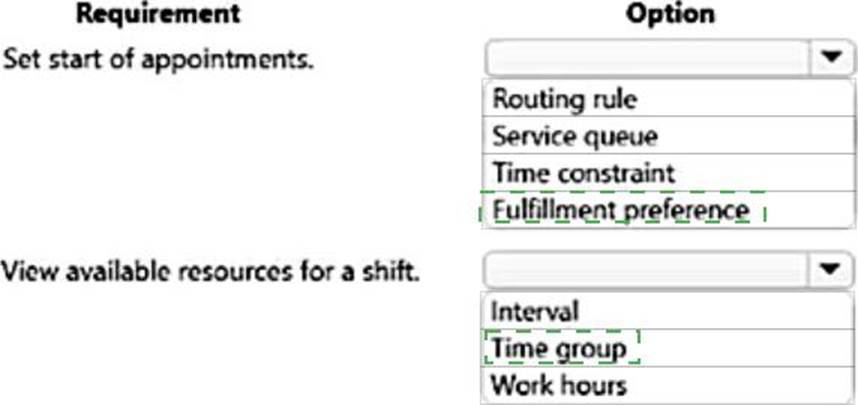
✑ Schedule resources to start appointments every 90 minutes.
✑ View available resources within the first, second, and third shifts.
You need to configure the system to optimize work scheduling.
What should you configure? To answer, select the appropriate options in the answer area. NOTE: Each correct selection is worth one point.
Explanation:
Box 1: Fulfillment preferences
Fulfillment preferences are customizable entities that let you choose how schedule assistant results are displayed, like with neat hourly appointments or morning and afternoon time windows.
By default, the schedule assistant displays results based entirely on resource schedules and the earliest available time, such as 10:39 AM. With fulfillment preferences set to hourly, the same resource’s availability shows as 11:00 AM. This makes it simpler for the scheduler to view and understand availability and communicate it to the customer.
Box 2: Time group
Time groups enable schedulers to search and view results as blocks of time when using the schedule assistant. Typical examples include mornings, afternoon, nights, and 2-hour windows. Unlike intervals, time groups do not dictate the start time of subsequent bookings. Time groups organize results, but leave the start time/arrival time as-is, based on the particular resource’s schedule.
When a time group is created for morning (8:00 AM to 12:00 PM) the schedule assistant will display a resource’s earliest availability within the defined morning bucket. Results will show a list of possible
resources to start at 8:32 AM, 9:07 AM, and 11:23 AM, and all results will appear within the "morning" time group because the start times fall within the 8:00 AM to 12:00 PM time group.
Reference: https://docs.microsoft.com/en-us/dynamics365/field-service/set-up-time-groups
HOTSPOT
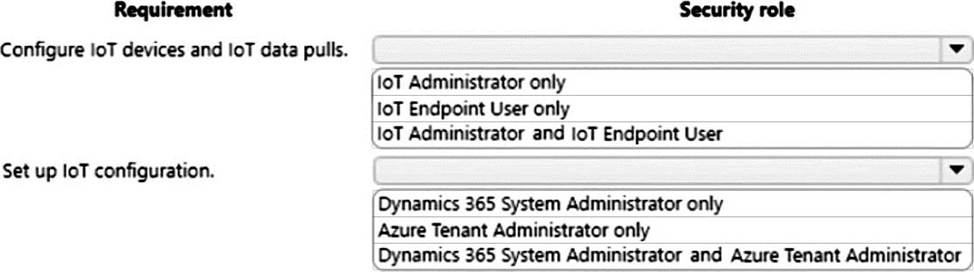
You need to configure security roles for Dynamics 365 Connected Customer Service by using the principle of least privilege.
How should you configure security? To answer, select the appropriate options in the answer area. NOTE: Each correct selection is worth one point.
Explanation:
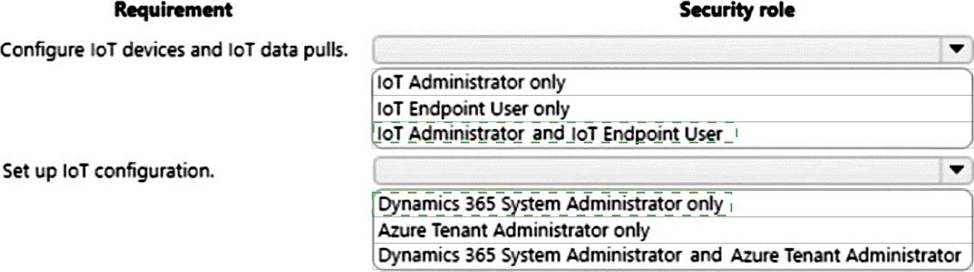
Box 1: IoT Administrator and IoT Endpoint User
Security roles for Connected Customer Service allow administrators to give appropriate access to Internet of Things (IoT) entities, including alerts, assets, devices, and commands, which are all included with Customer Service 9.0.20034.20XX +. These security roles should be added to existing Customer Service security roles.
Customer Service Representative who needs to work with device registration and device data pulls (IoT Hub operations).
CSR should be given the IoT Administrator and IoT Endpoint User security roles. General knowledge of Customer Service security roles. For more information, see the topic on setting up customer service users and security roles.
Box 2: Dynamics 365 system administrator only
A Customer Service administrator who needs to can set up IoT Configuration.
The CSR admin should be granted Dynamics 365 system administrator access.
Reference: https://docs.microsoft.com/en-us/dynamics365/customer-service/cs-iot-security-roles
A trucking company uses a custom table named Leased Truck in Dynamics 365 Customer Service to capture leasing details. The company is implementing Connected Customer Service for Azure IoT Hub to track the leased trucks.
You need to configure the custom table Leased Truck for IoT integration.
Which two methods achieve the goal? Each correct answer presents a complete solution. NOTE: Each correct selection is worth one point.
- A . Set the relationship in the Power Platform admin center.
- B . Create a one-to-many relationship from the Leased Truck table to the loT Alert table.
- C . Call the loT – Register Custom Entity action to associate a Leased Truck record with an existing loT device.
- D . Enable connections to the Leased Truck table.
CD
Explanation:
IOT enabling an entity type
Dynamics 365 entities can be associated to IoT entities so that within Dynamics 365 they can participate in IoT-related business processes and analyses. There are two methods of “IoT enabling” a Dynamics 365 entity; you can:
* (D) Programmatically form an association through the standard Dynamics 365 Connection entities capability. You can alternatively accomplish this same association through the administration UI; for more information, see Create connections to view relationships between records.
* (C) Call the IoT C Register Custom Entity action to associate an entity with an existing or new IoT Device.
Reference: https://docs.microsoft.com/en-us/dynamics365/customer-service/cs-iot-extend-connected-customer-service-solutions