
Microsoft MB-230 Practice Exams
Last updated on Nov 16,2026- Exam Code: MB-230
- Exam Name: Microsoft Dynamics 365 Customer Service Functional Consultant
- Certification Provider: Microsoft
- Latest update: Nov 16,2026
You create a Power Virtual Agents chatbot. The chatbot includes Power Automate flows. You are not a system administrator.
Users in your organization must collaborate to develop the chatbot.
You attempt to share the chatbot by adding user email addresses and assigning them Manager, Power Automate User, and Transcript Viewer permissions on the bot. The Send an email invitation to new users option is disabled.
Sharing of the chatbot fails.
You need to use the principle of least privilege to share the chatbot with users for collaboration.
Which two actions should you perform? Each correct answer presents part of a solution. NOTE: Each correct selection is worth one point.
- A . Assign the users the Environment Maker security role.
- B . Ensure that a System Administrator assigns the users the Environment Maker security role.
- C . Share the Power Automate flows.
- D . Enable Send an email invitation to new users and re-share the chatbot.
- E . Configure a custom context variable for the chatbot.
BC
Explanation:
B: Insufficient environment permissions
Users in the environment must have the Environment maker security role before a bot can be shared with them.
System administrators of the environment need to assign the Environment maker security role to the user before you share the bot.
C: Share Power Automate flows used in a bot
You can add actions to a bot using flows in Power Automate; however, flows in a bot aren’t automatically shared with other users when sharing a bot.
Users who don’t have access to the shared flow can still run it by using the test bot canvas.
To let other users edit or add flows you’ll need to share them in Power Automate. You can open flows directly from the topic where the flow is used.
Reference:
https://docs.microsoft.com/en-us/power-virtual-agents/admin-share-bots
https://docs.microsoft.com/en-us/dynamics365/customerengagement/on-premises/customize/create-site-map-app
Note: This question is part of a series of questions that present the same scenario. Each question in
the series contains a unique solution that might meet the stated goals. Some question sets might have more than one correct solution, while others might not have a correct solution.
After you answer a question in this section, you will NOT be able to return to it. As a result, these questions will not appear in the review screen.
You are implementing Dynamics 365 Customer Service for a call center. There are separate queues for level1 and level2.
You need to set up the queues to meet the following requirements:
✑ Users must have their own queues that no one else can access.
✑ Users must not be able to view each other’s queue.
✑ Users must be able to work from the support queue.
Solution:
✑ Set up each user queue to be private.
✑ Set up level1 and level2 queues to be private and add applicable members.
✑ Set up the support queue to be public.
Does the solution meet the goal?
- A . Yes
- B . No
B
Explanation:
The level1 and level2 queues must be public so the users can access them.
Note: Public: All users can see and access these queues, depending on their security role.
Users pick items from the queue. The items that a user picks are then moved to that user’s personal queue.
Private: Access to these queues is assigned to specific users. (Members are defined on the queue record.)
Users pick items from the queue. The items that a user picks are then moved to that user’s personal queue.
Also:
In Customer Service, you can create two types of queues:
Private queues: Create with limited set of members to help those members easily view the queue items in that queue. Private queues streamline queue items for the members of that queue only and help to remove clutter from other user’s views.
Public queues: Create to let everyone in the organization view the queue and all of its items.
Reference: https://docs.microsoft.com/en-us/dynamics365/customer-service/set-up-queues-manage-activities-cases
You are a Dynamics 365 Customer Service system administrator. You work with the Customer Service Hub application.
You need to enable entities for service-level agreements (SLAs).
For which entity can you enable SLAs?
- A . Contract
- B . Business unit
- C . KPIs
- D . Customer service schedule
- E . Holiday schedule
- F . Account
F
Explanation:
Reference: https://docs.microsoft.com/en-us/dynamics365/customer-service/enable-entities-service-level-agreements
You are configuring a single business process flow in Dynamics 365 for Customer Service.
You need to design the business process flow.
What should you do?
- A . Merge peer branches to a single stage when merging branches.
- B . Span the process across 10 unique entities.
- C . Combine multiple conditions in a rule by using both the AND and OR operators.
- D . Use 40 steps per stage.
A
Explanation:
Reference: https://docs.microsoft.com/en-us/dynamics365/customer-engagement/customize/enhance-business-processflows-branching
Customer service representatives are not able to manually add service-level agreements (SLAs) to a record.
You need to enable on-demand SLAs.
What should you do?
- A . Configure the scope of the workflow
- B . Publish the on-demand SLA
- C . Activate the SLA
- D . Request an administrator to add the SLA field to the entity form
D
Explanation:
Reference: https://docs.microsoft.com/en-us/dynamics365/customer-engagement/customer-service/define-service-levelagreements
You need to ensure that an appropriate resource for sick appointments can be scheduled.
What should you configure?
- A . Services
- B . Queues
- C . Facilities/equipment
- D . Activities
A
Explanation:
Reference: https://docs.microsoft.com/en-us/dynamics365/customer-service/basics-service-service-scheduling
You are integrating Power Virtual Agents with Omnichannel for Customer Service.
You create context variables.
You need to complete the handoff process to a human agent.
Which three actions should you perform? Each correct answer presents part of the solution. NOTE: Each correct selection is worth one point.
- A . In Power Virtual Agents, enter the Power Virtual Agents Application ID.
- B . In the Power Virtual Agents topic, add the Transfer to Agent node in the End the conversation node.
- C . In the Omnichannel Administration app. add a user as a virtual agent.
- D . In Power Virtual Agents, disable the Teams channel.
- E . In Power Virtual Agents, select Transfer to agent.
ABE
Explanation:
Reference: https://docs.microsoft.com/en-us/power-virtual-agents/configuration-hand-off-omnichannel
DRAG DROP
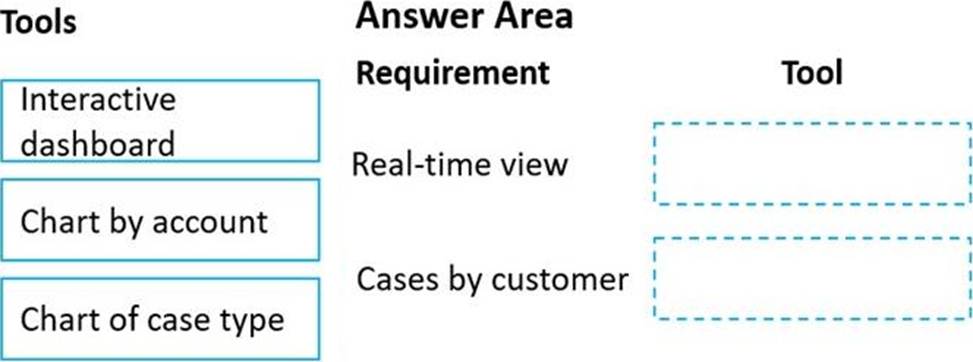
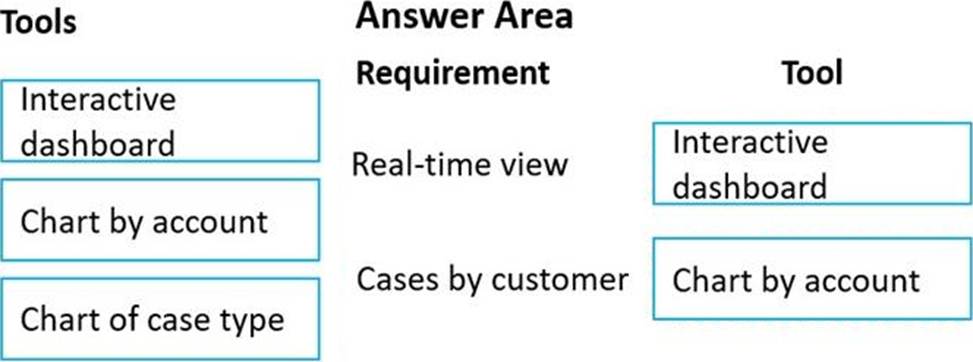
You need to choose which tools need to be created and configured to meet the following requirements.
Which tools should you configure? To answer, drag the appropriate tools to the correct requirements. Each tool may be used once, more than once, or not at all. You may need to drag the split bar between panes or scroll to view content. NOTE: Each correct selection is worth one point.
Explanation:
Box 1: Interactive dashboard
Support representatives must have a real-time view of cases assigned to them, including the status of each case.
What is an interactive dashboard?
An interactive dashboard is a data visualization tool that allows business teams to track, analyze, and display metrics of various sorts. Dashboards feature charts, tables, maps, and other visualizations to help viewers understand the story the data tells.
Box 2: Chart by account
Support representatives must be able to see a graphic view of cases by customer that are assigned to them.
Topic 5, Lucerne Publishing
Overview
Lucerne Publishing is a publishing company in Canada. The company publishes books for higher education, it also invests in multiple cloud-based solutions to support the customer sen/ice, publishing, and sales departments.
Lucerne Publishing uses the following:
• The Customer Service app for the publishing customer service division.
• Omnichannel capabilities in the Customer Service app.
• Third-party apps for e-commerce so students and parents can order books or courses online.
• Customer service agents as the representatives who will resolve customer’s issues using various channels.
• Resident employees who work for Lucerne Publishing and live in the buildings inside the business center.
• A technician dispatch team that includes dispatchers who review and schedule work orders and assign the work orders to resources on the schedule board.
The company has an internal division that provides repair services such as plumbing and electrical. The division provides services to the buildings inside the company business center, and some of those are used as residences by printing employees.
Customer Service _ Contact Center
The company has the following requirements:
• Improve agent response time in live chats with customers.
• improve agent productivity by automating tasks. For example, the customer service manager requests that a new case is created automatically when an agent is on a chat with a customer.
• Provide instructions for agents to use when processing book returns.
The instructions must include the following;
o Greet the customer.
o Automatically open the case form for the book return. o Close the session with the customer.
• Allow agents to use different channels such as short message service (SMS), social, and call when providing service to customers.
• Enable a new text SMS channel for the agents.
• Improve the agent’s capability to search using Al suggestions.
• Provide agents with real-time recommendations on similar cases and knowledge-base articles.
• Allow agents to know the customer’s point of view on the service.
• Provide a solution that will identify an agent’s supervisor when a customer has a negative experience.
• Improve how the agents’ skills and profiles are maintained.
• Route calls to agents who can support French-speaking customers.
• Configure the French language as a skill for agents who support French-speaking customers.
• Provide access to the Omnichannel agent app and productivity tools for supervisors and agents.
• Provide the customer service supervisor with the ability to create agent scripts for Omnichannel agents and a workstream for SMS. The customer service supervisor must also be able to edit an existing workstream.
• Provide the customer service supervisor with the ability to track sentiment in real time.
• Provide agents with all suggestions on the recent contact that worked on similar cases.
Customer Service – Repairs
The company has the following requirements for repair requests:
• Dispatchers must be able to track a technician and schedule jobs for technicians based on availability.
• A dispatcher named UserA must be able to create a new view to display only unscheduled work orders. The view must be displayed only when the work orders are open-unscheduled, and the substatus is ready to dispatch work orders.
• The technician dispatch team must be able to create a Schedule tab in the schedule board.
• Dispatchers must be able to track technicians’ utilization by using personal color codes.
• The field technician’s security role must be field service technician.
The company reports the following issues:
• Agents spend most of their time doing repetitive tasks during support calls or chats.
• There is no guided process for agents to follow the steps when a customer calls for a book return.
• Customer service managers are not able to provide real-time recommendations to customers using Ai suggestions.
• A new channel for SMS is not sending conversations to agents. Agents are required to answer conversations manually.
• The company is not able to retain customers who have a negative experience with the customer service agents.
• Agents are not able to use the schedule board to schedule repair work orders by using a custom view.
• The skills and proficiency model are not defined for the agents. Calls from French-speaking customers are not routed to the appropriate agents.
DRAG DROP
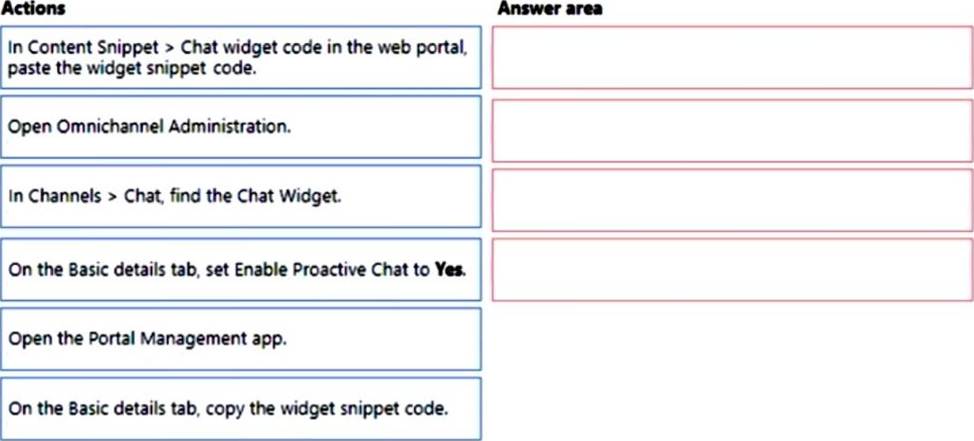
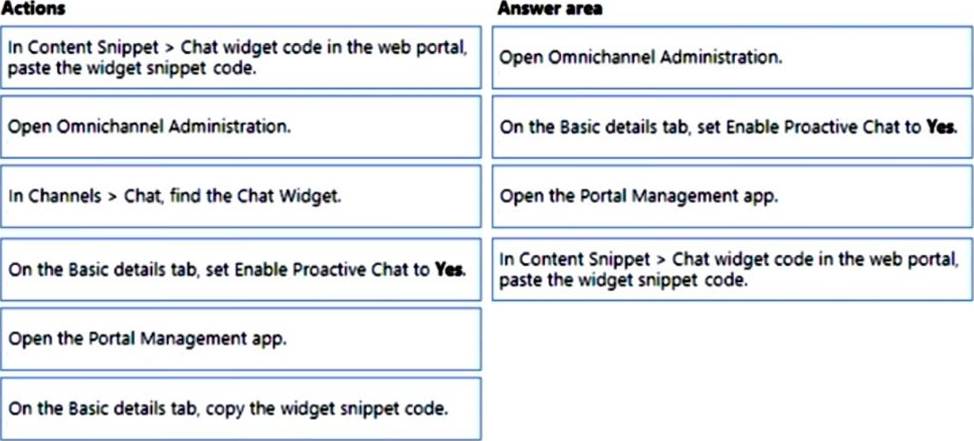
You must create a custom web portal to support customer service processes. The portal must allow customers to chat with customer service if the customer initiates a chat conversation.
You need to embed the chat widget into the web portal.
Which four actions should you perform in sequence? To answer, move the appropriate actions from the list of actions to the answer area and arrange them in the correct order.
Explanation:
Step 1: Open Omnichannel Administration.
Embed chat widget in your Power Apps portal.
To embed a chat widget in Power Apps portals:
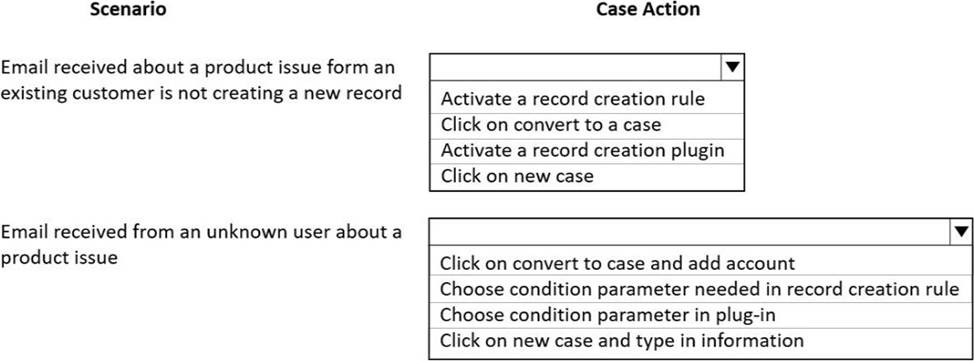
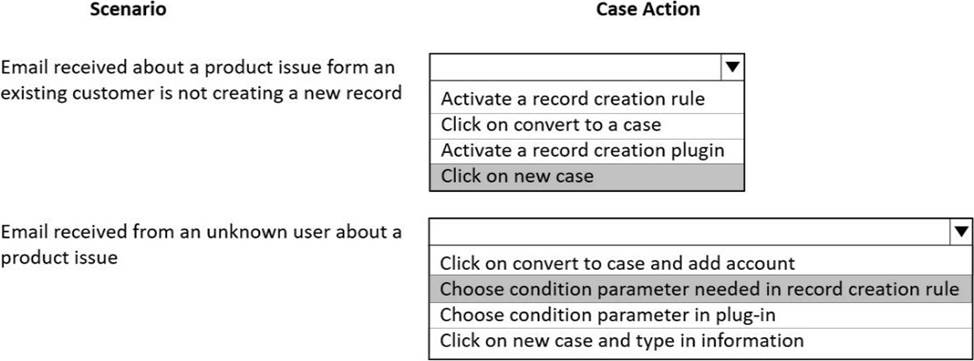
HOTSPOT
You need to meet the automatic case creation requirements.
What should you do? To answer, select the appropriate options in the answer area. NOTE: Each correct selection is worth one point.
Explanation:
Reference:
https://docs.microsoft.com/en-us/dynamics365/customer-service/automatically-create-case-from-email
https://cloudblogs.microsoft.com/dynamics365/it/2017/07/25/convert-email-to-a-case-with-a-few-clicks-in-dynamics-365-app-for-outlook/