
Microsoft MB-230 Practice Exams
Last updated on Nov 16,2026- Exam Code: MB-230
- Exam Name: Microsoft Dynamics 365 Customer Service Functional Consultant
- Certification Provider: Microsoft
- Latest update: Nov 16,2026
A customer’s entitlement is not available to assign to a case.
You need to determine the cause of the customer’s issue.
What are two possible reasons for the issue? Each correct answer presents a complete solution. NOTE: Each correct selection is worth one point.
- A . The entitlement is active
- B . The entitlement is in waiting status
- C . The entitlement is expired
- D . The entitlement was renewed
- E . The entitlement is set as the default
BC
Explanation:
Reference: https://docs.microsoft.com/en-us/dynamics365/customer-service/create-entitlement-define-support-terms-customer
You need to create the queue for cases.
What type of queue should you create?
- A . Teams
- B . Public
- C . Product
- D . Private
- E . Service
D
Explanation:
Reference: https://docs.microsoft.com/en-us/dynamics365/customer-service/set-up-queues-manage-activities-
cases
Your organization plans to use Microsoft Power BI to access and analyze data in Dynamics 365 for Customer Service.
You need to configure a Power BI connection to a Dynamics 365 organization named Contoso.
Which service URL should you use?
- A . https://contoso.crm.dynamics.com
- B . https://disco.crm.dynamics.com/xrmservices/2011/discovery.svc
- C . https://contoso.api.crm.dynamics.com/xrmservices/2011/organization.svc
- D . https://disco.crm.dynamics.com/api/discovery/v9.1
HOTSPOT
A company uses Dynamics 365 Customer Voice.
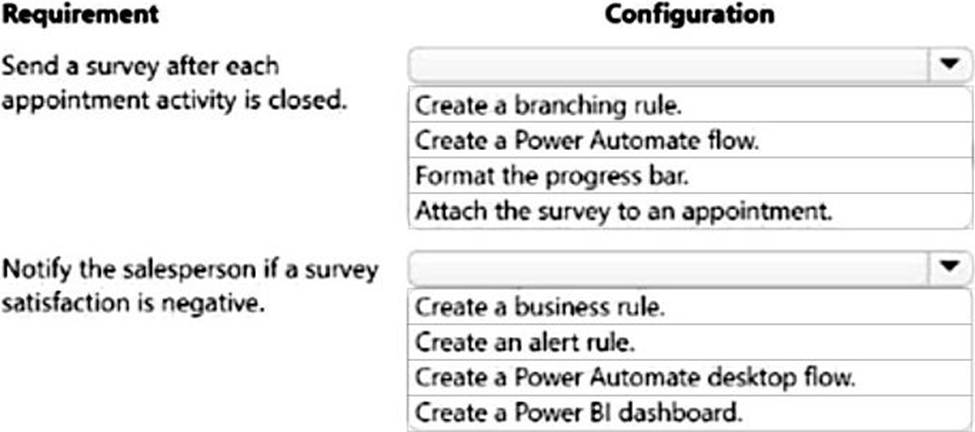
The company requires the following for a survey:
The survey must be sent automatically each time a salesperson visits a customer and closes the appointment.
If a survey satisfaction score is negative, an activity must be created for the salesperson.
You need to configure the survey.
What should you do? To answer, select the appropriate options in the answer area. NOTE: Each correct selection is worth one point.
Explanation:
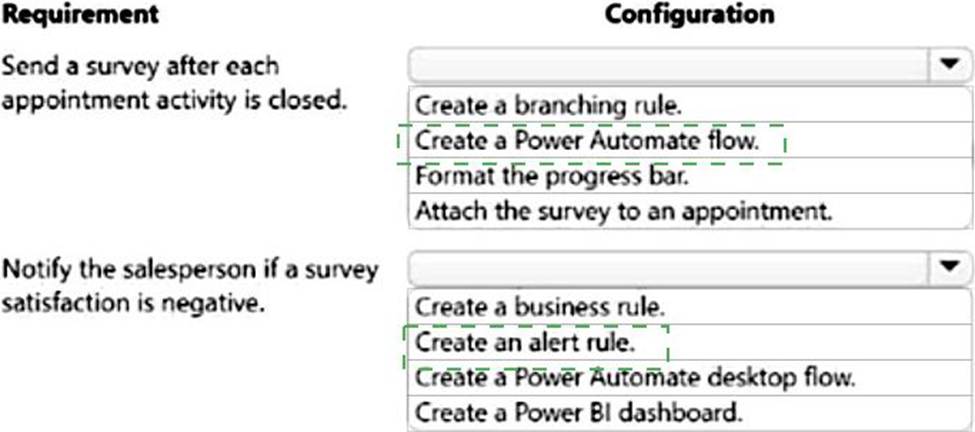
Box 1: Create a Power Automate flow
After creating a survey, you can send it to respondents based on a business trigger―resolution of a case or fulfillment of an order, for example. You can either select a built-in template or create a flow from scratch by using Power Automate.
Box 2: Create an alert rule
Dynamics 365 Customer Voice includes built-in follow-up management to ensure you follow up to your customer feedback in a timely manner. Each customer satisfaction metric includes support for a real-time alert to notify business users upon receiving customer feedback within the specified alert range. Business users can manage and resolve alerts with follow-up action notes using the built-in alert management dashboard.
Alerts are the follow-up activities that are created based on the defined alert rules. Alert rules are defined on satisfaction metrics. Alerts are created based on the values of satisfaction metrics in survey responses.
Reference:
https://docs.microsoft.com/en-us/dynamics365/customer-voice/send-survey-flow
https://docs.microsoft.com/en-us/dynamics365-release-plan/2020wave2/customer-voice/dynamics365-customer-voice/close-feedback-loop-through-alerting-follow-up-management
https://docs.microsoft.com/en-us/dynamics365/customer-voice/alerts
HOTSPOT
A company uses Omnichannel for Customer Service.
The company has the following requirements for their agents’ conversations with customers:
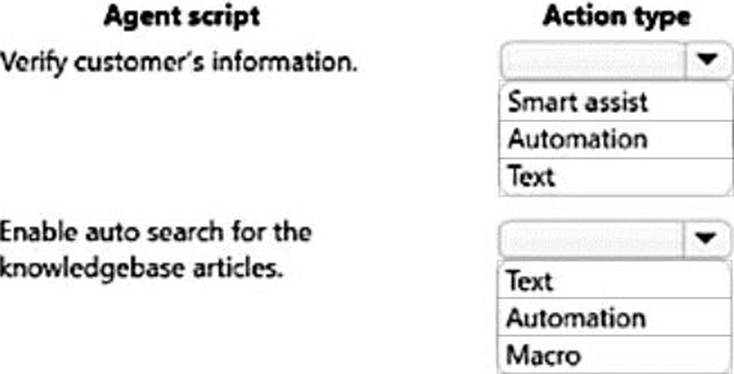
✑ Agents must verify a customer’s information when a chat starts.
✑ Auto search must be enabled for knowledgebase articles based on case title.
You need to enable agent scripts.
Which action types should you use? To answer, select the appropriate options in the answer area. NOTE: Each correct selection is worth one point. NOTE: Each correct selection is worth one point. NOTE: Each correct selection is worth one point.
Explanation:
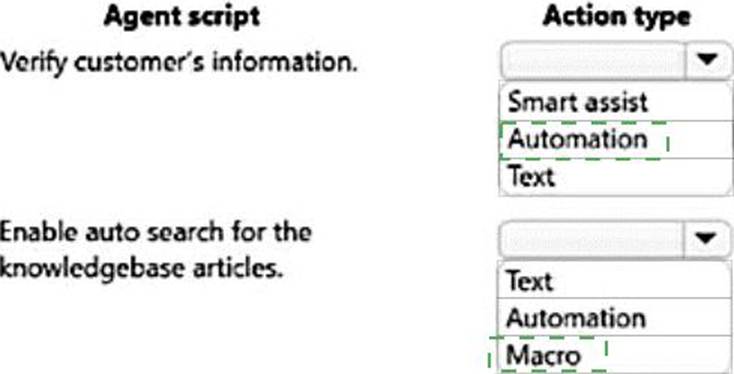
Box 1: Automation
The automation dictionary maintains the contextual data for sessions. You can use the keys from the automation dictionary to pass the parameter in an action.
While creating templates and macros in the admin app, you can pass parameter keys such as title of a session, title of notification, title of an application tab template, and custom parameter values for application tab types. These keys are replaced based on the contextual information available at the time of execution.
Box 2: Macro
Automate tasks with macros
Overview of macros
In the customer service industry, agents have to click often to perform simple tasks, such as open a form, fill, and save it, and many repetitive and monotonous actions, such as greeting and verifying a customer, sending acknowledgment mail, and taking notes. These clicks and repetitive tasks can lead to human errors when agents copy and paste the data across different operations.
Macros are a set of sequential actions that are performed by a user. They enable users to perform daily operations efficiently in a fast and process-compliant manner. You can reuse macros with different sessions based on the context parameters that are specific to the session.
The value propositions of the macros are as follows:
✑ Automate repetitive and monotonous tasks with a single click.
✑ Minimize human errors.
✑ Adhere to business processes.
✑ Lower average handling time.
✑ Improve customer satisfaction.
✑ Create contextual and reusable macros.
Reference:
https://docs.microsoft.com/en-us/dynamics365/app-profile-manager/automation-dictionary-keys
https://docs.microsoft.com/en-us/dynamics365/app-profile-manager/macros
https://docs.microsoft.com/en-us/dynamics365/app-profile-manager/smart-assist
HOTSPOT
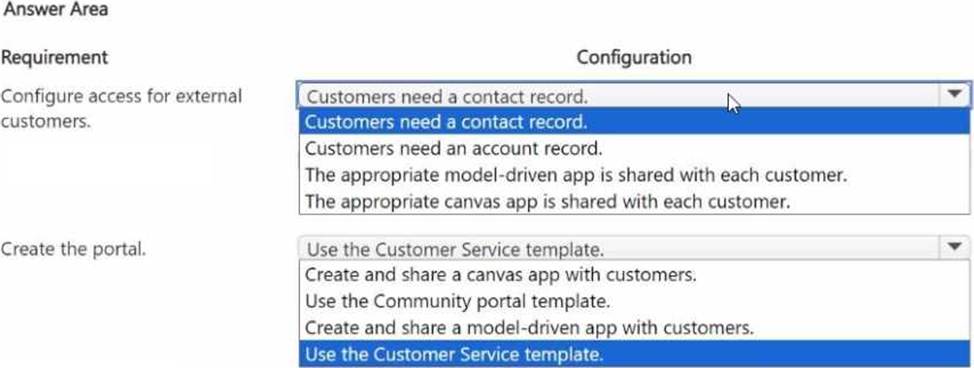
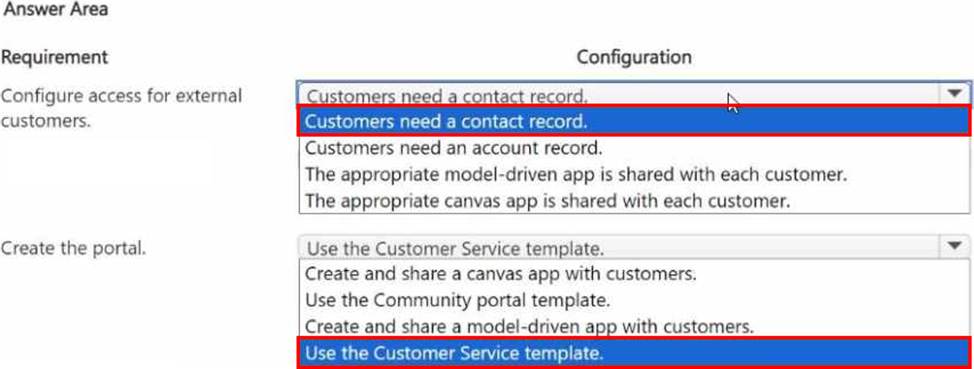
You need to configure the system to meet the requirements for external access and the portal.
What should you configure? To answer, select the appropriate options in the answer area. NOTE: Each correct selection is worth one point.
Explanation:
Customer need a contact record.
Use the Customer Service template.
HOTSPOT
You are a Dynamics 365 Customer Service administrator.
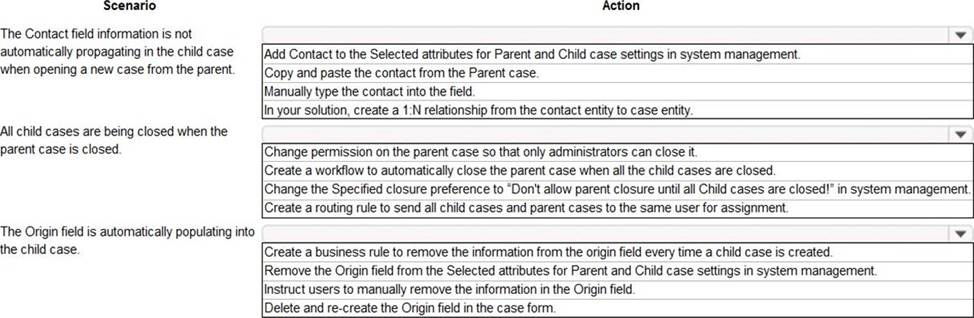
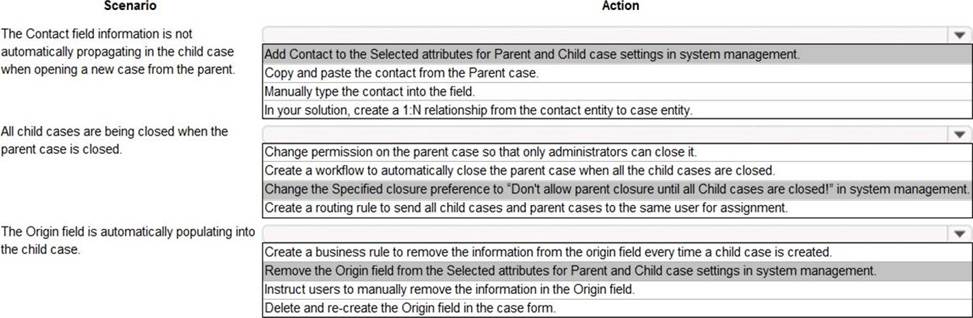
Users inform you about situations in which child cases are not working correctly.
You need to configure the system to correct the issues.
What should you do in each situation? To answer, select the appropriate options in the answer area. NOTE: Each correct selection is worth one point.
Explanation:
Reference: https://docs.microsoft.com/en-us/dynamics365/customer-service/define-settings-parent-child-cases
HOTSPOT
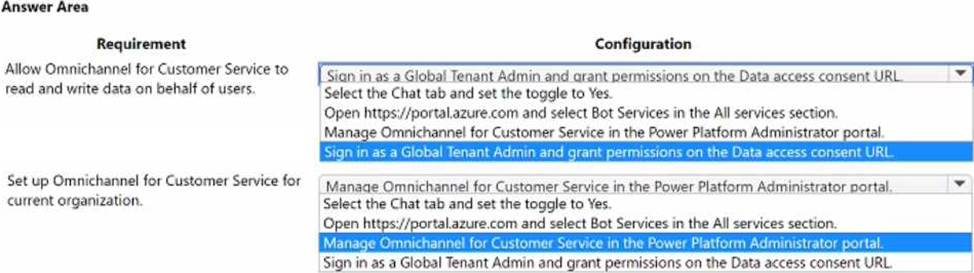
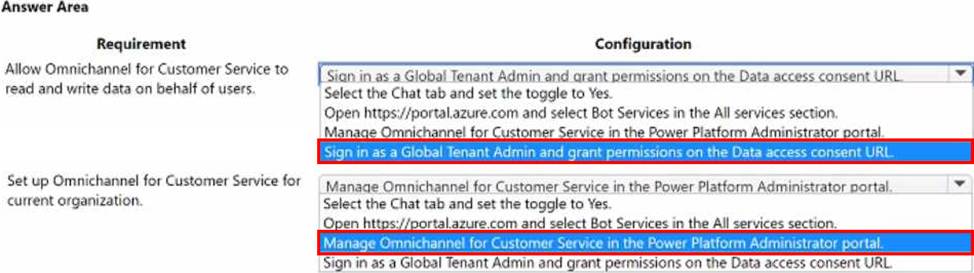
You are provisioning Omnichannel for Customer Service.
You need to configure the system.
What should you do? To answer, select the appropriate options in the answer area NOTE: Each correct selection is worth one point.
DRAG DROP
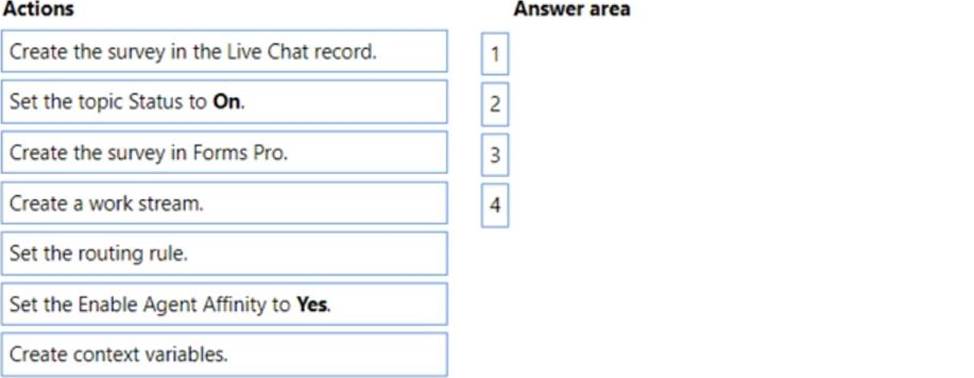
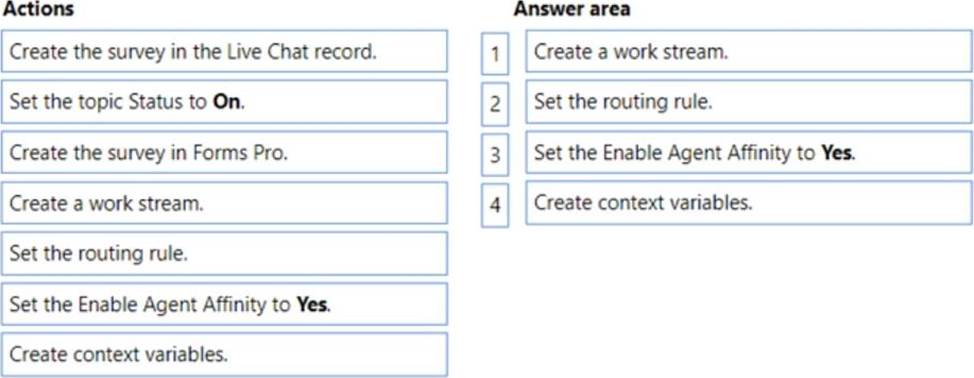
A company is using Omnichannel for Customer Service.
You add a live chat button to your company’s website for existing customers. Requests for chats are handled by the next available representative. The chat must route the customer to the same representative if the customer is inadvertently disconnected. You need to configure the chat.
Which four actions should you perform in sequence? To answer, move the appropriate actions from the list of actions to the answer area and arrange them in the correct order. NOTE: More than one order of answer choices is correct. You will receive credit for any of the correct orders you select.
HOTSPOT
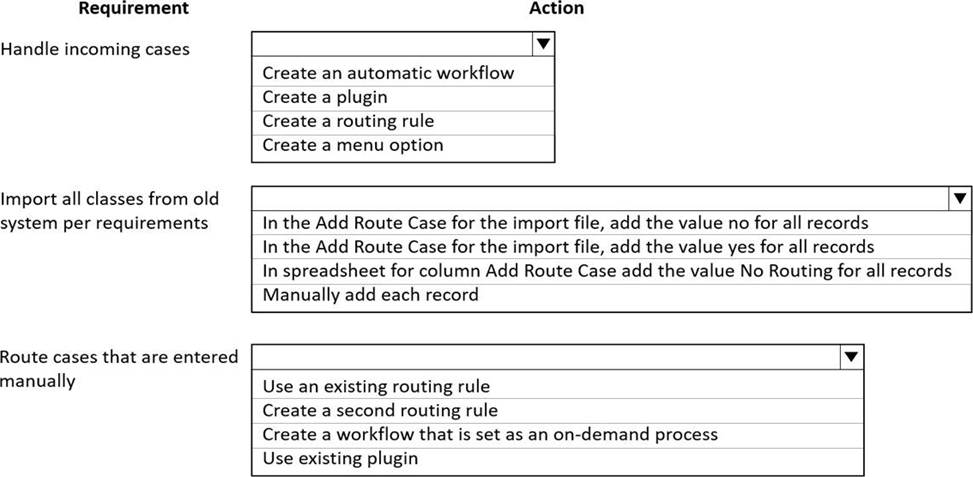
You need to ensure cases are handled correctly.
What should you do? To answer, select the appropriate options in the answer area. NOTE: Each correct selection is worth one point.
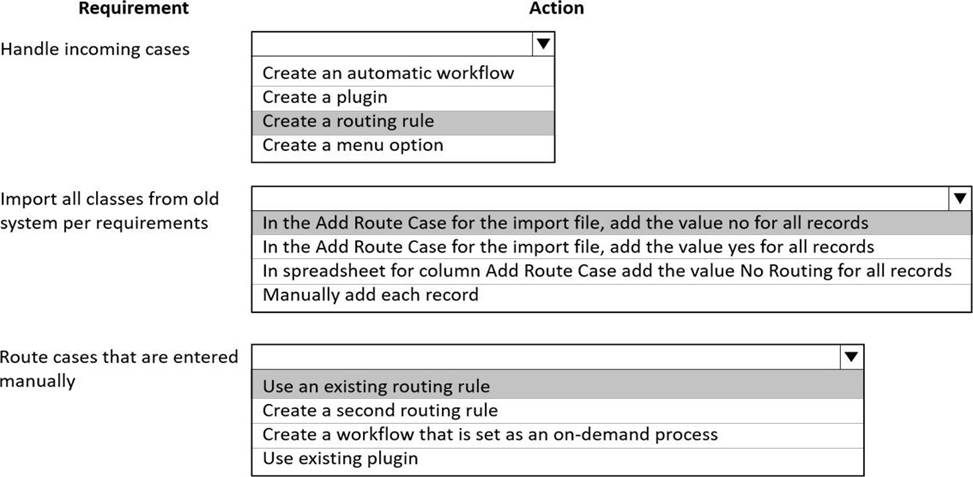
Explanation:
Reference: https://docs.microsoft.com/en-us/dynamics365/customer-service/overview-unified-routing