
Microsoft MB-230 Practice Exams
Last updated on Nov 16,2026- Exam Code: MB-230
- Exam Name: Microsoft Dynamics 365 Customer Service Functional Consultant
- Certification Provider: Microsoft
- Latest update: Nov 16,2026
DRAG DROP
You are a Dynamics 365 system administrator.
Your customer service team must define goal metrics to track and measure all resolved cases.
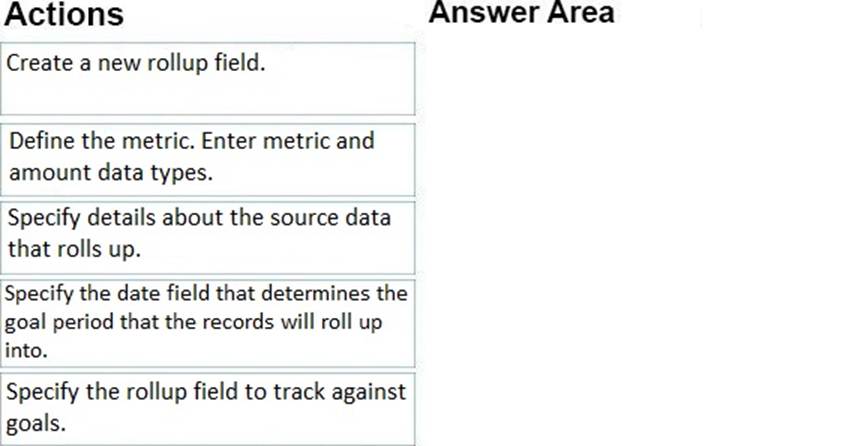
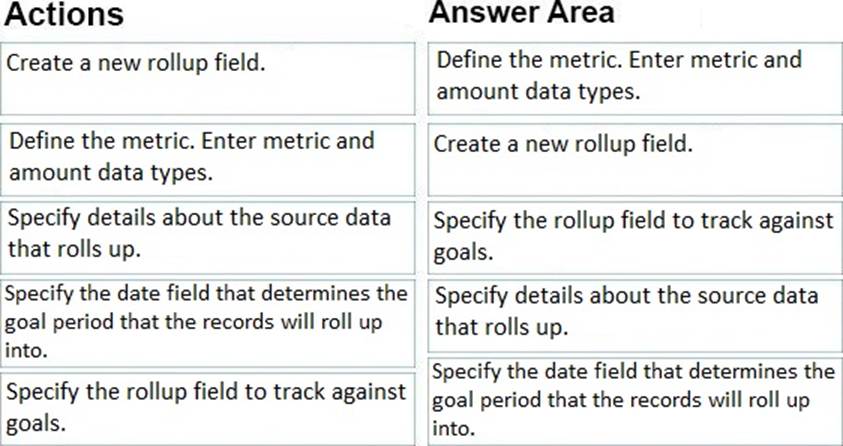
You need to create a goal metric with a rollup field.
In which order should you perform the actions? To answer, move all actions from the list of actions to the answer area and arrange them in the correct order.
Explanation:
Reference: https://docs.microsoft.com/en-us/dynamics365/customer-engagement/sales-enterprise/create-edit-goal-metric
You sign in to Dynamics 365 Customer Service as a system administrator. You attempt to configure unified record routing across digital messaging channels.
You receive the following error message:
Some required services need to be installed before unified routing can be turned on. Please contact Microsoft Support.
You need to enable unified record routing and route records.
Which three steps must you perform? Each correct answer presents part of the solution. NOTE: Each correct selection is worth one point.
- A . Set up users as leads.
- B . Deploy Omnichannel for Customer Service.
- C . Enable an entity for queues.
- D . Set up users as contacts.
- E . Provision unified routing for Customer Service only.
- F . Set up users as bookable resources.
BEF
Explanation:
BE: Provision unified routing in Customer Service with Omnichannel for Customer Service
When Omnichannel for Customer Service is available but not deployed, in the Service Configuration Settings page, the following message will appear:
"Some required services need to be installed before unified routing can be turned on. Please contact Microsoft Support."
F: Set up unified routing for records, prerequisites
To set up record routing for Customer Service, unified routing must be enabled in your environment.
You must have users configured as bookable resource.
Etc.
Reference:
https://docs.microsoft.com/en-us/dynamics365/customer-service/provision-unified-routing
https://docs.microsoft.com/en-us/dynamics365/customer-service/set-up-record-routing
You are a Dynamics 365 Customer Service administrator.
You need to add a new status reason to the case entity.
What are two possible ways to accomplish the goal? Each correct answer presents a complete solution. NOTE: Each correct selection is worth one point.
- A . Navigate to Cases in the Customer Service Hub app. Open a record, edit the form, and then edit the Status reason field.
- B . Modify the existing solution and the case entity. Edit the status reason and add an additional status reason value.
- C . Create a new solution and add the existing Case entity. Select Status Reason and add a new value.
- D . Modify the existing solution. Add another entity named Status. Then, create a status reason field with additional options.
BC
Explanation:
Reference: https://docs.microsoft.com/en-us/dynamics365/customer-service/define-status-reason-transitions-casemanagement
You are implementing Dynamics 365 Customer Service Insights.
The product manager would like to see product sales trends by age group.
The groupings are as follows:
✑ Ages 18 and younger
✑ Ages 19-25
✑ Ages 26-40
✑ Ages 41-55
✑ Ages 56 and older
You need to configure the system.
What should you define?
- A . activity
- B . measure
- C . segment
- D . member
B
Explanation:
Reference: https://docs.microsoft.com/en-us/dynamics365/customer-insights/audience-insights/measures
A company is implementing a customized app that will automatically route cases.
You need to determine the correct URL to connect to the app location in the cloud.
Which URL format should you use?
- A . https://"<"org">.dynamics.com/apps
- B . https://"<"org">.crm.dynamics.com/
- C . https://<orgname>.<CRMRegion>.dynamics.com/Apps/uniquename/<AppUniqueName>
- D . https://"<"org">/apps
A
Explanation:
Reference: https://docs.microsoft.com/en-us/dynamics365/customer-service/create-rules-automatically-route-cases
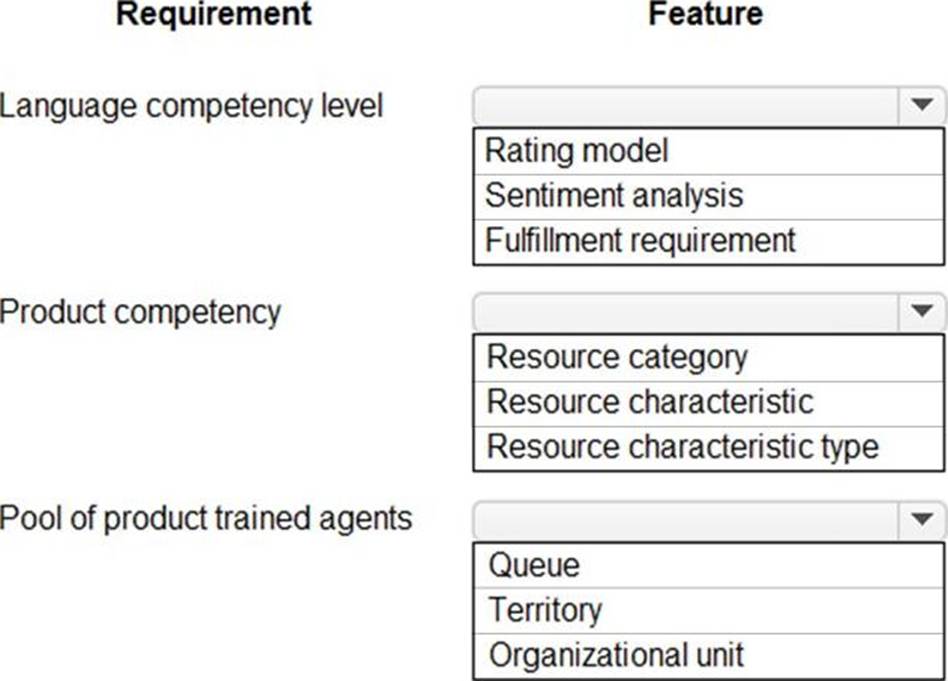
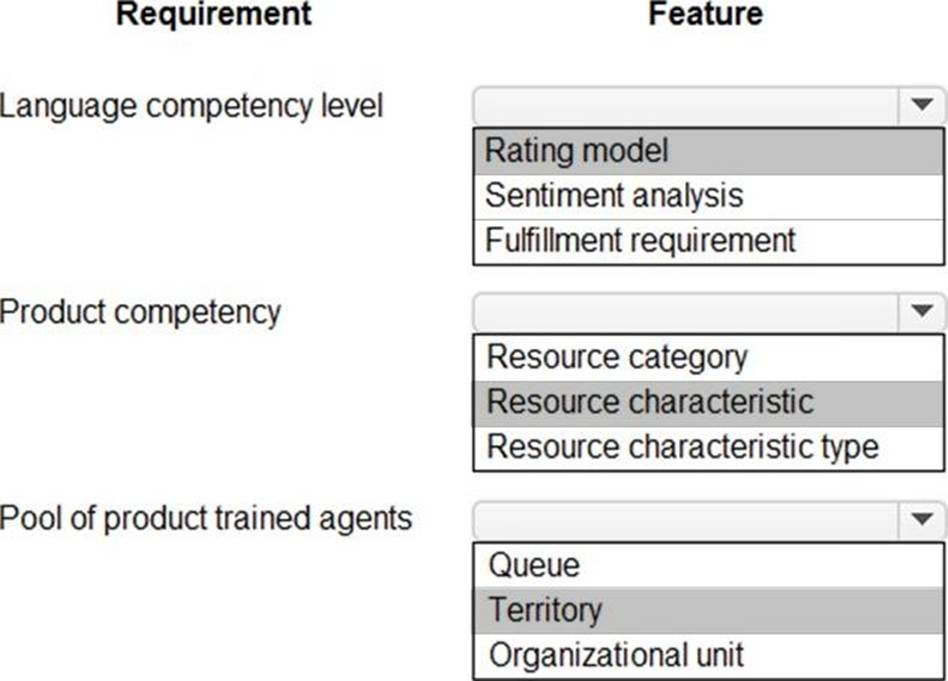
Route inquiries to an agent who speaks all caller languages but does not know the new product.
You need to configure the system.
Which feature should you use? To answer, select the appropriate options in the answer area. NOTE: Each correct selection is worth one point.
Explanation:
Reference: https://docs.microsoft.com/en-us/dynamics365/customer-service/setup-skills-assign-agents
You are an Omnichannel supervisor at a company. You install a dashboard in Power BI.
You need to ensure that managers are able to access the intraday insights dashboard.
What should you do?
- A . From the supervisor configuration, add all users to the intraday insights dashboard.
- B . From the agent configuration, promote the users to supervisors.
- C . From universal service desk, enable all dashboards.
- D . From the supervisor configuration, add the required users.
- E . From Power Bl, share the dashboard with the entire organization.
D
Explanation:
Reference: https://docs.microsoft.com/en-us/dynamics365/customer-service/configure-intraday-dashboard-supervisor
DRAG DROP
A company implements Dynamics 365 Customer Voice. The company sends out customer satisfaction surveys. The service team creates one survey from a blank project and others from a predefined project template.
When the company receives all the survey responses, a member of the service team must analyze the results. The member must calculate satisfaction scores to help the service manager identify required efficiency changes for the department.
You need to determine which type of satisfaction metrics to use.
Which metrics should you use? To answer, drag the appropriate metrics to the correct scores. Each metric may be used once, more than once, or not at all. You may need to drag the split bar between panes or scroll to view content. NOTE: Each correct selection is worth one point.
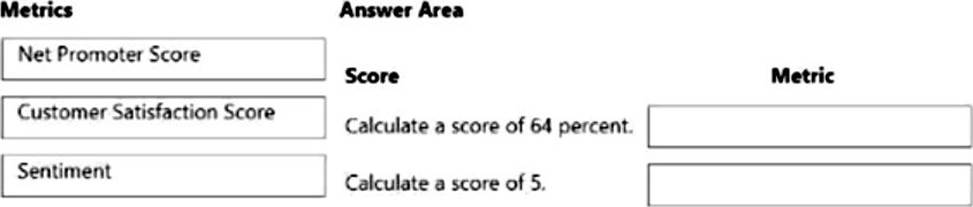
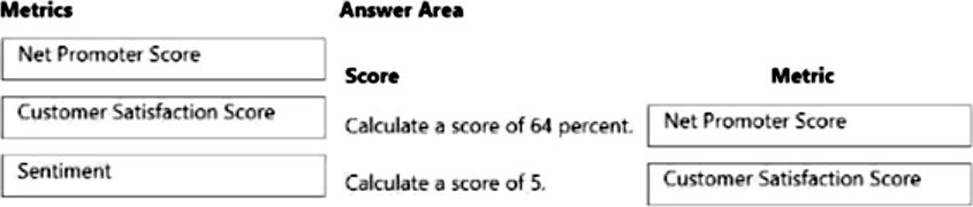
Explanation:
Box 1: Net Promoter Score
Net Promoter Score (NPS): NPS is a metric used to measure customer loyalty. The score is calculated from the NPS-type question by using a scale from 0 through 10.
The respondents are grouped as follows:
Detractors are those who respond with a score from 0 through 6.
Passives are those who respond with a score of 7 or 8.
Promoters are those who respond with a score of 9 or 10.
NPS is calculated by subtracting the percentage of detractors from the percentage of promoters. The score is a number that can range from C100 to 100.
Box 2: Customer Satisfaction Score
Customer Satisfaction (CSAT): CSAT is a metric used to measure the level of satisfaction customers have with a product or a service. CSAT is measured by responses to rating-type questions. The CSAT score is calculated on a scale of 1 to 5. If you create a question on a scale other than 1 to 5, the CSAT score is normalized as per the 1 to 5 scale. This helps in comparing various CSAT scores.
Incorrect:
Sentiment: Sentiment is a metric used to identify customer sentiment toward a product or a service.
Sentiment groups the responses to a text-based question as positive, negative, or neutral.
Reference: https://docs.microsoft.com/en-us/dynamics365/customer-voice/satisfaction-metrics
You need to configure the system to meet the three-day and seven-day timeframes.
What should you configure?
- A . Entitlement conditions
- B . Workflows
- C . Power Automate
- D . Service Level Agreement conditions
D
Explanation:
Cases that come in as phone calls must be resolved with seven business days.
Cases that come in as emails must be resolved within three business days.
Note: Service-level agreements (SLAs) enable businesses to track support policies and ensure customers are being supported per the support policy to which they are entitled. Businesses use SLAs to govern support products that customers either receive as part of their purchase or add on to their purchase. SLAs include policy details such as how quickly a customer is entitled to receive support, how many support requests a customer can make, and how long after purchases a customer can be supported as part of the agreement.
Note 2: Create SLAs to define conditions and actions that are applicable when an SLA is applied to an entity. The following steps are involved in creating the SLA:
Create an SLA.
Create an SLA item.
Configure actions for the SLA item.
Activate the SLA.
Reference: https://docs.microsoft.com/en-us/dynamics365/customer-service/define-service-level-agreements
HOTSPOT
A company uses Dynamics 365 Customer Service. The company installs Dynamics 365 Customer Service Insights.
The company wants to use dashboards to report phone calls and emails to monitor the productivity of representatives.
You need to perform the configuration.
Which configuration should you use? To answer, select the appropriate configurations in the answer area. NOTE: Each correct selection is worth one point.
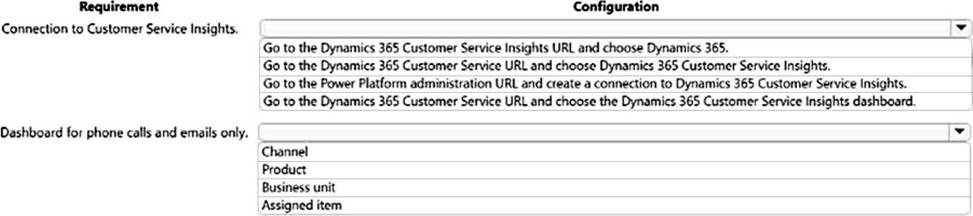
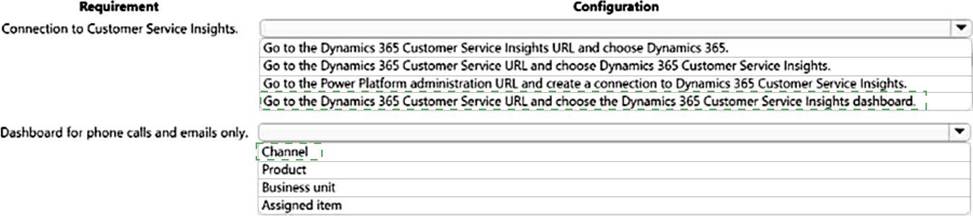
Explanation:
Box 1: Go to the Dynamics 365 Customer Service URL and choose the Dynamics 365 Customer Service Insights dashboard.
Customer Service Insights is now embedded in Dynamics 365 Customer Service. After it is enabled, this experience allows you to start seeing historical analytics directly within the Customer Service environment. Several reports and dashboards can be viewed by your management team.
Box 2: Channel
Reference: https://docs.microsoft.com/en-us/dynamics365/customer-service/introduction-customer-service-analytics