
Microsoft MB-230 Practice Exams
Last updated on Oct 01,2026- Exam Code: MB-230
- Exam Name: Microsoft Dynamics 365 Customer Service Functional Consultant
- Certification Provider: Microsoft
- Latest update: Oct 01,2026
HOTSPOT
A customer service manager needs a new business process flow to manage support for a product rollout for bicycles. There are two bicycle models: standard and high performance.
Support representatives must be able to:
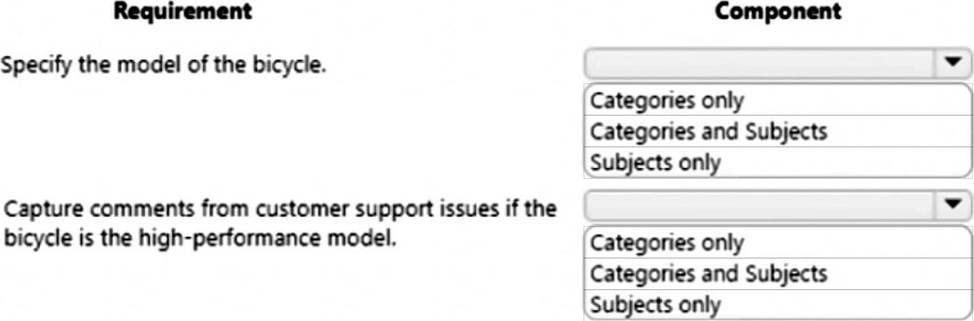
✑ Specify the model of the bicycle.
✑ Capture comments from customer support issues if the bicycle is the high-performance model.
You need to create the business process flow.
What should you configure for each requirement? To answer, select the appropriate options in the answer area.
Explanation:
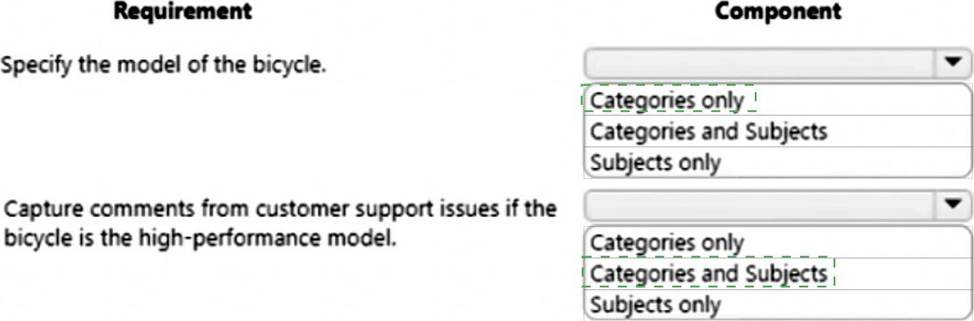
Box 1: Categories only
Box 2: Categories and Subjects
Note:
* Using the Categories entity, you can create hierarchical categorical data to help group records. Categorizing entity records in Dynamics 365 Customer Service helps you tag the records so that you can easily search them. Use the entity to create and manage a logical structure of categories in Dynamics 365 Customer Service, and then associate entity records to one or more categories.
Categories are useful for reporting, sorting, segmenting, and categorization of records.
* The customer engagement apps (Dynamics 365 Sales, Dynamics 365 Customer Service, Dynamics 365 Field Service, Dynamics 365 Marketing, and Dynamics 365 Project Service Automation), include a subject organizational structure that lets you mark and categorize service cases, knowledge base articles, products, and sales literature. By using the subject hierarchy, you can classify service cases to quickly provide service to your customer. You can also provide the appropriate sales literature. You’ll also be able to better understand gaps in your sales literature, evaluate service quality by subject area, and improve reporting on the performance of your products.
Reference:
https://docs.microsoft.com/en-us/dynamics365/customer-service/create-manage-categories
https://docs.microsoft.com/en-us/power-platform/admin/define-subjects-categorize-cases-products-articles
DRAG DROP
A company creates a single-page Power BI visualization to show how a Power Virtual Agents chatbot is performing.
Users must be able to navigate to the charts from anywhere within the Customer Service workspace.
You need to add the Power BI information to the Customer Service workspace app.
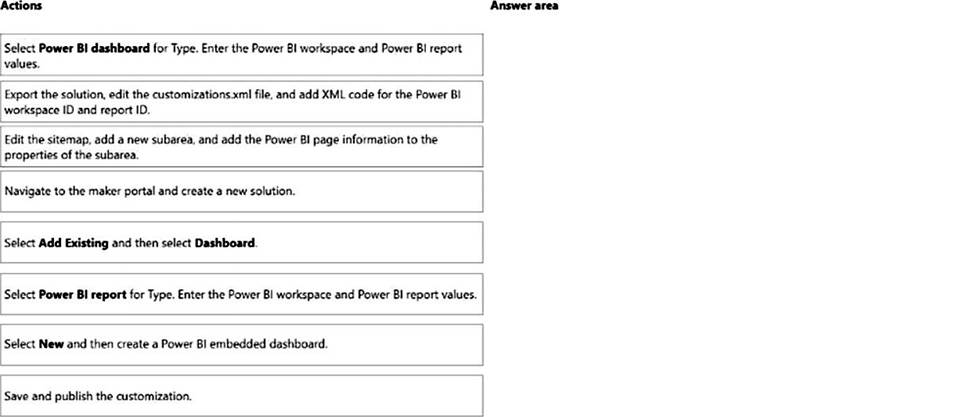
Which five actions should you perform in sequence? To answer, move the appropriate actions from the list of actions to the answer area and arrange them in the correct order.
Explanation:
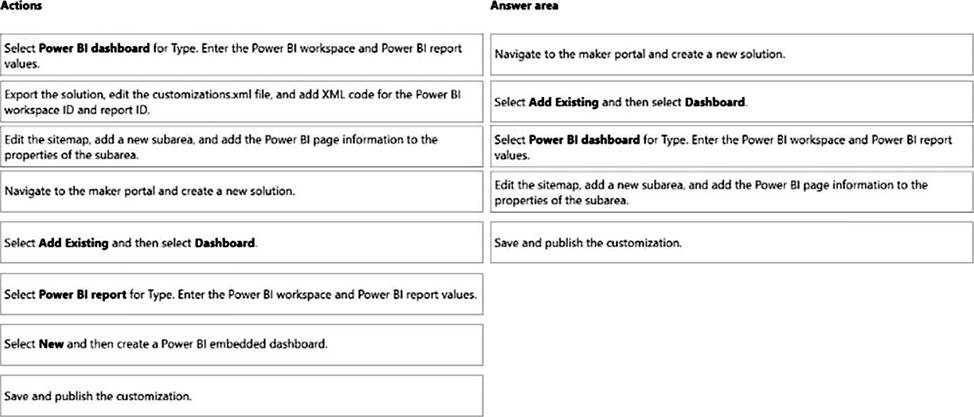
Step 1: Navigate to the maker portal and create a new solution.
Step 2: Select Add Existing and then select Dasbhoard.
Step 3: Select Power BI Report for type. Enter the Power BI workspace and Power BI report values.
Note: Get the embedding parameter values
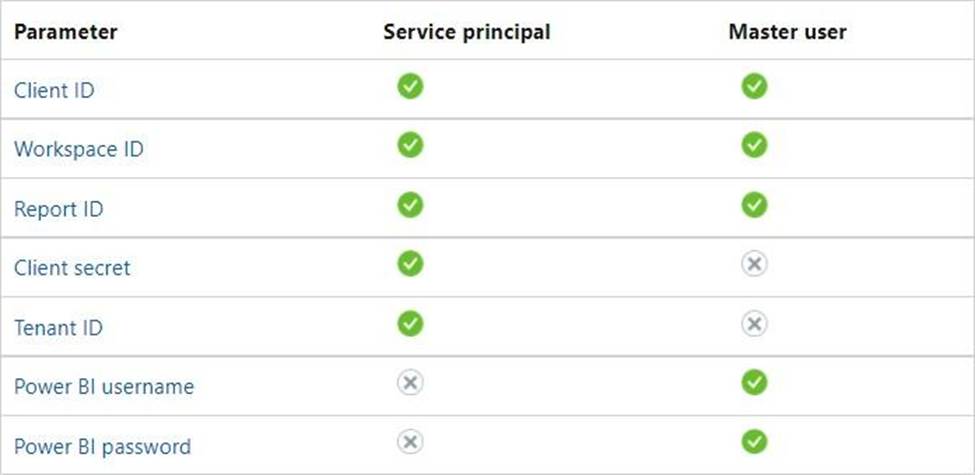
To embed your content, you need to obtain certain parameter values. The table below shows the required values, and indicates if they’re applicable to the service principal authentication method, the master user authentication method, or both.
Before you embed your content, make sure you have all the values listed below. Some of the values will differ, depending on the authentication method you’re using.
Step 4: Edit the sitemap, add a new subarea, and add the Power BI page information to the properties of the subarea
Edit the default site map
Your environment comes with a default site map. This site map is supported for both custom business apps and Dynamics 365 for Outlook.
✑ In the Dynamics 365 – custom app, go to Settings > Customizations.
✑ Select Customize the System.
✑ In the solution window, under Components, select Client Extensions.
✑ Double-click to select the site map that has the display name Site Map and is in a Managed state.
You can also select the site map, and then on the toolbar, select Edit.
✑ The site map opens in the site map designer.
✑ Add an area to the site map.
✑ Add a group to the site map.
✑ Add a subarea to a group in the site map.
✑ Select Save.
✑ Select Publish.
Step 5: Save and publish the customization
Reference: https://docs.microsoft.com/en-us/power-bi/developer/embedded/embed-sample-for-customers
HOTSPOT
You are implementing Omnichannel for Customer Service for a call center.
The call center manager needs to be able to track agents’ performance.
You need to configure the intraday insights dashboard to meet the requirement.
Which configurations should you use? To answer, select the appropriate options in the answer area. NOTE: Each correct selection is worth one point.
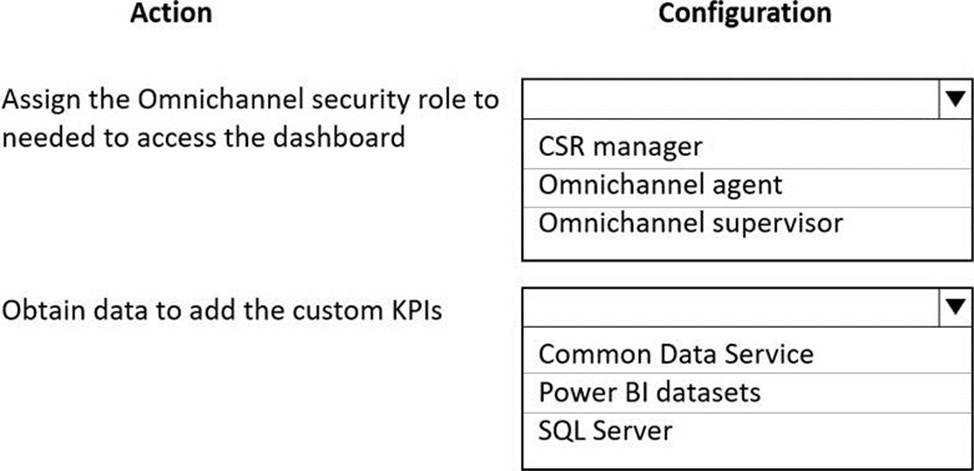
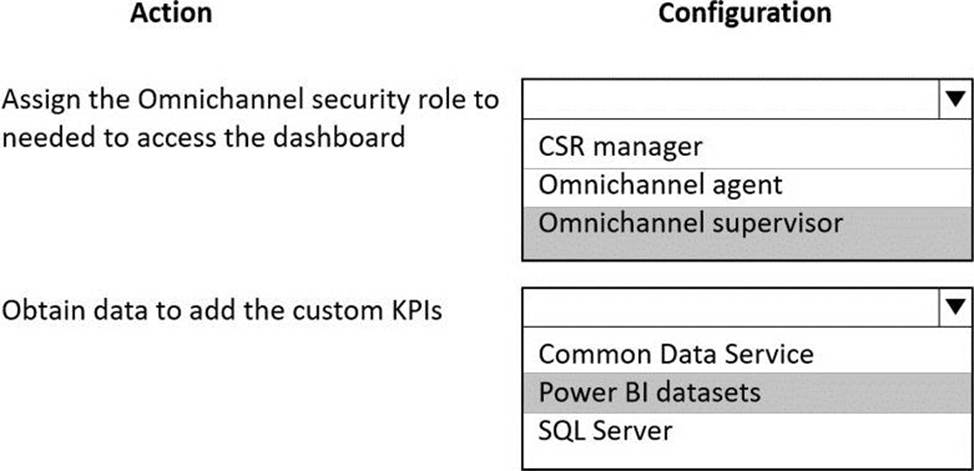
Explanation:
Reference: https://docs.microsoft.com/en-us/dynamics365/customer-service/configure-intraday-dashboard-supervisor
A company uses Dynamics 365 Customer Service.
Telemetry on agent case resolution time reveals that agents spend 20 minutes on average resolving cases. Analysis determines that resolution duration is increased because agents are often required to view and modify data on the related account.
The company requires a solution that allows agents to enter data in a single screen and edit multiple records without navigating to each record.
You need to create the solution.
Which two actions should you perform? Each correct answer presents part of the solution. NOTE: Each correct selection is worth one point
- A . Configure the editable grid of the case view to include account details.
- B . Add an editable grid control to the case view.
- C . Configure the Nested grid view.
- D . Add an editable grid of the account on the case form.
A company uses Dynamics 365 Customer Service. The app is shared by agents and the inventory department. The inventory department manages the products- The agents have read-only access. Agents must have access to the products to add the products to cases. The agents do not need to view the products in the site map.
You need to prevent agents from viewing products in the site map while maintaining the ability for the inventory department.
What should you do?
- A . Configure the site map to remove the subarea where the product is displayed.
- B . Set product privileges to Basic for the agents.
- C . Set product privileges to Local for the agents.
- D . Configure the site map subarea privileges of the product table.
Note: This question is part of a series of questions that present the same scenario. Each question in the series contains a unique solution that might meet the stated goals. Some question sets might have more than one correct solution, while others might not have a correct solution.
After you answer a question in this section, you will NOT be able to return to it. As a result, these questions will not appear in the review screen.
You are a Dynamics 365 for Customer Service system administrator for Contoso, Ltd.
You need to automatically create cases from emails sent to the [email protected] email address.
Solution: Create an automatic record creation and update rule. Set the Source type to Service activity, and then select the queue.
Does the solution meet the goal?
- A . Yes
- B . No
DRAG DROP
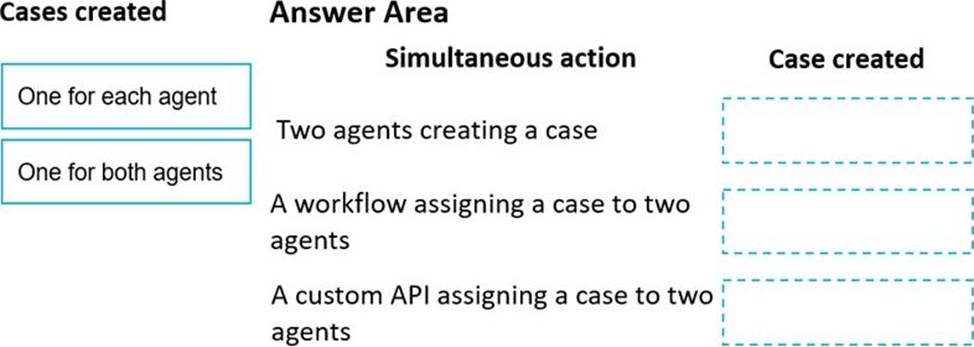
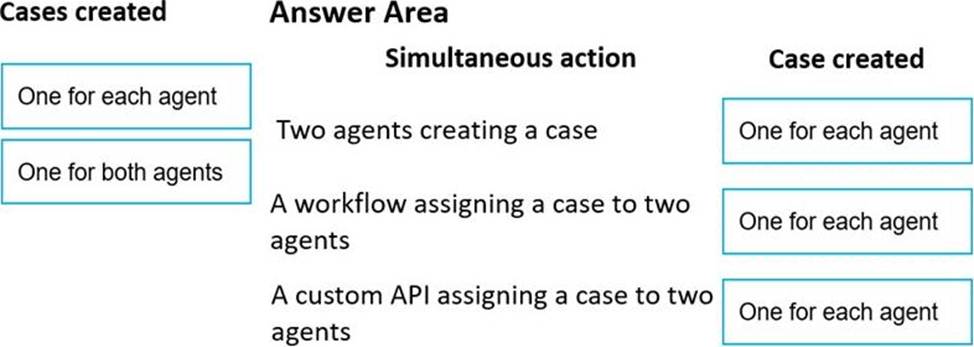
A service manager discovers a high number of cases in the agent queues. Cases are created manually but can be reassigned using a workflow or custom API.
The manager needs to know whether cases are getting duplicated because of simultaneous case creation or simultaneous case assignment.
You need to identify the number of cases that are created in each scenario.
How many cases are created? To answer, drag the appropriate cases created options to the correct simultaneous actions. Each cases created option may be used once, more than once, or not at all. You may need to drag the split bar between panes or scroll to view content. NOTE: Each correct selection is worth one point.
Explanation:
Reference: https://docs.microsoft.com/en-us/dynamics365/customer-service/set-up-queues-manage-activities-cases
HOTSPOT
You configure Dynamics 365 Customer Service.
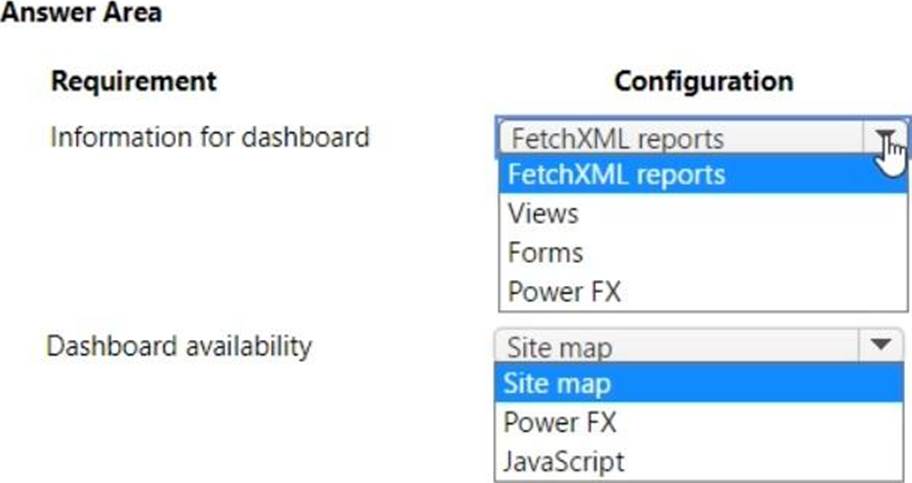
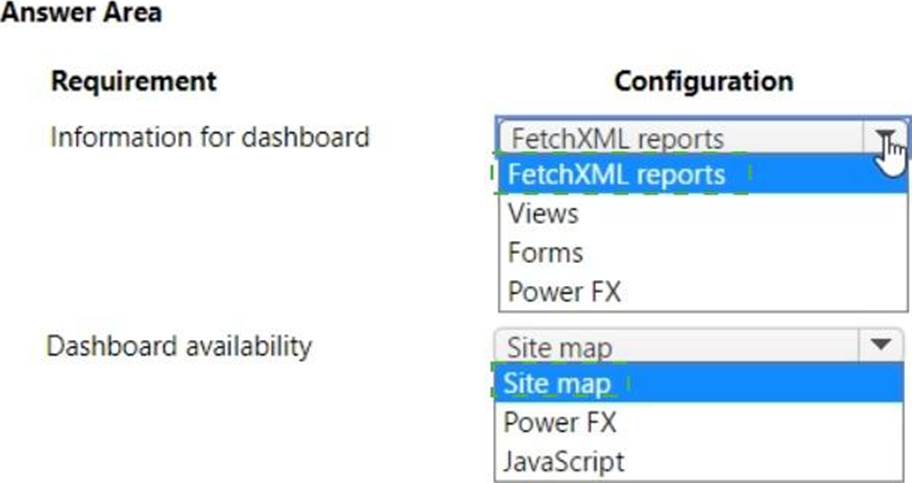
Managers require a custom dashboard with the following:
• A list of customers who have the most cases open.
• A list of customers who have the most missed service-level agreements (SLAs) sorted by contact.
• A list of top call takers for the week.
• A list of the cases that took the most amount of time to resolve.
The custom dashboard must be available for all users to use.
You need to configure the system.
What should you configure? To answer, select the appropriate options in the answer area. NOTE: Each correct selection is worth one point.
You use multiple workspaces within Dynamics 365 Customer Service insights.
You need to switch workspaces.
What should you do?
- A . Select Dashboard filters and then select a filter.
- B . Navigate to https://csi.ai.dynamics.com and then share a workspace.
- C . Select My workspaces and then select a workspace.
- D . Select View and then select a workspace view.
C
Explanation:
As an owner of a workspace, you launch sharing of a workspace by going to the My workspaces panel, hovering your mouse over the workspace name, and then selecting the share icon to open a dialog. From there, you add any users from your company’s Azure Active Directory. Any viewers will receive an email notifying them with a link to the workspace.
Reference: https://cloudblogs.microsoft.com/dynamics365/it/2019/06/13/new-in-dynamics-365-customer-service-insights-share-workspaces-train-ai-model-with-renamed-topics/
Your company uses Dynamics 365 Customer Service. You create the following support offerings.
Customers must choose one of the three offerings.
✑ Email only
✑ Phone only
✑ Half phone and half email
You allocate 50 cases to each support offering.
You need to create the entitlement with terms that adhere to the support offerings.
What are two possible ways to achieve this goal? Each correct answer presents a complete solution. NOTE: Each correct selection is worth one point.
- A . Create one entitlement template that includes the three different terms. Apply the template to the customer, and then remove the terms that do not apply.
- B . Create a new entitlement for each new support offering for the customer, with terms equal to 25 phone calls and 25 emails.
- C . Create a new entitlement for each new support offering for the customer, with terms equal to 50 phone calls and 50 emails.
- D . Create different entitlement templates for each set of terms. Apply the appropriate template to the customer.
- E . Create three entitlement templates with terms for 50 calls and 50 emails. Apply the template to the customers as they sign the support offering.
CE
Explanation:
Note: Quickly create other entitlements prefilled with the basic information like the start and end date, service level agreement (SLA), allocation type, and total term by using an entitlement template in Dynamics 365 Customer Service. For example, create a template for a standard entitlement, and then apply this template for every standard customer in your organization.
Template information include:
Total Term: Specify the total amount of support the customer is entitled to with respect to the allocation type. For example, if the allocation type is number of cases and you specify 100 in Total term, then the customer is entitled to support up to 100 cases.
Reference:
https://docs.microsoft.com/en-us/dynamics365/customer-service/create-entitlement-define-support-terms-customer
https://docs.microsoft.com/en-us/dynamics365/customer-service/set-up-entitlements-templates