
Microsoft AZ-204 Practice Exams
Last updated on Nov 16,2026- Exam Code: AZ-204
- Exam Name: Developing Solutions for Microsoft Azure
- Certification Provider: Microsoft
- Latest update: Nov 16,2026
Topic 3, City Power & Light
Case study
Overview
This is a case study. Case studies are not timed separately. You can use as much exam time as you would like to complete each case. However, there may be additional case studies and sections on this exam. You must manage your time to ensure that you are able to complete all questions included on this exam in the time provided.
To answer the questions included in a case study, you will need to reference information that is provided in the case study. Case studies might contain exhibits and other resources that provide more information about the scenario that is described in the case study. Each question is independent of the other questions in this case study.
At the end of this case study, a review screen will appear. This screen allows you to review your answers and to make changes before you move to the next section of the exam. After you begin a new section, you cannot return to this section.
To start the case study
To display the first question in this case study, click the Next button. Use the buttons in the left pane to explore the content of the case study before you answer the questions. Clicking these buttons displays information such as business requirements, existing environment, and problem statements. When you are ready to answer a question, click the Question button to return to the question.
Background
City Power & Light company provides electrical infrastructure monitoring solutions for homes and businesses. The company is migrating solutions to Azure.
Current environment
Architecture overview
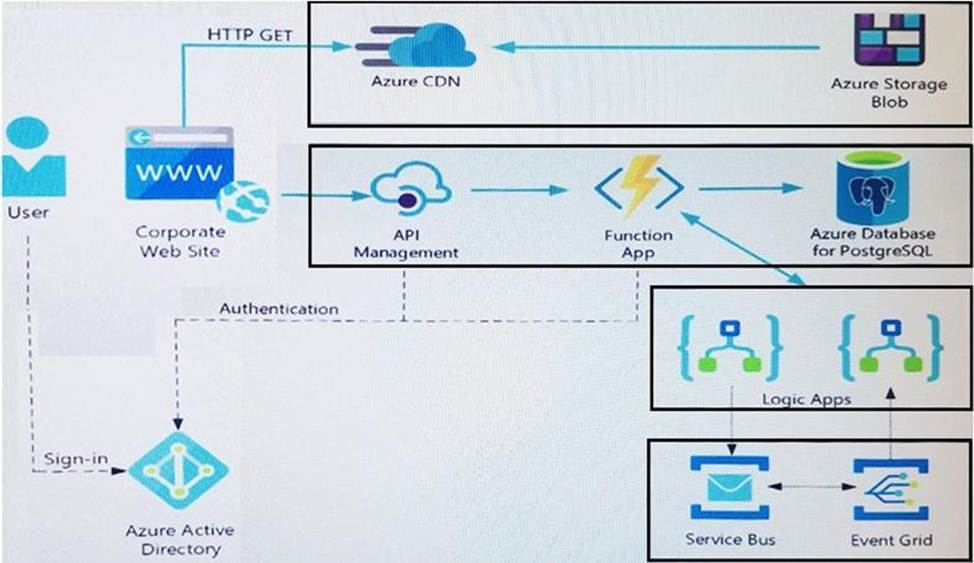
The company has a public website located at http://www.cpandl.com/. The site is a single-page web application that runs in Azure App Service on Linux. The website uses files stored in Azure Storage and cached in Azure Content Delivery Network (CDN) to serve static content.
API Management and Azure Function App functions are used to process and store data in Azure Database for PostgreSQL. API Management is used to broker communications to the Azure Function app functions for Logic app integration. Logic apps are used to orchestrate the data processing while Service Bus and Event Grid handle messaging and events.
The solution uses Application Insights, Azure Monitor, and Azure Key Vault.
Architecture diagram
The company has several applications and services that support their business. The company plans to implement serverless computing where possible.
The overall architecture is shown below.
User authentication
The following steps detail the user authentication process:
✑ The user selects Sign in in the website.
✑ The browser redirects the user to the Azure Active Directory (Azure AD) sign in page.
✑ The user signs in.
✑ Azure AD redirects the user’s session back to the web application. The URL includes an access token.
✑ The web application calls an API and includes the access token in the authentication header. The application ID is sent as the audience (‘aud’) claim in the access token.
✑ The back-end API validates the access token.
Requirements
Corporate website
✑ Communications and content must be secured by using SSL.
✑ Communications must use HTTPS.
✑ Data must be replicated to a secondary region and three availability zones.
✑ Data storage costs must be minimized.
Azure Database for PostgreSQL
The database connection string is stored in Azure Key Vault with the following attributes:
✑ Azure Key Vault name: cpandlkeyvault
✑ Secret name: PostgreSQLConn
✑ Id: 80df3e46ffcd4f1cb187f79905e9a1e8
The connection information is updated frequently. The application must always use the latest information to connect to the database.
Azure Service Bus and Azure Event Grid
✑ Azure Event Grid must use Azure Service Bus for queue-based load leveling.
✑ Events in Azure Event Grid must be routed directly to Service Bus queues for use in buffering.
✑ Events from Azure Service Bus and other Azure services must continue to be routed to Azure Event Grid for processing.
Security
✑ All SSL certificates and credentials must be stored in Azure Key Vault.
✑ File access must restrict access by IP, protocol, and Azure AD rights.
✑ All user accounts and processes must receive only those privileges which are essential to perform their intended function.
Compliance
Auditing of the file updates and transfers must be enabled to comply with General Data Protection Regulation (GDPR). The file updates must be read-only, stored in the order in which they occurred, include only create, update, delete, and copy operations, and be retained for compliance reasons.
Issues
Corporate website
While testing the site, the following error message displays:
CryptographicException: The system cannot find the file specified.
Function app
You perform local testing for the RequestUserApproval function. The following error
message displays:
‘Timeout value of 00:10:00 exceeded by function: RequestUserApproval’
The same error message displays when you test the function in an Azure development environment when you run the following Kusto query: FunctionAppLogs
| where FunctionName = = "RequestUserApproval"
Logic app
You test the Logic app in a development environment. The following error message displays:
‘400 Bad Request’
Troubleshooting of the error shows an HttpTrigger action to call the RequestUserApproval function.
Code
Corporate website
Security.cs:

Function app
RequestUserApproval.cs:
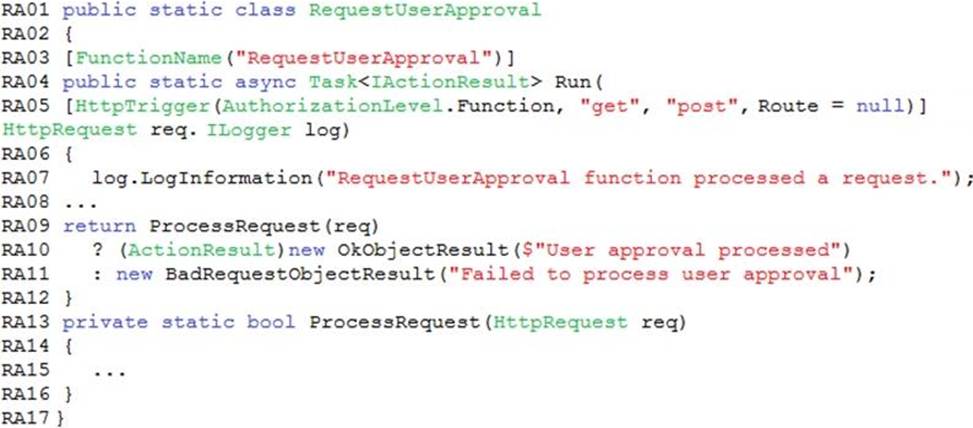
You need to correct the RequestUserApproval Function app error.
What should you do?
- A . Update line RA13 to use the async keyword and return an HttpRequest object value.
- B . Configure the Function app to use an App Service hosting plan. Enable the Always On setting of the hosting plan.
- C . Update the function to be stateful by using Durable Functions to process the request payload.
- D . Update the functionTimeout property of the host.json project file to 15 minutes.
C
Explanation:
Async operation tracking
The HTTP response mentioned previously is designed to help implement long-running HTTP async APIs with Durable Functions. This pattern is sometimes referred to as the polling consumer pattern.
Both the client and server implementations of this pattern are built into the Durable Functions HTTP APIs.
Function app
You perform local testing for the RequestUserApproval function. The following error message displays:
‘Timeout value of 00:10:00 exceeded by function: RequestUserApproval’
The same error message displays when you test the function in an Azure development environment when you run the following Kusto query:
FunctionAppLogs
| where FunctionName = = "RequestUserApproval"
Reference: https://docs.microsoft.com/en-us/azure/azure-functions/durable/durable-functions-http-features
HOTSPOT
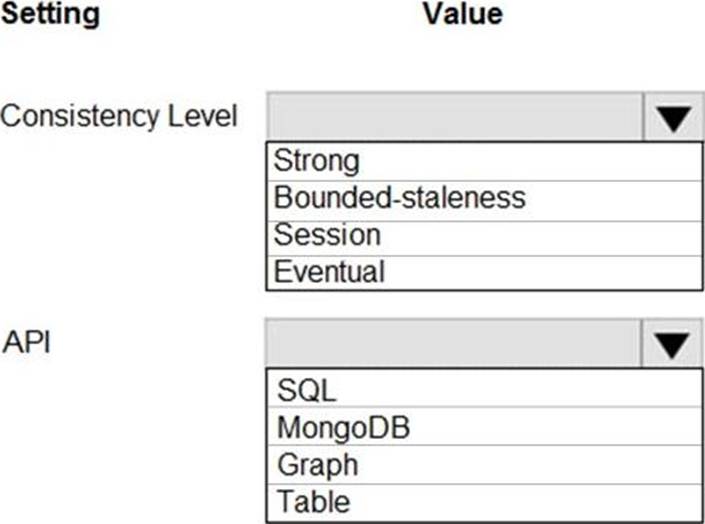
You need to configure Azure Cosmos DB.
Which settings should you use? To answer, select the appropriate options in the answer area. NOTE: Each correct selection is worth one point.
Explanation:
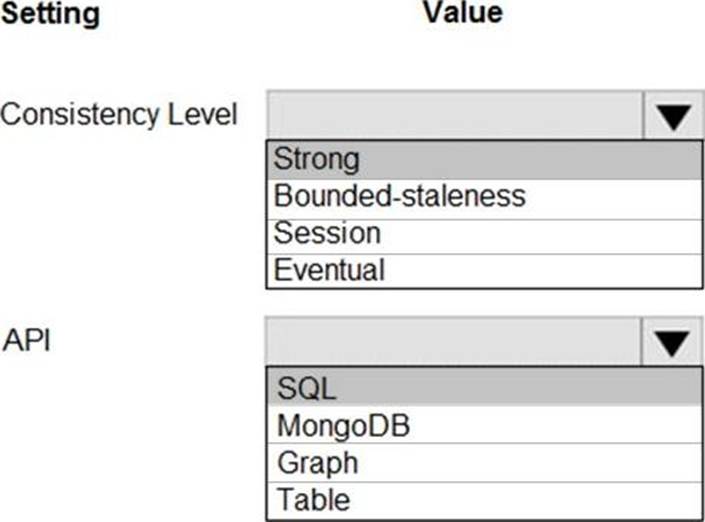
Box 1: Strong
When the consistency level is set to strong, the staleness window is equivalent to zero, and the clients are guaranteed to read the latest committed value of the write operation.
Scenario: Changes to the Order data must reflect immediately across all partitions. All reads to the Order data must fetch the most recent writes.
Note: You can choose from five well-defined models on the consistency spectrum. From strongest to weakest, the models are: Strong, Bounded staleness, Session, Consistent prefix, Eventual
Box 2: SQL
Scenario: You identify the following requirements for data management and manipulation:
Order data is stored as nonrelational JSON and must be queried using Structured Query Language (SQL).
HOTSPOT
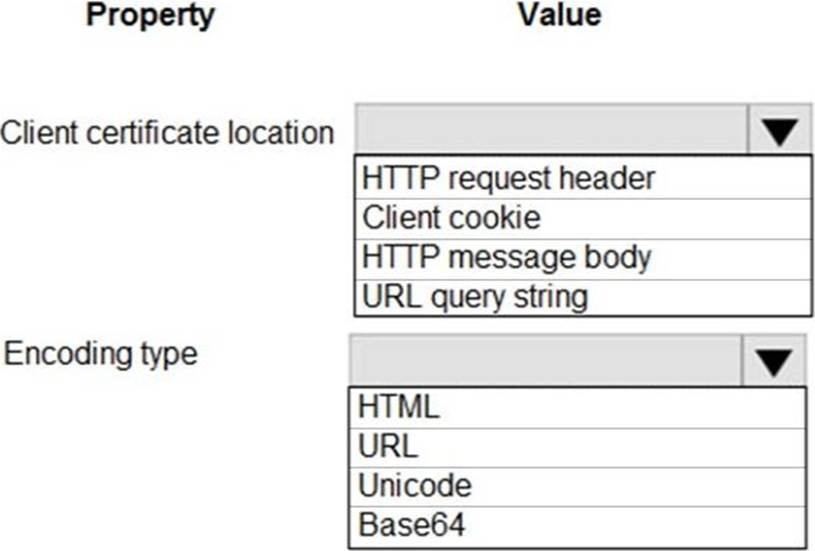
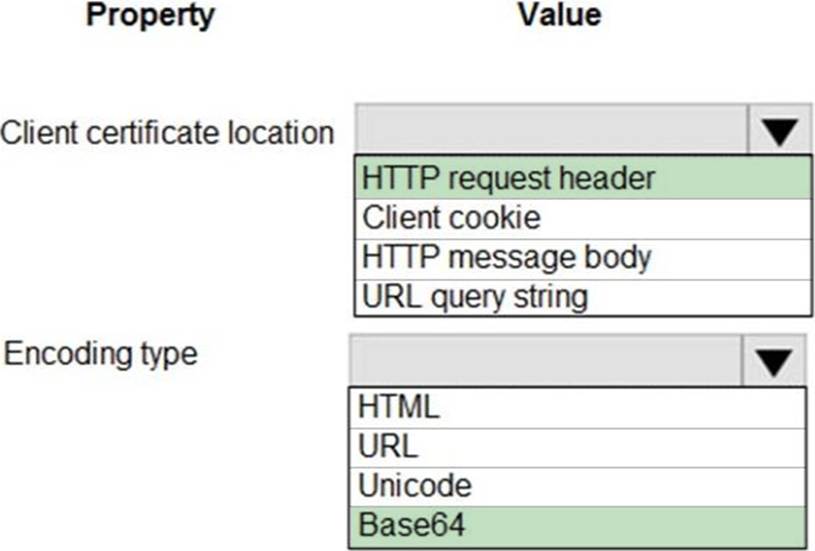
You are developing an Azure Web App. You configure TLS mutual authentication for the web app.
You need to validate the client certificate in the web app. To answer, select the appropriate options in the answer area. NOTE: Each correct selection is worth one point.
Explanation:
Accessing the client certificate from App Service.
If you are using ASP.NET and configure your app to use client certificate authentication, the certificate will be available through the HttpRequest.ClientCertificate property. For other application stacks, the client cert will be available in your app through a base64 encoded value in the "X-ARR-ClientCert" request header. Your application can create a certificate from this value and then use it for authentication and authorization purposes in your application.
Reference: https://docs.microsoft.com/en-us/azure/app-service/app-service-web-configure-tls-mutual-auth
HOTSPOT
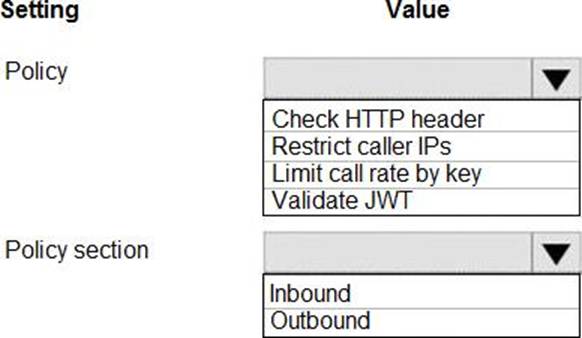
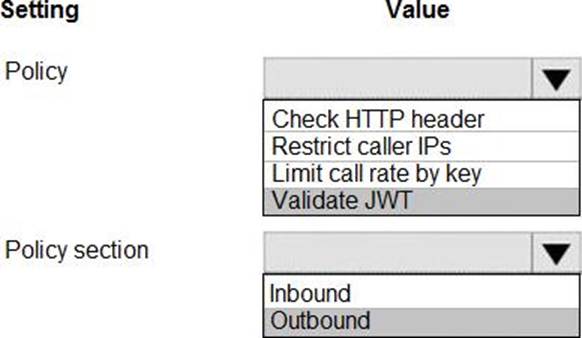
You need to configure API Management for authentication.
Which policy values should you use? To answer, select the appropriate options in the answer area. NOTE: Each correct selection is worth one point.
Explanation:
Box 1: Validate JWT
The validate-jwt policy enforces existence and validity of a JWT extracted from either a specified HTTP Header or a specified query parameter.
Scenario: User authentication (see step 5 below)
The following steps detail the user authentication process:
✑ The user selects Sign in in the website.
✑ The browser redirects the user to the Azure Active Directory (Azure AD) sign in page.
✑ The user signs in.
✑ Azure AD redirects the user’s session back to the web application. The URL includes an access token.
✑ The web application calls an API and includes the access token in the authentication header. The application ID is sent as the audience (‘aud’) claim in the access token.
✑ The back-end API validates the access token.
Box 2: Outbound
Reference: https://docs.microsoft.com/en-us/azure/api-management/api-management-access-restriction-policies
You need to implement a solution to resolve the retail store location data issue.
Which three Azure Blob features should you enable? Each correct answer presents part of the solution. NOTE Each correct selection is worth one point
- A . Immutability
- B . Snapshots
- C . Versioning
- D . Soft delete
- E . Object replication
- F . Change feed
CDF
Explanation:
Scenario: You must perform a point-in-time restoration of the retail store location data due to an unexpected and accidental deletion of data.
Before you enable and configure point-in-time restore, enable its prerequisites for the storage account: soft delete, change feed, and blob versioning.
Reference: https://docs.microsoft.com/en-us/azure/storage/blobs/point-in-time-restore-manage
HOTSPOT
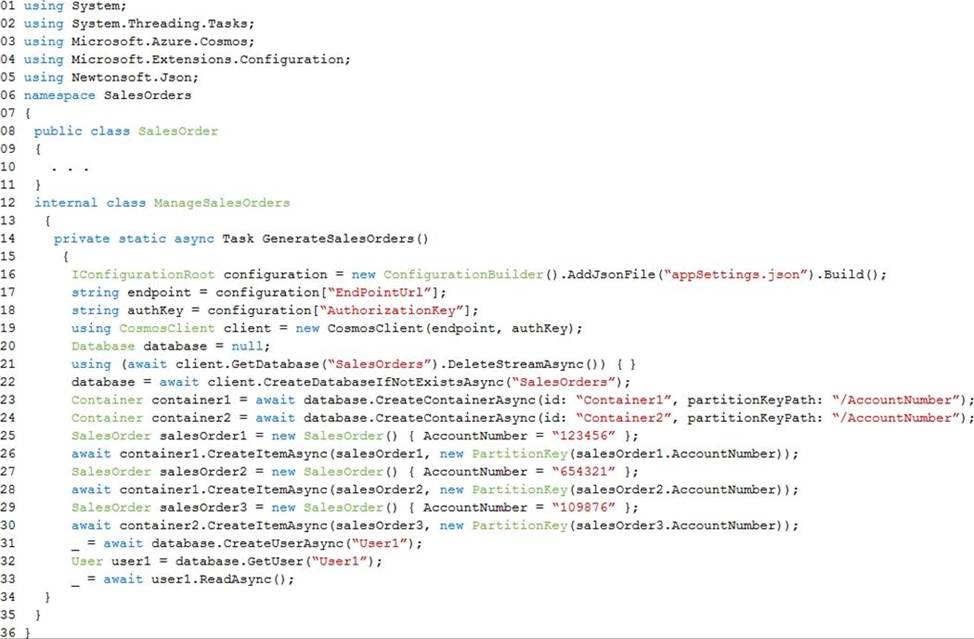
You are developing an Azure-hosted e-commerce web application. The application will use Azure Cosmos DB to store sales orders. You are using the latest SDK to manage the sales orders in the database.
You create a new Azure Cosmos DB instance. You include a valid endpoint and valid authorization key to an appSettings.json file in the code project.
You are evaluating the following application code: (Line number are included for reference only.)
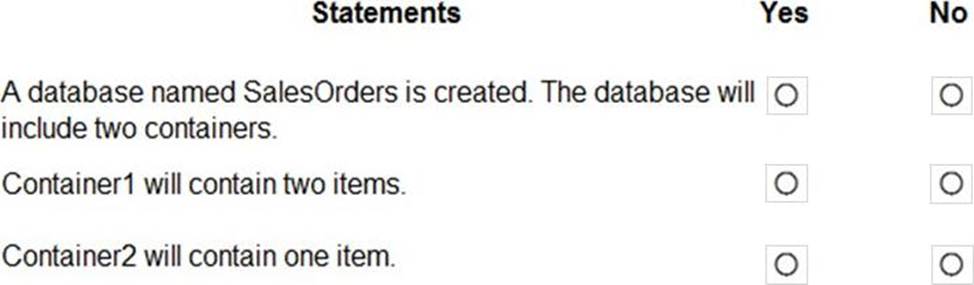
For each of the following statements, select Yes if the statement is true. Otherwise, select No. NOTE: Each correct selection is worth one point.
Explanation:
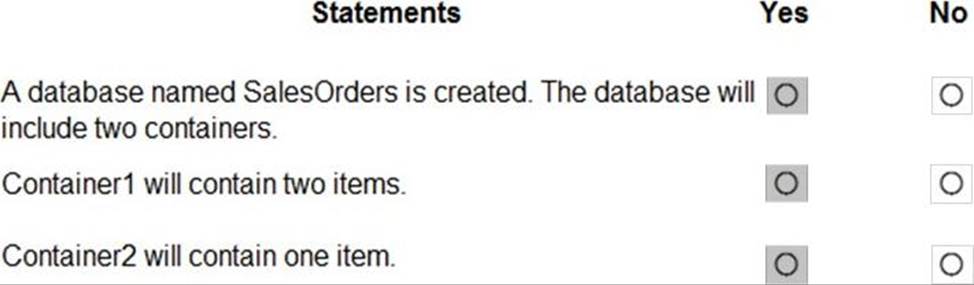
Box 1: Yes
The createDatabaseIfNotExistsAsync method checks if a database exists, and if it doesn’t, create it.
The Database.CreateContainerAsync method creates a container as an asynchronous operation in the Azure Cosmos service.
Box 2: Yes
The CosmosContainer.CreateItemAsync method creates an item as an asynchronous operation in the Azure Cosmos service.
Box 3: Yes
Reference:
https://docs.microsoft.com/en-us/dotnet/api/microsoft.azure.cosmos.cosmosclient.createdatabaseifnotexistsasync
https://docs.microsoft.com/en-us/dotnet/api/microsoft.azure.cosmos.database.createcontainerasync
https://docs.microsoft.com/en-us/dotnet/api/azure.cosmos.cosmoscontainer.createitemasync
You are building a loyalty program for a major snack producer. When customers buy a snack at any of 100 participating retailers the event is recorded in Azure Event Hub. Each retailer is given a unique identifier that is used as the primary identifier for the loyalty program.
Retailers must be able to be added or removed at any time. Retailers must only be able to record sales for themselves.
You need to ensure that retailers can record sales.
What should you do?
- A . Use publisher policies for retailers.
- B . Define a namespace for each retailer
- C . Create a partition for each retailer.
You are building a website that uses Azure Blob storage for data storage. You configure Azure Blob storage lifecycle to move all blobs to the archive tier after 30 days.
Customers have requested a service-level agreement (SLA) for viewing data older than 30 days.
You need to document the minimum SLA for data recovery.
Which SLA should you use?
- A . at least two days
- B . between one and 15 hours
- C . at least one day
- D . between zero and 60 minutes
B
Explanation:
The archive access tier has the lowest storage cost. But it has higher data retrieval costs compared to the hot and cool tiers. Data in the archive tier can take several hours to retrieve depending on the priority of the rehydration. For small objects, a high priority rehydrate may retrieve the object from archive in under 1 hour.
Reference: https://docs.microsoft.com/en-us/azure/storage/blobs/storage-blob-storage-tiers?tabs=azure-portal
You develop an app that allows users to upload photos and videos to Azure storage. The app uses a storage REST API call to upload the media to a blob storage account named Account1. You have blob storage containers named Container1 and Container2.
Uploading of videos occurs on an irregular basis.
You need to copy specific blobs from Container1 to Container2 when a new video is uploaded.
What should you do?
- A . Copy blobs to Container2 by using the Put Blob operation of the Blob Service REST API
- B . Create an Event Grid topic that uses the Start-AzureStorageBlobCopy cmdlet
- C . Use AzCopy with the Snapshot switch to copy blobs to Container2
- D . Download the blob to a virtual machine and then upload the blob to Container2
B
Explanation:
The Start-AzureStorageBlobCopy cmdlet starts to copy a blob.
Example 1: Copy a named blob
C:PS>Start-AzureStorageBlobCopy -SrcBlob "ContosoPlanning2015" -DestContainer "ContosoArchives" -SrcContainer "ContosoUploads"
This command starts the copy operation of the blob named ContosoPlanning2015 from the container named ContosoUploads to the container named ContosoArchives.
Reference: https://docs.microsoft.com/en-us/powershell/module/azure.storage/start-azurestorageblobcopy?view=azurermps-6.13.0
You develop an app that allows users to upload photos and videos to Azure storage. The app uses a storage REST API call to upload the media to a blob storage account named Account1. You have blob storage containers named Container1 and Container2.
Uploading of videos occurs on an irregular basis.
You need to copy specific blobs from Container1 to Container2 when a new video is uploaded.
What should you do?
- A . Copy blobs to Container2 by using the Put Blob operation of the Blob Service REST API
- B . Create an Event Grid topic that uses the Start-AzureStorageBlobCopy cmdlet
- C . Use AzCopy with the Snapshot switch to copy blobs to Container2
- D . Download the blob to a virtual machine and then upload the blob to Container2
B
Explanation:
The Start-AzureStorageBlobCopy cmdlet starts to copy a blob.
Example 1: Copy a named blob
C:PS>Start-AzureStorageBlobCopy -SrcBlob "ContosoPlanning2015" -DestContainer "ContosoArchives" -SrcContainer "ContosoUploads"
This command starts the copy operation of the blob named ContosoPlanning2015 from the container named ContosoUploads to the container named ContosoArchives.
Reference: https://docs.microsoft.com/en-us/powershell/module/azure.storage/start-azurestorageblobcopy?view=azurermps-6.13.0