
Microsoft AZ-204 Practice Exams
Last updated on Oct 21,2026- Exam Code: AZ-204
- Exam Name: Developing Solutions for Microsoft Azure
- Certification Provider: Microsoft
- Latest update: Oct 21,2026
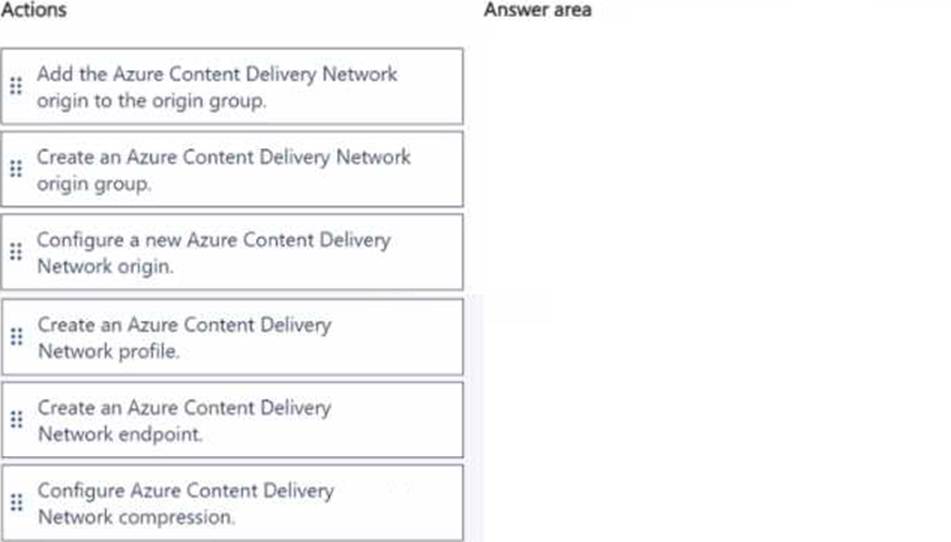
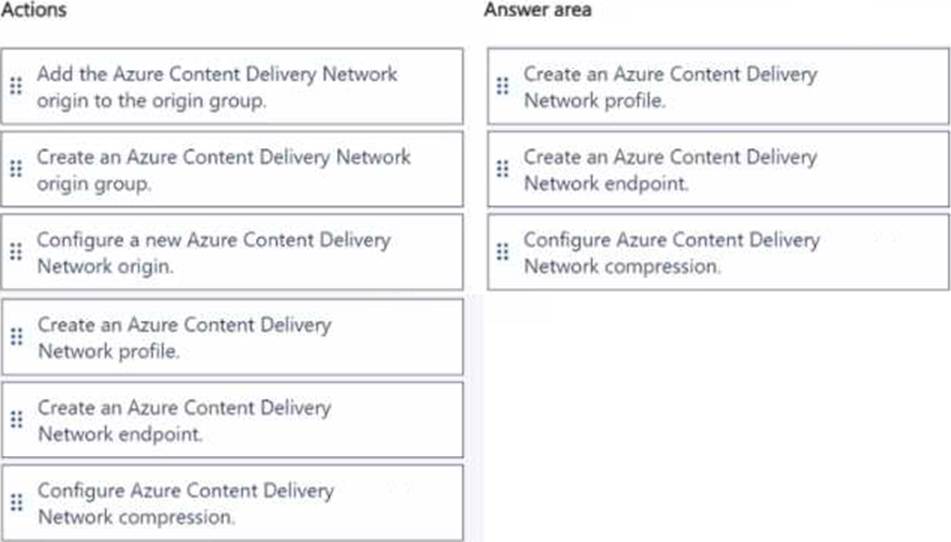
DRAG DROP
You need to correct the internal staff issue with webpages.
Which three actions should you perform in sequence? To answer, move the appropriate actions from the list of actions to the answer area and arrange them in the correct order.
You are creating an app that will use CosmosDB for data storage. The app will process batches of relational data.
You need to select an API for the app.
Which API should you use?
- A . MongoDBAPI
- B . Table API
- C . SQL API
- D . Cassandra API
C
Explanation:
For relational data you will need the SQL API
Reference: https://docs.microsoft.com/en-us/azure/cosmos-db/choose-api
You are developing a project management service by using ASP.NET. The service hosts conversations, files, to-do lists, and a calendar that users can interact with at any time.
The application uses Azure Search for allowing users to search for keywords in the project data.
You need to implement code that creates the object which is used to create indexes in the Azure Search service.
Which two objects should you use? Each correct answer presents part of the solution. NOTE: Each correct selection is worth one point.
- A . SearchService
- B . SearchlndexCIient
- C . SearchServiceClient
- D . SearchCredentials
BC
Explanation:
The various client libraries define classes like Index, Field, and Document, as well as operations like Indexes.Create and Documents.Search on the SearchServiceClient and SearchIndexClient classes.
Example:
The sample application we’ll be exploring creates a new index named "hotels", populates it with a few documents, then executes some search queries.
Here is the main program, showing the overall flow:
/ This sample shows how to delete, create, upload documents and query an index static void Main(string[] args)
{
IConfigurationBuilder builder = new ConfigurationBuilder().AddJsonFile("appsettings.json"); IConfigurationRoot configuration = builder.Build();
SearchServiceClient serviceClient = CreateSearchServiceClient(configuration);
Console.WriteLine("{0}", "Deleting index…n");
DeleteHotelsIndexIfExists(serviceClient);
Console.WriteLine("{0}", "Creating index…n");
CreateHotelsIndex(serviceClient);
ISearchIndexClient indexClient = serviceClient.Indexes.GetClient("hotels");
Reference: https://docs.microsoft.com/en-us/azure/search/search-howto-dotnet-sdk
You are developing a medical records document management website. The website is used to store scanned copies of patient intake forms. If the stored intake forms are downloaded from storage by a third party, the content of the forms must not be compromised.
You need to store the intake forms according to the requirements.
Solution: Store the intake forms as Azure Key Vault secrets.
Does the solution meet the goal?
- A . Yes
- B . No
B
Explanation:
Instead use an Azure Key vault and public key encryption. Store the encrypted from in Azure Storage Blob storage.
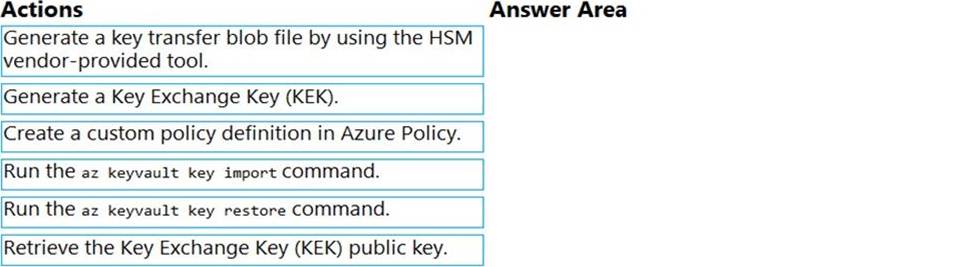
DRAG DROP
You are developing an Azure-hosted application that must use an on-premises hardware security module (HSM) key.
The key must be transferred to your existing Azure Key Vault by using the Bring Your Own Key (BYOK) process.
You need to securely transfer the key to Azure Key Vault.
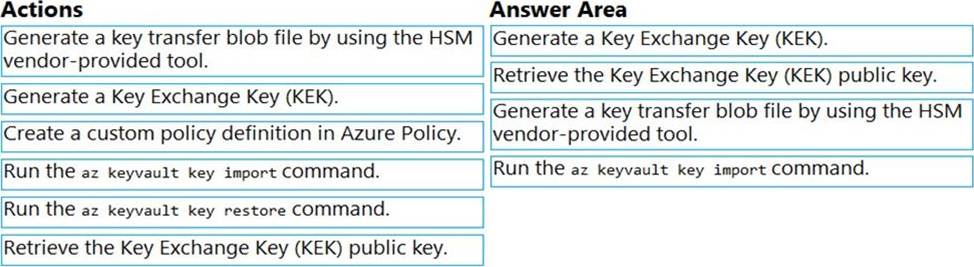
Which four actions should you perform in sequence? To answer, move the appropriate actions from the list of actions to the answer area and arrange them in the correct order.
Explanation:
To perform a key transfer, a user performs following steps:
✑ Generate KEK.
✑ Retrieve the public key of the KEK.
✑ Using HSM vendor provided BYOK tool – Import the KEK into the target HSM and exports the Target Key protected by the KEK.
✑ Import the protected Target Key to Azure Key Vault.
Step 1: Generate a Key Exchange Key (KEK).
Step 2: Retrieve the Key Exchange Key (KEK) public key.
Step 3: Generate a key transfer blob file by using the HSM vendor-provided tool. Generate key transfer blob using HSM vendor provided BYOK tool
Step 4: Run the az keyvault key import command Upload key transfer blob to import HSM-key.
Customer will transfer the Key Transfer Blob (".byok" file) to an online workstation and then run a az keyvault key import command to import this blob as a new HSM-backed key into Key Vault.
To import an RSA key use this command:
az keyvault key import
Reference: https://docs.microsoft.com/en-us/azure/key-vault/keys/byok-specification
You need to ensure that the solution can meet the scaling requirements for Policy Service.
Which Azure Application Insights data model should you use?
- A . an Application Insights dependency
- B . an Application Insights event
- C . an Application Insights trace
- D . an Application Insights metric
D
Explanation:
Application Insights provides three additional data types for custom telemetry:
Trace – used either directly, or through an adapter to implement diagnostics logging using an instrumentation
framework that is familiar to you, such as Log4Net or System.Diagnostics.
Event – typically used to capture user interaction with your service, to analyze usage patterns.
Metric – used to report periodic scalar measurements.
Scenario:
Policy service must use Application Insights to automatically scale with the number of policy actions that it is performing.
Reference: https://docs.microsoft.com/en-us/azure/azure-monitor/app/data-model
HOTSPOT
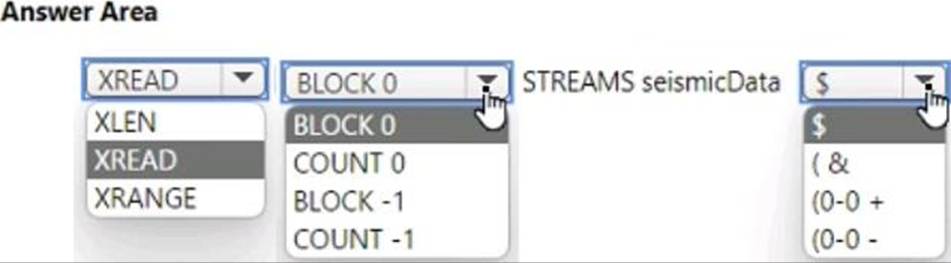
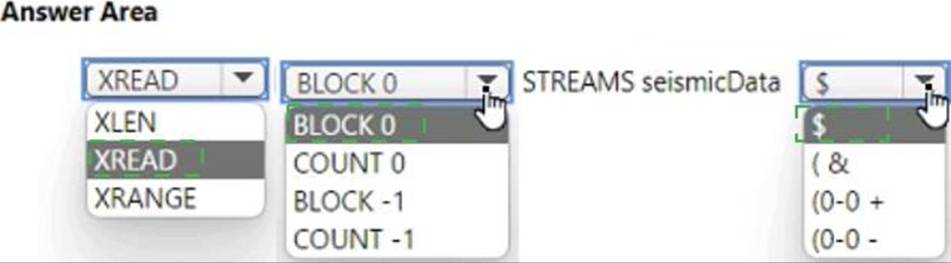
You develop new functionality in a web application for a company that provides access to seismic data from around the world. The seismic data is stored in Redis Streams within an Azure Cache for Redis instance.
The new functionality includes a real-time display of seismic events as they occur.
You need to implement the Azure Cache for Redis command to receive seismic data.
How should you complete the command? To answer, select the appropriate options in the answer area. NOTE: Each correct selection is worth one point.
Create a DataSource instance and set its Container property to the DataContamer
4 Call the Documents.Suggest method of the SearchlndexClient and pass the DataSource.
Does the solution meet the goal?
- A . Yes
- B . No
DRAG DROP
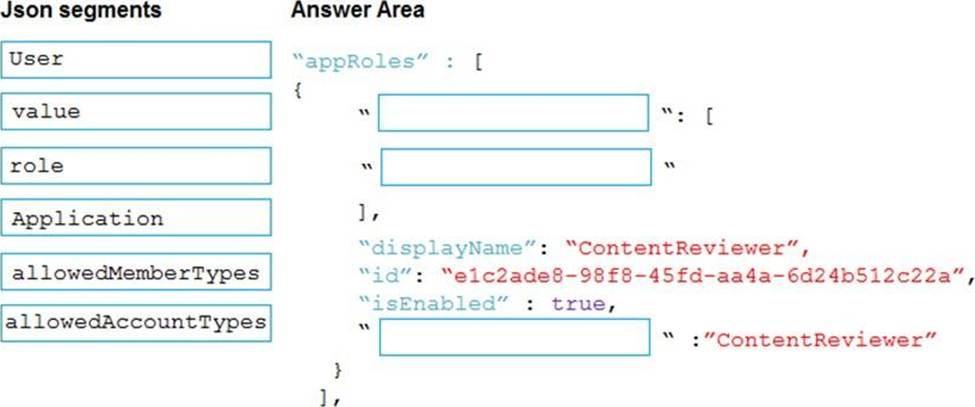
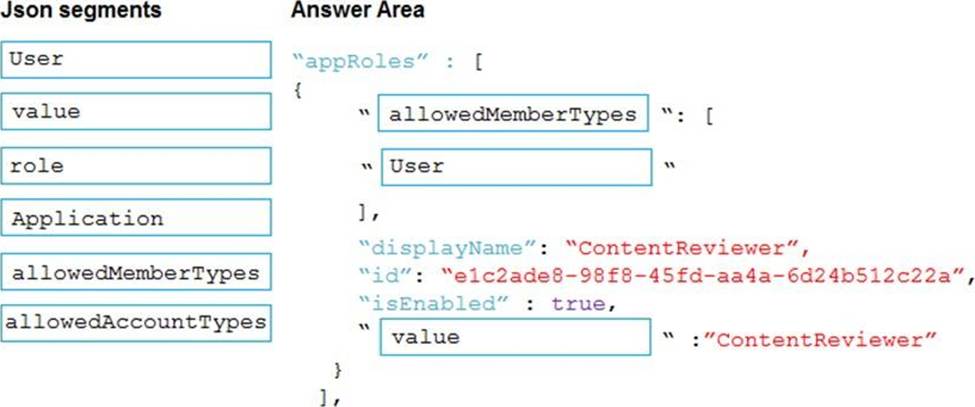
You need to add markup at line AM04 to implement the ContentReview role.
How should you complete the markup? To answer, drag the appropriate json segments to the correct locations. Each json segment may be used once, more than once, or not at all. You may need to drag the split bar between panes or scroll to view content. NOTE: Each correct selection is worth one point.
Explanation:
Box 1: allowedMemberTypes
allowedMemberTypes specifies whether this app role definition can be assigned to users and groups by setting to "User", or to other applications (that are accessing this application in daemon service scenarios) by setting to "Application", or to both.
Note: The following example shows the appRoles that you can assign to users.
"appId": "8763f1c4-f988-489c-a51e-158e9ef97d6a",
"appRoles": [
{
"allowedMemberTypes": [
"User"
],
"displayName": "Writer",
"id": "d1c2ade8-98f8-45fd-aa4a-6d06b947c66f",
"isEnabled": true,
"description": "Writers Have the ability to create tasks.",
"value": "Writer"
}
],
"availableToOtherTenants": false,
Box 2: User
Scenario: In order to review content a user must be part of a ContentReviewer role.
Box 3: value
value specifies the value which will be included in the roles claim in authentication and access tokens.
Reference: https://docs.microsoft.com/en-us/graph/api/resources/approle
Note: This question is part of a series of questions that present the same scenario. Each question in the series contains a unique solution that might meet the stated goals. Some question sets might have more than one correct solution, while others might not have a correct solution.
After you answer a question in this section, you will NOT be able to return to it. As a result, these questions will not appear in the review screen.
You are developing an Azure Service application that processes queue data when it receives a message from a mobile application. Messages may not be sent to the service consistently.
You have the following requirements:
✑ Queue size must not grow larger than 80 gigabytes (GB).
✑ Use first-in-first-out (FIFO) ordering of messages.
✑ Minimize Azure costs.
You need to implement the messaging solution.
Solution: Use the .Net API to add a message to an Azure Storage Queue from the mobile application.
Create an Azure Function App that uses an Azure Storage Queue trigger.
Does the solution meet the goal?
- A . Yes
- B . No
B
Explanation:
Create an Azure Function App that uses an Azure Service Bus Queue trigger.
Reference: https://docs.microsoft.com/en-us/azure/azure-functions/functions-create-storage-queue-triggered-function