
Microsoft AZ-140 Practice Exams
Last updated on Nov 16,2026- Exam Code: AZ-140
- Exam Name: Configuring and Operating Microsoft Azure Virtual Desktop
- Certification Provider: Microsoft
- Latest update: Nov 16,2026
HOTSPOT –
You have an Azure Virtual Desktop deployment that contains a host pool named Pool1. Pool1 contains two session hosts.
Pool1 is configured as shown in the following exhibit.
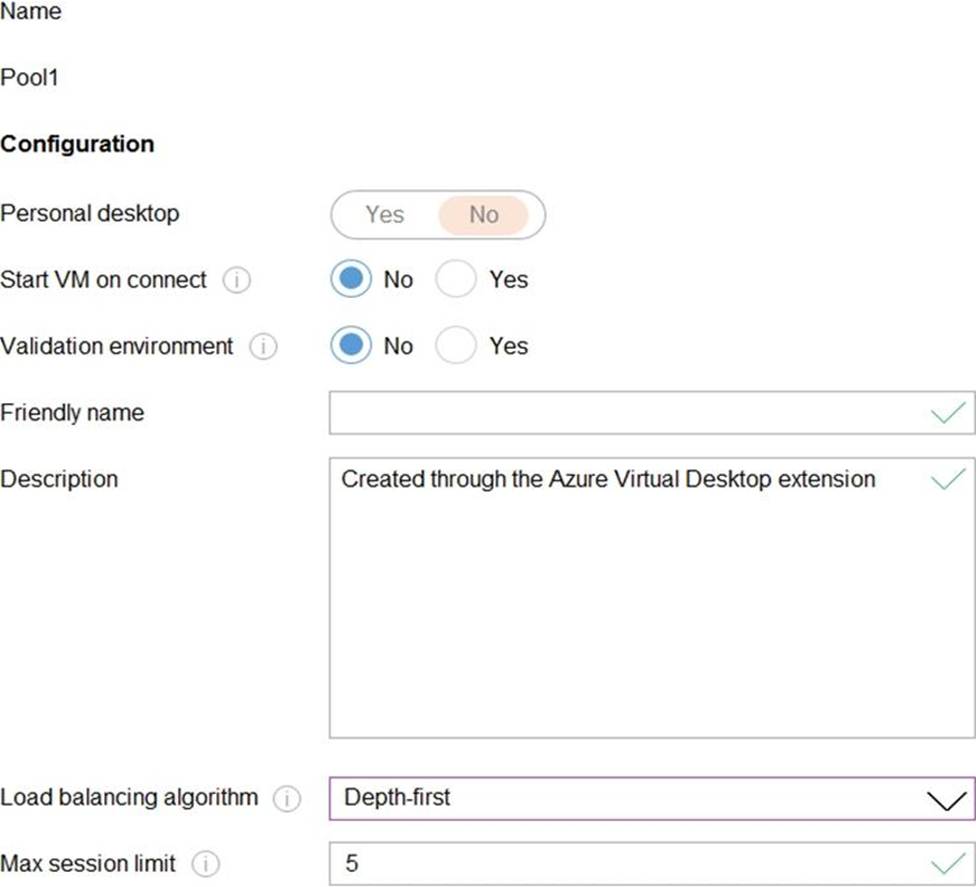
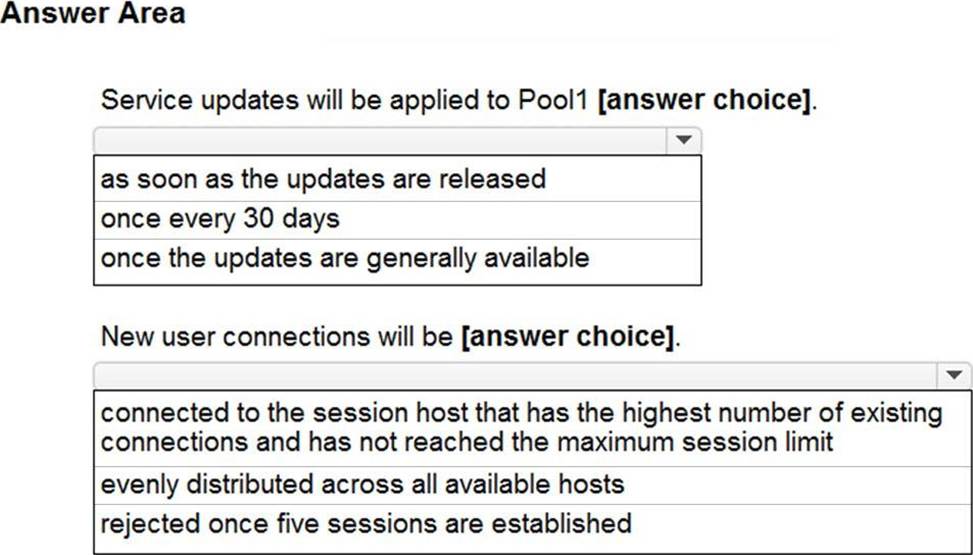
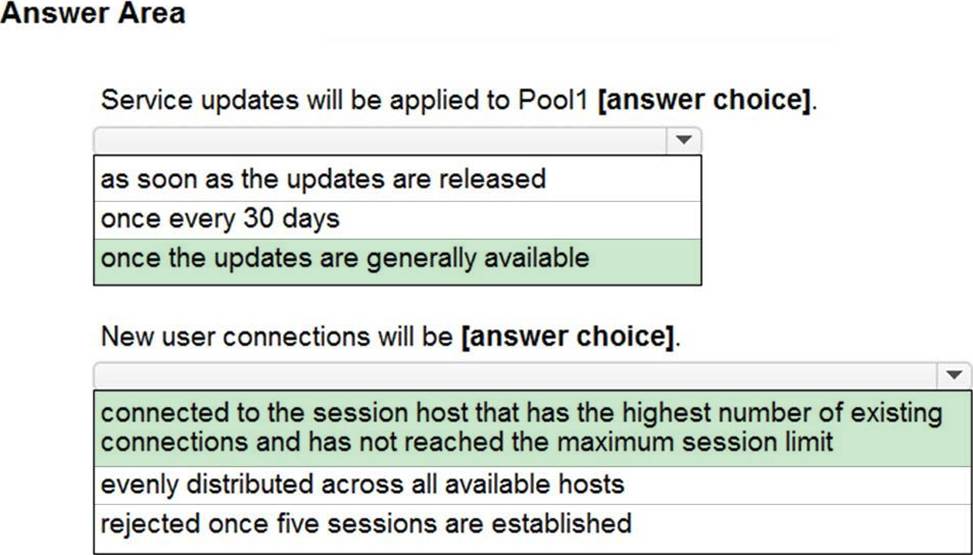
Use the drop-down menus to select the answer choice that completes each statement based on the information presented in the graphic. NOTE: Each correct selection is worth one point.
You have an Azure Virtual Desktop deployment that contains a session host named Host1.
You need to configure Windows Defender Firewall to allow inbound network traffic for RDP Shortpath on Host1.
Which program in the C:WindowsSystem32 folder should you specify in the inbound firewall rule?
- A . Rdpshell.exe
- B . Svchost.exe
- C . Raserver.exe
- D . Mstsc.exe
B
Explanation:
New-NetFirewallRule -DisplayName ‘Remote Desktop – RDP Shortpath (UDP-In)’ -Action Allow – Description ‘Inbound rule for the Remote Desktop service to allow RDP Shortpath traffic. [UDP 3390]’ -Group ‘@FirewallAPI.dll,-28752’ -Name ‘RemoteDesktop-UserMode-In-RDPShortpath-UDP’ – PolicyStore PersistentStore -Profile Domain, Private -Service TermService -Protocol UDP -LocalPort 3390 -Program ‘%SystemRoot%system32svchost.exe’ -Enabled:True https://learn.microsoft.com/en-us/azure/virtual-desktop/configure-rdp-shortpath?tabs=managed-networks
HOTSPOT
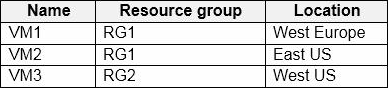
You have an Azure subscription that contains the virtual machines shown in the following table.
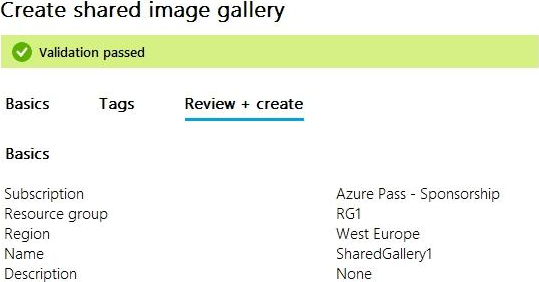
You create a shared image gallery as shown in the SharedGallery1 exhibit. (Click the SharedGallery1 tab.)
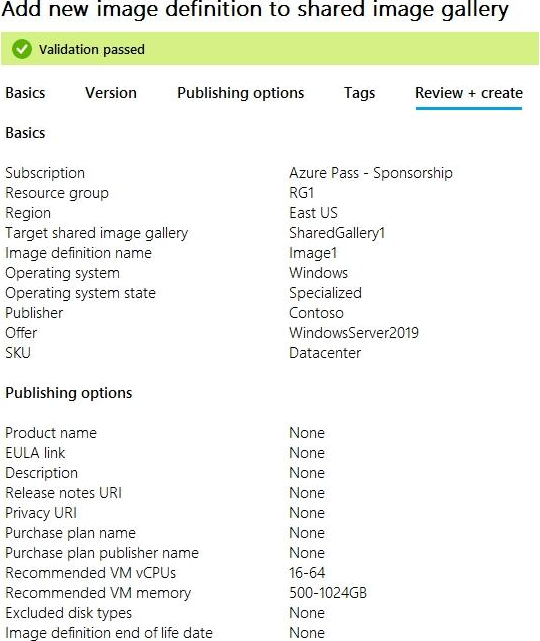
You create an image definition as shown in the Image1 exhibit. (Click the Image1 tab.)
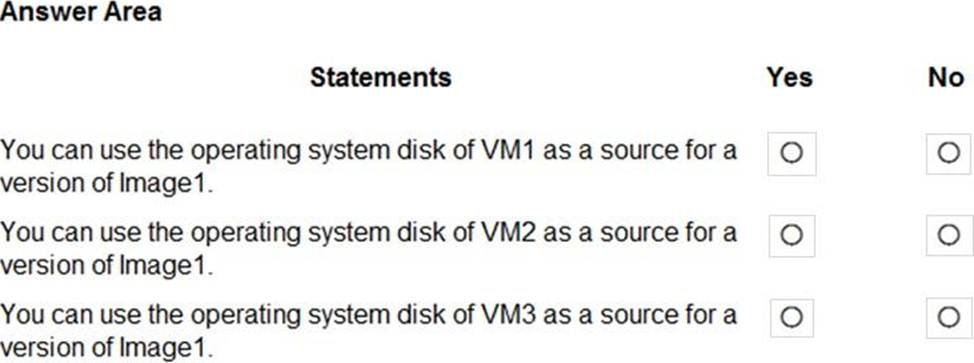
For each of the following statements, select Yes if the statement is true. Otherwise, select No. NOTE: Each correct selection is worth one point.
Explanation:
In Azure, when creating an image definition in a shared image gallery, you need to specify a region where the image version based on this definition will be stored. The image version can be created from a managed image, a snapshot, or a VHD in a storage account. The region of the source for the image version must match the region specified in the image definition.
Based on the shared image gallery and image definition details provided:
The shared image gallery is created in the West Europe region.
The image definition for Image1 is created in the East US region.
With these details in mind, let’s evaluate each statement:
You can use the operating system disk of VM1 as a source for a version of Image1.
VM1 is located in West Europe. However, the image definition for Image1 is in East US. Therefore, you cannot use VM1’s disk for Image1 because the regions do not match.
You can use the operating system disk of VM2 as a source for a version of Image1.
VM2 is located in East US, which matches the region specified in the image definition for Image1. Therefore, you can use VM2’s disk for Image1.
You can use the operating system disk of VM3 as a source for a version of Image1.
VM3 is located in West US. The image definition for Image1 is in East US, so VM3’s disk cannot be used for Image1 because the regions do not match.
Here are the answers:
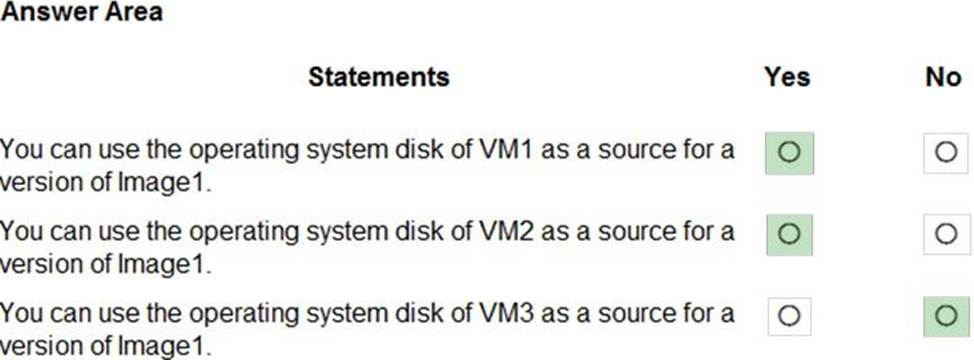
You can use the operating system disk of VM1 as a source for a version of Image1: No
You can use the operating system disk of VM2 as a source for a version of Image1: Yes
You can use the operating system disk of VM3 as a source for a version of Image1: No
You need to configure the device redirection settings. The solution must meet the technical requirements.
Where should you configure the settings?
- A . Workspace1
- B . MontrealUsers
- C . Group1
- D . Pool1
You have an on-premises network and an Azure subscription.
The subscription contains the following virtual network:
* Name:VNet1
* Address space: 10.10.0.0/16
* Subnet name: Subnet1
* Subnet1 address range: 10.10.0.0/16
You deploy an Azure Virtual Desktop host pool that contains 10 session hosts to Subnets.
You plan to deploy a VPN gateway to VNet1 and provide the session hosts with access to the on-premises network.
You need to ensure that you can deploy the VPN gateway.
What should you do first?
- A . Modify the address range of Subnet1. Most Voted
- B . Add a subnet named GatewaySubnet to VNet1.
- C . Modify the address space of VNet1. Most Voted
- D . Associate a network security group (NSG) to Subnet1.
B
Explanation:
In order to deploy a VPN gateway to VNet1, you should first add a subnet named GatewaySubnet to VNet1. According to the Microsoft Official Guide AZ-140, "You must create a gateway subnet for the virtual network that you plan to use for the gateway. The subnet must be named GatewaySubnet and it must use an address range that is large enough to accommodate the number of IP addresses that you plan to use for the gateway and its supporting resources." Therefore, the first step to ensure that you can deploy the VPN gateway is to add a subnet named GatewaySubnet to VNet1.
HOTSPOT –
You have an Azure subscription named Subscription1 that contains the users shown in the following table.
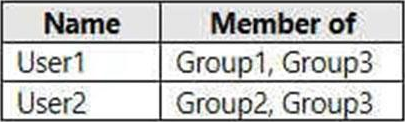
Subscription1 contains the Azure Virtual Desktop host pools shown in the following table.

Subscription1 contains the Azure Virtual Desktop application groups shown in the following table.

You perform the role assignments shown in the following table.
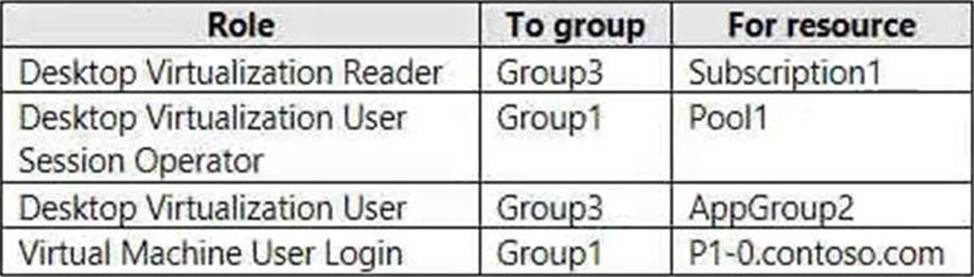
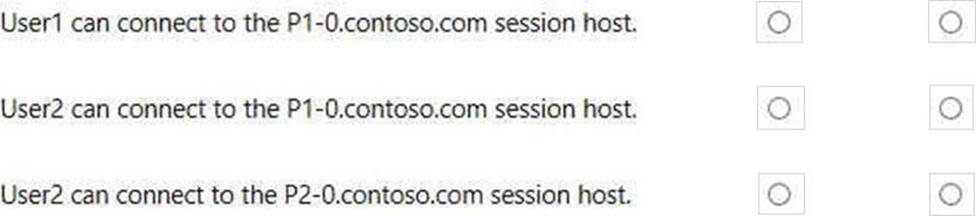
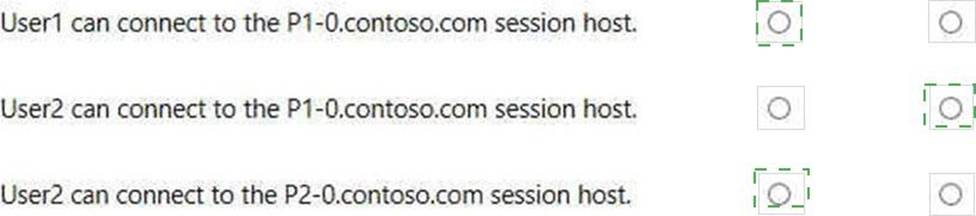
For each of the following statements, select Yes if the statement is true. Otherwise, select No. NOTE: Each correct selection is worth one point.
Explanation:
Yes, No, Yes
HOTSPOT
You have an Azure subscription that contains the storage accounts shown in the following table.

The subscription contains the vaults shown in the following table.
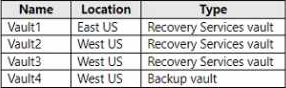
The subscription contains the Azure Virtual Desktop host pools shown in the following table.

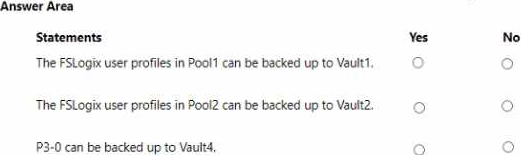
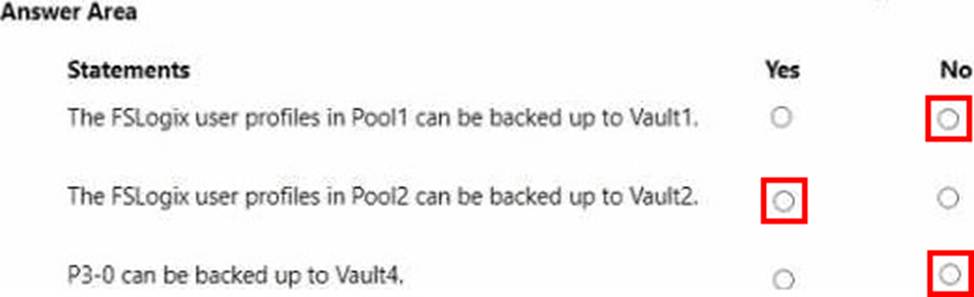
For each of the following statements, select Yes if the statement is true. Otherwise, select No. NOTE Each correct selection is worth one point.
You have a Azure Virtual Desktop deployment that contains multiple host pools.
You need to create a PowerShell script to sign users out of a specific session host before you perform a maintenance task.
Which PowerShell module should you load in the script?
- A . Az.Automation
- B . Az.COMputC
- C . Az.Maintenance
- D . Az.DektopVirtualization
D
Explanation:
Reference:
https://docs.microsoft.com/en-us/powershell/module/az.desktopvirtualization/?view=azps-6.6.0#desktopvirtualization
https://techgenix.com/logging-off-and-removing-wvd-user-sessions/
You have the devices shown in the following table.
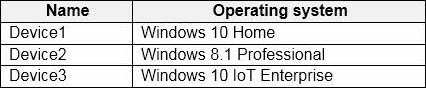
You plan to deploy Windows Virtual Desktop for client access to remove virtualized apps.
Which devices support the Remote Desktop client?
- A . Device1 and Device2 only
- B . Device1 and Device3 only
- C . Device1, Device2, and Device3
- D . Device1 only
C
Explanation:
The Remote Desktop client for Windows Virtual Desktop (WVD), now known as Azure Virtual Desktop, is supported on various operating systems including different versions of Windows. The Remote Desktop client is available for Windows 10, and while Windows 8.1 may not have the latest client, it can still connect to WVD using the available Remote Desktop client. Windows 10 IoT Enterprise also supports the Remote Desktop client as it is a version of Windows 10 optimized for smaller devices and scenarios which still require enterprise-grade manageability and security.
Based on the operating systems listed:
Device1 with Windows 10 Home can use the Remote Desktop client.
Device2 with Windows 8.1 Professional can use the Remote Desktop client, although it may need to be a specific version of the client compatible with Windows 8.1.
Device3 with Windows 10 IoT Enterprise supports the Remote Desktop client as it is part of the Windows 10 family.
Therefore, the correct answer is:
C. Device1, Device2, and Device3.
You have an Azure Virtual Desktop deployment that contains the host pools shown in the following table.

You need to create a disaster recovery environment in the West US region. The solution must minimize costs and administrative effort.
What should you do?
- A . Regenerate the token and reregister the virtual machines in the host pools.
- B . Create two new host pools in the West US region.
- C . Run the Invoke-RdsUserSessionLogoff cmdlet.
- D . Create an Azure Site Recovery plan.