
Microsoft AZ-140 Practice Exams
Last updated on Oct 01,2026- Exam Code: AZ-140
- Exam Name: Configuring and Operating Microsoft Azure Virtual Desktop
- Certification Provider: Microsoft
- Latest update: Oct 01,2026
You have an Azure subscription named Subscription that contains an Azure Virtual Desktop host pool named HostPool1.
HostPool1 is managed by using Microsoft Intune. Subscription1 contains 50 users that connect to HostPool1 by using computers that run Windows 10.
You need to prevent the users from copying files between an Azure Virtual Desktop session and the computers. The solution must minimize administrative effort.
What should you do?
- A . Modify the RDP properties of HostPool1.
- B . Create a Conditional Access policy in Azure Active Directory (Azure AD).
- C . Create a compliance policy in Intune.
- D . Create a configuration profile in Intune.
You have an Azure Virtual Desktop deployment that contains a host pool. The host pool contains 10
session hosts. The session hosts are configured by using a custom image and ephemeral disks.
You need to deploy Microsoft OneDrive for Business.
Which two actions should you perform for each session host? Each correct answer presents part of the solution. NOTE: Each correct selection is worth one point.
- A . Install FSLogix.
- B . Install the OneDrive sync app by using the per-machine installation option.
- C . Implement Application Masking.
- D . Install the OneDrive sync app by using the per-user installation option.
- E . Deploy an MSIX app attach package.
AB
Explanation:
The two actions you should perform for each session host in order to deploy Microsoft OneDrive for Business are:
You have a Azure Virtual Desktop host pool in the East US region.
You need to implement a disaster recovery solution that meets the following requirements:
• If users cannot connect to the Azure Virtual Desktop resources in the East US region, the users must be able to connect to the equivalent resources in the West US region.
• Users must connect to the Azure Virtual Desktop resources in either the East US or the West US region by selecting a single icon in the Remote Desktop client
• In the event of a disaster, failover between the Azure regions must be initiated manually by an administrator.
• Failover times must be minimized.
What should you do?
- A . Create new session hosts in the West US region and add the session hosts to an existing host pool.
- B . Enable Azure Backup to a Recovery Services vault in the West US region.
- C . Configure a shared image gallery that has replicas in the East US and West US regions.
- D . Create an additional host pool in the West US region.
- E . Enable Azure Site Recovery replication of the virtual machines to the West US region.
D
Explanation:
Reference: https://docs.microsoft.com/en-us/azure/virtual-desktop/disaster-recovery
You have a Windows Virtual Desktop host pool named Pool1.
You are troubleshooting an issue for a Remote Desktop client that stopped responding.
You need to restore the default Remote Desktop client settings and unsubscribe from all workspaces.
Which command should you run?
- A . msrdcw
- B . resetengine
- C . mstsc
- D . resetpluginhost
B
Explanation:
The correct command to restore the default Remote Desktop client settings and unsubscribe from all workspaces in a Windows Virtual Desktop (now Azure Virtual Desktop) environment is:
B. resetengine
This command is used with the Windows Virtual Desktop client and resets the client to its default settings, which includes unsubscribing from all workspaces. You would run this command in a Command Prompt window.
You have an Azure Active Directory Domain Services (Azure AD DS) managed domain named conioso.com.
You create a Azure Virtual Desktop host pool named Pool1. You assign the Virtual Machine Contributor role for the Azure subscription to a user named Admin1.
You need to ensure that Admin1 can add session hosts to Pool1. The solution must use the principle of least privilege.
Which two actions should you perform? Each correct answer presents part of the solution. NOTE: Each correct selection is worth one point.
- A . Add Admin1 to the AAD DC Administrators group.
- B . Assign a Microsoft 36S Enterprise E3 license to Admin1.
- C . Assign Admin1 the Desktop Virtualization Session Host Operator role tor Pool1.
- D . Assign Admin1 the Desktop Virtualization Host Pool Contributor role for Pool1.
- E . Generate a registration token.
C, E
Explanation:
To ensure that Admin1 can add session hosts to Pool1 in Azure Virtual Desktop with the principle of least privilege, the following actions should be performed:
C. Assign Admin1 the Desktop Virtualization Session Host Operator role for Pool1: This role provides the specific permissions needed to manage session hosts within a given host pool without granting broader permissions that are not necessary.
E. Generate a registration token: Admin1 will need a registration token to add session hosts to Pool1. The registration token is used when setting up new session hosts to join them to the host pool.
Adding Admin1 to the AAD DC Administrators group (A) would provide broader administrative privileges over the Azure AD DS managed domain than necessary for the task. Assigning a Microsoft 365 Enterprise E3 license to Admin1 (B) is related to user licensing for Microsoft 365 services and is not directly related to managing Azure Virtual Desktop resources. Assigning Admin1 the Desktop Virtualization Host Pool Contributor role for Pool1 (D) would grant more permissions than necessary for just adding session hosts.
You have an Azure Virtual Desktop host pool that runs Windows 10 Enterprise multi-session. User sessions are load-balanced between the session hosts. Idle session timeout is 30 minutes. You plan to shut down a session host named Host1 to perform routine maintenance. You need to prevent new user sessions to Host1 without disconnecting active user sessions.
Solution: From the Azure portal, add lock on Host1.
Does this meet the goal?
- A . Yes
- B . No
You have an Azure Virtual Desktop deployment that contains a host pool named Pool1.
Pool1 contains a session host named Host1 that is Azure AD-joined.
You need to verify whether a Windows license is assigned to Host1.
What should you do?
- A . From the Azure Active Directory admin center, view the product licenses.
- B . From VM1, run the Get-windowsDeveloperLicense cmdlet.
- C . From the Azure portal, view the properties of Host1.
- D . From Azure Cloud Shell, run the Get-Azvm cmdlet
You have a Microsoft Entra tenant named contoso.com and an Azure Virtual Desktop deployment. You have a RemoteApp app group named RemoteAppV
You have a partner company named Fabrikam, Inc. that has 200 users. The users require access to RemoteApp!. You need to identify which type of pricing is associated with providing RemoteAppI access to the Fabrikam users.
What should you identify?
- A . compute only
- B . compute, storage, and networking only
- C . Azure Virtual Desktop per-user access and compute only
- D . Azure Virtual Desktop per-user access only
- E . Azure Virtual Desktop per-user access, compute, storage, and networking
Topic 3, Misc. Questions
HOTSPOT
You have a Windows Virtual Desktop deployment.
Many users have iOS devices that have the Remote Desktop Mobile app installed.
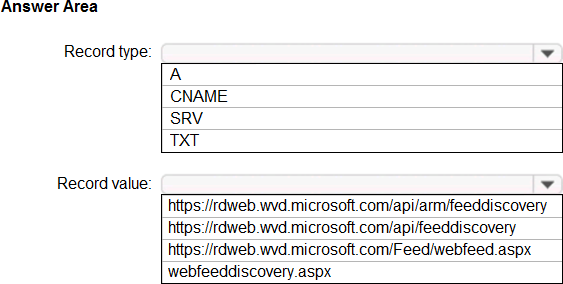
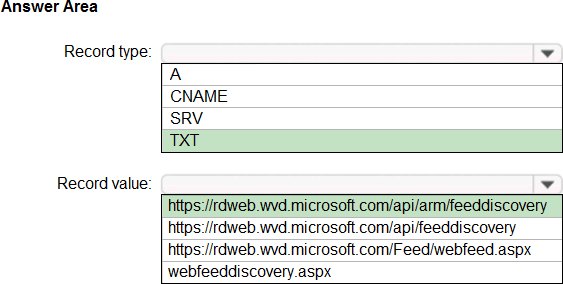
You need to ensure that the users can connect to the feed URL by using email discovery instead of entering the feed URL manually.
How should you configure the _msradc DNS record? To answer, select the appropriate options in the answer area. NOTE: Each correct selection is worth one point.
Explanation:
Your network contains an on-premises Active Directory domain named contoso.com that syncs to an Azure Active Directory (Azure AD) tenant.
You have an Azure Virtual Desktop host pool named Pool1 that has the following settings:
✑ Host pool name: Pool1
✑ Host pool type: Personal
✑ Load balancing algorithm: Breadth-first
✑ Number of VMs: 3
The session hosts have the following configurations:
✑ Image used to create the virtual machines: Windows 10 Enterprise
✑ Virtual machines domain-joined to: On-premises contoso.com domain
You need to ensure that you can use Microsoft EndPoint Manager to manage security update on the session hosts.
What should you do?
- A . Create Windows 10 Enterprise multi-session images
- B . Configure the session hosts as hybrid Azure AD-joined
- C . Change Host pool type to Pooled
- D . Change Load balancing algorithm to Depth-first
B
Explanation:
By configuring the session hosts as hybrid Azure AD-joined, you can use Microsoft EndPoint Manager to manage security updates on the session hosts. Hybrid Azure AD join is a feature that allows devices to be joined to both on-premises Active Directory and Azure AD. This enables device management scenarios such as remote wipe, device compliance, and conditional access. Once the session hosts are hybrid Azure AD-joined, you can use Microsoft EndPoint Manager to manage security updates on the session hosts.