
Microsoft AZ-120 Practice Exams
Last updated on Nov 16,2026- Exam Code: AZ-120
- Exam Name: Planning and Administering Microsoft Azure for SAP Workloads
- Certification Provider: Microsoft
- Latest update: Nov 16,2026
You deploy on SAP environment on Azure.
You need to monitor the performance of the SAP NetWeaver environment by using the Azure Enhanced Monitoring Extension for SAP.
What should you do first?
- A . From Azure CLI, install the Linux Diagnostic Extension.
- B . From the Azure portal, enable the Azure Network Watcher Agent.
- C . From the Azure portal, enable the Custom Script Extension.
- D . From Azure CLI. run the az v aem m set command.
B
Explanation:
This solution requires the VM Agent to be installed in the Azure Virtual Machines you want to run SAP systems.
Reference: https://docs.microsoft.com/en-us/azure/virtual-machines/workloads/sap/vm-extension-for-sap
HOTSPOT
You have an Azure alert rule and action group as shown in the following exhibit.
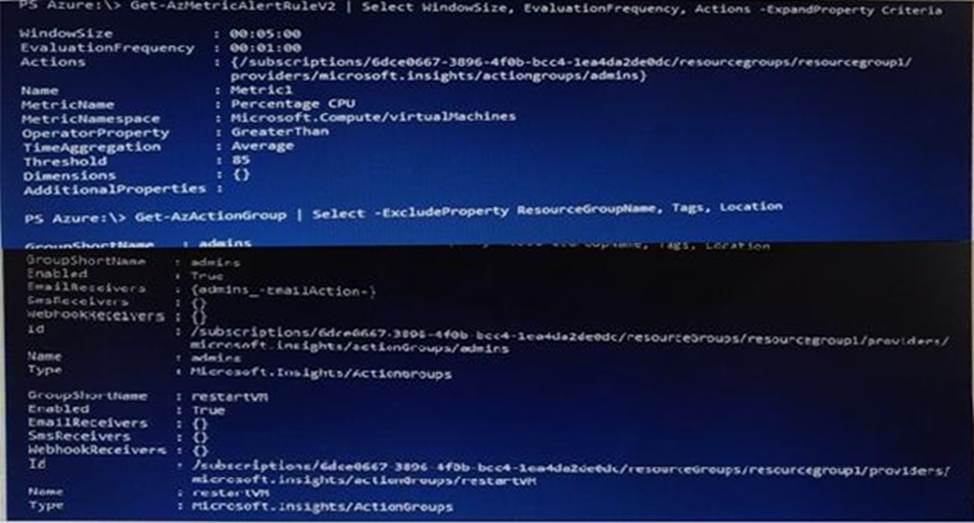
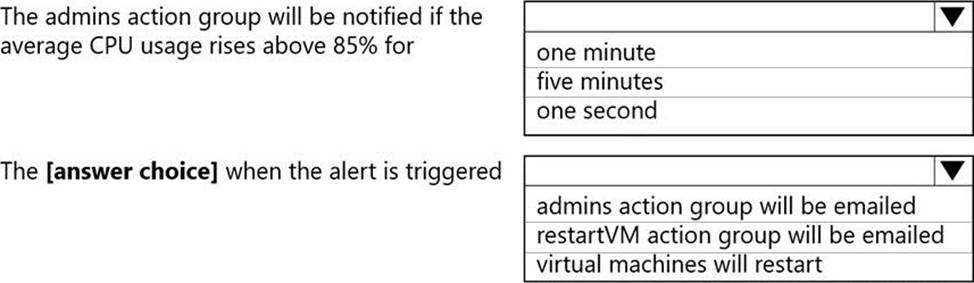
Use the drop-down menus to select the answer choice that completes each statement based on the information presented in the graphic. NOTE: Each correct selection is worth one point.
Explanation:
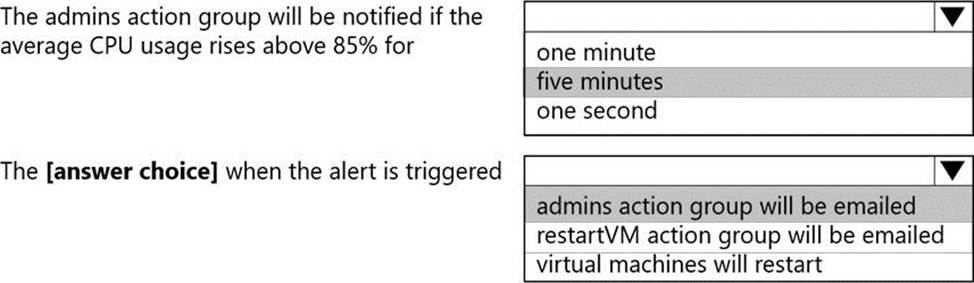
Box 1: five minutes
Window Size is 5 minutes.
Box 2: admins action group will be emailed
The admins1 actiongroup will be executed.
Reference: https://docs.microsoft.com/en-us/azure/azure-monitor/alerts/alerts-metric-overview
You plan to deploy an SAP landscape that will have virtual machines deployed to multiple Azure regions.
You need to ensure that the virtual machines can communicate across the regions.
What should you configure?
- A . virtual network peering in Azure
- B . local network gateways
- C . Azure Bastion hosts
- D . Azure Relay
A
Explanation:
Depending on the rules and restrictions you want to apply between the different virtual networks hosting VMs of different SAP systems, you should peer those virtual network
Note: Virtual network peering enables you to seamlessly connect two or more Virtual Networks in Azure. The virtual networks appear as one for connectivity purposes. The traffic between virtual machines in peered virtual networks uses the Microsoft backbone infrastructure. Like traffic between virtual machines in the same network, traffic is routed through Microsoft’s private network only.
Azure supports the following types of peering:
Virtual network peering: Connect virtual networks within the same Azure region.
Global virtual network peering: Connecting virtual networks across Azure regions.
Reference:
https://docs.microsoft.com/en-us/azure/virtual-machines/workloads/sap/hana-network-architecture
https://docs.microsoft.com/en-us/azure/virtual-network/virtual-network-peering-overview
You have an SAP production landscape in Azure that is hosted on virtual machines that run Windows Server and Red Hat Enterprise Linux.
You need to monitor the virtual machines. The solution must ensure that you can collect logs from the virtual machines by using data collection rules (DCRs).
What should you install on each virtual machine?
- A . the Log Analytics agent
- B . the Guest Configuration extension
- C . the Azure Monitor agent
- D . the Azure Diagnostics extension
You have an SAP production landscape on-premises and an SAP development landscape on Azure. You deploy a network virtual appliance to act as a firewall between the Azure subnet and the on-premises network.
Solution: You deploy an Azure Standard Load balancer.
Does this meet the goal?
- A . Yes
- B . No
HOTSPOT
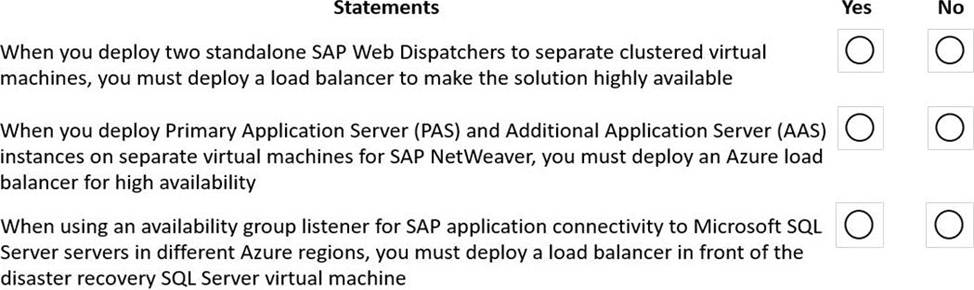
For each of the following statements, select Yes if the statement is true. Otherwise, select No. NOTE: Each correct selection is worth one point.
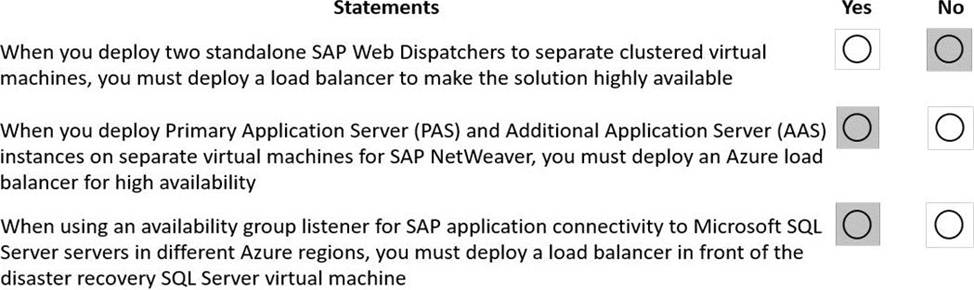
Explanation:
Box 1: No
Load balancers. Load balancers are used to distribute traffic to virtual machines in the application-tier subnet. For high availability, use the built-in SAP Web Dispatcher, Azure Load Balancer, or network appliances. Your choice depends on the traffic type (like HTTP or SAP GUI) or the required network services, like Secure Sockets Layer (SSL) termination.
Box 2: Yes
Availability group listener SAP application SQL server load balancer disaster recovery
Box 3: Yes
Reference:
https://docs.microsoft.com/en-us/azure/architecture/reference-architectures/sap/sap-netweaver
https://docs.microsoft.com/en-us/azure/virtual-machines/workloads/sap/high-availability-guide-suse
https://blogs.sap.com/2020/10/20/sap-on-azure-sap-netweaver-7.5-on-ms-sql-server-2019-high-availability-and-disaster-recovery-with-4-nodes-alwayson-cluster/
You have an Azure subscription.
You plan to deploy a virtual machine named VMt that will have the following configurations:
• Data disk size: 4 TB
• Generation: Generation 2
• Data disk type: Ultra disk
• Data disk encryption type: Double encryption
VM1 will host the SAP global transport directory in a volume on the data disk. You need to ensure that you can replicate VM1 by using Azure Site Recovery.
Which configuration should you change?
- A . generation
- B . data disk type
- C . data disk size
- D . data disk encryption type
Note: This question is part of a series of questions that present the same scenario. Each question in the series contains a unique solution that might meet the stated goals. Some question sets might have more than one correct solution, while others might not have a correct solution.
After you answer a question in this section, you will NOT be able to return to it. As a result, these questions will not appear in the review screen.
You deploy SAP HANA on Azure (Large Instances).
You need to back up the SAP HANA database to Azure.
Solution: You use a third-party tool that uses backint to back up the SAP HANA database to Azure storage.
Does this meet the goal?
- A . Yes
- B . No
B
Explanation:
https://blogs.sap.com/2018/08/31/overview-of-backint-for-sap-hana-and-faq-for-3rd-party-backup-tool-support/
https://documentation.commvault.com/commvault/v11_sp16/article?p=114414.htm
You have an existing SAP production landscape on Azure. The SAP application virtual machines have static IP addresses.
You need to replicate the virtual machines to another Azure region by using Azure Site Recovery. The source and target subnets have different address ranges.
Which three actions should you perform? Each correct answer presents part of the solution. NOTE: Each correct selection is worth one point.
- A . Stop the virtual machines.
- B . Create a backup policy.
- C . Create a recovery plan.
- D . Modify the networking configuration.
- E . Replicate the virtual machines.
You have an on-premises SAP environment that uses AIX servers and IBM DB2 as the database platform.
You plan to migrate SAP to Azure. In Azure, the SAP workloads will use Windows Server and Microsoft SQL
Server as the database platform.
What should you use to export from DB2 and import the data to SQL Server?
- A . R3load
- B . Azure SQL Data Warehouse
- C . SQL Server Management Studio (SSMS)
- D . R3trans
A
Explanation:
Both R3load and SSMA can be used to migrate from DB2 to SQL Server. In the options there is not SSMA, but SSMS, the SSMS cannot be use to migrate DB2 to SQL Server. please refer to:
https://techcommunity.microsoft.com/t5/running-sap-applications-on-the/sap-os-db-migration-to-sql-server-faq/ba-p/366986
https://sapnwnewbie.blogspot.com/2013/07/osdb-migration-cmd-str-toc-ext-r3load.html https://docs.microsoft.com/en-us/sql/ssma/sql-server-migration-assistant?view=sql-server-ver15 https://docs.microsoft.com/en-us/sql/ssms/sql-server-management-studio-ssms?view=sql-server-ver15