
Microsoft AZ-120 Practice Exams
Last updated on Nov 16,2026- Exam Code: AZ-120
- Exam Name: Planning and Administering Microsoft Azure for SAP Workloads
- Certification Provider: Microsoft
- Latest update: Nov 16,2026
HOTSPOT
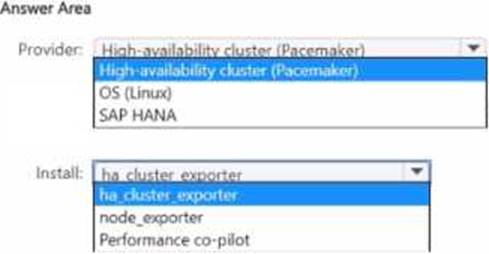
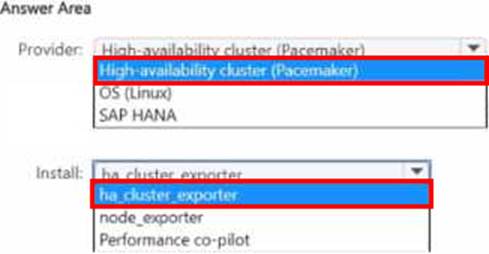
You have a SUSE Linux Enterprise Server (SLES) duster that runs SAP HANA.
You plan to use Azure Monitor for SAP Solutions to collect STONITH block device (SBD) metrics from the cluster.
Which provider should you use. and what should you install on each cluster node? To answer, select
the appropriate options in the answer area. NOTE: Each correct selection is worth one point.
Note: This question is part of a series of questions that present the same scenario. Each question in the series contains a unique solution that might meet the stated goals. Some question sets might have more than one correct solution, while others might not have a correct solution.
After you answer a question in this section, you will NOT be able to return to it. As a result, these questions will not appear in the review screen.
You deploy SAP HANA on Azure (Large Instances).
You need to back up the SAP HANA database to Azure.
Solution: You configure DB13 to back up directly to a local disk.
Does this meet the goal?
- A . Yes
- B . No
B
Explanation:
You need to back up the SAP HANA database to Azure, not to a local disk.
Reference:
https://docs.microsoft.com/en-us/azure/backup/sap-hana-db-about
https://docs.microsoft.com/en-us/azure/backup/backup-azure-sap-hana-database#configure-backup
You have an on-premises datacenter.
You have an Azure subscription that contains a virtual network named VNet1.
VNet1 uses forced tunneling to force all outbound traffic to the internet via the datacenter. You deploy an SAP landscape to VNet1. The landscape uses virtual machines that run Red Hat Enterprise Linux (RHEL) and uses the pay-as-you-go rates.
You discover that the virtual machines fail to receive operating system updates.
You need to ensure that the virtual machines receive operating system updates.
What should you do?
- A . Add user-defined routes (UDRs) to the route table.
- B . Deploy Azure Update Manager.
- C . Deploy an Azure firewall.
- D . Configure an Azure DNS Private Resolver.
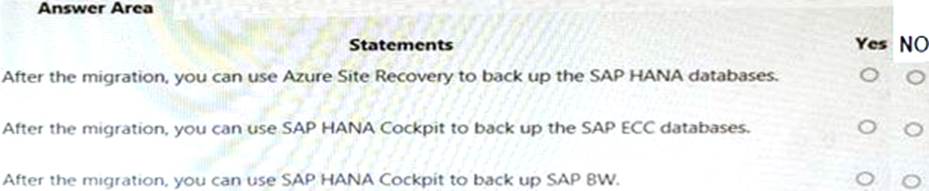
HOTSPOT
For each of the following statements, select Yes if the statement is true. Otherwise, select No. NOTE: Each correct selection is worth one point.
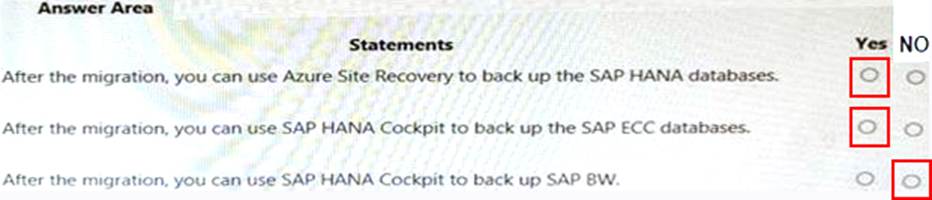
Explanation:
YES
YES
NO
This question requires that you evaluate the underlined text to determine if it is correct.
When deploying SAP HANA to an Azure virtual machine, you can enable Write Accelerator to reduce
the latency between the SAP application servers and the database layer.
Instructions: Review the underlined text. If it makes the statement correct, select “No change is needed”. If the statement is incorrect, select the answer choice that makes the statement correct.
- A . No change is needed
- B . install the Mellanox driver
- C . start the NIPING service
- D . enable Accelerated Networking
D
Explanation:
To further reduce network latency between Azure VMs, we [Microsoft] recommend that you choose Azure Accelerated Networking. Use it when you deploy Azure VMs for an SAP workload, especially for the SAP application layer and the SAP DBMS layer.
Incorrect Answers:
A: Write Accelerator is a disk capability for M-Series Virtual Machines (VMs) on Premium Storage with Azure Managed Disks exclusively. As the name states, the purpose of the functionality is to improve the I/O latency of writes against Azure Premium Storage.
B: Mellanox offers a robust and full set of protocol software and driver for Linux with the ConnectX EN family cards. Designed to provide a high performance support for Enhanced Ethernet with fabric consolidation over TCP/IP based LAN applications. The driver and software in conjunction with the Industry’s leading ConnectX family of cards achieve full line rate, full duplex of up to 100Gbps performance per port.
C: To analyze network issue or measure network metrics you can test the connection using SAP’s NIPING program. You can use NIPING to analyze the network connection between any two machines running SAP software.
Reference: https://docs.microsoft.com/en-us/azure/virtual-machines/workloads/sap/dbms_guide_general
You migrate an SAP environment to Azure.
You need to inspect all the outbound traffic from the SAP application servers to the Internet.
Which two Azure resources should you use? Each correct answer presents part of the solution. Network Performance Monitor
- A . Azure Firewall
- B . Azure Traffic Manager
- C . Azure Load Balancer NAT rules
- D . Azure user-defined routes
- E . a web application firewall (WAF) for Azure Application Gateway
HOTSPOT
You have an on-premises SAP NetWeaver production landscape and an Azure subscription that contains the resources shown in the following table.
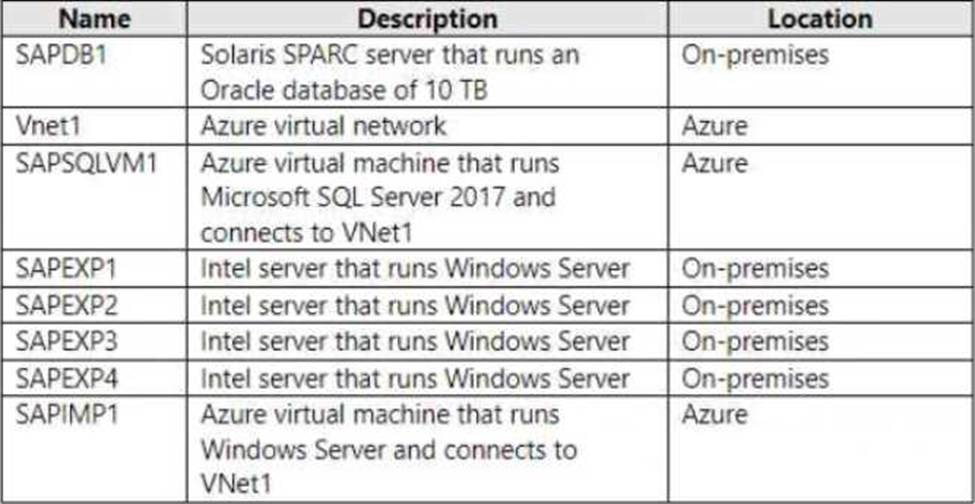
You have a 10-Gbps ExpressRoute circuit between the on-premises environment and VNet1.
You plan to migrate the landscape to Azure.
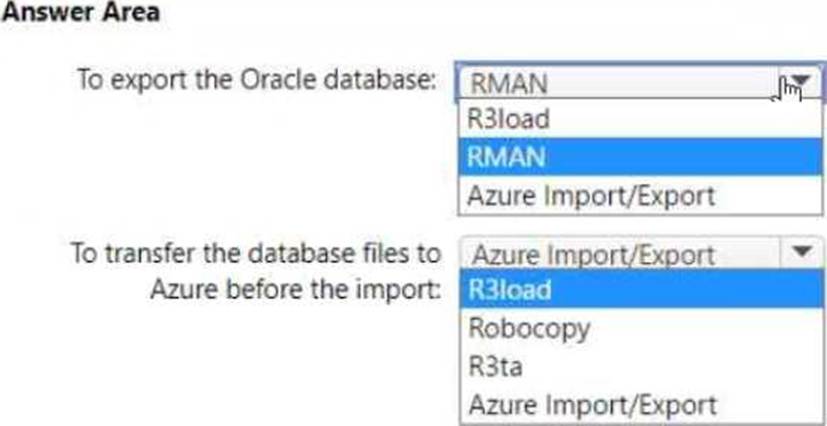
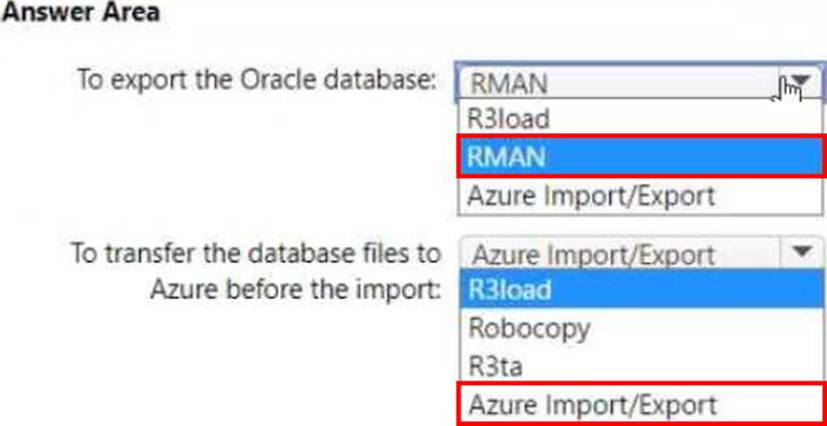
As part of the solution, you need to migrate the on-premises Oracle database to SAPSQLVM1. The solution must minimize how long it will take to complete the data migration.
What should you use? To answer, select the appropriate options in the answer area. NOTE: Each correct selection is worth one point.
HOTSPOT
Your on-premises network contains SAP and non-SAP applications.
You have JAVA-based SAP systems that use SPNEGO for single-sign on (SSO) authentication.
Your external portal uses multi-factor authentication (MFA) to authenticate users.
You plan to extend the on-premises authentication features to Azure and to migrate the SAP applications to Azure.
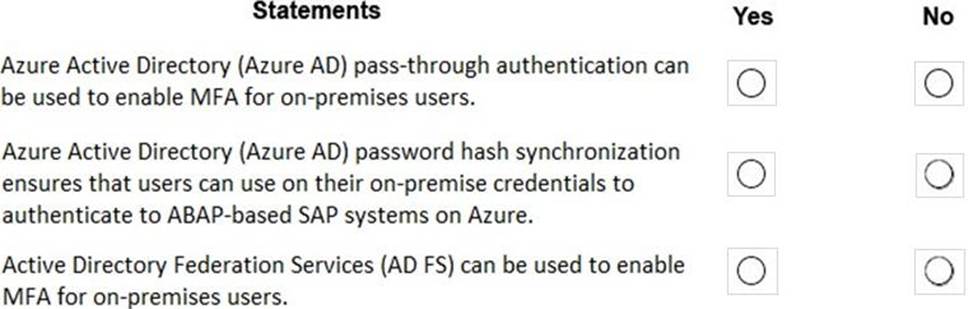
For each of the following statements, select Yes if the statement is true. Otherwise, select No. NOTE: Each correct selection is worth one point.
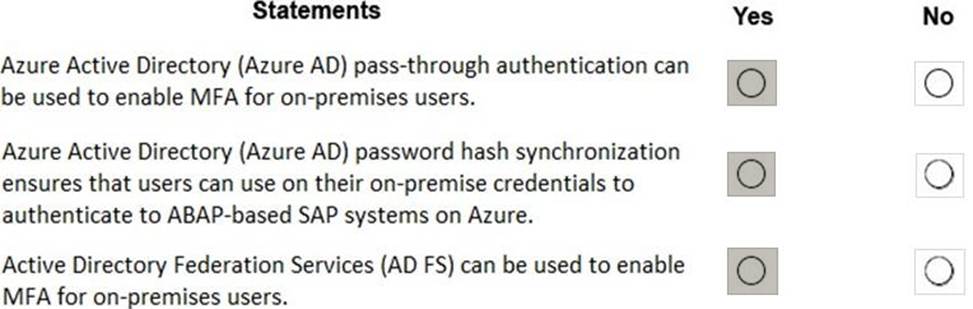
Explanation:
Box 1: Yes
Box 2: Yes
Password hash synchronization is one of the sign-in methods used to accomplish hybrid identity. Azure AD Connect synchronizes a hash, of the hash, of a users password from an on-premises Active Directory instance to a cloud-based Azure AD instance.
Password hash synchronization is an extension to the directory synchronization feature implemented by Azure AD Connect sync. You can use this feature to sign in to Azure AD services like Office 365. You sign in to the service by using the same password you use to sign in to your on-premises Active Directory instance.
Box 3: Yes
If your organization is federated with Azure AD, you can use Azure Multi-Factor Authentication to secure AD FS resources, both on-premises and in the cloud. Azure MFA enables you to eliminate passwords and provide a more secure way to authenticate.
Reference:
https://docs.microsoft.com/en-us/azure/active-directory/hybrid/whatis-phs
https://docs.microsoft.com/en-us/windows-server/identity/ad-fs/operations/configure-ad-fs-and-azure-mfa
https://docs.microsoft.com/en-us/azure/active-directory/hybrid/how-to-connect-pta
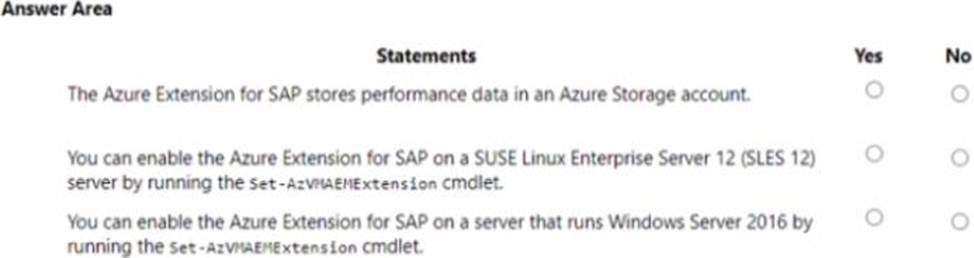
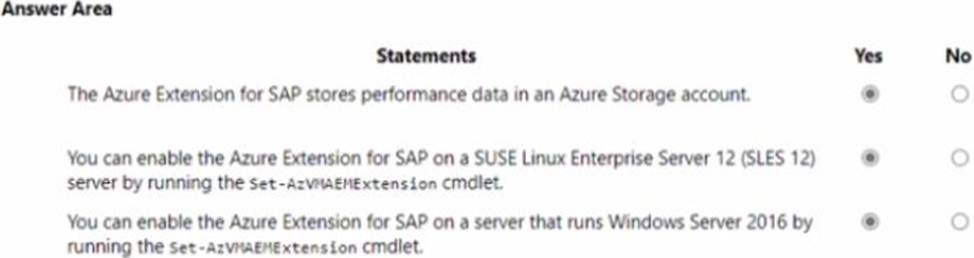
HOTSPOT
For each of the following statements, select Yes if the statement is true. Otherwise, select No. NOTE: Each correct selection is worth one point.
HOTSPOT
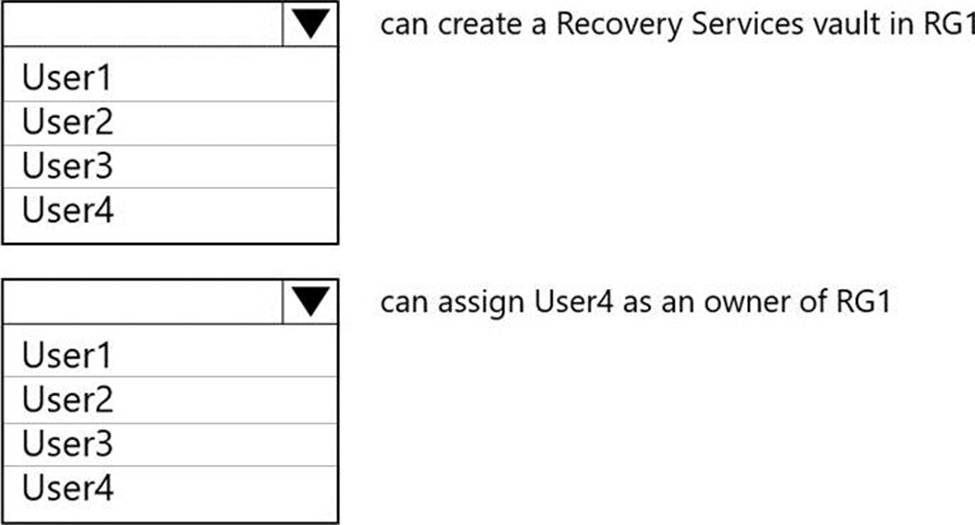
You have an Azure subscription that contains a resource group named RG1.
The role assignments for RG1 are shown in the following exhibit.
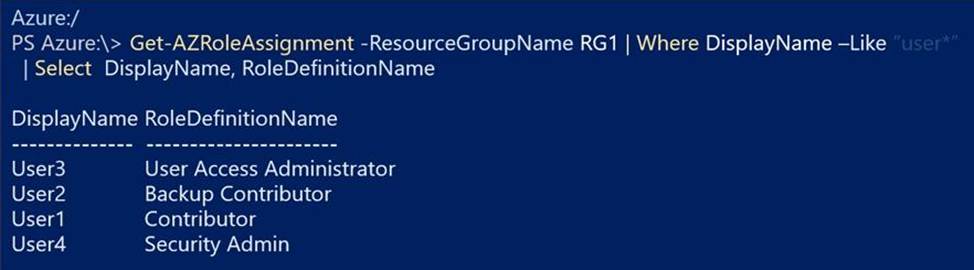
Use the drop-down menus to select the answer choice that completes each statement based on the information presented in the graphic. NOTE: Each correct selection is worth one point.
Explanation:
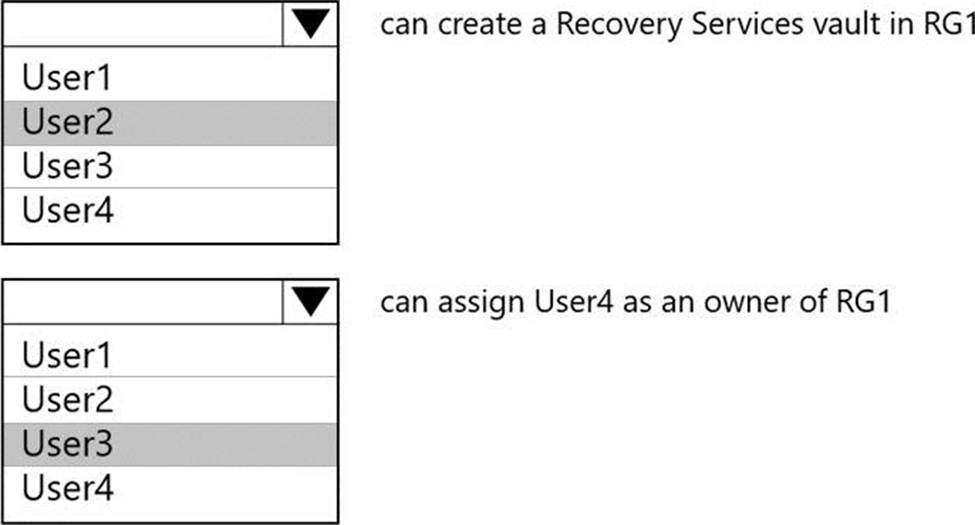
Box 1: User2
Note:
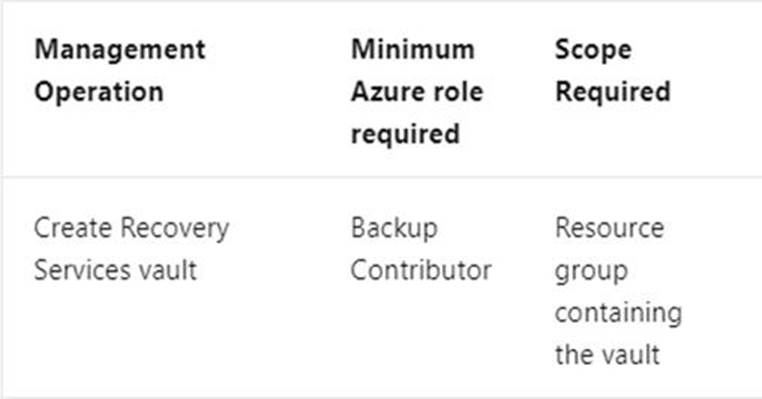
Backup Contributor – This role has all permissions to create and manage backup except deleting Recovery Services vault and giving access to others. Imagine this role as admin of backup management who can do every backup management operation.
Box 2: User3
The User Access Administrator role lets you manage user access to Azure resources.
Reference:
https://docs.microsoft.com/en-us/azure/backup/backup-rbac-rs-vault
https://docs.microsoft.com/en-us/azure/role-based-access-control/built-in-roles