
IBM C1000-162 Practice Exams
Last updated on Oct 22,2026- Exam Code: C1000-162
- Exam Name: IBM Security QRadar SIEM V7.5 Analysis
- Certification Provider: IBM
- Latest update: Oct 22,2026
Which log source and protocol combination delivers events to QRadar in real time?
- A . Sophos Enterprise console via JDBC
- B . McAfee ePolicy Orchestrator via JDBC
- C . McAfee ePolicy Orchestrator via SNMP
- D . Solaris Basic Security Mode (BSM) via Log File Protocol
A task is set up to identify events that were missed by the Custom Rule Engine.
Which two (2) types of events does an analyst look for?
- A . Log Only Events sent to a Data Store
- B . High Level Category: User Defined Events
- C . Forwarded Events to different destination
- D . High Level Category Unknown Events
- E . Low Level Category: Stored Events
A, D
Explanation:
To identify events that were missed by the Custom Rule Engine (CRE) in IBM Security QRadar SIEM, an analyst would primarily look for "Log Only Events sent to a Data Store" and "High Level Category Unknown Events." Log Only Events are those that are stored directly without being processed by the CRE, indicating they might have been overlooked or not matched by any existing rules. High Level Category Unknown Events are those that do not fit into any of the predefined categories in QRadar, suggesting that the CRE might not have rules to handle or categorize these events properly. These types of events are crucial for analysts to review to ensure that no significant incidents are missed and to refine the rule set for better detection in the future.
A Security Analyst was asked to search for an offense on a specific day. The requester was not sore of the time frame, but had Source Host information to use as well as networks involved, Destination IP and username.
Which fitters can the Security Analyst use to search for the information requested?
- A . Offense ID, Source IP, Username
- B . Magnitude, Source IP, Destination IP
- C . Description, Destination IP. Host Name
- D . Specific Interval, Username, Destination IP
What right-click menu option can an analyst use to find information about an IP or URL?
- A . IBM Advanced Threat lookup
- B . Watson Advisor Al IOC Lookup
- C . QRadar Anomaly lookup
- D . X-Force Exchange Lookup
D
Explanation:
To find information about an IP or URL within QRadar, analysts can use the right-click menu option "X-Force Exchange Lookup." This option is available when right-clicking an IP address or URL from the Offenses tab or event details windows, providing direct access to the X-Force Exchange interface for detailed threat intelligence and contextual information.
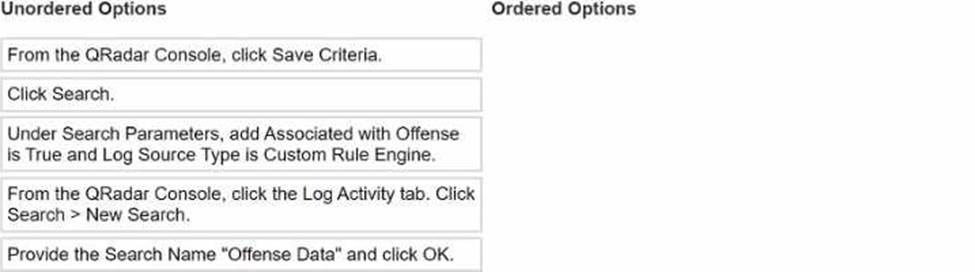
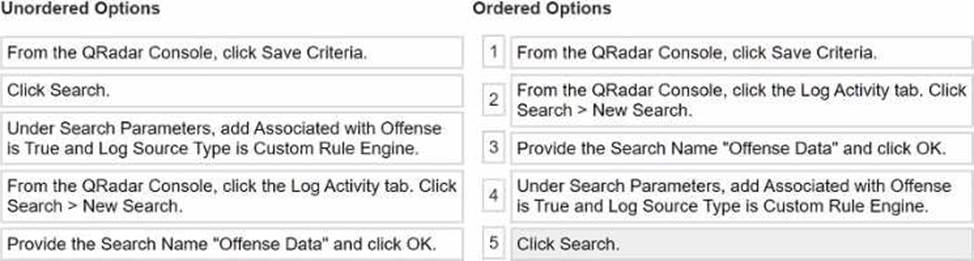
DRAG DROP
Select all that apply
What is the sequence to create and save a new search called "Offense Data" that shows all the CRE events that are associated with offenses?
A Security Analyst has noticed that an offense has been marked inactive.
How long had the offense been open since it had last been updated with new events or flows?
- A . 1 day + 30 minutes
- B . 5 days + 30 minutes
- C . 10 days + 30 minutes
- D . 30 days + 30 minutes
Which two (2) aggregation types ate available for the pie chart in the Pulse app?
- A . Last
- B . Total
- C . Average
- D . First
- E . Middle
B, C
Explanation:
For pie charts in the Pulse app of QRadar, the available aggregation types include "Total" and "Average." These aggregation types allow for the representation of data in a manner that summarizes the total sum of the data points or their average value, respectively, providing insightful and concise visualizations of the data within the Pulse app dashboards. This information is implied from the general capabilities of dashboard items in QRadar, as detailed in the provided
documentation, which typically includes such aggregation options for data visualization.
Which two (2) types of categories comprise events?
- A . Unsupported
- B . Unfound
- C . Stored
- D . Found
- E . Parsed
C, E
Explanation:
While the documentation does not explicitly list "Stored" and "Parsed" as categories comprising events, it discusses high-level event categories and the process of categorizing incoming events for easy searching. Without specific mention of the categories "Stored" and "Parsed," the provided documentation does not verify any of the options directly. Further insight into event categories is provided by discussing how events are grouped into high-level categories for organizational purposes.
On the Reports tab in QRadar. what does the message "Queued (position in the queue)" indicate
when generating a report?
- A . The report is scheduled to run, and the message is a count-down timer that specifies when the report will run next.
- B . The report is ready to be viewed in the Generated Reports column.
- C . The report is generating.
- D . The report is queued for generation and the message indicates the position of the report in the queue.
D
Explanation:
In the Reports tab of QRadar, the message "Queued (position in the queue)" indicates that the report is queued for generation. The message provides the position of the report within the generation queue, which helps users understand the report’s status and expected generation time
What does an analyst need to do before configuring the QRadar Use Case Manager app?
- A . Create a privileged user.
- B . Run a QRadar health check.
- C . Check the license agreement.
- D . Create an authorized service token.
D
Explanation:
Before configuring the QRadar Use Case Manager app, it is essential to ensure that the app has the necessary permissions to function correctly. This typically involves creating an authorized service token which provides the app with the permissions to access and manage the QRadar environment.