
HP HPE0-J68 Practice Exams
Last updated on Oct 23,2026- Exam Code: HPE0-J68
- Exam Name: HPE Storage Solutions
- Certification Provider: HP
- Latest update: Oct 23,2026
Which HPE storage array offers the ability to group up to four storage systems into a single logical array with a common pool of space?
- A . HPE Primera
- B . HPE GreenLake for Block Storage MP
- C . HPE XP
- D . HPE Alletra 6000
A customer wants to implement a management and monitoring tool for an HPE B-series SAN switch environment. You plan to recommend the HPE SAN Network Advisor.
Which information about the customer’s environment will help you to decide which edition to recommend?
- A . FCIP support
- B . Amount of used fabrics
- C . FCoE support
- D . Fabric OS version
B
Explanation:
When recommending the HPE SAN Network Advisor for managing and monitoring an HPE B-series SAN switch environment, the amount of used fabrics is a crucial factor in determining the appropriate edition. The HPE SAN Network Advisor comes in different editions, with each edition supporting a different number of fabrics. By assessing the number of fabrics in the customer’s environment, you can choose the edition that best fits their needs, ensuring effective management and monitoring capabilities.
For more details, refer to: HPE SAN Network Advisor
Which statement regarding the deduplication process on HPE StoreOnce is a true?
- A . It requires an extra license
- B . It is applied on a per-VTL/NAS/Catalyst Store basis
- C . It can be disabled at any time
- D . It is only available for Catalyst Store
B
Explanation:
The deduplication process on HPE StoreOnce is applied on a per-VTL (Virtual Tape Library), NAS, or Catalyst Store basis. This means that deduplication settings can be configured individually for each store type, allowing for flexible data reduction strategies depending on the specific use case.
Deduplication helps to significantly reduce the amount of storage required by eliminating duplicate data, making it a key feature in data protection environments.
Reference: HPE StoreOnce Deduplication
HPE Data Reduction Technologies
What is the maximum number of host-facing PCIe expansion slots available in a HPE Alletra 6030 system?
- A . 2
- B . 4
- C . 3
- D . 6
B
Explanation:
The HPE Alletra 6030 system has a maximum of 4 host-facing PCIe expansion slots. These slots are used to add additional connectivity options, such as Fibre Channel or iSCSI adapters, to meet the specific requirements of the workload and environment. The flexibility provided by these expansion slots allows the Alletra 6030 to be tailored to a wide range of enterprise storage needs.
For further details, refer to:
HPE Alletra 6030 Overview
DRAG DROP
Select the correct initiation option for each HPE Primera function.
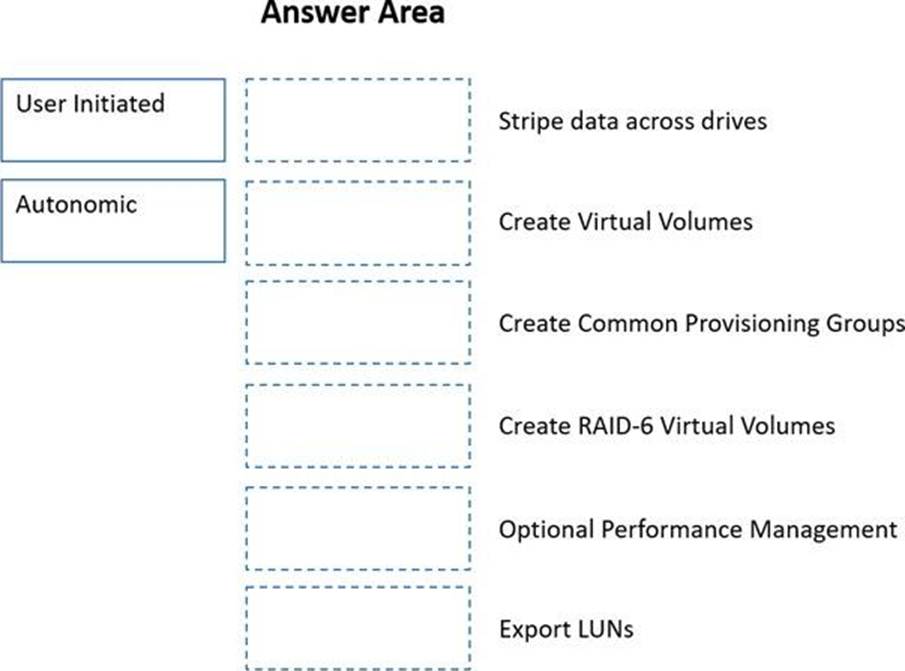
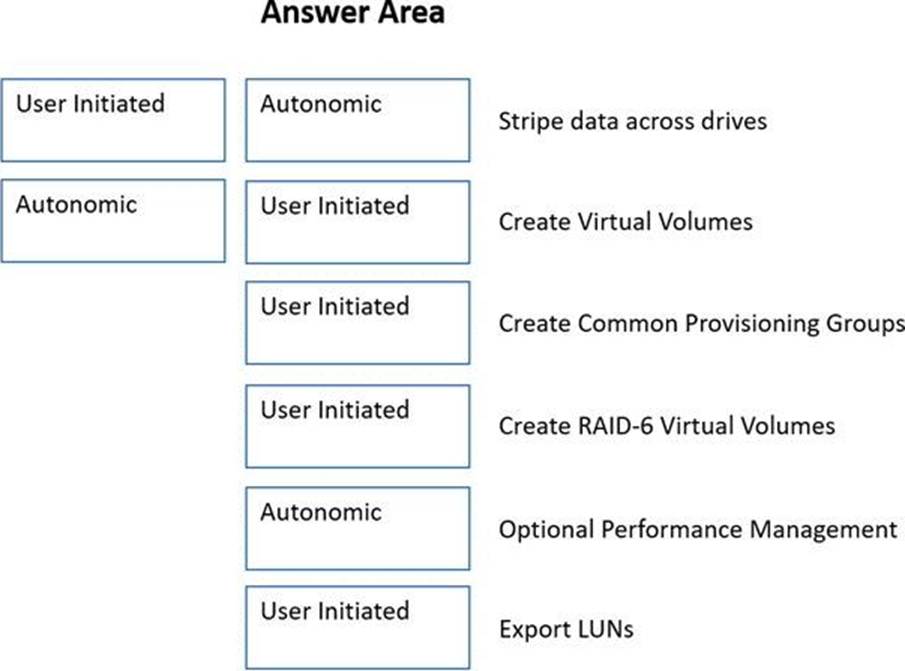
Explanation:
Graphical user interface, application Description automatically generated
A customer environment includes:
10 DL380 Gen8 servers in a VMware Cluster
2 MSA storage arrays
2 8GB b-series fibre channel switches
The customer needs to replace their environment because it is end of life. They have limited budget. The customer is primarily concerned with management because they have limited IT staff, and they want to move away from fibre channel.
Which HPE Storage should you recommend?
- A . HPE Primera
- B . HPE XP8
- C . HPE Nimble dHCI
- D . HPE StoreOnce
C
Explanation:
In this scenario, the customer is looking to replace their existing environment, which includes servers, MSA storage arrays, and Fibre Channel switches. They are budget-conscious, have limited IT staff, and prefer to move away from Fibre Channel technology. The HPE Nimble dHCI (Option C) is the ideal solution to recommend.
HPE Nimble dHCI offers a converged infrastructure that simplifies management, making it easier for organizations with limited IT resources to maintain their environment. It is designed to be easy to deploy and manage, providing the benefits of both hyper-converged infrastructure (HCI) and traditional converged solutions. This solution integrates compute, storage, and networking with advanced data services, and it moves away from Fibre Channel by leveraging iSCSI or Ethernet-based connectivity. The Nimble dHCI also provides excellent performance and reliability at a lower cost, which aligns with the customer’s budget constraints.
Reference: HPE Nimble Storage dHCI Overview
HPE Storage Solutions
Which Veeam feature allows you to automate validation of the backed up data?
- A . On-Demand Sandbox
- B . DataLabs
- C . Explorer
- D . SureBackup
D
Explanation:
SureBackup is a Veeam feature that allows you to automate the validation of backed-up data. It ensures that backups are not only restorable but also functionally correct. SureBackup automatically starts virtual machines from backups in an isolated environment, runs tests, and verifies the integrity of the backups. This feature is crucial for maintaining confidence in disaster recovery plans by regularly validating the consistency and reliability of backups.
For more details, refer to:
Veeam SureBackup Documentation
The customer is performing an initial setup of an HPE Alletra 6000 system.
Which user interface can you use to define initiators when configuring an HPE Alletra 6000 system?
- A . Web-based AUetra Ul
- B . Graphical VNC connection to Alletra system
- C . Command "Addlnitiator" in Host OS
- D . Command "Addlnitiator" in Nimble/Alletra CLI
A
Explanation:
During the initial setup of an HPE Alletra 6000 system, the most user-friendly and accessible interface for defining initiators is the Web-based Alletra UI. This web interface provides a comprehensive and intuitive platform for configuring, managing, and monitoring the storage system. It allows administrators to define initiators, set up volumes, and manage other critical storage functions through an easy-to-use graphical interface, which simplifies the overall setup process.
Reference: HPE Alletra 6000 Setup Guide
HPE Storage Management Tools
During the initial setup of an HPE Alletra 6000 system, the most user-friendly and accessible interface for defining initiators is the Web-based Alletra UI. This web interface provides a comprehensive and intuitive platform for configuring, managing, and monitoring the storage system. It allows administrators to define initiators, set up volumes, and manage other critical storage functions through an easy-to-use graphical interface, which simplifies the overall setup process.
Reference: HPE Alletra 6000 Setup Guide
HPE Storage Management Tools
Your customer would like you to prepare an upgrade plan that includes adding extra disks to their HPE GreenLake for Block Storage array to boost performance optimization.
What would be the optimal minimum upgrade?
- A . SSD per enclosure
- B . 1 SSD per system
- C . 2 SSDs per enclosure
- D . 2 SSDs per system
C
Explanation:
For optimal performance optimization in an HPE GreenLake for Block Storage array, the recommended minimum upgrade would be to add 2 SSDs per enclosure. This configuration helps to balance the load across the storage system and enhances performance by improving data distribution and access speeds. By adding SSDs to each enclosure, you ensure that the performance benefits are evenly distributed, which is crucial for maintaining consistent high-speed access across the entire storage environment.
Reference: HPE GreenLake Storage Solutions
HPE SSD Performance Optimization
An existing Nimble customer is interested in adding storage to their environment to store his Backups, but has a constrained budget and limited personal.
The solution must scale to allow for substantial growth over the next five years?
- A . Nimble SF series
- B . Nimble AF series
- C . Nimble cloud volume
- D . Nimble CS series
D
Explanation:
For a customer with a constrained budget and limited personnel, who requires a storage solution for backups that can scale significantly over the next five years, the HPE Nimble CS series is the most appropriate choice. The Nimble CS series offers hybrid storage capabilities, combining flash and disk storage to balance performance and cost. It is designed to be cost-effective while still providing the ability to scale as the customer’s storage needs grow. The Nimble CS series also integrates easily with existing environments, making it an ideal solution for backup storage with room for future expansion.
Reference: HPE Nimble Storage CS Series
HPE Storage Solutions for Backup