
HashiCorp HCVA0-003 Practice Exams
Last updated on Oct 22,2026- Exam Code: HCVA0-003
- Exam Name: HashiCorp Certified: Vault Associate (003)Exam
- Certification Provider: HashiCorp
- Latest update: Oct 22,2026
After issuing the command to delete a secret, you run a vault kv list command, but the path to the secret still seems to exist.
What command would permanently delete the path from Vault?

- A . vault kv delete -force kv/applications/app01
- B . vault kv destroy -versions=1 kv/applications/app01
- C . vault kv metadata delete kv/applications/app01
- D . vault kv delete -all kv/applications/app01
C
Explanation:
Comprehensive and Detailed in Depth
A: Soft-deletes data, not metadata. Incorrect.
B: Destroys a version, not the path. Incorrect.
C: Deletes all metadata and versions, removing the path. Correct.
D: Invalid syntax. Incorrect.
Overall Explanation from Vault Docs:
“kv metadata delete deletes all versions and metadata for the key, permanently removing it.”
Reference: https://developer.hashicorp.com/vault/docs/secrets/kv/kv-v2#key-metadata
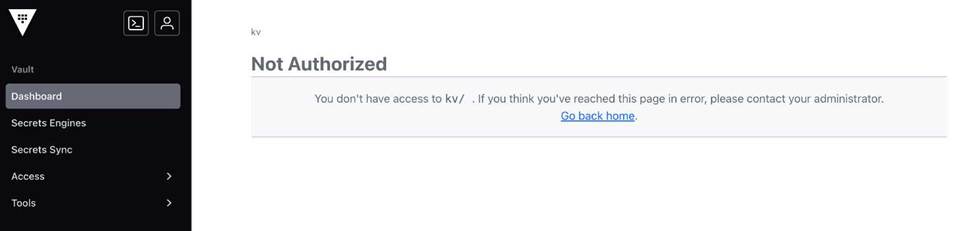
A user is assigned the following policy, and they can successfully retrieve secrets using the CLI. However, the user reports receiving an error message in the UI.
Why can’t the user access the secret in the Vault UI?
path "kv/apps/app01" { capabilities = ["read"] }
Successful retrieval using the CLI
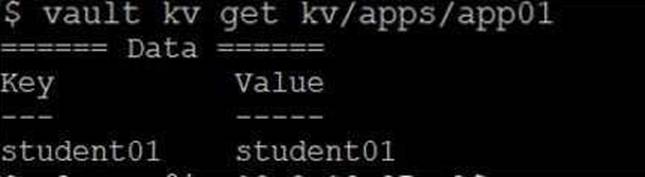
(Error: Permission denied in UI)
- A . The user doesn’t know what they’re doing
- B . The user doesn’t have permissions to retrieve the data from the UI, only the CLI
- C . The user needs list permissions to browse the UI
- D . The user’s token is invalid
C
Explanation:
Comprehensive and Detailed in Depth
A: Irrelevant to permissions. Incorrect.
B: UI and CLI use the same permissions. Incorrect.
C: UI browsing requires list on parent paths; read alone isn’t enough. Correct.
D: Token works via CLI, so it’s valid. Incorrect.
Overall Explanation from Vault Docs:
“To browse the UI, users need list permissions on paths leading to the secret…”
Reference: https://developer.hashicorp.com/vault/docs/concepts/policies#list
Which of the following unseal options can automatically unseal Vault upon the start of the Vault service? (Select four)
- A . HSM
- B . Azure KMS
- C . AWS KMS
- D . Transit
- E . Key Shards
A, B, C, D
Explanation:
Comprehensive and Detailed in Depth
Vault supports auto-unseal to simplify operations. The HashiCorp Vault documentation states: "Vault supports opt-in automatic unsealing via cloud technologies: AliCloud KMS, AWS KMS, Azure Key Vault, Google Cloud KMS, and OCI KMS," and includes HSM and Transit as additional options. It explains: "Auto unseal is used to automatically unseal Vault using an HSM or cloud HSM service."
The valid options are:
A (HSM): "HSM (Hardware Security Module) can automatically unseal Vault by securely storing and managing the master key used for encryption and decryption operations."
B (Azure KMS): "Azure KMS can automatically unseal Vault by utilizing Azure Key Management Service to manage the master key."
C (AWS KMS): "AWS KMS can automatically unseal Vault upon the start of the service by using AWS Key Management Service to manage the master key."
D (Transit): "Transit can automatically unseal Vault by using a pre-configured encryption key stored in Vault itself to encrypt the unseal key."
The documentation clarifies: "Key Shards require the user to provide unseal keys to reconstruct the master key," making E (Key Shards) a manual process, not auto-unseal. Thus, A, B, C, and D are correct.
Reference: HashiCorp Vault Documentation – Seal Configuration HashiCorp Vault Documentation – Auto Unseal Tutorial HashiCorp Vault Documentation – Seal Concepts: Auto Unseal
True or False? Once you authenticate to Vault using the API, subsequent requests will automatically be permitted without further interaction.
- A . True
- B . False
B
Explanation:
Comprehensive and Detailed In-Depth
API auth requires ongoing token use:
B. False: "Once you authenticate using the API, subsequent requests are not automatically permitted without further interaction. Each request to Vault requires authentication using the token returned
by Vault."
Incorrect Option:
You have successfully authenticated using the Kubernetes auth method, and Vault has provided a token.
What HTTP header can be used to specify your token when you request dynamic credentials? (Select two)
- A . X-Vault-Token: <token>
- B . Token: <token>
- C . Authentication: <token>
- D . Authorization: Bearer <token>
A, D
Explanation:
Comprehensive and Detailed In-Depth
After authenticating with the Kubernetes auth method, Vault returns a token that must be included in subsequent API requests to retrieve dynamic credentials. The Vault documentation specifies two valid HTTP headers for this purpose:
"Once authenticated, most Vault operations require a client token to be set either via the X-Vault-Token header or via the Authorization header using the Bearer type. For example:
X-Vault-Token: <token>
Authorization: Bearer <token>"
― Vault API Documentation: Authentication
A: X-Vault-Token: <token> is the primary Vault-specific header for token authentication:
"The X-Vault-Token header is used to specify the token when requesting dynamic credentials from Vault. This header is commonly used to authenticate and authorize requests to Vault services."
― Vault API Documentation
D: Authorization: Bearer <token> is a standard HTTP authentication header supported by Vault:
"The Authorization header with the Bearer token format is another common way to specify the token when requesting dynamic credentials from Vault. This header is widely used for authentication purposes in HTTP requests."
― Vault API Documentation
B: Token: <token> is not a recognized Vault header.
C: Authentication: <token> is not a standard or supported header in Vault; the correct header is Authorization.
These headers ensure the token is passed securely to Vault for authorizing credential requests.
Reference: Vault API Documentation: Authentication Vault Tokens
Which of the following features in Vault will replicate service tokens between clusters?
- A . Disaster Recovery Replication
- B . Performance Replication
- C . Vault Agent
- D . Integrated Storage
A
Explanation:
Comprehensive and Detailed In-Depth
Vault Enterprise supports replication to synchronize data across clusters, with two main types:
Disaster Recovery (DR) Replication and Performance Replication. Only one replicates service tokens:
Which of the following secrets engines can store static secrets in Vault for future retrieval?
- A . KV
- B . PKI (certificates)
- C . Database
- D . Transit
A
Explanation:
Comprehensive and Detailed In-Depth
For static secrets:
Use this screenshot to answer the question below:
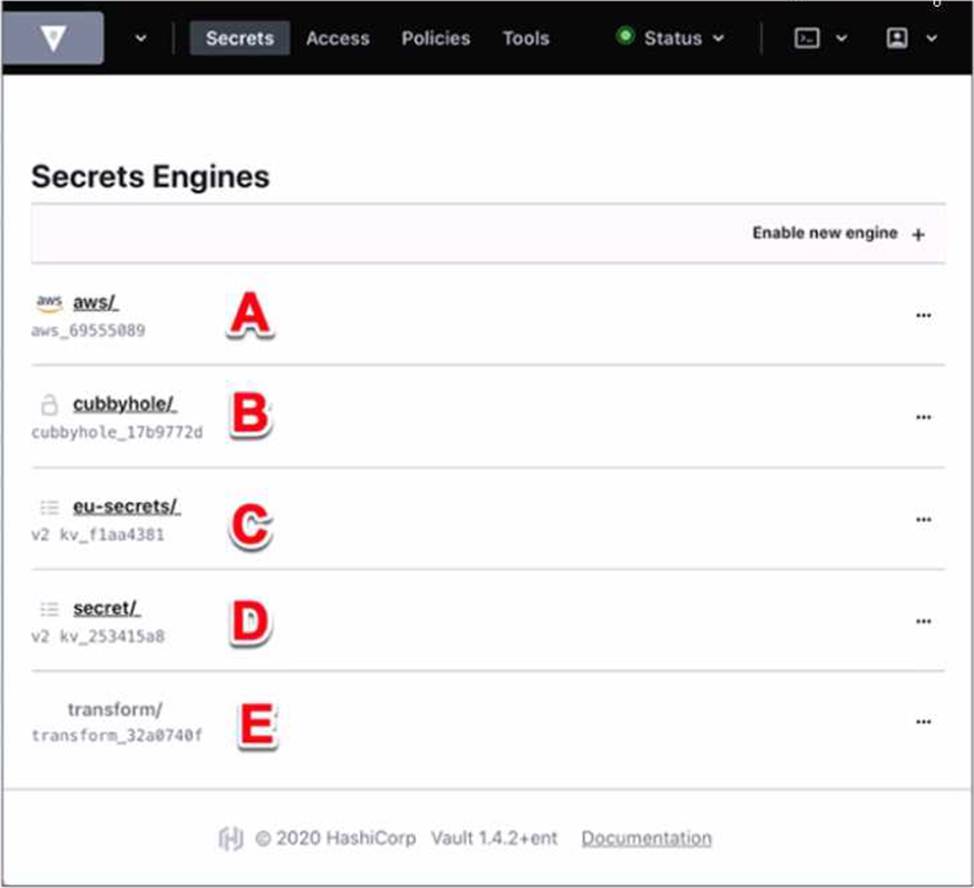
Where on this page would you click to view a secret located at secret/my-secret?
- A . A
- B . B
- C . C
- D . D
- E . E
C
Explanation:
In the HashiCorp Vault UI, secrets are organized in a tree-like structure. To view a secret located at secret/my-secret, you would click on the “secret/” folder in the tree, then click on the “my-secret” file. In this screenshot, the “secret/” folder is located at option C. This folder contains the secrets that are stored in the key/value secrets engine, which is the default secrets engine in Vault. The key/value secrets engine allows you to store arbitrary secrets as key/value pairs. The key is the path of the secret, and the value is the data of the secret. For example, the secret located at secret/my-secret has a key of “my-secret” and a value of whatever data you stored there.
Reference: [KV – Secrets Engines | Vault | HashiCorp Developer]
To make an authenticated request via the Vault HTTP API, which header would you use?
- A . The X-Vault-Token HTTP Header
- B . The x-Vault-Request HTTP Header
- C . The Content-Type HTTP Header
- D . The X-Vault-Namespace HTTP Header
A
Explanation:
To make an authenticated request via the Vault HTTP API, you need to use the X-Vault-Token HTTP Header or the Authorization HTTP Header using the Bearer <token> scheme. The token is a string that represents your identity and permissions in Vault. You can obtain a token by using an authentication method, such as userpass, approle, aws, etc. The token can also be a root token, which has unlimited access to Vault, or a wrapped token, which is a response-wrapping token that can be used to unwrap the actual token. The token must be sent with every request to Vault that requires authentication, except for the unauthenticated endpoints, such as sys/init, sys/seal-status, sys/unseal, etc. The token is used by Vault to verify your identity and enforce the policies that grant or deny access to various paths and operations.
Reference:
https://developer.hashicorp.com/vault/api-docs3, https://developer.hashicorp.com/vault/docs/concepts/tokens4, https://developer.hashicorp.com/vault/docs/concepts/auth5
After encrypting data using the Transit secrets engine, you’ve received the following output.
Which of the following is true based on the output displayed below?
Key: ciphertext Value:
vault:v2:45f9zW6cglbrzCjI0yCyC6DBYtSBSxnMgUn9B5aHcGEit71xefPEmmjMbrk3
- A . The original encryption key has been rotated at least once
- B . The data is stored in Vault using a KV v2 secrets engine
- C . This is the second version of the encrypted data
- D . Similar to the KV secrets engine, the Transit secrets engine was enabled using the transit v2 option
A
Explanation:
Comprehensive and Detailed in Depth
A: v2 shows the key was rotated once. Correct.
B: Transit doesn’t store data. Incorrect.
C: v2 is the key version, not data version. Incorrect.
D: No transit v2 option exists. Incorrect.
Overall Explanation from Vault Docs:
“Ciphertext is prepended with the key version (e.g., v2)… Indicates rotation.”
Reference: https://developer.hashicorp.com/vault/tutorials/encryption-as-a-service/eaas-transit#rotate-the-encryption-key