
HashiCorp HCVA0-003 Practice Exams
Last updated on Oct 21,2026- Exam Code: HCVA0-003
- Exam Name: HashiCorp Certified: Vault Associate (003)Exam
- Certification Provider: HashiCorp
- Latest update: Oct 21,2026
Tom needs to set the proper environment variable so he doesn’t need to first authenticate to Vault to retrieve dynamically generated credentials for a database server.
What environment variable does Tom need to set first before running commands?
- A . VAULT_NAMESPACE
- B . VAULT_TOKEN
- C . VAULT_CAPATH
- D . VAULT_CLIENT_KEY
B
Explanation:
Comprehensive and Detailed In-Depth
To bypass manual auth:
B. VAULT_TOKEN: "The VAULT_TOKEN environment variable holds the contents of the token," enabling seamless access.
Incorrect Options:
A: Sets namespace, not auth. C, D: TLS-related, not auth.
Reference: https://developer.hashicorp.com/vault/docs/commands#vault_token
What is true about the output of the following command (select three)?

- A . The admin never sees all the unseal keys and cannot unseal Vault by themselves
- B . All three users, Jane/John/Student01, will receive all unseal keys and can unseal Vault
- C . The admin will receive the unseal keys and be able to unseal Vault themselves
- D . The keys will be returned encrypted
- E . Each individual can only decrypt their own unseal key using their private PGP key
A, D, E
Explanation:
Comprehensive and Detailed in Depth
The command initializes Vault, splitting the master key into 3 shares (threshold 2) and encrypting each with PGP keys for Jane, John, and Student01. Let’s analyze:
Option A: The admin never sees all the unseal keys and cannot unseal Vault by themselves With -pgp-keys, Vault encrypts each share with a user’s public PGP key. The admin (initializer) sees only encrypted outputs (e.g., Key 1: <encrypted>), not plaintext keys. Since 2 shares are needed and no single entity gets all, the admin can’t unseal alone. Correct.
Vault Docs Insight: “The initializer receives encrypted keys… never sees all plaintext keys, enhancing security.” (Directly stated.)
Option B: All three users, Jane/John/Student01, will receive all unseal keys and can unseal Vault Each user gets one encrypted share (e.g., Jane gets Key 1, John Key 2). No user receives all shares― only one, decryptable with their private key. Unsealing requires collaboration (2 of 3), so this is false. Incorrect.
Vault Docs Insight: “Each PGP key encrypts one share… No single user gets all keys.” (Distribution is per-user.)
Option C: The admin will receive the unseal keys and be able to unseal Vault themselves Without PGP, the admin gets plaintext keys. With -pgp-keys, they get encrypted keys they can’t decrypt (lacking private keys). Threshold=2 means collaboration is required. Incorrect.
Vault Docs Insight: “Using PGP keys ensures the initializer cannot unseal alone…” (Security feature.)
Option D: The keys will be returned encrypted
The -pgp-keys flag encrypts each share with the corresponding public key. Output shows encrypted
blobs (e.g., base64-encoded PGP ciphertext), not plaintext. Correct.
Vault Docs Insight: “Vault will generate the unseal keys and encrypt them using the given PGP keys…” (Explicit behavior.)
Option E: Each individual can only decrypt their own unseal key using their private PGP key Each share is encrypted with one user’s public key (e.g., Jane’s key encrypts Key 1). Only Jane’s private key decrypts it. This ensures secure distribution. Correct.
Vault Docs Insight: “Only the owner of the corresponding private key can decrypt the value…” (PGP security.)
Detailed Mechanics:
Command: vault operator init -key-shares=3 -key-threshold=2 -pgp-
keys="jane.pgp,john.pgp,student01.pgp". Vault generates 3 shares via Shamir’s Secret Sharing,
encrypts each (Key 1 with jane.pgp, etc.), and outputs encrypted strings. Unsealing requires 2
decrypted shares combined via vault operator unseal. PGP ensures the admin can’t access plaintext,
enforcing split knowledge.
Real-World Example:
Output: Key 1: <encrypted-jane>, Key 2: <encrypted-john>, Key 3: <encrypted-student01>. Jane decrypts Key 1 with gpg -d, John decrypts Key 2. They submit via UI or CLI to unseal. Overall Explanation from Vault Docs:
“Vault can optionally be initialized using PGP keys. In this mode, Vault will generate the unseal keys and immediately encrypt them using the given users’ public PGP keys. Only the owner of the corresponding private key is able to decrypt the value… The initializer never sees all plaintext keys and cannot unseal Vault alone.” This enhances security by distributing trust.
Reference: https://developer.hashicorp.com/vault/docs/commands/operator/init#pgp-keys
Sara uses the Vault CLI for administrative tasks on the production cluster. However, she encounters permission-denied errors when making changes and needs to check which policies are attached to her token to view and adjust permissions.
What command can she run on the Vault node to see the attached policies?
- A . vault operator diagnose
- B . vault policy list
- C . vault token capabilities
- D . vault token lookup
D
Explanation:
Comprehensive and Detailed In-Depth
To view policies attached to her token, Sara needs vault token lookup. This command displays token details, including the policies field (e.g., [default, training]), revealing what permissions she has. Vault operator diagnose troubleshoots server issues, not tokens. vault policy list lists all policies in Vault, not those tied to a specific token. vault token capabilities checks capabilities on a path, not policy attachment. The token lookup command, per Vault docs, is the correct tool for inspecting token metadata like policies.
Reference: Token Lookup Docs
Token Concepts
You have logged into the Vault UI and see this screen.
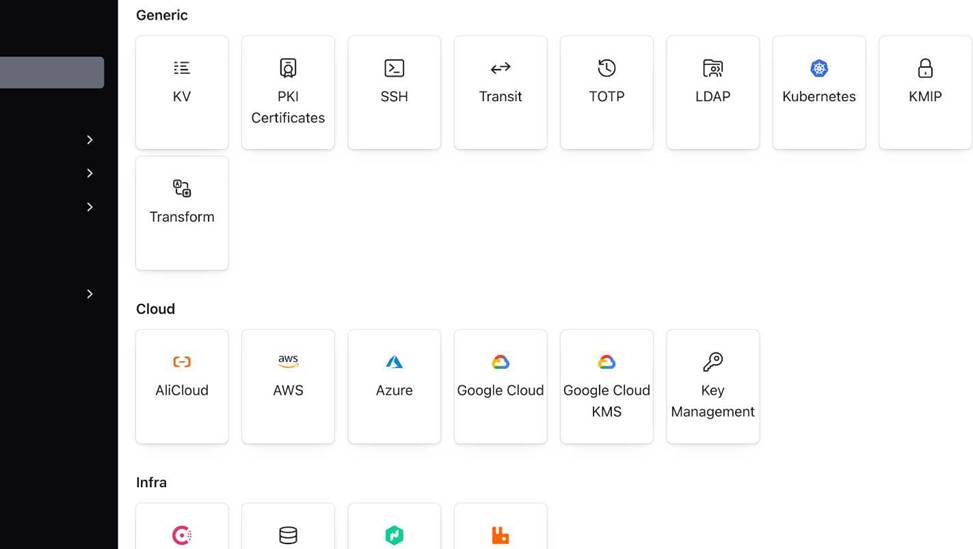
What Vault component is being enabled in the screenshot below?
- A . Storage Backends
- B . Secrets Engine
- C . Auth Methods
- D . Audit Devices
B
Explanation:
Comprehensive and Detailed In-Depth
In the Vault UI, the “Secrets” tab lists enabled secrets engines and includes an “Enable new engine”
option to add a new one. Secrets engines manage secrets (e.g., KV, Transit), and enabling one configures it at a specific path. Storage backends (e.g., Raft) are set in the config file, not the UI. Auth methods (e.g., LDAP) are enabled under the “Access” tab. Audit devices (e.g., file logging) are under “Tools”. The screenshot context and UI workflow align with enabling a secrets engine, per the getting-started tutorial.
Reference: Secrets Engines Tutorial
Secrets Engines Docs
The Vault encryption key is stored in Vault’s backend storage.
- A . True
- B . False
B
Explanation:
The statement is false. The Vault encryption key is not stored in Vault’s backend storage, but rather in Vault’s memory. The Vault encryption key is the key that is used to encrypt and decrypt the data that is stored in Vault’s backend storage, such as secrets, tokens, policies, etc. The Vault encryption key is derived from the master key, which is generated when Vault is initialized. The master key is split into unseal keys using Shamir’s secret sharing algorithm, and the unseal keys are distributed to trusted operators. To start Vault, a quorum of unseal keys is required to reconstruct the master key and derive the encryption key. The encryption key is then kept in memory and used to protect the data in Vault’s backend storage. The encryption key is never written to disk or exposed via the API.
Reference: Seal/Unseal | Vault | HashiCorp Developer, Key Rotation | Vault | HashiCorp Developer
What is the primary role of the Vault Security Operator (VSO) in a Kubernetes environment?
- A . Managing Vault server deployments and auto-scaling Vault instances in Kubernetes
- B . Enforcing Kubernetes network policies for Vault communication
- C . Automating the injection and lifecycle management of Vault secrets for Kubernetes workloads
- D . Replacing Kubernetes Secrets with a built-in alternative that does not require Vault
C
Explanation:
Comprehensive and Detailed In-Depth
The VSO automates secret management in Kubernetes. The Vault documentation states:
"The Vault Security Operator (VSO) is designed to streamline the integration of Vault with Kubernetes by automating the retrieval, injection, and lifecycle management of secrets for workloads running in a Kubernetes cluster. It enables Kubernetes applications to securely consume Vault secrets without requiring direct interaction with Vault, improving security and operational efficiency."
― Vault Security Operator C: Correct.
"Automating the injection and lifecycle management of Vault secrets for Kubernetes workloads."
― Vault Security Operator
A: Server management is not VSO’s role.
B: Network policies are separate.
D: VSO enhances, doesn’t replace, Kubernetes Secrets.
Reference: Vault Security Operator
When generating dynamic credentials, Vault also creates associated metadata, including information like time duration, renewability, and more, and links it to the credentials.
What is this referred to as?
- A . Secret
- B . Token
- C . Lease
- D . Secrets engine
C
Explanation:
Comprehensive and Detailed in Depth
A: Secrets are the credentials themselves, not the metadata. Incorrect.
B: Tokens authenticate clients, not the metadata for credentials. Incorrect.
C: A lease is metadata tied to dynamic secrets, managing their lifecycle (TTL, renewability). Correct.
D: Secrets engines generate secrets, not the metadata. Incorrect.
Overall Explanation from Vault Docs:
“With every dynamic secret… Vault creates a lease: metadata containing TTL, renewability, etc.”
Reference: https://developer.hashicorp.com/vault/docs/concepts/lease
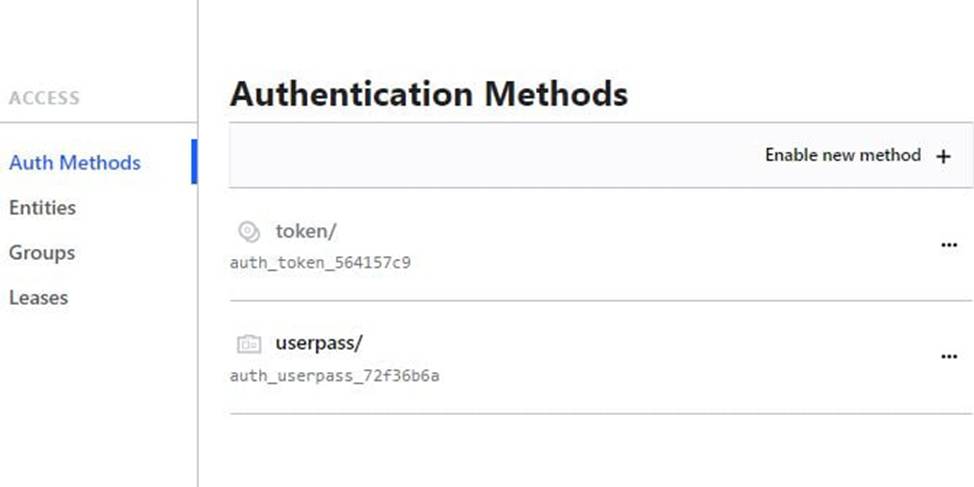
Based on the screenshot below, how many auth methods have been enabled on this Vault instance?
- A . 1
- B . 2
- C . 4
- D . 3
B
Explanation:
Comprehensive and Detailed in Depth
Token is enabled by default and cannot be disabled.
Userpass is explicitly enabled.
Total: 2 auth methods.
Overall Explanation from Vault Docs:
“Tokens are the default auth method… Additional methods like userpass increase the count.”
Reference: https://developer.hashicorp.com/vault/docs/concepts/tokens
Which of the following capabilities can be used when writing a Vault policy? (Select four)
- A . list
- B . deny
- C . apply
- D . root
- E . create
- F . write
A, B, E, F
Explanation:
Comprehensive and Detailed In-Depth
Vault policies define access control using specific capabilities.
The Vault documentation lists the valid capabilities:
"When creating a policy, only the following capabilities are available in Vault:
create
read
update
delete
list
sudo
deny"
― Vault Policies: Capabilities
A: list is valid:
"The list capability enables the user to view a list of available resources or entities within Vault."
― Vault Policies: Capabilities
B: deny is valid:
"The deny capability is used to explicitly deny access to specific resources or operations within Vault."
― Vault Policies: Capabilities
E: create is valid:
"The create capability allows the user to create new policies, roles, tokens, and other entities within Vault."
― Vault Policies: Capabilities
F: write is a common shorthand for update in Vault’s context and is valid:
"The update capability (often referred to as write in CLI contexts) allows the user to modify or update existing resources or entities within Vault."
― Vault Policies: Capabilities
Note: While write isn’t explicitly listed, it’s synonymous with update in practice, as confirmed by CLI usage and community convention.
C: apply is not a Vault policy capability.
D: root is not a capability; it’s a policy name for superuser access.
Reference: Vault Policies: Capabilities
When using the Vault Secrets Operator, where is the secret written to after being retrieved from Vault?
- A . The secret is never written to any service or persistent storage
- B . Directly to the filesystem of the pod
- C . Kubernetes Secrets
- D . To the cloud-provider’s native secret manager (Azure Key Vault, AWS Secrets Manager, etc.)
C
Explanation:
Comprehensive and Detailed in Depth
A: Incorrect; VSO writes to Kubernetes Secrets.
B: Incorrect; not written to pod filesystem.
C: VSO syncs secrets to Kubernetes Secrets. Correct.
D: Incorrect; no automatic cloud provider integration. Overall Explanation from Vault Docs:
“VSO synchronizes secrets from Vault to Kubernetes Secrets…”
Reference: https://developer.hashicorp.com/vault/docs/platform/k8s/vso