
HashiCorp HCVA0-003 Practice Exams
Last updated on Oct 22,2026- Exam Code: HCVA0-003
- Exam Name: HashiCorp Certified: Vault Associate (003)Exam
- Certification Provider: HashiCorp
- Latest update: Oct 22,2026
Which Vault secret engine may be used to build your own internal certificate authority?
- A . Transit
- B . PKI
- C . PostgreSQL
- D . Generic
B
Explanation:
The Vault secret engine that can be used to build your own internal certificate authority is the PKI secret engine. The PKI secret engine generates dynamic X.509 certificates on-demand, without requiring manual processes of generating private keys and CSRs, submitting to a CA, and waiting for verification and signing. The PKI secret engine can act as a root CA or an intermediate CA, and can issue certificates for various purposes, such as TLS, code signing, email encryption, etc. The PKI secret engine can also manage the certificate lifecycle, such as rotation, revocation, renewal, and CRL generation. The PKI secret engine can also integrate with external CAs, such as Venafi or Entrust, to delegate the certificate issuance and management.
Reference: PKI – Secrets Engines | Vault | HashiCorp Developer, Build Your Own Certificate Authority (CA) | Vault – HashiCorp Learn
A developer mistakenly committed code that contained AWS S3 credentials into a public repository. You have been tasked with revoking the AWS S3 credential that was in the code. This credential was created using Vault’s AWS secrets engine and the developer received the following output when requesting a credential from Vault.
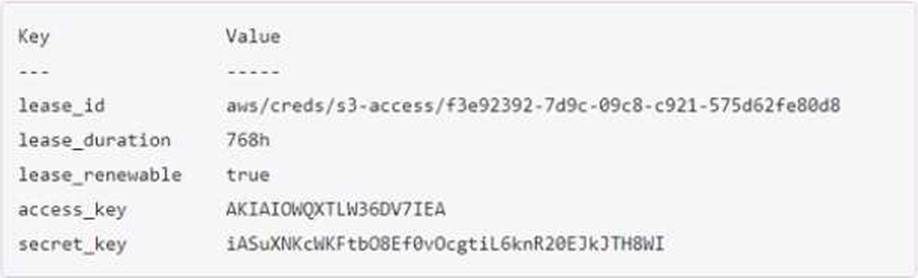
Which Vault command will revoke the lease and remove the credential from AWS?
- A . vault lease revoke aws/creds/s3-access/f3e92392-7d9c-99c8-c921-57Sd62fe89d8
- B . vault lease revoke AKIAI0WQXTLW36DV7IEA
- C . vault lease revoke f3e92392-7d9c-O9c8-c921-575d62fe80d8
- D . vault lease revoke access_key-AKIAI0WQXTLW36DV7IEA
A
Explanation:
The correct answer is A because the lease ID is the unique identifier for the credential. The lease ID is used to revoke the credential using the vault lease revoke command. This command will invalidate the credential immediately and prevent any further renewals. It will also delete the access key and secret key from AWS, rendering them useless1. The access key and secret key are not sufficient to revoke the credential, as they are not recognized by Vault. The lease ID is composed of the path of the secrets engine, the role name, and a random UUID. In this case, the path is aws/creds, the role name is s3-access, and the UUID is f3e92392-7d9c-99c8-c921-57Sd62fe89d8.
Reference: lease revoke – Command | Vault | HashiCorp Developer
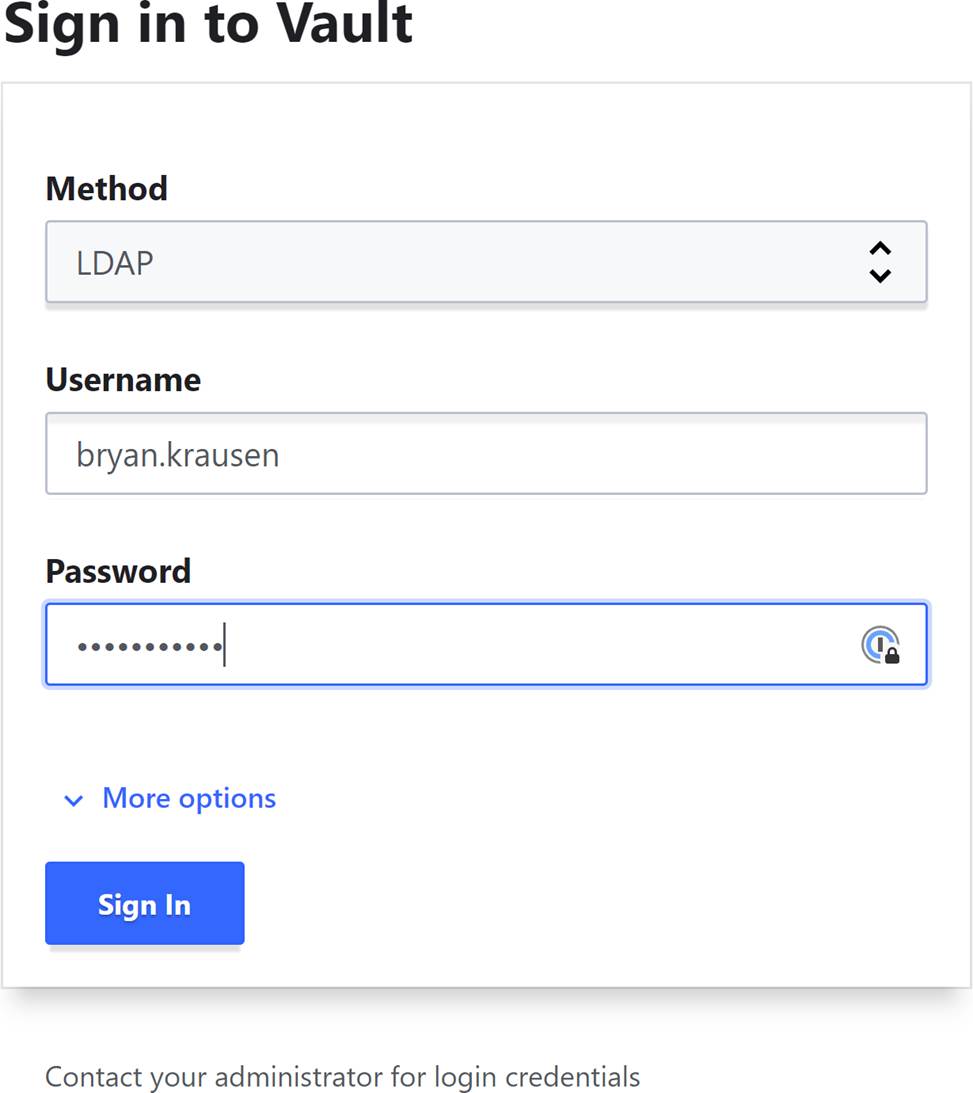
Your organization has enabled the LDAP auth method on the path of corp-auth/. When you access the Vault UI, you cannot log in despite providing the correct credentials. Based on the screenshot below, what action should you take to log in?
- A . Select corp-auth from the dropdown list
- B . Enter the username as corp-auth/bryan.krausen
- C . Select More Options and enter the Mount path that LDAP was enabled on (corp-auth/)
- D . Change to the Namespace of corp-auth before trying to authenticate
C
Explanation:
Comprehensive and Detailed In-Depth
When an auth method like LDAP is mounted at a non-default path (e.g., corp-auth/), the Vault UI requires specifying that path. The Vault documentation implies this via CLI examples, and UI behavior confirms it:
"If a backend was mounted using a non-default path, you need to provide it under the Mount Path option under More Options."
― Vault Tutorials: Getting Started UI (Implied)
C: Correct. Clicking “More Options” and entering corp-auth/ directs the UI to the LDAP method:
"By entering the mount path, you are directing Vault to use the LDAP auth method configured on that specific path for authentication."
― Vault Auth: LDAP
A: Dropdowns typically list methods, not paths; incorrect assumption.
B: Username doesn’t include the path in this context.
D: Namespace is unrelated to auth mount paths.
Reference: Vault Tutorials: Getting Started UI
Vault Auth: LDAP
What command creates a secret with the key "my-password" and the value "53cr3t" at path "my-secrets" within the KV secrets engine mounted at "secret"?
- A . vault kv put secret/my-secrets/my-password 53cr3t
- B . vault kv write secret/my-secrets/my-password 53cr3t
- C . vault kv write 53cr3t my-secrets/my-password
- D . vault kv put secret/my-secrets »y-password-53cr3t
A
Explanation:
The vault kv put command writes the data to the given path in the K/V secrets engine. The command requires the mount path of the K/V secrets engine, the secret path, and the key-value pair to store. The mount path can be specified with the -mount flag or as part of the secret path. The key-value pair can be given as an argument or read from a file or stdin. The correct syntax for the command is: vault kv put -mount=secret my-secrets/my-password 53cr3t or
vault kv put secret/my-secrets my-password=53cr3t
The other options are incorrect because they use the deprecated vault kv write command, or they have the wrong order or format of the arguments.
Reference: https://developer.hashicorp.com/vault/docs/commands/kv/put3, https://developer.hashicorp.com/vault/docs/commands/kv4
Elijah manages a legacy application that requires strict control over when its service account credentials change.
Which type of credential should be used for this legacy application?
- A . static
- B . dynamic
A
Explanation:
Comprehensive and Detailed In-Depth
For strict control over credential changes:
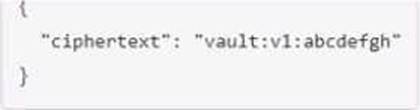
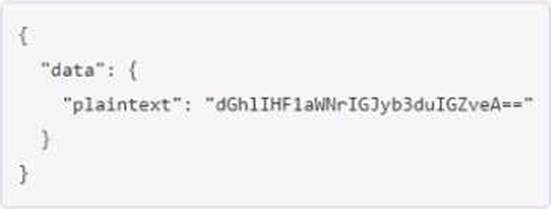
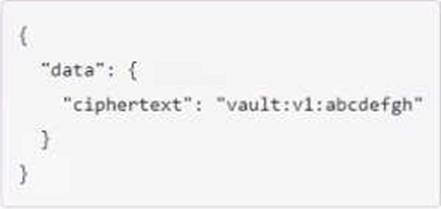
A user issues the following cURL command to encrypt data using the transit engine and the Vault AP:
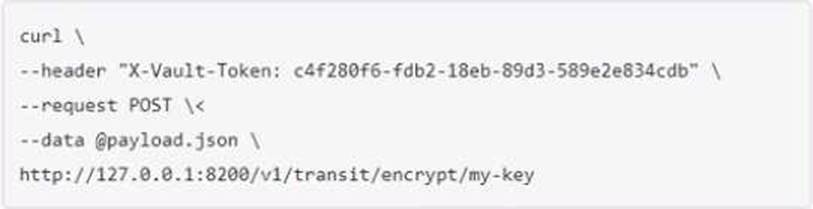
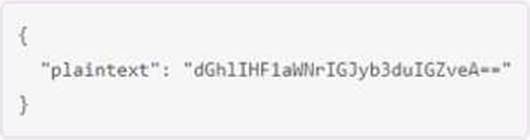
Which payload.json file has the correct contents?
A)
B)
C)
D)
Explanation:
The payload.json file that has the correct contents is C. This file contains a JSON object with a single key, “plaintext”, and a value that is the base64-encoded string of the data to be encrypted. This is the format that the Vault API expects for the transit encrypt endpoint1. The other files are not correct because they either have the wrong key name, the wrong value format, or the wrong JSON syntax.
Reference: Encrypt Data – Transit Secrets Engine | Vault | HashiCorp Developer
Tom is authenticating to Vault using the CLI.
Which of the following commands allows Tom to authenticate using the userpass method WITHOUT logging his password to the shell history?
- A . vault login tom
- B . vault login -method=userpass username=tom
- C . vault login userpass username=tom password=jerry
- D . vault login -method=userpass username=tom password=jerry
B
Explanation:
Comprehensive and Detailed In-Depth
To avoid logging passwords:
B. Correct: "If you enter the command vault login -method=userpass username=tom and press enter, you will be prompted to enter your credentials but they will be hidden." Incorrect Options:
A: Incomplete.
C, D: Expose password in history.
Reference: https://developer.hashicorp.com/vault/docs/auth/userpass
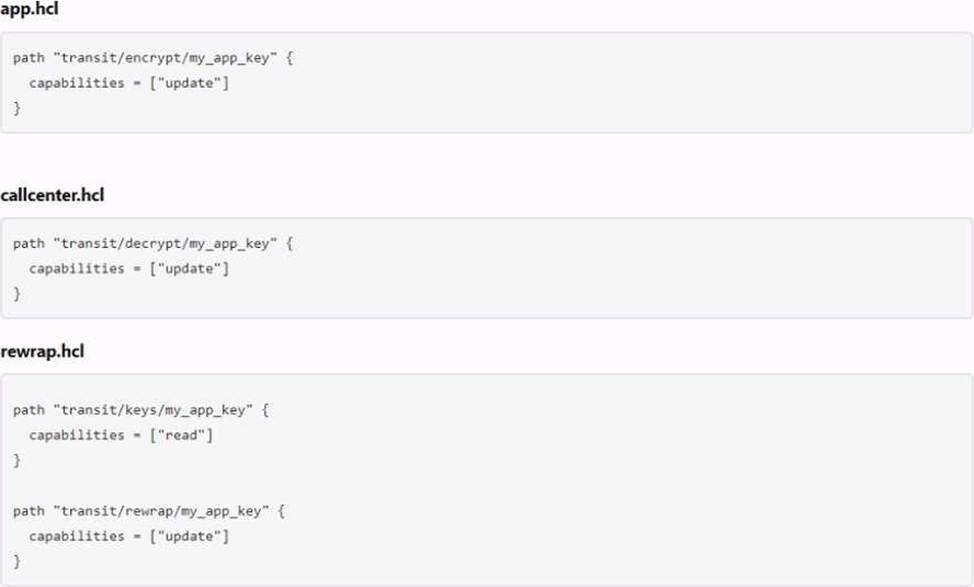
The following three policies exist in Vault.
What do these policies allow an organization to do?
- A . Separates permissions allowed on actions associated with the transit secret engine
- B . Nothing, as the minimum permissions to perform useful tasks are not present
- C . Encrypt, decrypt, and rewrap data using the transit engine all in one policy
- D . Create a transit encryption key for encrypting, decrypting, and rewrapping encrypted data
C
Explanation:
The three policies that exist in Vault are:
admins: This policy grants full access to all secrets and operations in Vault. It can be used by administrators or operators who need to manage all aspects of Vault.
default: This policy grants access to all secrets and operations in Vault except for those that require specific policies. It can be used as a fallback policy when no other policy matches.
transit: This policy grants access only to the transit secrets engine, which handles cryptographic functions on data in-transit. It can be used by applications or services that need to encrypt or decrypt data using Vault.
These policies allow an organization to perform useful tasks such as:
Encrypting, decrypting, and rewrapping data using the transit engine all in one policy: This policy grants access to both the transit secrets engine and the default policy, which allows performing any operation on any secret in Vault.
Creating a transit encryption key for encrypting, decrypting, and rewrapping encrypted data: This policy grants access only to the transit secrets engine and its associated keys, which are used for encrypting and decrypting data in transit using AES-GCM with a 256-bit AES key or other supported key types.
Separating permissions allowed on actions associated with the transit secret engine: This policy grants access only to specific actions related to the transit secrets engine, such as creating keys or wrapping requests. It does not grant access to other operations or secrets in Vault.
Which of the following statements describe the CLI command below?
S vault login -method-1dap username-mitche11h
- A . Generates a token which is response wrapped
- B . You will be prompted to enter the password
- C . By default the generated token is valid for 24 hours
- D . Fails because the password is not provided
A
Explanation:
The CLI command vault login -method ldap username=mitchellh generates a token that is response wrapped. This means that the token contains a base64-encoded response wrapper, which is a JSON object that contains information about the token, such as its policies, metadata, and expiration time. The response wrapper is used to verify the authenticity and integrity of the token, and to prevent replay attacks. The response wrapper also allows Vault to automatically renew the token when it expires, or to revoke it if it is compromised. The -method ldap option specifies that the authentication method is LDAP, which requires a username and password to be provided. The username mitchellh is an example of an LDAP user name, and the password will be hidden when entered.
Reference: Vault CLI Reference | Vault | HashiCorp Developer, Vault CLI Reference | Vault | HashiCorp Developer
What is the default value of the VAULT_ADDR environment variable?
- A . http://127.0.0.1:8200
- B . https://vault.example.com:8200
- C . https://127.0.0.1:8200
- D . http://vault.example.com:8200
C
Explanation:
Comprehensive and Detailed In-Depth
The default address is:
C. https://127.0.0.1:8200: "Vault assumes the value of https://127.0.0.1:8200 when you make
requests to Vault."
Incorrect Options:
A, B, D: Non-default values requiring manual setting.
Reference: https://developer.hashicorp.com/vault/docs/commands#vault_addr