
HashiCorp HCVA0-003 Practice Exams
Last updated on Oct 22,2026- Exam Code: HCVA0-003
- Exam Name: HashiCorp Certified: Vault Associate (003)Exam
- Certification Provider: HashiCorp
- Latest update: Oct 22,2026
You need to write a new policy for Vault for a group of users on the automation team. The requirements stipulate that each user (and all future users) get access to their own private section of a KV secrets engine at the path kv/team/ and be able to manage their own secrets.
Which policy below meets these requirements while minimizing the administrative effort and following the principle of least privilege?
- A . path "secret/data/groups/{{identity.groups.ids.2f62-9503-42aa7A869741.name}}/" { capabilities = ["list"] }
- B . path "kv/team/frank/" { capabilities = ["create", "update", "read", "delete"] } path "kv/team/steve/" { capabilities = ["create", "update", "read", "delete"] } path "kv/team/bryan/" { capabilities = ["create", "update", "read", "delete"] }
- C . path "kv/team/" { capabilities = ["create", "update", "read", "delete"] }
- D . path "kv/team/{{identity.entity.id}}/" { capabilities = ["create", "update", "read", "delete"] } path "kv/team/{{identity.entity.id}}" { capabilities = ["create", "update", "read", "delete"] }
D
Explanation:
Comprehensive and Detailed In-Depth
Templated policies with {{identity.entity.id}} provide user-specific access. The Vault documentation states:
"This policy would permit all current and future users with a custom path based on their entity ID when they log into Vault using a variable replacement within the path. Templated policies allow policy authors to create policies that can dynamically adjust based on attributes of the identity requesting access."
― Vault Policies: Templated Policies
D: Correct. Uses entity ID for private sections with minimal effort:
"By using {{identity.entity.id}}, each user gets access to their own private section, minimizing administrative effort as new users automatically get their own path."
― Vault Policies: Templated Policies
A: Group-based and only lists, not manages.
B: Hardcodes users, not scalable.
C: Grants all users access to all secrets, violating least privilege.
Reference: Vault Policies: Templated Policies
Which of the following describes the Vault’s auth method component?
- A . It verifies a client against an internal or external system, and generates a token with the appropriate policies attached
- B . It verifies a client against an internal or external system, and generates a token with root policy
- C . It is responsible for durable storage of client tokens
- D . It dynamically generates a unique set of secrets with appropriate permissions attached
A
Explanation:
The Vault’s auth method component is the component that performs authentication and assigns identity and policies to a client. It verifies a client against an internal or external system, and generates a token with the appropriate policies attached. The token can then be used to access the secrets and resources that are authorized by the policies. Vault supports various auth methods, such as userpass, ldap, aws, kubernetes, etc., that can integrate with different identity providers and systems. The auth method component can also handle token renewal and revocation, as well as identity grouping and aliasing.
Reference: Auth Methods | Vault | HashiCorp Developer, Authentication – Concepts | Vault | HashiCorp Developer
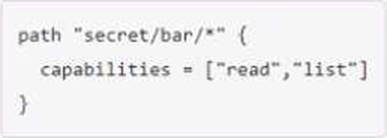
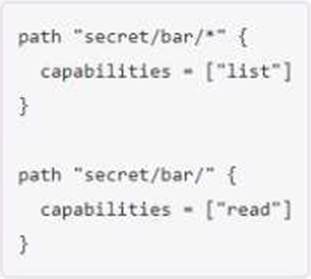
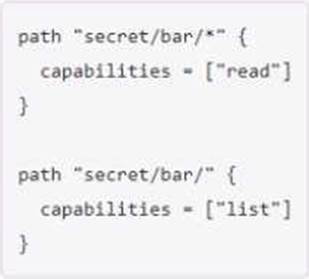
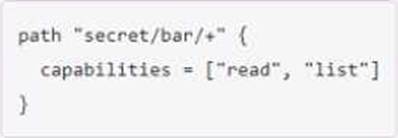
You have been tasked with writing a policy that will allow read permissions for all secrets at path secret/bar. The users that are assigned this policy should also be able to list the secrets.
What should this policy look like?
A)
B)
C)
D)
- A . Option A
- B . Option B
- C . Option C
- D . Option D
C
Explanation:
This policy would allow read permissions for all secrets at path secret/bar, as well as list permissions for the secret/bar/ path. The list permission is required to be able to see the names of the secrets under a given path1. The wildcard () character matches any number of characters within a single path segment, while the slash (/) character matches the end of the path2. Therefore, the policy would grant read access to any secret that starts with secret/bar/, such as secret/bar/foo or secret/bar/baz, but not to secret/bar itself. To grant list access to secret/bar, the policy needs to specify the exact path with a slash at the end. This policy follows the principle of least privilege, which means that it only grants the minimum permissions necessary for the users to perform their tasks3.
The other options are not correct because they either grant too much or too little permissions.
Option A would grant both read and list permissions to all secrets under secret/bar, which is more than what is required.
Option B would grant list permissions to all secrets under secret/bar, but only read permissions to secret/bar itself, which is not what is required.
Option D would use an invalid character (+) in the policy, which would cause an error.
Reference: Policy Syntax | Vault | HashiCorp Developer
Policy Syntax | Vault | HashiCorp Developer
Policies | Vault | HashiCorp Developer
What is the default maximum time-to-live (TTL) for a token, measured in days?
- A . 32 days (768 hours)
- B . 7 days (168 hours)
- C . 14 days (336 hours)
- D . 31 days (744 hours)
A
Explanation:
Comprehensive and Detailed in Depth
A: Vault’s default max TTL is 768 hours (32 days). Correct. B, C, D: Incorrect values per Vault’s defaults.
Overall Explanation from Vault Docs:
“The system max TTL is 768 hours (32 days) unless overridden…”
Reference: https://developer.hashicorp.com/vault/docs/concepts/tokens#token-time-to-live-periodic-tokens-and-explicit-max-ttls
During a service outage, you must ensure all current tokens and leases are copied to another Vault cluster for failover so applications don’t need to authenticate.
How can you accomplish this?
- A . Have Vault write all the tokens and leases to a file so you have a second copy of them
- B . Configure all applications to use the auto-auth feature of the Vault Agent
- C . Configure Disaster Recovery replication and promote the secondary cluster during an outage
- D . Replicate to another cluster using Performance Replication and promote the secondary cluster during an outage
C
Explanation:
Comprehensive and Detailed in Depth
A: Insecure and manual; not a Vault feature. Incorrect.
B: Auto-auth doesn’t replicate tokens/leases. Incorrect.
C: DR replication mirrors tokens and leases; promotion enables failover. Correct.
D: Performance replication doesn’t replicate tokens fully. Incorrect.
Overall Explanation from Vault Docs:
“Disaster Recovery replication mirrors tokens and leases… Promote the secondary during an outage.”
Reference: https://developer.hashicorp.com/vault/docs/enterprise/replication#replicated-data
Beyond encryption and decryption of data, which of the following is not a function of the Transit secrets engine?
- A . Generate hashes and HMACs of data
- B . Sign and verify data
- C . Store the encrypted data securely in Vault for retrieval
- D . Act as a source of random bytes
C
Explanation:
Comprehensive and Detailed in Depth
The Transit secrets engine focuses on cryptographic operations, not storage. The HashiCorp Vault documentation states: "The transit secrets engine handles cryptographic functions on data in-transit. Vault doesn’t store the data sent to the secrets engine. It can also be viewed as ‘cryptography as a service’ or ‘encryption as a service’. The transit secrets engine can also sign and verify data; generate hashes and HMACs of data; and act as a source of random bytes."
It emphasizes: "Vault does not store the data sent to the secrets engine," making store the encrypted data (C) incorrect. Generate hashes/HMACs (A), sign/verify (B), and random bytes (D) are all supported functions. Thus, C is correct.
Reference: HashiCorp Vault Documentation – Transit Secrets Engine
True or False? Once the lease for a dynamic secret has expired, Vault revokes the credentials on the backend platform for which they were created (i.e., database, AWS, Kubernetes).
- A . True
- B . False
A
Explanation:
Comprehensive and Detailed In-Depth
Dynamic secrets are managed actively:
Which of the following cannot define the maximum time-to-live (TTL) for a token?
- A . By the authentication method t natively provide a method of expiring credentials
- B . By the client system f credentials leaking
- C . By the mount endpoint configuration very password used
- D . A parent token TTL e password rotation tools and practices
- E . System max TTL
B
Explanation:
The maximum time-to-live (TTL) for a token is defined by the lowest value among the following factors:
The authentication method that issued the token. Each auth method can have a default and a maximum TTL for the tokens it generates. These values can be configured by the auth method’s mount options or by the auth method’s specific endpoints.
The mount endpoint configuration that the token is accessing. Each secrets engine can have a default
and a maximum TTL for the leases it grants. These values can be configured by the secrets engine’s mount options or by the secrets engine’s specific endpoints.
A parent token TTL. If a token is created by another token, it inherits the remaining TTL of its parent token, unless the parent token has an infinite TTL (such as the root token). A child token cannot outlive its parent token.
System max TTL. This is a global limit for all tokens and leases in Vault. It can be configured by the system backend’s max_lease_ttl option.
The client system that uses the token cannot define the maximum TTL for the token, as this is determined by Vault’s configuration and policies. The client system can only request a specific TTL for the token, but this request is subject to the limits imposed by the factors above.
Reference:
https://developer.hashicorp.com/vault/docs/concepts/tokens3, https://developer.hashicorp.com/vault/docs/concepts/lease2, https://developer.hashicorp.com/vault/docs/commands/auth/tune4, https://developer.hashicorp.com/vault/docs/commands/secrets/tune5, https://developer.hashicorp.com/vault/docs/commands/token/create6
Based on the following output, what command can Steve use to determine if the KV store is configured for versioning?
- A . vault secrets list -all
- B . vault kv get automation
- C . vault secrets list -detailed
- D . vault kv list
C
Explanation:
Comprehensive and Detailed in Depth
To determine if a KV store is configured for versioning (i.e., KV v1 or v2), Steve needs detailed information about the secrets engines. The HashiCorp Vault documentation states: "To list all enabled secrets engines with detailed output, use the command vault secrets list -detailed. This will provide additional information about each secrets engine, including the version of the KV secrets engines." The -detailed flag reveals configuration details, such as the options field indicating version=2 for KV v2, which supports versioning.
vault secrets list -all is not a valid command. vault kv get automation retrieves a specific secret, not engine configuration. vault kv list lists keys in a path, not engine details. Thus, C is correct.
Reference: HashiCorp Vault Documentation – Secrets Engines (Note: Specific command details are from CLI help and tutorials)
True or False? All dynamic secrets in Vault are required to have a lease.
- A . True
- B . False
A
Explanation:
Comprehensive and Detailed in Depth
A: All dynamic secrets (e.g., database creds) have leases for lifecycle management. Correct.
B: Incorrect; leases are mandatory for dynamic secrets.
Overall Explanation from Vault Docs:
“All dynamic secrets in Vault are required to have a lease… forcing consumers to check in routinely.”
Reference: https://developer.hashicorp.com/vault/docs/concepts/lease