
Google Professional Machine Learning Engineer Practice Exams
Last updated on Oct 09,2026- Exam Code: Professional Machine Learning Engineer
- Exam Name: Google Professional Machine Learning Engineer
- Certification Provider: Google
- Latest update: Oct 09,2026
You recently deployed a model to a Vertex Al endpoint Your data drifts frequently so you have enabled request-response logging and created a Vertex Al Model Monitoring job. You have observed that your model is receiving higher traffic than expected. You need to reduce the model monitoring cost while continuing to quickly detect drift.
What should you do?
- A . Replace the monitoring job with a DataFlow pipeline that uses TensorFlow Data Validation (TFDV).
- B . Replace the monitoring job with a custom SQL scnpt to calculate statistics on the features and predictions in BigQuery.
- C . Decrease the sample_rate parameter in the Randomsampleconfig of the monitoring job.
- D . Increase the monitor_interval parameter in the scheduieconfig of the monitoring job.
C
Explanation:
According to the official exam guide1, one of the skills assessed in the exam is to “configure and optimize model monitoring jobs”. The Vertex AI Model Monitoring documentation states that “to reduce the cost of model monitoring, you can configure the sample rate of the requests that are logged and analyzed by model monitoring”. Therefore, decreasing the sample_rate parameter in the Randomsampleconfig of the monitoring job would reduce the model monitoring cost while continuing to quickly detect drift. The other options are not relevant or optimal for this scenario.
Reference: Preparing for Google Cloud Certification: Machine Learning Engineer Professional Certificate Professional ML Engineer Exam Guide
Google Professional Machine Learning Certification Exam 2023
Latest Google Professional Machine Learning Engineer Actual Free Exam Questions [Vertex AI Model Monitoring]
You are developing an ML pipeline using Vertex Al Pipelines. You want your pipeline to upload a new version of the XGBoost model to Vertex Al Model Registry and deploy it to Vertex Al End points for online inference. You want to use the simplest approach.
What should you do?
- A . Use the Vertex Al REST API within a custom component based on a vertex-ai/prediction/xgboost-cpu image.
- B . Use the Vertex Al ModelEvaluationOp component to evaluate the model.
- C . Use the Vertex Al SDK for Python within a custom component based on a python: 3.10 Image.
- D . Chain the Vertex Al ModelUploadOp and ModelDeployop components together.
D
Explanation:
According to the web search results, Vertex AI Pipelines is a serverless orchestrator for running ML pipelines, using either the KFP SDK or TFX1. Vertex AI Pipelines provides a set of prebuilt components that can be used to perform common ML tasks, such as training, evaluation, deployment, and more2. Vertex AI ModelUploadOp and ModelDeployOp are two such components that can be used to upload a new version of the XGBoost model to Vertex AI Model Registry and deploy it to Vertex AI Endpoints for online inference3. Therefore, option D is the best way to use the simplest approach for the given use case, as it only requires chaining two prebuilt components together. The other options are not relevant or optimal for this scenario.
Reference: Vertex AI Pipelines
Google Cloud Pipeline Components
Vertex AI ModelUploadOp and ModelDeployOp
Google Professional Machine Learning Certification Exam 2023
Latest Google Professional Machine Learning Engineer Actual Free Exam Questions
You are working on a classification problem with time series data and achieved an area under the receiver operating characteristic curve (AUC ROC) value of 99% for training data after just a few experiments. You haven’t explored using any sophisticated algorithms or spent any time on hyperparameter tuning.
What should your next step be to identify and fix the problem?
- A . Address the model overfitting by using a less complex algorithm.
- B . Address data leakage by applying nested cross-validation during model training.
- C . Address data leakage by removing features highly correlated with the target value.
- D . Address the model overfitting by tuning the hyperparameters to reduce the AUC ROC value.
B
Explanation:
Data leakage is a problem where information from outside the training dataset is used to create the model, resulting in an overly optimistic or invalid estimate of the model performance. Data leakage can occur in time series data when the temporal order of the data is not preserved during data preparation or model evaluation. For example, if the data is shuffled before splitting into train and test sets, or if future data is used to impute missing values in past data, then data leakage can occur. One way to address data leakage in time series data is to apply nested cross-validation during model training. Nested cross-validation is a technique that allows you to perform both model selection and model evaluation in a robust way, while preserving the temporal order of the data. Nested cross-validation involves two levels of cross-validation: an inner loop for model selection and an outer loop for model evaluation. The inner loop splits the training data into k folds, trains and tunes the model on k-1 folds, and validates the model on the remaining fold. The inner loop repeats this process for each fold and selects the best model based on the validation performance. The outer loop splits the data into n folds, trains the best model from the inner loop on n-1 folds, and tests the model on the remaining fold. The outer loop repeats this process for each fold and evaluates the model performance based on the test results.
Nested cross-validation can help to avoid data leakage in time series data by ensuring that the model is trained and tested on non-overlapping data, and that the data used for validation is never seen by the model during training. Nested cross-validation can also provide a more reliable estimate of the model performance than a single train-test split or a simple cross-validation, as it reduces the variance and bias of the estimate.
Reference: Data Leakage in Machine Learning
How to Avoid Data Leakage When Performing Data Preparation Classification on a single time series – prevent leakage between train and test
You are working on a classification problem with time series data and achieved an area under the receiver operating characteristic curve (AUC ROC) value of 99% for training data after just a few experiments. You haven’t explored using any sophisticated algorithms or spent any time on hyperparameter tuning.
What should your next step be to identify and fix the problem?
- A . Address the model overfitting by using a less complex algorithm.
- B . Address data leakage by applying nested cross-validation during model training.
- C . Address data leakage by removing features highly correlated with the target value.
- D . Address the model overfitting by tuning the hyperparameters to reduce the AUC ROC value.
B
Explanation:
Data leakage is a problem where information from outside the training dataset is used to create the model, resulting in an overly optimistic or invalid estimate of the model performance. Data leakage can occur in time series data when the temporal order of the data is not preserved during data preparation or model evaluation. For example, if the data is shuffled before splitting into train and test sets, or if future data is used to impute missing values in past data, then data leakage can occur. One way to address data leakage in time series data is to apply nested cross-validation during model training. Nested cross-validation is a technique that allows you to perform both model selection and model evaluation in a robust way, while preserving the temporal order of the data. Nested cross-validation involves two levels of cross-validation: an inner loop for model selection and an outer loop for model evaluation. The inner loop splits the training data into k folds, trains and tunes the model on k-1 folds, and validates the model on the remaining fold. The inner loop repeats this process for each fold and selects the best model based on the validation performance. The outer loop splits the data into n folds, trains the best model from the inner loop on n-1 folds, and tests the model on the remaining fold. The outer loop repeats this process for each fold and evaluates the model performance based on the test results.
Nested cross-validation can help to avoid data leakage in time series data by ensuring that the model is trained and tested on non-overlapping data, and that the data used for validation is never seen by the model during training. Nested cross-validation can also provide a more reliable estimate of the model performance than a single train-test split or a simple cross-validation, as it reduces the variance and bias of the estimate.
Reference: Data Leakage in Machine Learning
How to Avoid Data Leakage When Performing Data Preparation Classification on a single time series – prevent leakage between train and test
You work for a company that sells corporate electronic products to thousands of businesses worldwide. Your company stores historical customer data in BigQuery. You need to build a model that predicts customer lifetime value over the next three years. You want to use the simplest approach to build the model and you want to have access to visualization tools.
What should you do?
- A . Create a Vertex Al Workbench notebook to perform exploratory data analysis. Use IPython magics to create a new BigQuery table with input features Use the BigQuery console to run the create model statement Validate the results by using the ml. evaluate and ml. predict statements.
- B . Run the create model statement from the BigQuery console to create an AutoML model Validate the results by using the ml. evaluate and ml. predict statements.
- C . Create a Vertex Al Workbench notebook to perform exploratory data analysis and create input features Save the features as a CSV file in Cloud Storage Import the CSV file as a new BigQuery table Use the BigQuery console to run the create model statement Validate the results by using the ml. evaluate and ml. predict statements.
- D . Create a Vertex Al Workbench notebook to perform exploratory data analysis Use IPython magics to create a new BigQuery table with input features, create the model and validate the results by using the create model, ml. evaluates, and ml. predict statements.
B
Explanation:
BigQuery is a service that allows you to store and query large amounts of data in a scalable and cost-effective way. You can use BigQuery to build a model that predicts customer lifetime value over the next three years, by using the create model statement. The create model statement is a SQL command that allows you to create and train an ML model using your data in BigQuery. You can use the create model statement to create an AutoML model, which is a type of model that automatically selects the best features and architecture for your data. By using an AutoML model, you can use the simplest approach to build the model, without writing any code or performing any feature engineering. You can also use the ml.evaluate and ml.predict statements to validate the results of your model. The ml.evaluate statement is a SQL command that allows you to evaluate the performance and quality of your model using various metrics. The ml.predict statement is a SQL command that allows you to make predictions using your model and new data. You can also use the BigQuery console to access visualization tools, such as charts and graphs, to explore and analyze your data and model results. By using the BigQuery console, the create model statement, and the ml.evaluate and ml.predict statements, you can build and validate a model that predicts customer lifetime value over the next three years, and have access to visualization tools.
Reference: BigQuery documentation
create model statement documentation
ml.evaluate statement documentation
ml.predict statement documentation
Preparing for Google Cloud Certification: Machine Learning Engineer Professional Certificate
You developed a Vertex Al pipeline that trains a classification model on data stored in a large BigQuery table. The pipeline has four steps, where each step is created by a Python function that uses the KubeFlow v2 API.
The components have the following names:

You launch your Vertex Al pipeline as the following:
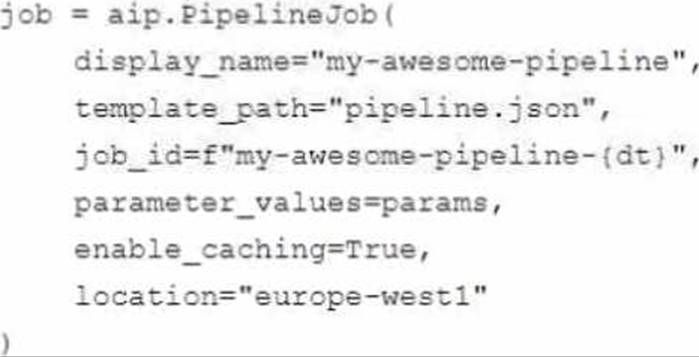
You perform many model iterations by adjusting the code and parameters of the training step. You observe high costs associated with the development, particularly the data export and preprocessing steps. You need to reduce model development costs.
What should you do?
A)

B)

C)

D)

- A . Option A
- B . Option B
- C . Option C
- D . Option D
A
Explanation:
According to the official exam guide1, one of the skills assessed in the exam is to “automate and orchestrate ML pipelines using Cloud Composer”. Vertex AI Pipelines2 is a service that allows you to orchestrate your ML workflows using Kubeflow Pipelines SDK v2 or TensorFlow Extended. Vertex AI Pipelines supports execution caching, which means that if you run a pipeline and it reaches a component that has already been run with the same inputs and parameters, the component does not run again. Instead, the component uses the output from the previous run. This can save you time and resources when you are iterating on your pipeline. Therefore, option A is the best way to reduce model development costs, as it enables execution caching for the data export and preprocessing steps, which are likely to be the same for each model iteration. The other options are not relevant or optimal for this scenario.
Reference: Professional ML Engineer Exam Guide
Vertex AI Pipelines
Google Professional Machine Learning Certification Exam 2023
Latest Google Professional Machine Learning Engineer Actual Free Exam Questions
You developed a Vertex Al pipeline that trains a classification model on data stored in a large BigQuery table. The pipeline has four steps, where each step is created by a Python function that uses the KubeFlow v2 API.
The components have the following names:
You launch your Vertex Al pipeline as the following:
You perform many model iterations by adjusting the code and parameters of the training step. You observe high costs associated with the development, particularly the data export and preprocessing steps. You need to reduce model development costs.
What should you do?
A)
B)
C)
D)
- A . Option A
- B . Option B
- C . Option C
- D . Option D
A
Explanation:
According to the official exam guide1, one of the skills assessed in the exam is to “automate and orchestrate ML pipelines using Cloud Composer”. Vertex AI Pipelines2 is a service that allows you to orchestrate your ML workflows using Kubeflow Pipelines SDK v2 or TensorFlow Extended. Vertex AI Pipelines supports execution caching, which means that if you run a pipeline and it reaches a component that has already been run with the same inputs and parameters, the component does not run again. Instead, the component uses the output from the previous run. This can save you time and resources when you are iterating on your pipeline. Therefore, option A is the best way to reduce model development costs, as it enables execution caching for the data export and preprocessing steps, which are likely to be the same for each model iteration. The other options are not relevant or optimal for this scenario.
Reference: Professional ML Engineer Exam Guide
Vertex AI Pipelines
Google Professional Machine Learning Certification Exam 2023
Latest Google Professional Machine Learning Engineer Actual Free Exam Questions
You developed a Vertex Al pipeline that trains a classification model on data stored in a large BigQuery table. The pipeline has four steps, where each step is created by a Python function that uses the KubeFlow v2 API.
The components have the following names:
You launch your Vertex Al pipeline as the following:
You perform many model iterations by adjusting the code and parameters of the training step. You observe high costs associated with the development, particularly the data export and preprocessing steps. You need to reduce model development costs.
What should you do?
A)
B)
C)
D)
- A . Option A
- B . Option B
- C . Option C
- D . Option D
A
Explanation:
According to the official exam guide1, one of the skills assessed in the exam is to “automate and orchestrate ML pipelines using Cloud Composer”. Vertex AI Pipelines2 is a service that allows you to orchestrate your ML workflows using Kubeflow Pipelines SDK v2 or TensorFlow Extended. Vertex AI Pipelines supports execution caching, which means that if you run a pipeline and it reaches a component that has already been run with the same inputs and parameters, the component does not run again. Instead, the component uses the output from the previous run. This can save you time and resources when you are iterating on your pipeline. Therefore, option A is the best way to reduce model development costs, as it enables execution caching for the data export and preprocessing steps, which are likely to be the same for each model iteration. The other options are not relevant or optimal for this scenario.
Reference: Professional ML Engineer Exam Guide
Vertex AI Pipelines
Google Professional Machine Learning Certification Exam 2023
Latest Google Professional Machine Learning Engineer Actual Free Exam Questions
You are building a TensorFlow text-to-image generative model by using a dataset that contains billions of images with their respective captions. You want to create a low maintenance, automated workflow that reads the data from a Cloud Storage bucket collects statistics, splits the dataset into training/validation/test datasets performs data transformations, trains the model using the training/validation datasets. and validates the model by using the test dataset.
What should you do?
- A . Use the Apache Airflow SDK to create multiple operators that use Dataflow and Vertex Al services Deploy the workflow on Cloud Composer.
- B . Use the MLFlow SDK and deploy it on a Google Kubernetes Engine Cluster Create multiple components that use Dataflow and Vertex Al services.
- C . Use the Kubeflow Pipelines (KFP) SDK to create multiple components that use Dataflow and Vertex Al services Deploy the workflow on Vertex Al Pipelines.
- D . Use the TensorFlow Extended (TFX) SDK to create multiple components that use Dataflow and Vertex Al services Deploy the workflow on Vertex Al Pipelines.
D
Explanation:
According to the web search results, TensorFlow Extended (TFX) is a platform for building end-to-end machine learning pipelines using TensorFlow1. TFX provides a set of components that can be orchestrated using either the TFX SDK or Kubeflow Pipelines. TFX components can handle different aspects of the pipeline, such as data ingestion, data validation, data transformation, model training, model evaluation, model serving, and more. TFX components can also leverage other Google Cloud services, such as Dataflow2 and Vertex AI3. Dataflow is a fully managed service for running Apache Beam pipelines on Google Cloud. Dataflow handles the provisioning and management of the compute resources, as well as the optimization and execution of the pipelines. Vertex AI is a unified platform for machine learning development and deployment. Vertex AI offers various services and tools for building, managing, and serving machine learning models. Therefore, option D is the best way to create a low maintenance, automated workflow for the given use case, as it allows you to use the TFX SDK to define and execute your pipeline components, and use Dataflow and Vertex AI services to scale and optimize your pipeline. The other options are not relevant or optimal for this scenario.
Reference: TensorFlow Extended
Dataflow
Vertex AI
Google Professional Machine Learning Certification Exam 2023
Latest Google Professional Machine Learning Engineer Actual Free Exam Questions
You are developing an ML model that uses sliced frames from video feed and creates bounding boxes around specific objects. You want to automate the following steps in your training pipeline: ingestion and preprocessing of data in Cloud Storage, followed by training and hyperparameter tuning of the object model using Vertex AI jobs, and finally deploying the model to an endpoint. You want to orchestrate the entire pipeline with minimal cluster management.
What approach should you use?
- A . Use Kubeflow Pipelines on Google Kubernetes Engine.
- B . Use Vertex AI Pipelines with TensorFlow Extended (TFX) SDK.
- C . Use Vertex AI Pipelines with Kubeflow Pipelines SDK.
- D . Use Cloud Composer for the orchestration.
B
Explanation:
Option A is incorrect because using Kubeflow Pipelines on Google Kubernetes Engine is not the most convenient way to orchestrate the entire pipeline with minimal cluster management. Kubeflow Pipelines is an open-source platform that allows you to build, run, and manage ML pipelines using containers1. Google Kubernetes Engine is a service that allows you to create and manage clusters of virtual machines that run Kubernetes, an open-source system for orchestrating containerized applications2. However, this option requires more effort and resources than option B, as it involves creating and configuring the clusters, installing and maintaining Kubeflow Pipelines, and writing and running the pipeline code.
Option B is correct because using Vertex AI Pipelines with TensorFlow Extended (TFX) SDK is the best way to orchestrate the entire pipeline with minimal cluster management. Vertex AI Pipelines is a service that allows you to create and run scalable and portable ML pipelines on Google Cloud3. TensorFlow Extended (TFX) is a framework that provides a set of components and libraries for building production-ready ML pipelines using TensorFlow4. You can use Vertex AI Pipelines with TFX SDK to ingest and preprocess the data in Cloud Storage, train and tune the object model using Vertex AI jobs, and deploy the model to an endpoint, using predefined or custom components.
Vertex AI Pipelines handles the underlying infrastructure and orchestration for you, so you don’t need to worry about cluster management or scalability.
Option C is incorrect because using Vertex AI Pipelines with Kubeflow Pipelines SDK is not the most suitable way to orchestrate the entire pipeline with minimal cluster management. Kubeflow Pipelines SDK is a library that allows you to build and run ML pipelines using Kubeflow Pipelines5. You can use Vertex AI Pipelines with Kubeflow Pipelines SDK to create and run ML pipelines on Google Cloud, using containers. However, this option is less convenient and consistent than option B, as it requires you to use different APIs and tools for different steps of the pipeline, such as Vertex AI SDK for training and deployment, and Kubeflow Pipelines SDK for ingestion and preprocessing. Moreover, this option does not leverage the benefits of TFX, such as the standard components, the metadata store, or the ML Metadata library.
Option D is incorrect because using Cloud Composer for the orchestration is not the most efficient way to orchestrate the entire pipeline with minimal cluster management. Cloud Composer is a service that allows you to create and run workflows using Apache Airflow, an open-source platform for orchestrating complex tasks. You can use Cloud Composer to orchestrate the entire pipeline, by creating and managing DAGs (directed acyclic graphs) that define the dependencies and order of the tasks. However, this option is more complex and costly than option B, as it involves creating and configuring the environments, installing and maintaining Airflow, and writing and running the DAGs.
Reference: Kubeflow Pipelines documentation
Google Kubernetes Engine documentation
Vertex AI Pipelines documentation
TensorFlow Extended documentation
Kubeflow Pipelines SDK documentation
[Cloud Composer documentation]
[Vertex AI documentation]
[Cloud Storage documentation]
[TensorFlow documentation]