
Google Professional Machine Learning Engineer Practice Exams
Last updated on Oct 10,2026- Exam Code: Professional Machine Learning Engineer
- Exam Name: Google Professional Machine Learning Engineer
- Certification Provider: Google
- Latest update: Oct 10,2026
You have trained a deep neural network model on Google Cloud. The model has low loss on the training data, but is performing worse on the validation data. You want the model to be resilient to overfitting.
Which strategy should you use when retraining the model?
- A . Apply a dropout parameter of 0 2, and decrease the learning rate by a factor of 10
- B . Apply a L2 regularization parameter of 0.4, and decrease the learning rate by a factor of 10.
- C . Run a hyperparameter tuning job on Al Platform to optimize for the L2 regularization and dropout parameters
- D . Run a hyperparameter tuning job on Al Platform to optimize for the learning rate, and increase the number of neurons by a factor of 2.
C
Explanation:
Overfitting occurs when a model tries to fit the training data so closely that it does not generalize well to new data. Overfitting can be caused by having a model that is too complex for the data, such as having too many parameters or layers. Overfitting can lead to poor performance on the validation data, which reflects how the model will perform on unseen data1
To prevent overfitting, one strategy is to use regularization techniques that penalize the complexity of the model and encourage it to learn simpler patterns. Two common regularization techniques for deep neural networks are L2 regularization and dropout. L2 regularization adds a term to the loss function that is proportional to the squared magnitude of the model’s weights. This term penalizes large weights and encourages the model to use smaller weights. Dropout randomly drops out some units in the network during training, which prevents co-adaptation of features and reduces the effective number of parameters. Both L2 regularization and dropout have hyperparameters that control the strength of the regularization effect23
Another strategy to prevent overfitting is to use hyperparameter tuning, which is the process of finding the optimal values for the parameters of the model that affect its performance. Hyperparameter tuning can help find the best combination of hyperparameters that minimize the validation loss and improve the generalization ability of the model. AI Platform provides a service for hyperparameter tuning that can run multiple trials in parallel and use different search algorithms to find the best solution.
Therefore, the best strategy to use when retraining the model is to run a hyperparameter tuning job on AI Platform to optimize for the L2 regularization and dropout parameters. This will allow the model to find the optimal balance between fitting the training data and generalizing to new data. The other options are not as effective, as they either use fixed values for the regularization parameters, which may not be optimal, or they do not address the issue of overfitting at all.
References: 1: Generalization: Peril of Overfitting 2: Regularization for Deep Learning 3: Dropout: A Simple Way to Prevent Neural Networks from Overfitting: [Hyperparameter tuning overview]
You have a custom job that runs on Vertex Al on a weekly basis The job is Implemented using a proprietary ML workflow that produces the datasets. models, and custom artifacts, and sends them to a Cloud Storage bucket Many different versions of the datasets and models were created Due to compliance requirements, your company needs to track which model was used for making a particular prediction, and needs access to the artifacts for each model.
How should you configure your workflows to meet these requirement?
- A . Configure a TensorFlow Extended (TFX) ML Metadata database, and use the ML Metadata API.
- B . Create a Vertex Al experiment, and enable autologging inside the custom job
- C . Use the Vertex Al Metadata API inside the custom Job to create context, execution, and artifacts for each model, and use events to link them together.
- D . Register each model in Vertex Al Model Registry, and use model labels to store the related dataset and model information.
You work at a large organization that recently decided to move their ML and data workloads to Google Cloud. The data engineering team has exported the structured data to a Cloud Storage bucket in Avro format. You need to propose a workflow that performs analytics, creates features, and hosts the features that your ML models use for online prediction.
How should you configure the pipeline?
- A . Ingest the Avro files into Cloud Spanner to perform analytics Use a Dataflow pipeline to create the features and store them in BigQuery for online prediction.
- B . Ingest the Avro files into BigQuery to perform analytics Use a Dataflow pipeline to create the features, and store them in Vertex Al Feature Store for online prediction.
- C . Ingest the Avro files into BigQuery to perform analytics Use BigQuery SQL to create features and store them in a separate BigQuery table for online prediction.
- D . Ingest the Avro files into Cloud Spanner to perform analytics. Use a Dataflow pipeline to create the features. and store them in Vertex Al Feature Store for online prediction.
B
Explanation:
BigQuery is a service that allows you to store and query large amounts of data in a scalable and cost-effective way. You can use BigQuery to ingest the Avro files from the Cloud Storage bucket and perform analytics on the structured data. Avro is a binary file format that can store complex data types and schemas. You can use the bq load command or the BigQuery API to load the Avro files into a BigQuery table. You can then use SQL queries to analyze the data and generate insights. Dataflow is a service that allows you to create and run scalable and portable data processing pipelines on Google Cloud. You can use Dataflow to create the features for your ML models, such as transforming, aggregating, and encoding the data. You can use the Apache Beam SDK to write your Dataflow pipeline code in Python or Java. You can also use the built-in transforms or custom transforms to apply the feature engineering logic to your data. Vertex AI Feature Store is a service that allows you to store and manage your ML features on Google Cloud. You can use Vertex AI Feature Store to host the features that your ML models use for online prediction. Online prediction is a type of prediction that provides low-latency responses to individual or small batches of input data. You can use the Vertex AI Feature Store API to write the features from your Dataflow pipeline to a feature store entity type. You can then use the Vertex AI Feature Store online serving API to read the features from the feature store and pass them to your ML models for online prediction. By using BigQuery, Dataflow, and Vertex AI Feature Store, you can configure a pipeline that performs analytics, creates features, and hosts the features that your ML models use for online prediction.
Reference: BigQuery documentation
Dataflow documentation
Vertex AI Feature Store documentation
Preparing for Google Cloud Certification: Machine Learning Engineer Professional Certificate
You are an ML engineer at a travel company. You have been researching customers’ travel behavior for many years, and you have deployed models that predict customers’ vacation patterns. You have observed that customers’ vacation destinations vary based on seasonality and holidays; however, these seasonal variations are similar across years. You want to quickly and easily store and compare the model versions and performance statistics across years.
What should you do?
- A . Store the performance statistics in Cloud SQL. Query that database to compare the performance statistics across the model versions.
- B . Create versions of your models for each season per year in Vertex AI. Compare the performance statistics across the models in the Evaluate tab of the Vertex AI UI.
- C . Store the performance statistics of each pipeline run in Kubeflow under an experiment for each season per year. Compare the results across the experiments in the Kubeflow UI.
- D . Store the performance statistics of each version of your models using seasons and years as events in Vertex ML Metadata. Compare the results across the slices.
D
Explanation:
Option A is incorrect because Cloud SQL is a relational database service that is not designed for storing and comparing model performance statistics. It would require writing complex SQL queries to perform the comparison, and it would not provide any visualization or analysis tools.
Option B is incorrect because Vertex AI does not support creating versions of models for each season per year. Vertex AI models are versioned based on the training data and hyperparameters, not on external factors such as seasonality or holidays. Moreover, the Evaluate tab of the Vertex AI UI only shows the performance metrics of a single model version, not across multiple versions.
Option C is incorrect because Kubeflow is a different platform than Vertex AI, and it does not integrate well with Vertex AI Pipelines. Kubeflow experiments are used to group pipeline runs that share a common goal or objective, not to compare performance statistics across different seasons or years. Kubeflow UI does not provide any tools to compare the results across the experiments, and it would require switching between different platforms to access the data.
Option D is correct because Vertex ML Metadata is a service that allows storing and tracking metadata associated with machine learning workflows, such as models, datasets, metrics, and events. Events are user-defined labels that can be used to group or slice the metadata for analysis. By using seasons and years as events, you can easily store and compare the performance statistics of each version of your models across different time periods. Vertex ML Metadata also provides tools to visualize and analyze the metadata, such as the ML Metadata Explorer and the What-If Tool.
You are going to train a DNN regression model with Keras APIs using this code:
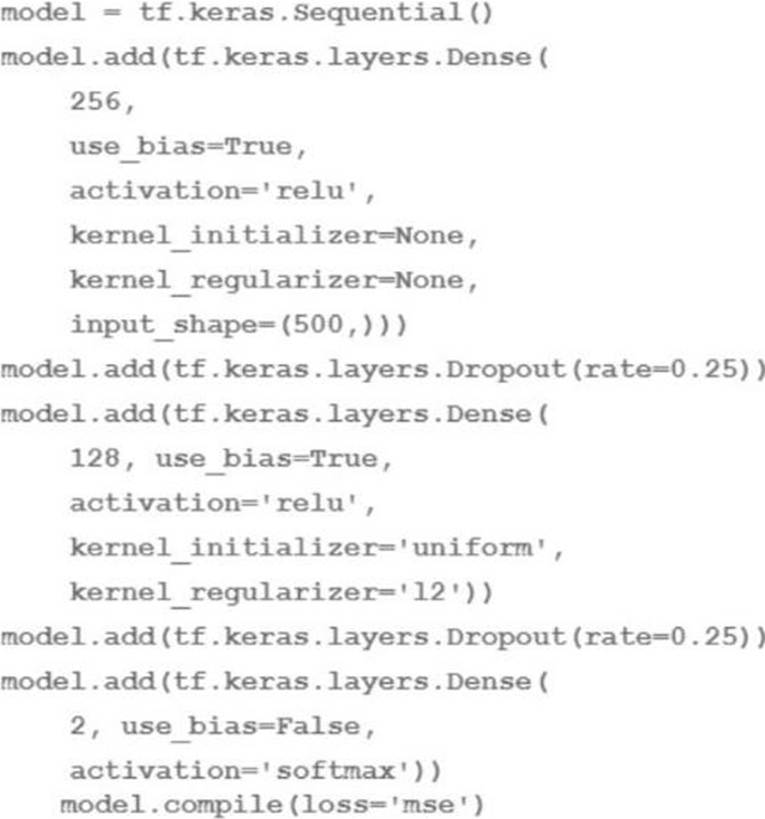
How many trainable weights does your model have? (The arithmetic below is correct.)
- A . 501*256+257*128+2 161154
- B . 500*256+256*128+128*2 161024
- C . 501*256+257*128+128*2161408
- D . 500*256*0 25+256*128*0 25+128*2 40448
B
Explanation:
The number of trainable weights in a DNN regression model with Keras APIs can be calculated by multiplying the number of input units by the number of output units for each layer, and adding the number of bias units for each layer. The bias units are usually equal to the number of output units, except for the last layer, which does not have bias units if the activation function is softmax1. In this code, the model has three layers: a dense layer with 256 units and relu activation, a dropout layer with 0.25 rate, and a dense layer with 2 units and softmax activation. The input shape is 500.
Therefore, the number of trainable weights is:
For the first layer: 500 input units * 256 output units + 256 bias units 128256
For the second layer: The dropout layer does not have any trainable weights, as it only randomly sets some of the input units to zero to prevent overfitting2.
For the third layer: 256 input units * 2 output units + 0 bias units 512
The total number of trainable weights is 128256 + 512 161024. Therefore, the correct answer is B.
Reference: How to calculate the number of parameters for a Convolutional Neural Network?
Dropout (keras.io)
You are going to train a DNN regression model with Keras APIs using this code:
How many trainable weights does your model have? (The arithmetic below is correct.)
- A . 501*256+257*128+2 161154
- B . 500*256+256*128+128*2 161024
- C . 501*256+257*128+128*2161408
- D . 500*256*0 25+256*128*0 25+128*2 40448
B
Explanation:
The number of trainable weights in a DNN regression model with Keras APIs can be calculated by multiplying the number of input units by the number of output units for each layer, and adding the number of bias units for each layer. The bias units are usually equal to the number of output units, except for the last layer, which does not have bias units if the activation function is softmax1. In this code, the model has three layers: a dense layer with 256 units and relu activation, a dropout layer with 0.25 rate, and a dense layer with 2 units and softmax activation. The input shape is 500.
Therefore, the number of trainable weights is:
For the first layer: 500 input units * 256 output units + 256 bias units 128256
For the second layer: The dropout layer does not have any trainable weights, as it only randomly sets some of the input units to zero to prevent overfitting2.
For the third layer: 256 input units * 2 output units + 0 bias units 512
The total number of trainable weights is 128256 + 512 161024. Therefore, the correct answer is B.
Reference: How to calculate the number of parameters for a Convolutional Neural Network?
Dropout (keras.io)
Your team is building a convolutional neural network (CNN)-based architecture from scratch. The preliminary experiments running on your on-premises CPU-only infrastructure were encouraging, but have slow convergence. You have been asked to speed up model training to reduce time-to-market. You want to experiment with virtual machines (VMs) on Google Cloud to leverage more powerful hardware. Your code does not include any manual device placement and has not been wrapped in Estimator model-level abstraction.
Which environment should you train your model on?
- A . AVM on Compute Engine and 1 TPU with all dependencies installed manually.
- B . AVM on Compute Engine and 8 GPUs with all dependencies installed manually.
- C . A Deep Learning VM with an n1-standard-2 machine and 1 GPU with all libraries pre-installed.
- D . A Deep Learning VM with more powerful CPU e2-highcpu-16 machines with all libraries pre-installed.
C
Explanation:
In this scenario, the goal is to speed up model training for a CNN-based architecture on Google Cloud. The code does not include any manual device placement and has not been wrapped in Estimator model-level abstraction. Given these constraints, the best environment to train the model on would be a Deep Learning VM with an n1-standard-2 machine and 1 GPU with all libraries pre-installed.
Option C is the correct answer.
Option C: A Deep Learning VM with an n1-standard-2 machine and 1 GPU with all libraries pre-installed. This option is the most suitable for the scenario because it provides a ready-to-use environment for deep learning on Google Cloud. A Deep Learning VM is a specialized VM image that is pre-installed with popular deep learning frameworks such as TensorFlow, PyTorch, Keras, and more. A Deep Learning VM also comes with NVIDIA GPU drivers and CUDA libraries that enable GPU acceleration for model training. A Deep Learning VM can be easily configured and launched from the Google Cloud Console or the Cloud SDK. An n1-standard-2 machine is a general-purpose machine type that provides 2 vCPUs and 7.5 GB of memory. This machine type can be sufficient for running a CNN-based architecture. A GPU is a specialized hardware accelerator that can speed up the computation of matrix operations and convolutions, which are common in CNN-based architectures. By using a Deep Learning VM with an n1-standard-2 machine and 1 GPU, the model training can be significantly faster than on an on-premises CPU-only infrastructure.
Option A: A VM on Compute Engine and 1 TPU with all dependencies installed manually. This option is not suitable for the scenario because it requires manual installation of dependencies and device placement. A TPU is a custom-designed ASIC that can provide high performance and efficiency for TensorFlow models. However, to use a TPU, the code needs to include manual device placement and be wrapped in Estimator model-level abstraction. Moreover, to use a TPU, the dependencies such as TensorFlow, Cloud TPU Client, and Cloud Storage need to be installed manually on the VM. This option can be complex and time-consuming to set up and may not be compatible with the existing code.
Option B: A VM on Compute Engine and 8 GPUs with all dependencies installed manually. This option is not suitable for the scenario because it requires manual installation of dependencies and may not be cost-effective. While using 8 GPUs can provide high parallelism and speed for model training, it also increases the cost and complexity of the environment. Moreover, to use GPUs, the dependencies such as NVIDIA GPU drivers, CUDA libraries, and deep learning frameworks need to be installed manually on the VM. This option can be tedious and error-prone to set up and may not be necessary for the scenario.
Option D: A Deep Learning VM with more powerful CPU e2-highcpu-16 machines with all libraries pre-installed. This option is not suitable for the scenario because it does not leverage GPU acceleration for model training. While using more powerful CPU machines can provide more compute resources and memory for model training, it may not be as fast and efficient as using GPU machines. CPU machines are not optimized for matrix operations and convolutions, which are common in CNN-based architectures. Moreover, using more powerful CPU machines can also increase the cost of the environment. This option can be suboptimal and wasteful for the scenario.
Reference: Deep Learning VM Image documentation
Compute Engine documentation
Cloud TPU documentation
Machine types documentation
GPUs on Compute Engine documentation
Your team is building a convolutional neural network (CNN)-based architecture from scratch. The preliminary experiments running on your on-premises CPU-only infrastructure were encouraging, but have slow convergence. You have been asked to speed up model training to reduce time-to-market. You want to experiment with virtual machines (VMs) on Google Cloud to leverage more powerful hardware. Your code does not include any manual device placement and has not been wrapped in Estimator model-level abstraction.
Which environment should you train your model on?
- A . AVM on Compute Engine and 1 TPU with all dependencies installed manually.
- B . AVM on Compute Engine and 8 GPUs with all dependencies installed manually.
- C . A Deep Learning VM with an n1-standard-2 machine and 1 GPU with all libraries pre-installed.
- D . A Deep Learning VM with more powerful CPU e2-highcpu-16 machines with all libraries pre-installed.
C
Explanation:
In this scenario, the goal is to speed up model training for a CNN-based architecture on Google Cloud. The code does not include any manual device placement and has not been wrapped in Estimator model-level abstraction. Given these constraints, the best environment to train the model on would be a Deep Learning VM with an n1-standard-2 machine and 1 GPU with all libraries pre-installed.
Option C is the correct answer.
Option C: A Deep Learning VM with an n1-standard-2 machine and 1 GPU with all libraries pre-installed. This option is the most suitable for the scenario because it provides a ready-to-use environment for deep learning on Google Cloud. A Deep Learning VM is a specialized VM image that is pre-installed with popular deep learning frameworks such as TensorFlow, PyTorch, Keras, and more. A Deep Learning VM also comes with NVIDIA GPU drivers and CUDA libraries that enable GPU acceleration for model training. A Deep Learning VM can be easily configured and launched from the Google Cloud Console or the Cloud SDK. An n1-standard-2 machine is a general-purpose machine type that provides 2 vCPUs and 7.5 GB of memory. This machine type can be sufficient for running a CNN-based architecture. A GPU is a specialized hardware accelerator that can speed up the computation of matrix operations and convolutions, which are common in CNN-based architectures. By using a Deep Learning VM with an n1-standard-2 machine and 1 GPU, the model training can be significantly faster than on an on-premises CPU-only infrastructure.
Option A: A VM on Compute Engine and 1 TPU with all dependencies installed manually. This option is not suitable for the scenario because it requires manual installation of dependencies and device placement. A TPU is a custom-designed ASIC that can provide high performance and efficiency for TensorFlow models. However, to use a TPU, the code needs to include manual device placement and be wrapped in Estimator model-level abstraction. Moreover, to use a TPU, the dependencies such as TensorFlow, Cloud TPU Client, and Cloud Storage need to be installed manually on the VM. This option can be complex and time-consuming to set up and may not be compatible with the existing code.
Option B: A VM on Compute Engine and 8 GPUs with all dependencies installed manually. This option is not suitable for the scenario because it requires manual installation of dependencies and may not be cost-effective. While using 8 GPUs can provide high parallelism and speed for model training, it also increases the cost and complexity of the environment. Moreover, to use GPUs, the dependencies such as NVIDIA GPU drivers, CUDA libraries, and deep learning frameworks need to be installed manually on the VM. This option can be tedious and error-prone to set up and may not be necessary for the scenario.
Option D: A Deep Learning VM with more powerful CPU e2-highcpu-16 machines with all libraries pre-installed. This option is not suitable for the scenario because it does not leverage GPU acceleration for model training. While using more powerful CPU machines can provide more compute resources and memory for model training, it may not be as fast and efficient as using GPU machines. CPU machines are not optimized for matrix operations and convolutions, which are common in CNN-based architectures. Moreover, using more powerful CPU machines can also increase the cost of the environment. This option can be suboptimal and wasteful for the scenario.
Reference: Deep Learning VM Image documentation
Compute Engine documentation
Cloud TPU documentation
Machine types documentation
GPUs on Compute Engine documentation
Your team is building a convolutional neural network (CNN)-based architecture from scratch. The preliminary experiments running on your on-premises CPU-only infrastructure were encouraging, but have slow convergence. You have been asked to speed up model training to reduce time-to-market. You want to experiment with virtual machines (VMs) on Google Cloud to leverage more powerful hardware. Your code does not include any manual device placement and has not been wrapped in Estimator model-level abstraction.
Which environment should you train your model on?
- A . AVM on Compute Engine and 1 TPU with all dependencies installed manually.
- B . AVM on Compute Engine and 8 GPUs with all dependencies installed manually.
- C . A Deep Learning VM with an n1-standard-2 machine and 1 GPU with all libraries pre-installed.
- D . A Deep Learning VM with more powerful CPU e2-highcpu-16 machines with all libraries pre-installed.
C
Explanation:
In this scenario, the goal is to speed up model training for a CNN-based architecture on Google Cloud. The code does not include any manual device placement and has not been wrapped in Estimator model-level abstraction. Given these constraints, the best environment to train the model on would be a Deep Learning VM with an n1-standard-2 machine and 1 GPU with all libraries pre-installed.
Option C is the correct answer.
Option C: A Deep Learning VM with an n1-standard-2 machine and 1 GPU with all libraries pre-installed. This option is the most suitable for the scenario because it provides a ready-to-use environment for deep learning on Google Cloud. A Deep Learning VM is a specialized VM image that is pre-installed with popular deep learning frameworks such as TensorFlow, PyTorch, Keras, and more. A Deep Learning VM also comes with NVIDIA GPU drivers and CUDA libraries that enable GPU acceleration for model training. A Deep Learning VM can be easily configured and launched from the Google Cloud Console or the Cloud SDK. An n1-standard-2 machine is a general-purpose machine type that provides 2 vCPUs and 7.5 GB of memory. This machine type can be sufficient for running a CNN-based architecture. A GPU is a specialized hardware accelerator that can speed up the computation of matrix operations and convolutions, which are common in CNN-based architectures. By using a Deep Learning VM with an n1-standard-2 machine and 1 GPU, the model training can be significantly faster than on an on-premises CPU-only infrastructure.
Option A: A VM on Compute Engine and 1 TPU with all dependencies installed manually. This option is not suitable for the scenario because it requires manual installation of dependencies and device placement. A TPU is a custom-designed ASIC that can provide high performance and efficiency for TensorFlow models. However, to use a TPU, the code needs to include manual device placement and be wrapped in Estimator model-level abstraction. Moreover, to use a TPU, the dependencies such as TensorFlow, Cloud TPU Client, and Cloud Storage need to be installed manually on the VM. This option can be complex and time-consuming to set up and may not be compatible with the existing code.
Option B: A VM on Compute Engine and 8 GPUs with all dependencies installed manually. This option is not suitable for the scenario because it requires manual installation of dependencies and may not be cost-effective. While using 8 GPUs can provide high parallelism and speed for model training, it also increases the cost and complexity of the environment. Moreover, to use GPUs, the dependencies such as NVIDIA GPU drivers, CUDA libraries, and deep learning frameworks need to be installed manually on the VM. This option can be tedious and error-prone to set up and may not be necessary for the scenario.
Option D: A Deep Learning VM with more powerful CPU e2-highcpu-16 machines with all libraries pre-installed. This option is not suitable for the scenario because it does not leverage GPU acceleration for model training. While using more powerful CPU machines can provide more compute resources and memory for model training, it may not be as fast and efficient as using GPU machines. CPU machines are not optimized for matrix operations and convolutions, which are common in CNN-based architectures. Moreover, using more powerful CPU machines can also increase the cost of the environment. This option can be suboptimal and wasteful for the scenario.
Reference: Deep Learning VM Image documentation
Compute Engine documentation
Cloud TPU documentation
Machine types documentation
GPUs on Compute Engine documentation
You are an ML engineer at a bank that has a mobile application. Management has asked you to build an ML-based biometric authentication for the app that verifies a customer’s identity based on their fingerprint. Fingerprints are considered highly sensitive personal information and cannot be downloaded and stored into the bank databases.
Which learning strategy should you recommend to train and deploy this ML model?
- A . Differential privacy
- B . Federated learning
- C . MD5 to encrypt data
- D . Data Loss Prevention API
B
Explanation:
Federated learning is a machine learning technique that enables organizations to train AI models on decentralized data without centralizing or sharing it1. It allows data privacy, continual learning, and better performance on end-user devices2. Federated learning works by sending the model parameters to the devices, where they are updated locally on the device’s data, and then aggregating the updated parameters on a central server to form a global model3. This way, the data never leaves the device and the model can learn from a large and diverse dataset.
Federated learning is suitable for the use case of building an ML-based biometric authentication for the bank’s mobile app that verifies a customer’s identity based on their fingerprint. Fingerprints are considered highly sensitive personal information and cannot be downloaded and stored into the bank databases. By using federated learning, the bank can train and deploy an ML model that can recognize fingerprints without compromising the data privacy of the customers. The model can also adapt to the variations and changes in the fingerprints over time and improve its accuracy and reliability. Therefore, federated learning is the best learning strategy for this use case.