
Google Professional Machine Learning Engineer Practice Exams
Last updated on Oct 09,2026- Exam Code: Professional Machine Learning Engineer
- Exam Name: Google Professional Machine Learning Engineer
- Certification Provider: Google
- Latest update: Oct 09,2026
You work for an online travel agency that also sells advertising placements on its website to other companies.
You have been asked to predict the most relevant web banner that a user should see next. Security is important to your company. The model latency requirements are 300ms@p99, the inventory is thousands of web banners, and your exploratory analysis has shown that navigation context is a good predictor. You want to Implement the simplest solution.
How should you configure the prediction pipeline?
- A . Embed the client on the website, and then deploy the model on AI Platform Prediction.
- B . Embed the client on the website, deploy the gateway on App Engine, and then deploy the model on AI Platform Prediction.
- C . Embed the client on the website, deploy the gateway on App Engine, deploy the database on Cloud Bigtable for writing and for reading the user’s navigation context, and then deploy the model on AI Platform Prediction.
- D . Embed the client on the website, deploy the gateway on App Engine, deploy the database on Memorystore for writing and for reading the user’s navigation context, and then deploy the model on Google Kubernetes Engine.
A
Explanation:
In this scenario, the goal is to predict the most relevant web banner that a user should see next on an online travel agency’s website. The model needs to have low latency requirements of 300ms@p99, and there are thousands of web banners to choose from. The exploratory analysis has shown that the navigation context is a good predictor. Security is also important to the company. Given these requirements, the best configuration for the prediction pipeline would be to embed the client on the website and deploy the model on AI Platform Prediction.
Option A is the correct answer.
Option A: Embed the client on the website, and then deploy the model on AI Platform Prediction. This option is the simplest solution that meets the requirements. The client can collect the user’s navigation context and send it to the model deployed on AI Platform Prediction for prediction. AI Platform Prediction can handle large-scale prediction requests and has low latency requirements. This option does not require any additional infrastructure or services, making it the simplest solution.
Option B: Embed the client on the website, deploy the gateway on App Engine, and then deploy the model on AI Platform Prediction. This option adds an additional layer of infrastructure by deploying the gateway on App Engine. While App Engine can handle large-scale requests, it adds complexity to the pipeline and may not be necessary for this use case.
Option C: Embed the client on the website, deploy the gateway on App Engine, deploy the database on Cloud Bigtable for writing and for reading the user’s navigation context, and then deploy the model on AI Platform Prediction. This option adds even more complexity to the pipeline by deploying the database on Cloud Bigtable. While Cloud Bigtable can provide fast and scalable access to the user’s navigation context, it may not be needed for this use case. Moreover, Cloud Bigtable may introduce additional latency and cost to the pipeline.
Option D: Embed the client on the website, deploy the gateway on App Engine, deploy the database on Memorystore for writing and for reading the user’s navigation context, and then deploy the model on Google Kubernetes Engine. This option is the most complex and costly solution that does not meet the requirements. Deploying the model on Google Kubernetes Engine requires more management and configuration than AI Platform Prediction. Moreover, Google Kubernetes Engine may not be able to meet the low latency requirements of 300ms@p99. Deploying the database on Memorystore also adds unnecessary overhead and cost to the pipeline.
Reference: AI Platform Prediction documentation
App Engine documentation
Cloud Bigtable documentation
[Memorystore documentation]
[Google Kubernetes Engine documentation]
You work for an online travel agency that also sells advertising placements on its website to other companies.
You have been asked to predict the most relevant web banner that a user should see next. Security is important to your company. The model latency requirements are 300ms@p99, the inventory is thousands of web banners, and your exploratory analysis has shown that navigation context is a good predictor. You want to Implement the simplest solution.
How should you configure the prediction pipeline?
- A . Embed the client on the website, and then deploy the model on AI Platform Prediction.
- B . Embed the client on the website, deploy the gateway on App Engine, and then deploy the model on AI Platform Prediction.
- C . Embed the client on the website, deploy the gateway on App Engine, deploy the database on Cloud Bigtable for writing and for reading the user’s navigation context, and then deploy the model on AI Platform Prediction.
- D . Embed the client on the website, deploy the gateway on App Engine, deploy the database on Memorystore for writing and for reading the user’s navigation context, and then deploy the model on Google Kubernetes Engine.
A
Explanation:
In this scenario, the goal is to predict the most relevant web banner that a user should see next on an online travel agency’s website. The model needs to have low latency requirements of 300ms@p99, and there are thousands of web banners to choose from. The exploratory analysis has shown that the navigation context is a good predictor. Security is also important to the company. Given these requirements, the best configuration for the prediction pipeline would be to embed the client on the website and deploy the model on AI Platform Prediction.
Option A is the correct answer.
Option A: Embed the client on the website, and then deploy the model on AI Platform Prediction. This option is the simplest solution that meets the requirements. The client can collect the user’s navigation context and send it to the model deployed on AI Platform Prediction for prediction. AI Platform Prediction can handle large-scale prediction requests and has low latency requirements. This option does not require any additional infrastructure or services, making it the simplest solution.
Option B: Embed the client on the website, deploy the gateway on App Engine, and then deploy the model on AI Platform Prediction. This option adds an additional layer of infrastructure by deploying the gateway on App Engine. While App Engine can handle large-scale requests, it adds complexity to the pipeline and may not be necessary for this use case.
Option C: Embed the client on the website, deploy the gateway on App Engine, deploy the database on Cloud Bigtable for writing and for reading the user’s navigation context, and then deploy the model on AI Platform Prediction. This option adds even more complexity to the pipeline by deploying the database on Cloud Bigtable. While Cloud Bigtable can provide fast and scalable access to the user’s navigation context, it may not be needed for this use case. Moreover, Cloud Bigtable may introduce additional latency and cost to the pipeline.
Option D: Embed the client on the website, deploy the gateway on App Engine, deploy the database on Memorystore for writing and for reading the user’s navigation context, and then deploy the model on Google Kubernetes Engine. This option is the most complex and costly solution that does not meet the requirements. Deploying the model on Google Kubernetes Engine requires more management and configuration than AI Platform Prediction. Moreover, Google Kubernetes Engine may not be able to meet the low latency requirements of 300ms@p99. Deploying the database on Memorystore also adds unnecessary overhead and cost to the pipeline.
Reference: AI Platform Prediction documentation
App Engine documentation
Cloud Bigtable documentation
[Memorystore documentation]
[Google Kubernetes Engine documentation]
You work for an online travel agency that also sells advertising placements on its website to other companies.
You have been asked to predict the most relevant web banner that a user should see next. Security is important to your company. The model latency requirements are 300ms@p99, the inventory is thousands of web banners, and your exploratory analysis has shown that navigation context is a good predictor. You want to Implement the simplest solution.
How should you configure the prediction pipeline?
- A . Embed the client on the website, and then deploy the model on AI Platform Prediction.
- B . Embed the client on the website, deploy the gateway on App Engine, and then deploy the model on AI Platform Prediction.
- C . Embed the client on the website, deploy the gateway on App Engine, deploy the database on Cloud Bigtable for writing and for reading the user’s navigation context, and then deploy the model on AI Platform Prediction.
- D . Embed the client on the website, deploy the gateway on App Engine, deploy the database on Memorystore for writing and for reading the user’s navigation context, and then deploy the model on Google Kubernetes Engine.
A
Explanation:
In this scenario, the goal is to predict the most relevant web banner that a user should see next on an online travel agency’s website. The model needs to have low latency requirements of 300ms@p99, and there are thousands of web banners to choose from. The exploratory analysis has shown that the navigation context is a good predictor. Security is also important to the company. Given these requirements, the best configuration for the prediction pipeline would be to embed the client on the website and deploy the model on AI Platform Prediction.
Option A is the correct answer.
Option A: Embed the client on the website, and then deploy the model on AI Platform Prediction. This option is the simplest solution that meets the requirements. The client can collect the user’s navigation context and send it to the model deployed on AI Platform Prediction for prediction. AI Platform Prediction can handle large-scale prediction requests and has low latency requirements. This option does not require any additional infrastructure or services, making it the simplest solution.
Option B: Embed the client on the website, deploy the gateway on App Engine, and then deploy the model on AI Platform Prediction. This option adds an additional layer of infrastructure by deploying the gateway on App Engine. While App Engine can handle large-scale requests, it adds complexity to the pipeline and may not be necessary for this use case.
Option C: Embed the client on the website, deploy the gateway on App Engine, deploy the database on Cloud Bigtable for writing and for reading the user’s navigation context, and then deploy the model on AI Platform Prediction. This option adds even more complexity to the pipeline by deploying the database on Cloud Bigtable. While Cloud Bigtable can provide fast and scalable access to the user’s navigation context, it may not be needed for this use case. Moreover, Cloud Bigtable may introduce additional latency and cost to the pipeline.
Option D: Embed the client on the website, deploy the gateway on App Engine, deploy the database on Memorystore for writing and for reading the user’s navigation context, and then deploy the model on Google Kubernetes Engine. This option is the most complex and costly solution that does not meet the requirements. Deploying the model on Google Kubernetes Engine requires more management and configuration than AI Platform Prediction. Moreover, Google Kubernetes Engine may not be able to meet the low latency requirements of 300ms@p99. Deploying the database on Memorystore also adds unnecessary overhead and cost to the pipeline.
Reference: AI Platform Prediction documentation
App Engine documentation
Cloud Bigtable documentation
[Memorystore documentation]
[Google Kubernetes Engine documentation]
You are an ML engineer at a bank. You have developed a binary classification model using AutoML Tables to predict whether a customer will make loan payments on time. The output is used to approve or reject loan requests. One customer’s loan request has been rejected by your model, and the bank’s risks department is asking you to provide the reasons that contributed to the model’s decision.
What should you do?
- A . Use local feature importance from the predictions.
- B . Use the correlation with target values in the data summary page.
- C . Use the feature importance percentages in the model evaluation page.
- D . Vary features independently to identify the threshold per feature that changes the classification.
A
Explanation:
Option A is correct because using local feature importance from the predictions is the best way to provide the reasons that contributed to the model’s decision for a specific customer’s loan request. Local feature importance is a measure of how much each feature affects the prediction for a given instance, relative to the average prediction for the dataset1. AutoML Tables provides local feature importance values for each prediction, which can be accessed using the Vertex AI SDK for Python or the Cloud Console2. By using local feature importance, you can explain why the model rejected the loan request based on the customer’s data.
Option B is incorrect because using the correlation with target values in the data summary page is not a good way to provide the reasons that contributed to the model’s decision for a specific customer’s loan request. The correlation with target values is a measure of how much each feature is linearly related to the target variable for the entire dataset, not for a single instance3. The data summary page in AutoML Tables shows the correlation with target values for each feature, as well as other statistics such as mean, standard deviation, and histogram4. However, these statistics are not useful for explaining the model’s decision for a specific customer, as they do not account for the interactions between features or the non-linearity of the model.
Option C is incorrect because using the feature importance percentages in the model evaluation page is not a good way to provide the reasons that contributed to the model’s decision for a specific customer’s loan request. The feature importance percentages are a measure of how much each feature affects the overall accuracy of the model for the entire dataset, not for a single instance5. The model evaluation page in AutoML Tables shows the feature importance percentages for each feature, as well as other metrics such as precision, recall, and confusion matrix. However, these metrics are not useful for explaining the model’s decision for a specific customer, as they do not reflect the individual contribution of each feature for a given prediction.
Option D is incorrect because varying features independently to identify the threshold per feature that changes the classification is not a feasible way to provide the reasons that contributed to the model’s decision for a specific customer’s loan request. This method involves changing the value of one feature at a time, while keeping the other features constant, and observing how the prediction changes. However, this method is not practical, as it requires making multiple prediction requests, and may not capture the interactions between features or the non-linearity of the model.
Reference: Local feature importance
Getting local feature importance values
Correlation with target values
Data summary page
Feature importance percentages
[Model evaluation page]
[Varying features independently]
You work for a social media company. You want to create a no-code image classification model for an iOS mobile application to identify fashion accessories You have a labeled dataset in Cloud Storage You need to configure a training workflow that minimizes cost and serves predictions with the lowest possible latency What should you do?
- A . Train the model by using AutoML, and register the model in Vertex Al Model Registry Configure your mobile
application to send batch requests during prediction. - B . Train the model by using AutoML Edge and export it as a Core ML model Configure your mobile application
to use the mlmodel file directly. - C . Train the model by using AutoML Edge and export the model as a TFLite model Configure your mobile application to use the tflite file directly
- D . Train the model by using AutoML, and expose the model as a Vertex Al endpoint Configure your mobile application to invoke the endpoint during prediction.
B
Explanation:
AutoML Edge is a service that allows you to train and deploy custom image classification models for mobile devices12. It supports exporting models as Core ML files, which are compatible with iOS applications3.
Using a Core ML model directly on the device eliminates the need for network requests and reduces prediction latency. It also minimizes the cost of serving predictions, as there is no need to pay for cloud resources or network bandwidth.
Option A is incorrect because sending batch requests during prediction does not reduce latency, as the requests still need to be processed by the cloud service. It also incurs more cost than using a local model on the device.
Option C is incorrect because TFLite models are not compatible with iOS applications. TFLite models are designed for Android and other platforms that support TensorFlow Lite4.
Option D is incorrect because exposing the model as a Vertex AI endpoint requires network requests and cloud resources, which increase latency and cost. It also does not leverage the benefits of AutoML Edge, which is optimized for mobile devices.
Your organization’s call center has asked you to develop a model that analyzes customer sentiments in each call. The call center receives over one million calls daily, and data is stored in Cloud Storage. The data collected must not leave the region in which the call originated, and no Personally Identifiable Information (Pll) can be stored or analyzed. The data science team has a third-party tool for visualization and access which requires a SQL ANSI-2011 compliant interface. You need to select components for data processing and for analytics.
How should the data pipeline be designed?
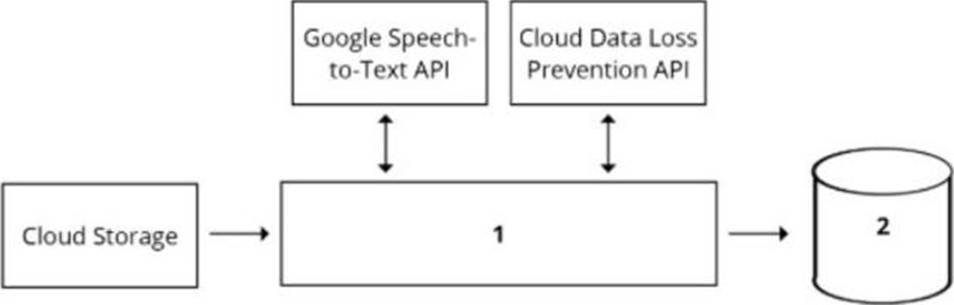
- A . 1 Dataflow, 2 BigQuery
- B . 1 Pub/Sub, 2 Datastore
- C . 1 Dataflow, 2 Cloud SQL
- D . 1 Cloud Function, 2 Cloud SQL
A
Explanation:
A data pipeline is a set of steps or processes that move data from one or more sources to one or more destinations, usually for the purpose of analysis, transformation, or storage. A data pipeline can be designed using various components, such as data sources, data processing tools, data storage systems, and data analytics tools1
To design a data pipeline for analyzing customer sentiments in each call, one should consider the following requirements and constraints:
The call center receives over one million calls daily, and data is stored in Cloud Storage. This implies that the data is large, unstructured, and distributed, and requires a scalable and efficient data processing tool that can handle various types of data formats, such as audio, text, or image.
The data collected must not leave the region in which the call originated, and no Personally Identifiable Information (Pll) can be stored or analyzed. This implies that the data is sensitive and subject to data privacy and compliance regulations, and requires a secure and reliable data storage system that can enforce data encryption, access control, and regional policies.
The data science team has a third-party tool for visualization and access which requires a SQL ANSI-2011 compliant interface. This implies that the data analytics tool is external and independent of the data pipeline, and requires a standard and compatible data interface that can support SQL queries and operations.
One of the best options for selecting components for data processing and for analytics is to use Dataflow for data processing and BigQuery for analytics. Dataflow is a fully managed service for executing Apache Beam pipelines for data processing, such as batch or stream processing, extract-transform-load (ETL), or data integration. BigQuery is a serverless, scalable, and cost-effective data warehouse that allows you to run fast and complex queries on large-scale data23
Using Dataflow and BigQuery has several advantages for this use case:
Dataflow can process large and unstructured data from Cloud Storage in a parallel and distributed manner, and apply various transformations, such as converting audio to text, extracting sentiment scores, or anonymizing PII. Dataflow can also handle both batch and stream processing, which can enable real-time or near-real-time analysis of the call data.
BigQuery can store and analyze the processed data from Dataflow in a secure and reliable way, and enforce data encryption, access control, and regional policies. BigQuery can also support SQL ANSI-2011 compliant interface, which can enable the data science team to use their third-party tool for visualization and access. BigQuery can also integrate with various Google Cloud services and tools, such as AI Platform, Data Studio, or Looker.
Dataflow and BigQuery can work seamlessly together, as they are both part of the Google Cloud ecosystem, and support various data formats, such as CSV, JSON, Avro, or Parquet. Dataflow and BigQuery can also leverage the benefits of Google Cloud infrastructure, such as scalability, performance, and cost-effectiveness.
The other options are not as suitable or feasible. Using Pub/Sub for data processing and Datastore for analytics is not ideal, as Pub/Sub is mainly designed for event-driven and asynchronous messaging, not data processing, and Datastore is mainly designed for low-latency and high-throughput key-value operations, not analytics. Using Cloud Function for data processing and Cloud SQL for analytics is not optimal, as Cloud Function has limitations on the memory, CPU, and execution time, and does not support complex data processing, and Cloud SQL is a relational database service that may not scale well for large-scale data. Using Cloud Composer for data processing and Cloud SQL for analytics is not relevant, as Cloud Composer is mainly designed for orchestrating complex workflows across multiple systems, not data processing, and Cloud SQL is a relational database service that may not scale well for large-scale data.
Reference: 1: Data pipeline 2: Dataflow overview 3: BigQuery overview: [Dataflow documentation]: [BigQuery documentation]
You are responsible for building a unified analytics environment across a variety of on-premises data marts. Your company is experiencing data quality and security challenges when integrating data across the servers, caused by the use of a wide range of disconnected tools and temporary solutions. You need a fully managed, cloud-native data integration service that will lower the total cost of work and reduce repetitive work. Some members on your team prefer a codeless interface for building Extract, Transform, Load (ETL) process.
Which service should you use?
- A . Dataflow
- B . Dataprep
- C . Apache Flink
- D . Cloud Data Fusion
D
Explanation:
Cloud Data Fusion is a fully managed, cloud-native data integration service that helps users efficiently build and manage ETL/ELT data pipelines. It provides a graphical interface to increase time efficiency and reduce complexity, and allows users to easily create and explore data pipelines using a code-free, point and click visual interface. Cloud Data Fusion also supports a broad range of data sources and formats, including on-premises data marts, and ensures data quality and security by using built-in transformation capabilities and Cloud Data Loss Prevention. Cloud Data Fusion lowers the total cost of ownership by handling performance, scalability, availability, security, and compliance needs automatically.
Reference: Cloud Data Fusion documentation
Cloud Data Fusion overview
You are training models in Vertex Al by using data that spans across multiple Google Cloud Projects You need to find track, and compare the performance of the different versions of your models.
Which Google Cloud services should you include in your ML workflow?
- A . Dataplex. Vertex Al Feature Store and Vertex Al TensorBoard
- B . Vertex Al Pipelines, Vertex Al Feature Store, and Vertex Al Experiments
- C . Dataplex. Vertex Al Experiments, and Vertex Al ML Metadata
- D . Vertex Al Pipelines: Vertex Al Experiments and Vertex Al Metadata
B
Explanation:
Vertex AI Pipelines is a service that allows you to orchestrate and automate your machine learning (ML) workflows using pipelines1. A pipeline is a description of an ML workflow, including all of the components in the workflow, how the components are connected as a graph, and the runtime parameters that the pipeline accepts1. Vertex AI Pipelines helps you manage the end-to-end lifecycle of your ML projects, from data preprocessing to model deployment1.
Vertex AI Feature Store is a service that enables you to serve, share, and reuse ML features across different models and projects2. A feature is a measurable property or characteristic of an entity, such as the age of a person or the price of a product2. Vertex AI Feature Store helps you reduce data duplication, ensure data consistency, and improve model performance2.
Vertex AI Experiments is a service that helps you track and compare the performance of different versions of your models3. You can use Vertex AI Experiments to run multiple training jobs with different hyperparameters, architectures, or data sources, and then compare the results using metrics, visualizations, and reports3. Vertex AI Experiments helps you identify the best model for your use case and optimize your model performance3.
Reference: Vertex AI Pipelines | Google Cloud
Vertex AI Feature Store | Google Cloud
Vertex AI Experiments | Google Cloud
You work for a large social network service provider whose users post articles and discuss news. Millions of comments are posted online each day, and more than 200 human moderators constantly review comments and flag those that are inappropriate. Your team is building an ML model to help human moderators check content on the platform. The model scores each comment and flags suspicious comments to be reviewed by a human.
Which metric(s) should you use to monitor the model’s performance?
- A . Number of messages flagged by the model per minute
- B . Number of messages flagged by the model per minute confirmed as being inappropriate by humans.
- C . Precision and recall estimates based on a random sample of 0.1% of raw messages each minute sent to a human for review
- D . Precision and recall estimates based on a sample of messages flagged by the model as potentially inappropriate each minute
D
Explanation:
Precision measures the fraction of messages flagged by the model that are actually inappropriate, while recall measures the fraction of inappropriate messages that are flagged by the model. These metrics are useful for evaluating how well the model can identify and filter out inappropriate comments.
Option A is not a good metric because it does not account for the accuracy of the model. The model might flag many messages that are not inappropriate, or miss many messages that are inappropriate.
Option B is better than option A, but it still does not account for the recall of the model. The model might flag only a few messages that are highly likely to be inappropriate, but miss many other messages that are less obvious but still inappropriate.
Option C is not a good metric because it does not focus on the messages that are flagged by the model. The random sample of 0.1% of raw messages might contain very few inappropriate messages, making the precision and recall estimates unreliable.
You work for a large social network service provider whose users post articles and discuss news. Millions of comments are posted online each day, and more than 200 human moderators constantly review comments and flag those that are inappropriate. Your team is building an ML model to help human moderators check content on the platform. The model scores each comment and flags suspicious comments to be reviewed by a human.
Which metric(s) should you use to monitor the model’s performance?
- A . Number of messages flagged by the model per minute
- B . Number of messages flagged by the model per minute confirmed as being inappropriate by humans.
- C . Precision and recall estimates based on a random sample of 0.1% of raw messages each minute sent to a human for review
- D . Precision and recall estimates based on a sample of messages flagged by the model as potentially inappropriate each minute
D
Explanation:
Precision measures the fraction of messages flagged by the model that are actually inappropriate, while recall measures the fraction of inappropriate messages that are flagged by the model. These metrics are useful for evaluating how well the model can identify and filter out inappropriate comments.
Option A is not a good metric because it does not account for the accuracy of the model. The model might flag many messages that are not inappropriate, or miss many messages that are inappropriate.
Option B is better than option A, but it still does not account for the recall of the model. The model might flag only a few messages that are highly likely to be inappropriate, but miss many other messages that are less obvious but still inappropriate.
Option C is not a good metric because it does not focus on the messages that are flagged by the model. The random sample of 0.1% of raw messages might contain very few inappropriate messages, making the precision and recall estimates unreliable.