
Google Professional Cloud Developer Practice Exams
Last updated on Oct 24,2026- Exam Code: Professional Cloud Developer
- Exam Name: Professional Cloud Developer
- Certification Provider: Google
- Latest update: Oct 24,2026
You have a container deployed on Google Kubernetes Engine. The container can sometimes be slow to launch, so you have implemented a liveness probe. You notice that the liveness probe occasionally fails on launch.
What should you do?
- A . Add a startup probe.
- B . Increase the initial delay for the liveness probe.
- C . Increase the CPU limit for the container.
- D . Add a readiness probe.
B
Explanation:
https://kubernetes.io/docs/tasks/configure-pod-container/configure-liveness-readiness-startup-probes/#configure-probes
You are designing an application that consists of several microservices. Each microservice has its own RESTful API and will be deployed as a separate Kubernetes Service. You want to ensure that the consumers of these APIs aren’t impacted when there is a change to your API, and also ensure that third-party systems aren’t interrupted when new versions of the API are released.
How should you configure the connection to the application following Google-recommended best practices?
- A . Use an Ingress that uses the API’s URL to route requests to the appropriate backend.
- B . Leverage a Service Discovery system, and connect to the backend specified by the request.
- C . Use multiple clusters, and use DNS entries to route requests to separate versioned backends.
- D . Combine multiple versions in the same service, and then specify the API version in the POST request.
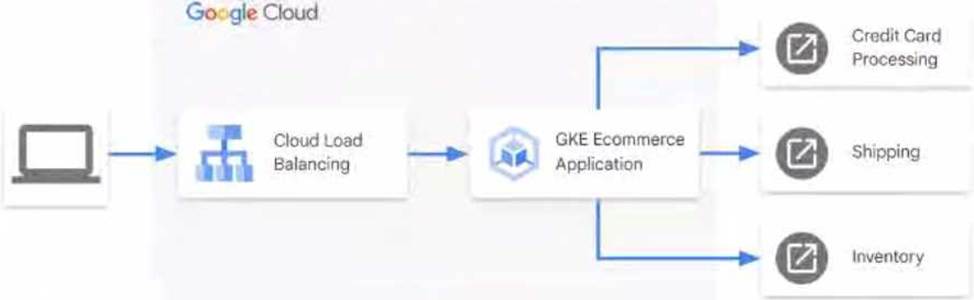
You have an ecommerce application hosted in Google Kubernetes Engine (GKE) that receives external requests and forwards them to third-party APIs external to Google Cloud. The third-party APIs are responsible for credit card processing, shipping, and inventory management using the process shown in the diagram.
Your customers are reporting that the ecommerce application is running slowly at unpredictable times. The application doesn’t report any metrics You need to determine the cause of the inconsistent performance
What should you do?
- A . Install the Ops Agent inside your container and configure it to gather application metrics.
- B . Install the Open Telemetry library for your respective language, and instrument your application.
- C . Modify your application to read and forward the x-Cloud-Trace-context header when it calls the downstream services
D Enable Managed Service for Prometheus on the GKE cluster to gather application metrics.
You have deployed a Java application to Cloud Run. Your application requires access to a database hosted on Cloud SQL Due to regulatory requirements: your connection to the Cloud SQL instance must use its internal IP address.
How should you configure the connectivity while following Google-recommended best practices?
- A . Configure your Cloud Run service with a Cloud SQL connection.
- B . Configure your Cloud Run service to use a Serverless VPC Access connector
- C . Configure your application to use the Cloud SQL Java connector
- D . Configure your application to connect to an instance of the Cloud SQL Auth proxy
HipLocal’s APIs are showing occasional failures, but they cannot find a pattern. They want to collect some metrics to help them troubleshoot.
What should they do?
- A . Take frequent snapshots of all of the VMs.
- B . Install the Stackdriver Logging agent on the VMs.
- C . Install the Stackdriver Monitoring agent on the VMs.
- D . Use Stackdriver Trace to look for performance bottlenecks.
You manage a microservices application on Google Kubernetes Engine (GKE) using Istio. You secure the communication channels between your microservices by implementing an Istio AuthorizationPolicy, a Kubernetes NetworkPolicy, and mTLS on your GKE cluster. You discover that HTTP requests between two Pods to specific URLs fail, while other requests to other URLs succeed.
What is the cause of the connection issue?
- A . A Kubernetes NetworkPolicy resource is blocking HTTP traffic between the Pods.
- B . The Pod initiating the HTTP requests is attempting to connect to the target Pod via an incorrect TCP port.
- C . The Authorization Policy of your cluster is blocking HTTP requests for specific paths within your application.
- D . The cluster has mTLS configured in permissive mode, but the Pod’s sidecar proxy is sending unencrypted traffic in plain text.
Your company just experienced a Google Kubernetes Engine (GKE) API outage due to a zone failure. You want to deploy a highly available GKE architecture that minimizes service interruption to users in the event of a future zone failure.
What should you do?
- A . Deploy Zonal clusters
- B . Deploy Regional clusters
- C . Deploy Multi-Zone clusters
- D . Deploy GKE on-premises clusters
B
Explanation:
https://cloud.google.com/kubernetes-engine/docs/concepts/types-of-clusters#regional_clusters
A regional cluster has multiple replicas of the control plane, running in multiple zones within a given region. Nodes in a regional cluster can run in multiple zones or a single zone depending on the configured node locations. By default, GKE replicates each node pool across three zones of the control plane’s region. When you create a cluster or when you add a new node pool, you can change the default configuration by specifying the zone(s) in which the cluster’s nodes run. All zones must be within the same region as the control plane.
You are developing a microservice-based application that will be deployed on a Google Kubernetes Engine cluster. The application needs to read and write to a Spanner database. You want to follow security best practices while minimizing code changes.
How should you configure your application to retrieve Spanner credentials?
- A . Configure the appropriate service accounts, and use Workload Identity to run the pods.
- B . Store the application credentials as Kubernetes Secrets, and expose them as environment variables.
- C . Configure the appropriate routing rules, and use a VPC-native cluster to directly connect to the
database. - D . Store the application credentials using Cloud Key Management Service, and retrieve them whenever a database connection is made.
A
Explanation:
https://cloud.google.com/kubernetes-engine/docs/concepts/workload-identity
One of your deployed applications in Google Kubernetes Engine (GKE) is having intermittent performance issues. Your team uses a third-party logging solution. You want to install this solution on each node in your GKE cluster so you can view the logs.
What should you do?
- A . Deploy the third-party solution as a DaemonSet
- B . Modify your container image to include the monitoring software
- C . Use SSH to connect to the GKE node, and install the software manually
- D . Deploy the third-party solution using Terraform and deploy the logging Pod as a Kubernetes Deployment
A
Explanation:
https://cloud.google.com/kubernetes-engine/docs/concepts/daemonset#usage_patterns DaemonSets are useful for deploying ongoing background tasks that you need to run on all or certain nodes, and which do not require user intervention. Examples of such tasks include storage daemons like ceph, log collection daemons like fluent-bit, and node monitoring daemons like collectd.
You plan to make a simple HTML application available on the internet. This site keeps information about FAQs for your application. The application is static and contains images, HTML, CSS, and Javascript. You want to make this application available on the internet with as few steps as possible.
What should you do?
- A . Upload your application to Cloud Storage.
- B . Upload your application to an App Engine environment.
- C . Create a Compute Engine instance with Apache web server installed. Configure Apache web server to host the application.
- D . Containerize your application first. Deploy this container to Google Kubernetes Engine (GKE) and assign an external IP address to the GKE pod hosting the application.
A
Explanation:
Reference: https://cloud.google.com/storage/docs/hosting-static-website