
Google Professional Cloud Developer Practice Exams
Last updated on Oct 24,2026- Exam Code: Professional Cloud Developer
- Exam Name: Professional Cloud Developer
- Certification Provider: Google
- Latest update: Oct 24,2026
HipLocal wants to reduce the number of on-call engineers and eliminate manual scaling.
Which two services should they choose? (Choose two.)
- A . Use Google App Engine services.
- B . Use serverless Google Cloud Functions.
- C . Use Knative to build and deploy serverless applications.
- D . Use Google Kubernetes Engine for automated deployments.
- E . Use a large Google Compute Engine cluster for deployments.
Your team develops services that run on Google Cloud. You need to build a data processing service and will use Cloud Functions. The data to be processed by the function is sensitive. You need to ensure that invocations can only happen from authorized services and follow Google-recommended best practices for securing functions.
What should you do?
- A . Enable Identity-Aware Proxy in your project. Secure function access using its permissions.
- B . Create a service account with the Cloud Functions Viewer role. Use that service account to invoke the function.
- C . Create a service account with the Cloud Functions Invoker role. Use that service account to invoke the function.
- D . Create an OAuth 2.0 client ID for your calling service in the same project as the function you want to secure. Use those credentials to invoke the function.
C
Explanation:
Reference: https://medium.com/google-cloud/how-to-securely-invoke-a-cloud-function-from-google-kubernetes-engine-running-on-another-gcp-79797ec2b2c6
You are a developer working on an internal application for payroll processing.
You are building a component of the application that allows an employee to submit a timesheet, which then initiates several steps:
• An email is sent to the employee and manager, notifying them that the timesheet was submitted.
• A timesheet is sent to payroll processing for the vendor’s API.
• A timesheet is sent to the data warehouse for headcount planning.
These steps are not dependent on each other and can be completed in any order. New steps are being considered and will be implemented by different development teams. Each development team will implement the error handling specific to their step.
What should you do?
- A . Deploy a Cloud Function for each step that calls the corresponding downstream system to complete the required action.
- B . Create a Pub/Sub topic for each step. Create a subscription for each downstream development team to subscribe to their step’s topic.
- C . Create a Pub/Sub topic for timesheet submissions. Create a subscription for each downstream development team to subscribe to the topic.
- D . Create a timesheet microservice deployed to Google Kubernetes Engine. The microservice calls each downstream step and waits for a successful response before calling the next step.
Your team is developing an application in Google Cloud that executes with user identities maintained by Cloud Identity. Each of your application’s users will have an associated Pub/Sub topic to which messages are published, and a Pub/Sub subscription where the same user will retrieve published messages. You need to ensure that only authorized users can publish and subscribe to their own specific Pub/Sub topic and subscription.
What should you do?
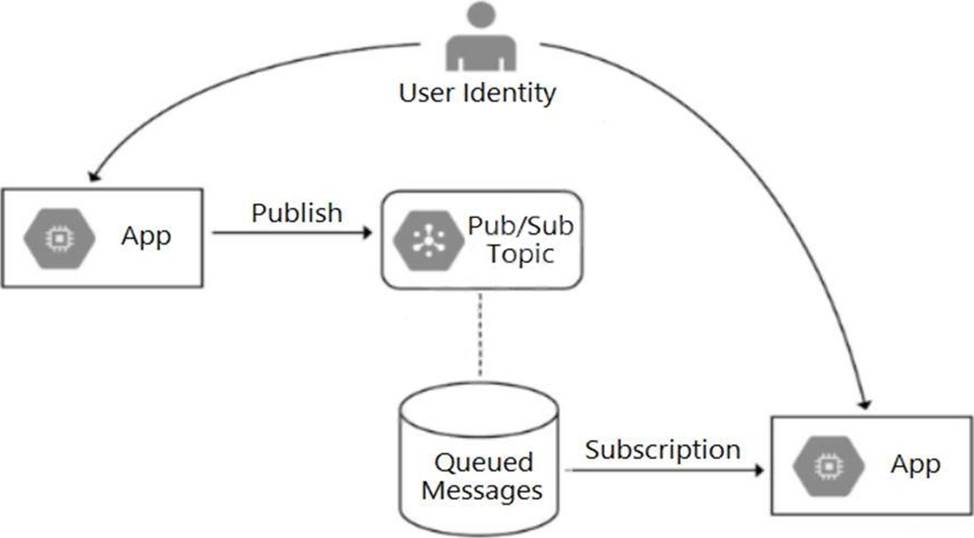
- A . Bind the user identity to the pubsub.publisher and pubsub.subscriber roles at the resource level.
- B . Grant the user identity the pubsub.publisher and pubsub.subscriber roles at the project level.
- C . Grant the user identity a custom role that contains the pubsub.topics.create and pubsub.subscriptions.create permissions.
- D . Configure the application to run as a service account that has the pubsub.publisher and pubsub.subscriber roles.
You need to deploy resources from your laptop to Google Cloud using Terraform. Resources in your Google Cloud environment must be created using a service account. Your Cloud Identity has the
roles/iam.serviceAccountTokenCreator Identity and Access Management (IAM) role and the necessary permissions to deploy the resources using Terraform. You want to set up your development environment to deploy the desired resources following Google-recommended best practices.
What should you do?
- A . 1) Download the service account’s key file in JSON format, and store it locally on your laptop.
2) Set the GOOGLE_APPLICATION_CREDENTIALS environment variable to the path of your downloaded key file. - B . 1) Run the following command from a command line: gcloud config set auth/impersonate_service_account [email protected].
2) Set the GOOGLE_OAUTH_ACCESS_TOKEN environment variable to the value that is returned by the gcloud auth print-access-token command. - C . 1) Run the following command from a command line: gcloud auth application-default login.
2) In the browser window that opens, authenticate using your personal credentials. - D . 1) Store the service account’s key file in JSON format in Hashicorp Vault.
2) Integrate Terraform with Vault to retrieve the key file dynamically, and authenticate to Vault using a short-lived access token.
D
Explanation:
https://cloud.google.com/iam/docs/best-practices-for-managing-service-account-keys#file-system
Whenever possible, avoid storing service account keys on a file system. If you can’t avoid storing keys on disk, make sure to restrict access to the key file, configure file access auditing, and encrypt the underlying disk.
https://cloud.google.com/iam/docs/best-practices-for-managing-service-account-keys#software-keystore
In situations where using a hardware-based key store isn’t viable, use a software-based key store to manage service account keys. Similar to hardware-based options, a software-based key store lets users or applications use service account keys without revealing the private key. Software-based key store solutions can help you control key access in a fine-grained manner and can also ensure that each key access is logged.
You are deploying your application to a Compute Engine virtual machine instance. Your application is configured to write its log files to disk. You want to view the logs in Stackdriver Logging without changing the application code.
What should you do?
- A . Install the Stackdriver Logging Agent and configure it to send the application logs.
- B . Use a Stackdriver Logging Library to log directly from the application to Stackdriver Logging.
- C . Provide the log file folder path in the metadata of the instance to configure it to send the application logs.
- D . Change the application to log to /var/log so that its logs are automatically sent to Stackdriver Logging.
Your team is responsible for maintaining an application that aggregates news articles from many different sources. Your monitoring dashboard contains publicly accessible real-time reports and runs on a Compute Engine instance as a web application. External stakeholders and analysts need to access these reports via a secure channel without authentication.
How should you configure this secure channel?
- A . Add a public IP address to the instance. Use the service account key of the instance to encrypt the traffic.
- B . Use Cloud Scheduler to trigger Cloud Build every hour to create an export from the reports. Store the reports in a public Cloud Storage bucket.
- C . Add an HTTP(S) load balancer in front of the monitoring dashboard. Configure Identity-Aware Proxy to secure the communication channel.
- D . Add an HTTP(S) load balancer in front of the monitoring dashboard. Set up a Google-managed SSL certificate on the load balancer for traffic encryption.
D
Explanation:
https://cloud.google.com/load-balancing/docs/ssl-certificates/google-managed-certs
Your company has deployed a new API to App Engine Standard environment. During testing, the API is not behaving as expected. You want to monitor the application over time to diagnose the problem within the application code without redeploying the application.
Which tool should you use?
- A . Stackdriver Trace
- B . Stackdriver Monitoring
- C . Stackdriver Debug Snapshots
- D . Stackdriver Debug Logpoints
B
Explanation:
Reference: https://rominirani.com/gcp-stackdriver-tutorial-debug-snapshots-traces-logging-and-logpoints-1ba49e4780e6
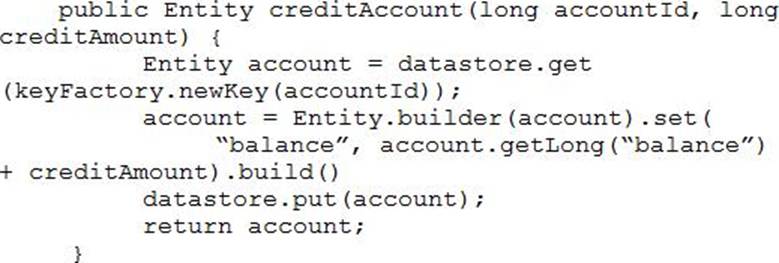
Your teammate has asked you to review the code below, which is adding a credit to an account balance in Cloud Datastore.
Which improvement should you suggest your teammate make?
- A . Get the entity with an ancestor query.
- B . Get and put the entity in a transaction.
- C . Use a strongly consistent transactional database.
- D . Don’t return the account entity from the function.
Your application is running in multiple Google Kubernetes Engine clusters. It is managed by a Deployment in each cluster. The Deployment has created multiple replicas of your Pod in each cluster. You want to view the logs sent to stdout for all of the replicas in your Deployment in all clusters.
Which command should you use?
- A . kubectl logs [PARAM]
- B . gcloud logging read [PARAM]
- C . kubectl exec Cit [PARAM] journalctl
- D . gcloud compute ssh [PARAM] C-command= “sudo journalctl”