
Google Professional Cloud Developer Practice Exams
Last updated on Oct 21,2026- Exam Code: Professional Cloud Developer
- Exam Name: Professional Cloud Developer
- Certification Provider: Google
- Latest update: Oct 21,2026
Your company has a BigQuery data mart that provides analytics information to hundreds of employees. One user of wants to run jobs without interrupting important workloads. This user isn’t concerned about the time it takes to run these jobs. You want to fulfill this request while minimizing cost to the company and the effort required on your part.
What should you do?
- A . Ask the user to run the jobs as batch jobs.
- B . Create a separate project for the user to run jobs.
- C . Add the user as a job.user role in the existing project.
- D . Allow the user to run jobs when important workloads are not running.
Your company has a BigQuery data mart that provides analytics information to hundreds of employees. One user of wants to run jobs without interrupting important workloads. This user isn’t concerned about the time it takes to run these jobs. You want to fulfill this request while minimizing cost to the company and the effort required on your part.
What should you do?
- A . Ask the user to run the jobs as batch jobs.
- B . Create a separate project for the user to run jobs.
- C . Add the user as a job.user role in the existing project.
- D . Allow the user to run jobs when important workloads are not running.
You have written a Cloud Function that accesses other Google Cloud resources. You want to secure the environment using the principle of least privilege.
What should you do?
- A . Create a new service account that has Editor authority to access the resources. The deployer is given permission to get the access token.
- B . Create a new service account that has a custom IAM role to access the resources. The deployer is given permission to get the access token.
- C . Create a new service account that has Editor authority to access the resources. The deployer is given permission to act as the new service account.
- D . Create a new service account that has a custom IAM role to access the resources. The deployer is given permission to act as the new service account.
D
Explanation:
Reference: https://cloud.google.com/blog/products/application-development/least-privilege-for-cloud-functions-using-cloud-iam
You have written a Cloud Function that accesses other Google Cloud resources. You want to secure the environment using the principle of least privilege.
What should you do?
- A . Create a new service account that has Editor authority to access the resources. The deployer is given permission to get the access token.
- B . Create a new service account that has a custom IAM role to access the resources. The deployer is given permission to get the access token.
- C . Create a new service account that has Editor authority to access the resources. The deployer is given permission to act as the new service account.
- D . Create a new service account that has a custom IAM role to access the resources. The deployer is given permission to act as the new service account.
D
Explanation:
Reference: https://cloud.google.com/blog/products/application-development/least-privilege-for-cloud-functions-using-cloud-iam
For this question, refer to the HipLocal case study.
HipLocal’s application uses Cloud Client Libraries to interact with Google Cloud. HipLocal needs to configure authentication and authorization in the Cloud Client Libraries to implement least privileged access for the application.
What should they do?
- A . Create an API key. Use the API key to interact with Google Cloud.
- B . Use the default compute service account to interact with Google Cloud.
- C . Create a service account for the application. Export and deploy the private key for the application.
Use the service account to interact with Google Cloud. - D . Create a service account for the application and for each Google Cloud API used by the application. Export and deploy the private keys used by the application. Use the service account with one Google Cloud API to interact with Google Cloud.
You are deploying a microservices application to Google Kubernetes Engine (GKE) that will broadcast livestreams. You expect unpredictable traffic patterns and large variations in the number of concurrent users.
Your application must meet the following requirements:
• Scales automatically during popular events and maintains high availability
• Is resilient in the event of hardware failures
How should you configure the deployment parameters? (Choose two.)
- A . Distribute your workload evenly using a multi-zonal node pool.
- B . Distribute your workload evenly using multiple zonal node pools.
- C . Use cluster autoscaler to resize the number of nodes in the node pool, and use a Horizontal Pod Autoscaler to scale the workload.
- D . Create a managed instance group for Compute Engine with the cluster nodes. Configure autoscaling rules for the managed instance group.
- E . Create alerting policies in Cloud Monitoring based on GKE CPU and memory utilization. Ask an on-duty engineer to scale the workload by executing a script when CPU and memory usage exceed predefined thresholds.
Your teammate has asked you to review the code below. Its purpose is to efficiently add a large number of small rows to a BigQuery table.
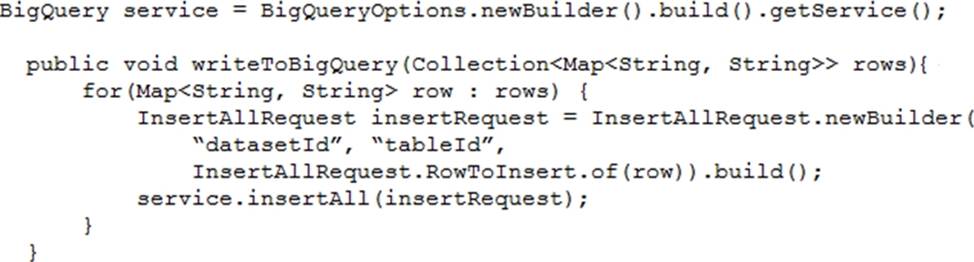
Which improvement should you suggest your teammate make?
- A . Include multiple rows with each request.
- B . Perform the inserts in parallel by creating multiple threads.
- C . Write each row to a Cloud Storage object, then load into BigQuery.
- D . Write each row to a Cloud Storage object in parallel, then load into BigQuery.
You work for a financial services company that has a container-first approach. Your team develops microservices applications You have a Cloud Build pipeline that creates a container image, runs regression tests, and publishes the image to Artifact Registry You need to ensure that only containers that have passed the regression tests are deployed to Google Kubernetes Engine (GKE) clusters You have already enabled Binary Authorization on the GKE clusters.
What should you do next?
- A . Deploy Voucher Server and Voucher Client Components. After a container image has passed the regression tests, run Voucher Client as a step in the Cloud Build pipeline.
- B . Set the Pod Security Standard level to Restricted for the relevant namespaces Digitally sign the container
images that have passed the regression tests as a step in the Cloud Build pipeline. - C . Create an attestor and a policy. Create an attestation for the container images that have passed the regression tests as a step in the Cloud Build pipeline.
- D . Create an attestor and a policy Run a vulnerability scan to create an attestation for the container image as a step in the Cloud Build pipeline.
You are developing a web application that will be accessible over both HTTP and HTTPS and will run on Compute Engine instances. On occasion, you will need to SSH from your remote laptop into one of the Compute Engine instances to conduct maintenance on the app.
How should you configure the instances while following Google-recommended best practices?
- A . Set up a backend with Compute Engine web server instances with a private IP address behind a TCP proxy load balancer.
- B . Configure the firewall rules to allow all ingress traffic to connect to the Compute Engine web servers, with each server having a unique external IP address.
- C . Configure Cloud Identity-Aware Proxy API for SSH access. Then configure the Compute Engine servers with private IP addresses behind an HTTP(s) load balancer for the application web traffic.
- D . Set up a backend with Compute Engine web server instances with a private IP address behind an HTTP(S) load balancer. Set up a bastion host with a public IP address and open firewall ports. Connect to the web instances using the bastion host.
C
Explanation:
Reference:
https://cloud.google.com/compute/docs/instances/connecting-advanced#cloud_iap
https://cloud.google.com/solutions/connecting-securely#storing_host_keys_by_enabling_guest_attributes
You are developing a web application that will be accessible over both HTTP and HTTPS and will run on Compute Engine instances. On occasion, you will need to SSH from your remote laptop into one of the Compute Engine instances to conduct maintenance on the app.
How should you configure the instances while following Google-recommended best practices?
- A . Set up a backend with Compute Engine web server instances with a private IP address behind a TCP proxy load balancer.
- B . Configure the firewall rules to allow all ingress traffic to connect to the Compute Engine web servers, with each server having a unique external IP address.
- C . Configure Cloud Identity-Aware Proxy API for SSH access. Then configure the Compute Engine servers with private IP addresses behind an HTTP(s) load balancer for the application web traffic.
- D . Set up a backend with Compute Engine web server instances with a private IP address behind an HTTP(S) load balancer. Set up a bastion host with a public IP address and open firewall ports. Connect to the web instances using the bastion host.
C
Explanation:
Reference:
https://cloud.google.com/compute/docs/instances/connecting-advanced#cloud_iap
https://cloud.google.com/solutions/connecting-securely#storing_host_keys_by_enabling_guest_attributes