
Google Professional Cloud Architect Practice Exams
Last updated on Oct 22,2026- Exam Code: Professional Cloud Architect
- Exam Name: Google Certified Professional – Cloud Architect (GCP)
- Certification Provider: Google
- Latest update: Oct 22,2026
Your company sends all Google Cloud logs to Cloud Logging. Your security team wants to monitor the logs. You want to ensure that the security team can react quickly if an anomaly such as an unwanted firewall change or server breach is detected. You want to follow Google-recommended practices.
What should you do?
- A . Schedule a cron job with Cloud Scheduler. The scheduled job queries the logs every minute for the relevant events.
- B . Export logs to BigQuery, and trigger a query in BigQuery to process the log data for the relevant events.
- C . Export logs to a Pub/Sub topic, and trigger Cloud Function with the relevant log events.
- D . Export logs to a Cloud Storage bucket, and trigger Cloud Run with the relevant log events.
C
Explanation:
https://cloud.google.com/blog/products/management-tools/automate-your-response-to-a-cloud-logging-event
The operations manager asks you for a list of recommended practices that she should consider when migrating a J2EE application to the cloud.
Which three practices should you recommend? Choose 3 answers
- A . Port the application code to run on Google App Engine.
- B . Integrate Cloud Dataflow into the application to capture real-time metrics.
- C . Instrument the application with a monitoring tool like Stackdriver Debugger.
- D . Select an automation framework to reliably provision the cloud infrastructure.
- E . Deploy a continuous integration tool with automated testing in a staging environment.
- F . Migrate from MySQL to a managed NoSQL database like Google Cloud Datastore or Bigtable.
AEF
Explanation:
Reference:
https://cloud.google.com/appengine/docs/standard/java/tools/uploadinganapp
https://cloud.google.com/appengine/docs/standard/java/building-app/cloud-sql
For this question, refer to the JencoMart case study.
JencoMart has decided to migrate user profile storage to Google Cloud Datastore and the application servers to Google Compute Engine (GCE). During the migration, the existing infrastructure will need access to Datastore to upload the data.
What service account key-management strategy should you recommend?
- A . Provision service account keys for the on-premises infrastructure and for the GCE virtual machines (VMs).
- B . Authenticate the on-premises infrastructure with a user account and provision service account keys for the VMs.
- C . Provision service account keys for the on-premises infrastructure and use Google Cloud Platform (GCP) managed keys for the VMs
- D . Deploy a custom authentication service on GCE/Google Container Engine (GKE) for the on-premises infrastructure and use GCP managed keys for the VMs.
A
Explanation:
https://cloud.google.com/iam/docs/understanding-service-accounts
Migrating data to Google Cloud Platform
Let’s say that you have some data processing that happens on another cloud provider and you want to transfer the processed data to Google Cloud Platform. You can use a service account from the virtual machines on the external cloud to push the data to Google Cloud Platform. To do this, you must create and download a service account key when you create the service account and then use that key from the external process to call the Cloud Platform APIs.
Reference: https://cloud.google.com/iam/docs/understanding-service-accounts#migrating_data_to_google_cloud_platform
You are migrating third-party applications from optimized on-premises virtual machines to Google Cloud. You are unsure about the optimum CPU and memory options. The application have a consistent usage patterns across multiple weeks. You want to optimize resource usage for the lowest cost.
What should you do?
- A . Create a Compute engine instance with CPU and Memory options similar to your application’s current on-premises virtual machine. Install the cloud monitoring agent, and deploy the third party application. Run a load with normal traffic levels on third party application and follow the Rightsizing Recommendations in the Cloud Console
- B . Create an App Engine flexible environment, and deploy the third party application using a Docker file and a custom runtime. Set CPU and memory options similar to your application’s current on-premises virtual machine in the app.yaml file.
- C . Create an instance template with the smallest available machine type, and use an image of the third party application taken from the current on-premises virtual machine. Create a managed instance group that uses average CPU to autoscale the number of instances in the group. Modify the average CPU utilization threshold to optimize the number of instances running.
- D . Create multiple Compute Engine instances with varying CPU and memory options. Install the cloud monitoring agent and deploy the third-party application on each of them. Run a load test with high traffic levels on the application and use the results to determine the optimal settings.
A
Explanation:
Create a Compute engine instance with CPU and Memory options similar to your application’s current on-premises virtual machine. Install the cloud monitoring agent, and deploy the third party application. Run a load with normal traffic levels on third party application and follow the Rightsizing Recommendations in the Cloud Console
https://cloud.google.com/migrate/compute-engine/docs/4.9/concepts/planning-a-migration/cloud-instance-rightsizing?hl=en
You are migrating third-party applications from optimized on-premises virtual machines to Google Cloud. You are unsure about the optimum CPU and memory options. The application have a consistent usage patterns across multiple weeks. You want to optimize resource usage for the lowest cost.
What should you do?
- A . Create a Compute engine instance with CPU and Memory options similar to your application’s current on-premises virtual machine. Install the cloud monitoring agent, and deploy the third party application. Run a load with normal traffic levels on third party application and follow the Rightsizing Recommendations in the Cloud Console
- B . Create an App Engine flexible environment, and deploy the third party application using a Docker file and a custom runtime. Set CPU and memory options similar to your application’s current on-premises virtual machine in the app.yaml file.
- C . Create an instance template with the smallest available machine type, and use an image of the third party application taken from the current on-premises virtual machine. Create a managed instance group that uses average CPU to autoscale the number of instances in the group. Modify the average CPU utilization threshold to optimize the number of instances running.
- D . Create multiple Compute Engine instances with varying CPU and memory options. Install the cloud monitoring agent and deploy the third-party application on each of them. Run a load test with high traffic levels on the application and use the results to determine the optimal settings.
A
Explanation:
Create a Compute engine instance with CPU and Memory options similar to your application’s current on-premises virtual machine. Install the cloud monitoring agent, and deploy the third party application. Run a load with normal traffic levels on third party application and follow the Rightsizing Recommendations in the Cloud Console
https://cloud.google.com/migrate/compute-engine/docs/4.9/concepts/planning-a-migration/cloud-instance-rightsizing?hl=en
You are migrating third-party applications from optimized on-premises virtual machines to Google Cloud. You are unsure about the optimum CPU and memory options. The application have a consistent usage patterns across multiple weeks. You want to optimize resource usage for the lowest cost.
What should you do?
- A . Create a Compute engine instance with CPU and Memory options similar to your application’s current on-premises virtual machine. Install the cloud monitoring agent, and deploy the third party application. Run a load with normal traffic levels on third party application and follow the Rightsizing Recommendations in the Cloud Console
- B . Create an App Engine flexible environment, and deploy the third party application using a Docker file and a custom runtime. Set CPU and memory options similar to your application’s current on-premises virtual machine in the app.yaml file.
- C . Create an instance template with the smallest available machine type, and use an image of the third party application taken from the current on-premises virtual machine. Create a managed instance group that uses average CPU to autoscale the number of instances in the group. Modify the average CPU utilization threshold to optimize the number of instances running.
- D . Create multiple Compute Engine instances with varying CPU and memory options. Install the cloud monitoring agent and deploy the third-party application on each of them. Run a load test with high traffic levels on the application and use the results to determine the optimal settings.
A
Explanation:
Create a Compute engine instance with CPU and Memory options similar to your application’s current on-premises virtual machine. Install the cloud monitoring agent, and deploy the third party application. Run a load with normal traffic levels on third party application and follow the Rightsizing Recommendations in the Cloud Console
https://cloud.google.com/migrate/compute-engine/docs/4.9/concepts/planning-a-migration/cloud-instance-rightsizing?hl=en
You are migrating third-party applications from optimized on-premises virtual machines to Google Cloud. You are unsure about the optimum CPU and memory options. The application have a consistent usage patterns across multiple weeks. You want to optimize resource usage for the lowest cost.
What should you do?
- A . Create a Compute engine instance with CPU and Memory options similar to your application’s current on-premises virtual machine. Install the cloud monitoring agent, and deploy the third party application. Run a load with normal traffic levels on third party application and follow the Rightsizing Recommendations in the Cloud Console
- B . Create an App Engine flexible environment, and deploy the third party application using a Docker file and a custom runtime. Set CPU and memory options similar to your application’s current on-premises virtual machine in the app.yaml file.
- C . Create an instance template with the smallest available machine type, and use an image of the third party application taken from the current on-premises virtual machine. Create a managed instance group that uses average CPU to autoscale the number of instances in the group. Modify the average CPU utilization threshold to optimize the number of instances running.
- D . Create multiple Compute Engine instances with varying CPU and memory options. Install the cloud monitoring agent and deploy the third-party application on each of them. Run a load test with high traffic levels on the application and use the results to determine the optimal settings.
A
Explanation:
Create a Compute engine instance with CPU and Memory options similar to your application’s current on-premises virtual machine. Install the cloud monitoring agent, and deploy the third party application. Run a load with normal traffic levels on third party application and follow the Rightsizing Recommendations in the Cloud Console
https://cloud.google.com/migrate/compute-engine/docs/4.9/concepts/planning-a-migration/cloud-instance-rightsizing?hl=en
For this question, refer to the TerramEarth case study.
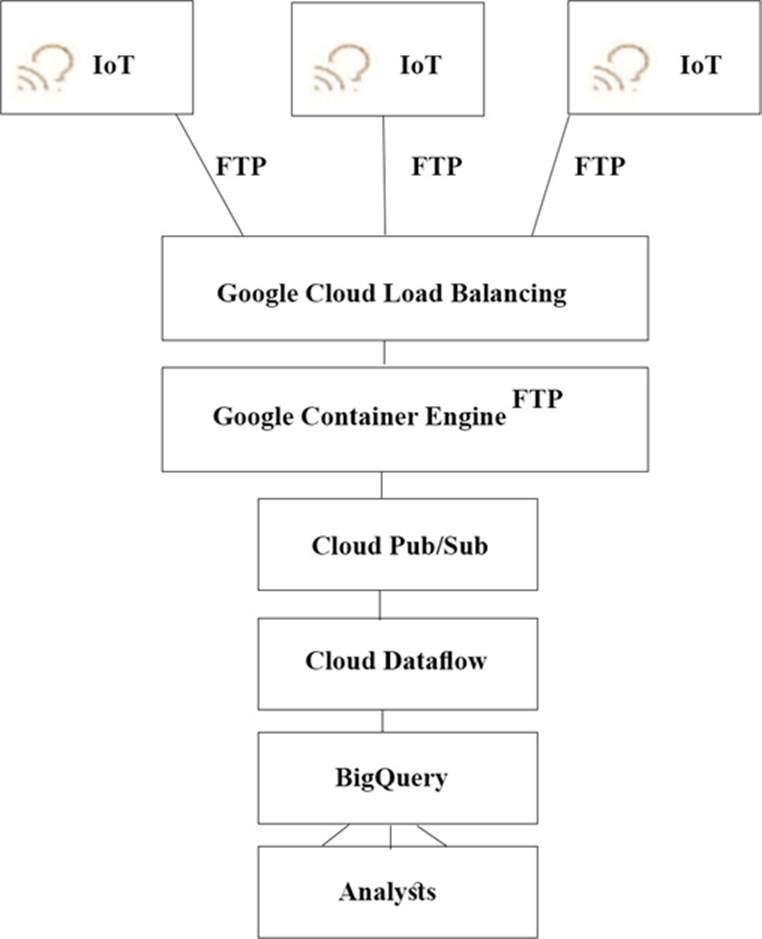
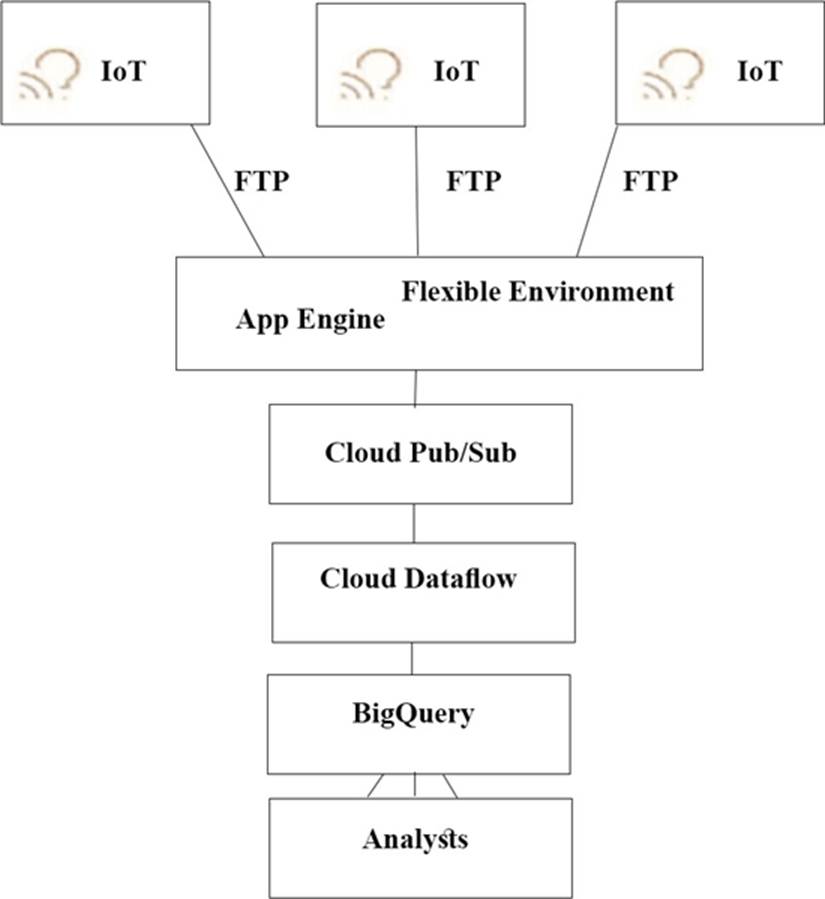
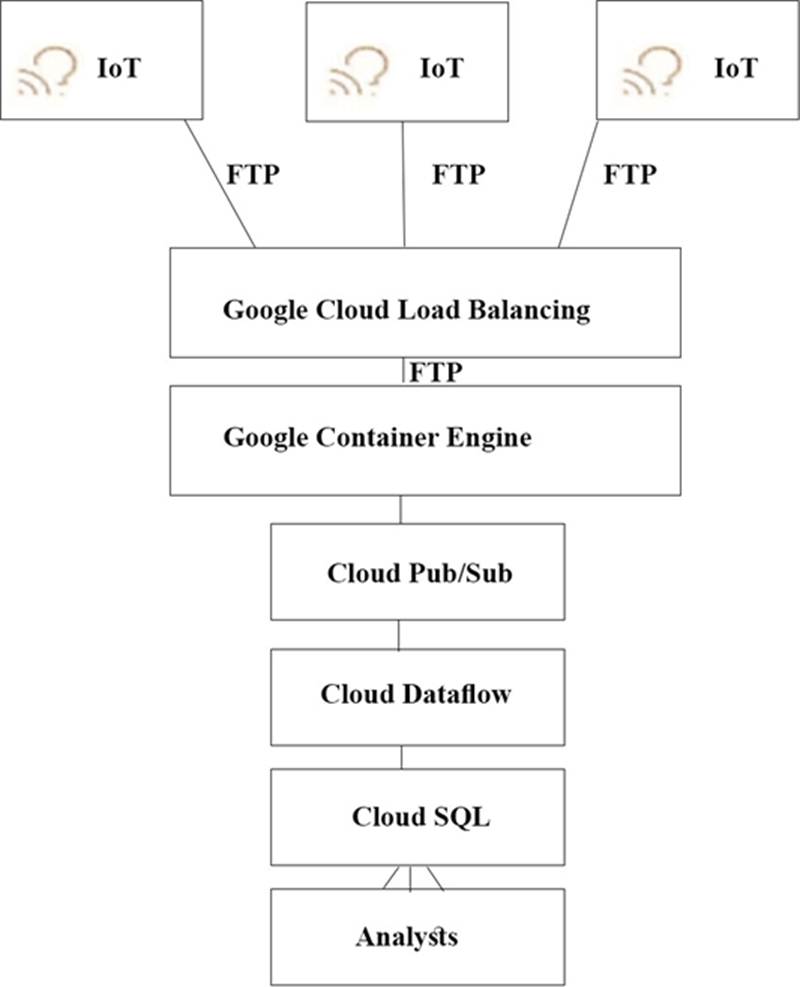
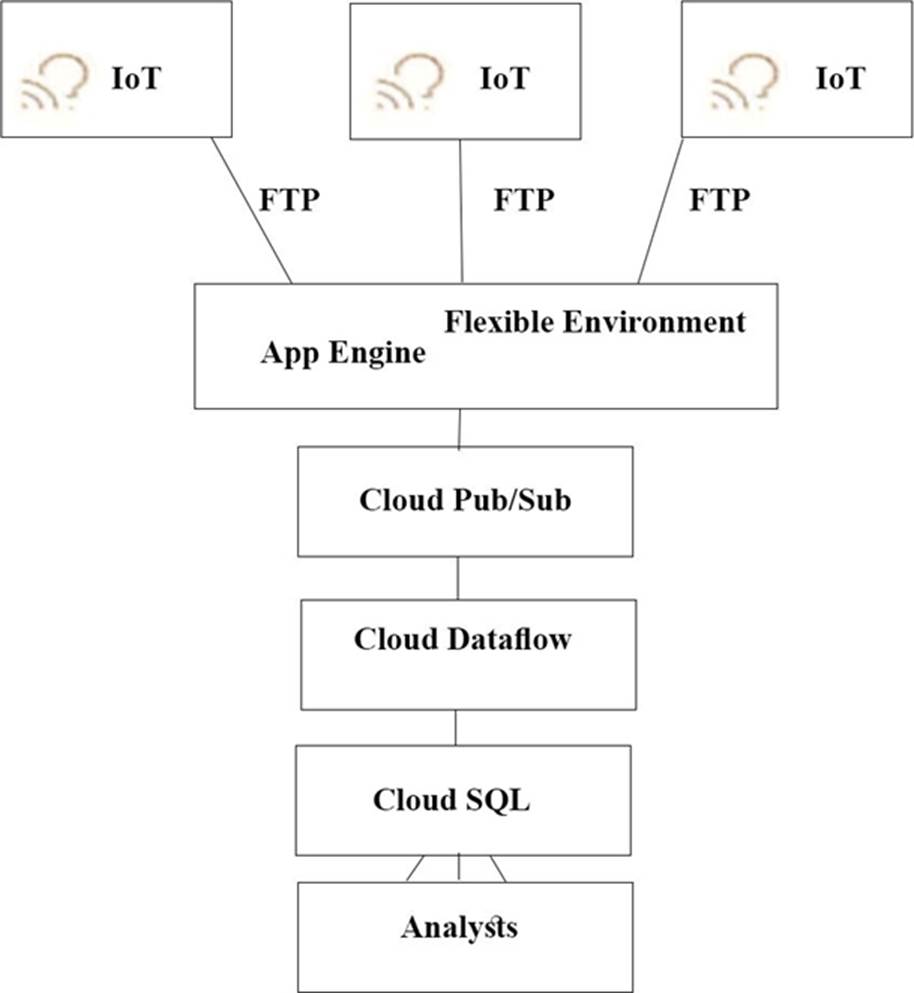
TerramEarth’s CTO wants to use the raw data from connected vehicles to help identify approximately when a vehicle in the development team to focus their failure. You want to allow analysts to centrally query the vehicle data.
Which architecture should you recommend?
A)
B)
C)
D)
- A . Option A
- B . Option B
- C . Option C
- D . Option D
A
Explanation:
https://cloud.google.com/solutions/iot/
https://cloud.google.com/solutions/designing-connected-vehicle-platform
https://cloud.google.com/solutions/designing-connected-vehicle-platform#data_ingestion
http://www.eweek.com/big-data-and-analytics/google-touts-value-of-cloud-iot-core-for-analyzing-connected-car-data
https://cloud.google.com/solutions/iot/
The push endpoint can be a load balancer.
A container cluster can be used.
Cloud Pub/Sub for Stream Analytics
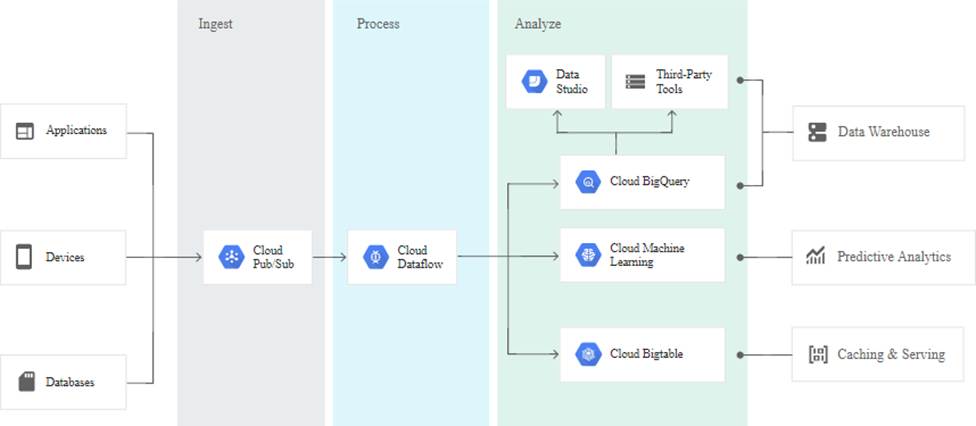
Reference:
https://cloud.google.com/pubsub/
https://cloud.google.com/solutions/iot/
https://cloud.google.com/solutions/designing-connected-vehicle-platform
https://cloud.google.com/solutions/designing-connected-vehicle-platform#data_ingestion
http://www.eweek.com/big-data-and-analytics/google-touts-value-of-cloud-iot-core-for-analyzing-connected-car-data
https://cloud.google.com/solutions/iot/
The current Dress4win system architecture has high latency to some customers because it is located
in one data center.
As of a future evaluation and optimizing for performance in the cloud, Dresss4win wants to distribute it’s system architecture to multiple locations when Google cloud platform.
Which approach should they use?
- A . Use regional managed instance groups and a global load balancer to increase performance because the regional managed instance group can grow instances in each region separately based on traffic.
- B . Use a global load balancer with a set of virtual machines that forward the requests to a closer group of
virtual machines managed by your operations team. - C . Use regional managed instance groups and a global load balancer to increase reliability by providing
automatic failover between zones in different regions. - D . Use a global load balancer with a set of virtual machines that forward the requests to a closer group of
virtual machines as part of a separate managed instance groups.
Your company has just acquired another company, and you have been asked to integrate their existing Google Cloud environment into your company’s data center. Upon investigation, you discover that some of the RFC 1918 IP ranges being used in the new company’s Virtual Private Cloud (VPC) overlap with your data center IP space.
What should you do to enable connectivity and make sure that there are no routing conflicts when connectivity is established?
- A . Create a Cloud VPN connection from the new VPC to the data center, create a Cloud Router,
and apply new IP addresses so there is no overlapping IP space. - B . Create a Cloud VPN connection from the new VPC to the data center, and create a Cloud NAT instance to perform NAT on the overlapping IP space.
- C . Create a Cloud VPN connection from the new VPC to the data center, create a Cloud Router, and apply a custom route advertisement to block the overlapping IP space.
- D . Create a Cloud VPN connection from the new VPC to the data center, and apply a firewall rule that blocks the overlapping IP space.
A
Explanation:
To connect two networks together we need (1) either VPN or interconnect and (2) peering. When there is peering, you cannot have conflicting IP addresses. You can use either Cloud VPN or Cloud Interconnect to securely connect your on-premises network to your VPC network.
(https://cloud.google.com/vpc/docs/vpc-peering#transit-network) At the time of peering, Google Cloud checks to see if there are any subnet IP ranges that overlap subnet IP ranges in the other network. If there is any overlap, peering is not established. (https://cloud.google.com/vpc/docs/vpc-peering#considerations) NAT is used to translate private to public IP and vice versa, however because we are connecting 2 networks together, they become private IPs. So it is not applicable.