
Google Associate Data Practitioner Practice Exams
Last updated on Oct 21,2026- Exam Code: Associate Data Practitioner
- Exam Name: Google Cloud Associate Data Practitioner ( ADP Exam )
- Certification Provider: Google
- Latest update: Oct 21,2026
Create five subfolders inside the Shared folder. Grant each team member the Manage Access, Edit access level to their corresponding subfolder.
Explanation:
Comprehensive and Detailed in Depth
Why C is correct:Setting the Shared folder to "View" ensures everyone can see the content.
Creating Looker groups simplifies access management.
Subfolders allow granular permissions for each team.
Granting "Manage Access, Edit" allows teams to modify only their own content.
Why other options are incorrect:A: Grants View access only, so teams can’t edit.
B: Moving content to personal folders defeats the purpose of sharing.
D: Grants edit access to all members of the team, not the team as a whole, which is not ideal.
Reference: Looker Access Control: https://cloud.google.com/looker/docs/access-control
Looker Groups: https://cloud.google.com/looker/docs/groups
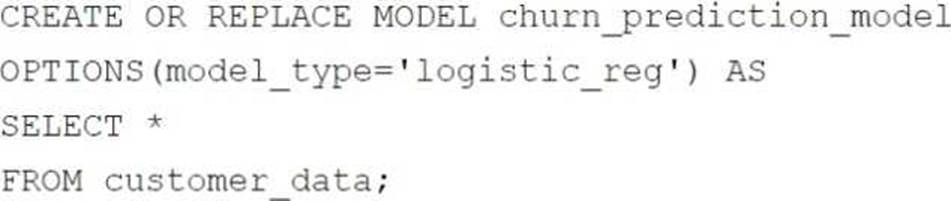
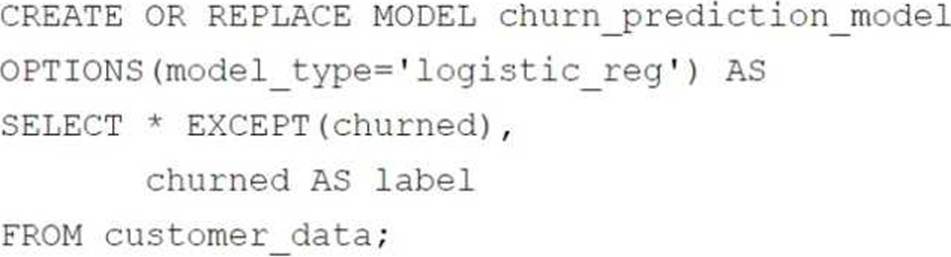
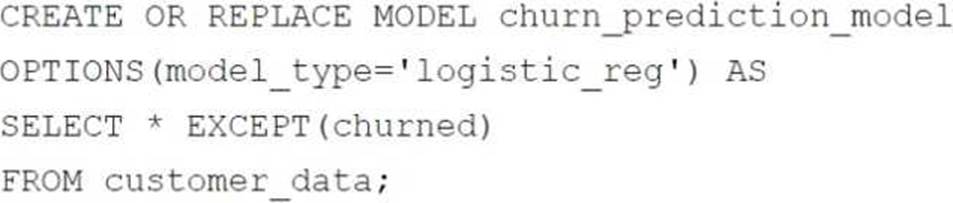
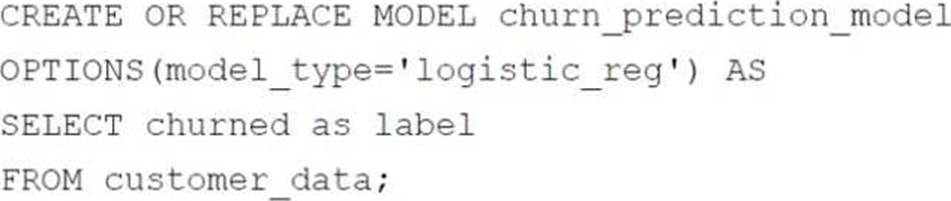
Your retail company wants to predict customer churn using historical purchase data stored in BigQuery. The dataset includes customer demographics, purchase history, and a label indicating whether the customer churned or not. You want to build a machine learning model to identify customers at risk of churning. You need to create and train a logistic regression model for predicting customer churn, using the customer_data table with the churned column as the target label.
Which BigQuery ML query should you use?
A)
B)
C)
D)
- A . Option A
- B . Option B
- C . Option C
- D . Option D
B
Explanation:
In BigQuery ML, when creating a logistic regression model to predict customer churn, the correct query should:
Exclude the target label column (in this case, churned) from the feature columns, as it is used for training and not as a feature input.
Rename the target label column to label, as BigQuery ML requires the target column to be named label.
The chosen query satisfies these requirements:
SELECT * EXCEPT(churned), churned AS label: Excludes churned from features and renames it to label.
The OPTIONS(model_type=’logistic_reg’) specifies that a logistic regression model is being trained.
This setup ensures the model is correctly trained using the features in the dataset while targeting the churned column for predictions.
Your retail company wants to predict customer churn using historical purchase data stored in BigQuery. The dataset includes customer demographics, purchase history, and a label indicating whether the customer churned or not. You want to build a machine learning model to identify customers at risk of churning. You need to create and train a logistic regression model for predicting customer churn, using the customer_data table with the churned column as the target label.
Which BigQuery ML query should you use?
A)
B)
C)
D)
- A . Option A
- B . Option B
- C . Option C
- D . Option D
B
Explanation:
In BigQuery ML, when creating a logistic regression model to predict customer churn, the correct query should:
Exclude the target label column (in this case, churned) from the feature columns, as it is used for training and not as a feature input.
Rename the target label column to label, as BigQuery ML requires the target column to be named label.
The chosen query satisfies these requirements:
SELECT * EXCEPT(churned), churned AS label: Excludes churned from features and renames it to label.
The OPTIONS(model_type=’logistic_reg’) specifies that a logistic regression model is being trained.
This setup ensures the model is correctly trained using the features in the dataset while targeting the churned column for predictions.
You manage a Cloud Storage bucket that stores temporary files created during data processing. These temporary files are only needed for seven days, after which they are no longer needed. To reduce storage costs and keep your bucket organized, you want to automatically delete these files once they are older than seven days.
What should you do?
- A . Set up a Cloud Scheduler job that invokes a weekly Cloud Run function to delete files older than seven days.
- B . Configure a Cloud Storage lifecycle rule that automatically deletes objects older than seven days.
- C . Develop a batch process using Dataflow that runs weekly and deletes files based on their age.
- D . Create a Cloud Run function that runs daily and deletes files older than seven days.
B
Explanation:
Configuring a Cloud Storage lifecycle rule to automatically delete objects older than seven days is the best solution because:
Built-in feature: Cloud Storage lifecycle rules are specifically designed to manage object lifecycles, such as automatically deleting or transitioning objects based on age.
No additional setup: It requires no external services or custom code, reducing complexity and maintenance.
Cost-effective: It directly achieves the goal of deleting files after seven days without incurring additional compute costs.
You are using your own data to demonstrate the capabilities of BigQuery to your organization’s leadership team. You need to perform a one-time load of the files stored on your local machine into BigQuery using as little effort as possible.
What should you do?
- A . Write and execute a Python script using the BigQuery Storage Write API library.
- B . Create a Dataproc cluster, copy the files to Cloud Storage, and write an Apache Spark job using the spark-bigquery-connector.
- C . Execute the bq load command on your local machine.
- D . Create a Dataflow job using the Apache Beam FileIO and BigQueryIO connectors with a local runner.
C
Explanation:
Comprehensive and Detailed In-Depth
A one-time load with minimal effort points to a simple, out-of-the-box tool. The files are local, so the solution must bridge on-premises to BigQuery easily.
Option A: A Python script with the Storage Write API requires coding, setup (authentication, libraries), and debugging―more effort than necessary for a one-time task.
Option B: Dataproc with Spark involves cluster creation, file transfer to Cloud Storage, and job scripting―far too complex for a simple load.
Option C: The bq load command (part of the Google Cloud SDK) is a CLI tool that uploads local files (e.g., CSV, JSON) directly to BigQuery with one command (e.g., bq load –source_format=CSV dataset.table file.csv). It’s pre-built, requires no coding, and leverages existing SDK installation, minimizing effort.
Option D: Dataflow with Beam requires pipeline development and isn’t designed for local execution to BigQuery without Cloud Storage staging, adding complexity.
Why C is Best: For a demo, bq load is the fastest, simplest way to get data into BigQuery. Install the SDK, run a command, and you’re done―no infrastructure or coding needed. It’s Google’s go-to for ad-hoc loads.
Extract from Google Documentation: From "Loading Data into BigQuery with the bq Command-Line Tool" (https://cloud.google.com/bigquery/docs/bq-command-line-tool#loading_data): "The bq load command allows you to upload data files from your local machine to BigQuery with a single command, providing a quick and easy way to perform one-time data loads."
Reference: Google Cloud Documentation – "bq Command-Line Tool"
(https://cloud.google.com/bigquery/docs/bq-command-line-tool).
You work for an ecommerce company that has a BigQuery dataset that contains customer purchase history, demographics, and website interactions. You need to build a machine learning (ML) model to predict which customers are most likely to make a purchase in the next month. You have limited engineering resources and need to minimize the ML expertise required for the solution.
What should you do?
- A . Use BigQuery ML to create a logistic regression model for purchase prediction.
- B . Use Vertex AI Workbench to develop a custom model for purchase prediction.
- C . Use Colab Enterprise to develop a custom model for purchase prediction.
- D . Export the data to Cloud Storage, and use AutoML Tables to build a classification model for purchase prediction.
A
Explanation:
Using BigQuery ML is the best solution in this case because:
Ease of use: BigQuery ML allows users to build machine learning models using SQL, which requires minimal ML expertise.
Integrated platform: Since the data already exists in BigQuery, there’s no need to move it to another service, saving time and engineering resources.
Logistic regression: This is an appropriate model for binary classification tasks like predicting the likelihood of a customer making a purchase in the next month.
Your company is adopting BigQuery as their data warehouse platform. Your team has experienced Python developers. You need to recommend a fully-managed tool to build batch ETL processes that extract data from various source systems, transform the data using a variety of Google Cloud services, and load the transformed data into BigQuery. You want this tool to leverage your team’s Python skills.
What should you do?
- A . Use Dataform with assertions.
- B . Deploy Cloud Data Fusion and included plugins.
- C . Use Cloud Composer with pre-built operators.
- D . Use Dataflow and pre-built templates.
C
Explanation:
Comprehensive and Detailed In-Depth
The tool must be fully managed, support batch ETL, integrate with multiple Google Cloud services, and leverage Python skills.
Option A: Dataform is SQL-focused for ELT within BigQuery, not Python-centric, and lacks broad service integration for extraction.
Option B: Cloud Data Fusion is a visual ETL tool, not Python-focused, and requires more UI-based configuration than coding.
Option C: Cloud Composer (managed Apache Airflow) is fully managed, supports batch ETL via DAGs, integrates with various Google Cloud services (e.g., BigQuery, GCS) through operators, and allows custom Python code in tasks. It’s ideal for Python developers per the "Cloud Composer" documentation.
Option D: Dataflow excels at streaming and batch processing but focuses on Apache Beam (Python SDK available), not broad service orchestration. Pre-built templates limit customization.
Reference: Google Cloud Documentation – "Cloud Composer Overview" (https://cloud.google.com/composer/docs).
You are working on a data pipeline that will validate and clean incoming data before loading it into BigQuery for real-time analysis. You want to ensure that the data validation and cleaning is performed efficiently and can handle high volumes of data.
What should you do?
- A . Write custom scripts in Python to validate and clean the data outside of Google Cloud. Load the cleaned data into BigQuery.
- B . Use Cloud Run functions to trigger data validation and cleaning routines when new data arrives in Cloud Storage.
- C . Use Dataflow to create a streaming pipeline that includes validation and transformation steps.
- D . Load the raw data into BigQuery using Cloud Storage as a staging area, and use SQL queries in BigQuery to validate and clean the data.
C
Explanation:
Using Dataflow to create a streaming pipeline that includes validation and transformation steps is the most efficient and scalable approach for real-time analysis. Dataflow is optimized for high-volume data processing and allows you to apply validation and cleaning logic as the data flows through the pipeline. This ensures that only clean, validated data is loaded into BigQuery, supporting real-time analysis while handling high data volumes effectively.
You manage an ecommerce website that has a diverse range of products. You need to forecast future product demand accurately to ensure that your company has sufficient inventory to meet customer needs and avoid stockouts. Your company’s historical sales data is stored in a BigQuery table. You need to create a scalable solution that takes into account the seasonality and historical data to predict product demand.
What should you do?
- A . Use the historical sales data to train and create a BigQuery ML time series model. Use the ML.FORECAST function call to output the predictions into a new BigQuery table.
- B . Use Colab Enterprise to create a Jupyter notebook. Use the historical sales data to train a custom prediction model in Python.
- C . Use the historical sales data to train and create a BigQuery ML linear regression model. Use the ML.PREDICT function call to output the predictions into a new BigQuery table.
- D . Use the historical sales data to train and create a BigQuery ML logistic regression model. Use the ML.PREDICT function call to output the predictions into a new BigQuery table.
A
Explanation:
Comprehensive and Detailed In-Depth
Forecasting product demand with seasonality requires a time series model, and BigQuery ML offers a scalable, serverless solution. Let’s analyze:
Option A: BigQuery ML’s time series models (e.g., ARIMA_PLUS) are designed for forecasting with seasonality and trends. The ML.FORECAST function generates predictions based on historical data, storing them in a table. This is scalable (no infrastructure) and integrates natively with BigQuery, ideal for ecommerce demand prediction.
Option B: Colab Enterprise with a custom Python model (e.g., Prophet) is flexible but requires coding, maintenance, and potentially exporting data, reducing scalability compared to BigQuery ML’s in-place processing.
Option C: Linear regression predicts continuous values but doesn’t handle seasonality or time series patterns effectively, making it unsuitable for demand forecasting.
Option D: Logistic regression is for binary classification (e.g., yes/no), not time series forecasting of demand quantities.
Why A is Best: ARIMA_PLUS in BigQuery ML automatically models seasonality and trends, requiring only SQL knowledge. It’s serverless, scales with BigQuery’s capacity, and keeps data in one place, minimizing complexity and cost. For example, CREATE MODEL …
OPTIONS(model_type=’ARIMA_PLUS’) followed by ML.FORECAST delivers accurate, scalable forecasts.
Extract from Google Documentation: From "BigQuery ML Time Series Forecasting"
(https://cloud.google.com/bigquery-ml/docs/reference/standard-sql/bigqueryml-syntax-create-time-series): "The ARIMA_PLUS model type in BigQuery ML is designed for time series forecasting, accounting for seasonality and trends, making it ideal for predicting future values like product demand based on historical data."
Reference: Google Cloud Documentation – "BigQuery ML Time Series"
(https://cloud.google.com/bigquery-ml/docs/time-series).
Your company has several retail locations. Your company tracks the total number of sales made at each location each day. You want to use SQL to calculate the weekly moving average of sales by location to identify trends for each store.
Which query should you use?
A)

B)

C)

D)

- A . Option A
- B . Option B
- C . Option C
- D . Option D
C
Explanation:
To calculate the weekly moving average of sales by location:
The query must group by store_id (partitioning the calculation by each store).
The ORDER BY date ensures the sales are evaluated chronologically.
The ROWS BETWEEN 6 PRECEDING AND CURRENT ROW specifies a rolling window of 7 rows (1 week if each row represents daily data).
The AVG(total_sales) computes the average sales over the defined rolling window.
Chosen query meets these requirements:
– PARTITION BY store_id groups the calculation by each store.
– ORDER BY date orders the rows correctly for the rolling average.
– ROWS BETWEEN 6 PRECEDING AND CURRENT ROW ensures the 7-day moving average.
Extract from Google Documentation: From "Analytic Functions in BigQuery"
(https://cloud.google.com/bigquery/docs/reference/standard-sql/analytic-function-concepts): "Use ROWS BETWEEN n PRECEDING AND CURRENT ROW with ORDER BY a time column to compute moving averages over a fixed number of rows, such as a 7-day window, partitioned by a grouping key like store_id."
Reference: Google Cloud Documentation – "BigQuery Window Functions"
(https://cloud.google.com/bigquery/docs/reference/standard-sql/window-function-calls).