
EC-Council 212-82 Practice Exams
Last updated on Oct 22,2026- Exam Code: 212-82
- Exam Name: Certified Cybersecurity Technician(C|CT)
- Certification Provider: EC-Council
- Latest update: Oct 22,2026
In an organization, all the servers and database systems are guarded in a sealed room with a single-entry point. The entrance is protected with a physical lock system that requires typing a sequence of numbers and letters by using a rotating dial that intermingles with several other rotating discs.
Which of the following types of physical locks is used by the organization in the above scenario?
- A . Digital locks
- B . Combination locks
- C . Mechanical locks
- D . Electromagnetic locks
B
Explanation:
It identifies the type of physical lock used by the organization in the above scenario. A physical lock is a device that prevents unauthorized access to a door, gate, cabinet, or other enclosure by using a mechanism that requires a key, code, or biometric factor to open or close it.
There are different types of physical locks, such as:
Combination lock: This type of lock requires typing a sequence of numbers and letters by using a rotating dial that intermingles with several other rotating discs. This type of lock is suitable for securing safes, lockers, or cabinets that store valuable items or documents.
Digital lock: This type of lock requires entering a numeric or alphanumeric code by using a keypad or touchscreen. This type of lock is suitable for securing doors or gates that require frequent access or multiple users.
Mechanical lock: This type of lock requires inserting and turning a metal key that matches the shape and size of the lock. This type of lock is suitable for securing doors or gates that require simple and reliable access or single users.
Electromagnetic lock: This type of lock requires applying an electric current to a magnet that attracts a metal plate attached to the door or gate. This type of lock is suitable for securing doors or gates that require remote control or integration with other security systems.
In the above scenario, the organization used a combination lock that requires typing a sequence of numbers and letters by using a rotating dial that intermingles with several other rotating discs.
Option A is incorrect, as it does not identify the type of physical lock used by the organization in the above scenario. A digital lock requires entering a numeric or alphanumeric code by using a keypad or touchscreen. In the above scenario, the organization did not use a digital lock, but a combination lock.
Option C is incorrect, as it does not identify the type of physical lock used by the organization in the above scenario. A mechanical lock requires inserting and turning a metal key that matches the shape and size of the lock. In the above scenario, the organization did not use a mechanical lock, but a combination lock.
Option D is incorrect, as it does not identify the type of physical lock used by the organization in the above scenario. An electromagnetic lock requires applying an electric current to a magnet that attracts a metal plate attached to the door or gate. In the above scenario, the organization did not use an electromagnetic lock, but a combination lock.
Reference: , Section 7.2
You are Harris working for a web development company. You have been assigned to perform a task for vulnerability assessment on the given IP address 20.20.10.26. Select the vulnerability that may affect the website according to the severity factor. Hint: Greenbone web credentials: admin/password
- A . TCP timestamps
- B . Anonymous FTP Login Reporting
- C . FTP Unencrypted Cleartext Login
- D . UDP timestamps
C
Explanation:
FTP Unencrypted Cleartext Login is the vulnerability that may affect the website according to the severity factor in the above scenario. A vulnerability is a weakness or flaw in a system or network that can be exploited by an attacker to compromise its security or functionality. A vulnerability assessment is a process that involves identifying, analyzing, and evaluating vulnerabilities in a system or network using various tools and techniques. Greenbone is a tool that can perform vulnerability assessment on various targets using various tests and scans. To perform a vulnerability assessment on the given IP address 20.20.10.26, one has to follow these steps: Open a web browser and type 20.20.10.26:9392
Press Enter key to access the Greenbone web interface.
Enter admin as username and password as password.
Click on Login button.
Click on Scans menu and select Tasks option.
Click on Start Scan icon next to IP Address Scan task.
Wait for the scan to complete and click on Report icon next to IP Address Scan task.
Observe the vulnerabilities found by the scan.
The vulnerabilities found by the scan are:
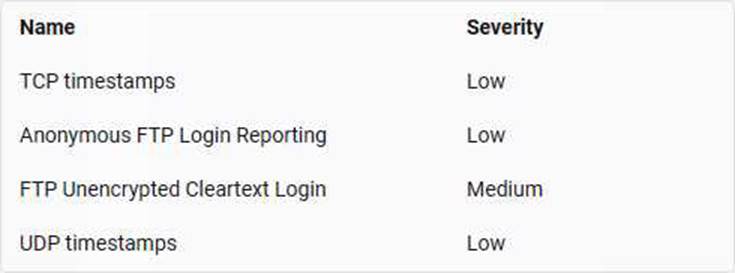
The vulnerability that may affect the website according to the severity factor is FTP Unencrypted Cleartext Login, which has a medium severity level. FTP Unencrypted Cleartext Login is a vulnerability that allows an attacker to intercept or sniff FTP login credentials that are sent in cleartext over an unencrypted connection. An attacker can use these credentials to access or modify files or data on the FTP server. TCP timestamps and UDP timestamps are vulnerabilities that allow an attacker to estimate the uptime of a system or network by analyzing the timestamp values in TCP or UDP packets. Anonymous FTP Login Reporting is a vulnerability that allows an attacker to access an FTP server anonymously without providing any username or password.
As a network security analyst for a video game development company, you are responsible for monitoring the traffic patterns on the development server used by programmers. During business hours, you notice a steady stream of data packets moving between the server and internal programmer workstations. Most of this traffic is utilizing TCP connections on port 22 (SSH) and port 5900 (VNC).
Based on this scenario, what does it describe?
- A . Traffic appears suspicious – The presence of encrypted connections might indicate attempts to conceal malicious activities.
- B . Traffic seems normal SSH and VNC are commonly used by programmers for secure remote access and collaboration.
- C . Traffic is because of malware infection – Frequently used SSH & VNC Ports could indicate malware spreading through the Network.
- D . The situation is inconclusive – Further investigation is necessary to determine the nature of the traffic.
B
Explanation:
Common Usage of SSH and VNC:
SSH (Secure Shell) on port 22 is widely used for secure remote access and administration. It provides encrypted communication channels, ensuring data security.
VNC (Virtual Network Computing) on port 5900 is used for remote desktop sharing, allowing programmers to collaborate and access their development environments securely.
Reference: NIST SP 800-46, Guide to Enterprise Telework, Remote Access, and Bring Your Own Device
(BYOD) Security.
Secure Remote Access:
Both SSH and VNC are legitimate tools for remote access and are commonly used in development environments for secure communications and remote collaboration.
Reference: OWASP Secure Coding Practices.
Regular Traffic Patterns:
The steady stream of data packets between the server and workstations indicates regular usage patterns typical of development activities, suggesting that the traffic is normal.
Reference: IEEE Communications Surveys & Tutorials on Secure Remote Access.
Monitoring and Verification:
Continuous monitoring and verification of traffic patterns can help ensure that these connections remain secure and are not being misused for malicious purposes.
Reference: CIS Controls, Control 6 – Maintenance, Monitoring, and Analysis of Audit Logs.
Given the context, the observed traffic patterns involving SSH and VNC connections are consistent with normal, secure remote access and collaboration activities among programmers.
A text file containing sensitive information about the organization has been leaked and modified to bring down the reputation of the organization. As a safety measure, the organization did contain the MD5 hash of the original file. The file which has been leaked is retained for examining the integrity. A file named "Sensitiveinfo.txt" along with OriginalFileHash.txt has been stored in a folder named Hash in Documents of Attacker Machine-1. Compare the hash value of the original file with the leaked file and state whether the file has been modified or not by selecting yes or no.
- A . No
- B . Yes
B
Explanation:
Yes is the answer to whether the file has been modified or not in the above scenario. A hash is a fixed-length string that is generated by applying a mathematical function, called a hash function, to a piece of data, such as a file or a message. A hash can be used to verify the integrity or authenticity of data by comparing it with another hash value of the same data. A hash value is unique and any change in the data will result in a different hash value. To compare the hash value of the original file with the leaked file and state whether the file has been modified or not, one has to follow these steps:
Navigate to Hash folder in Documents of Attacker-1 machine.
Open OriginalFileHash.txt file with a text editor.
Note down the MD5 hash value of the original file as 8f14e45fceea167a5a36dedd4bea2543 Open Command Prompt and change directory to Hash folder using cd command.
Type certutil -hashfile Sensitiveinfo.txt MD5 and press Enter key to generate MD5 hash value of leaked file.
Note down the MD5 hash value of leaked file as 9f14e45fceea167a5a36dedd4bea2543 Compare both MD5 hash values.
The MD5 hash values are different, which means that the file has been modified.
As a cybersecurity technician, you were assigned to analyze the file system of a Linux image captured from a device that has been attacked recently. Study the forensic image ‘Evidenced.img" in the Documents folder of the "Attacker Machine-1" and identify a user from the image file. (Practical Question)
- A . smith
- B . attacker
- C . roger
- D . john
B
Explanation:
The attacker is a user from the image file in the above scenario. A file system is a method or structure that organizes and stores files and data on a storage device, such as a hard disk, a flash drive, etc. A file system can have different types based on its format or features, such as FAT, NTFS, ext4, etc. A file system can be analyzed to extract various information, such as file names, sizes, dates, contents, etc. A Linux image is an image file that contains a copy or a snapshot of a Linux-based file system. A Linux image can be analyzed to extract various information about a Linux-based system or device. To analyze the file system of a Linux image captured from a device that has been attacked recently and identify a user from the image file, one has to follow these steps: Navigate to Documents folder of Attacker Machine-1.
Right-click on Evidenced.img file and select Mount option.
Wait for the image file to be mounted and assigned a drive letter.
Open File Explorer and navigate to the mounted drive.
Open etc folder and open passwd file with a text editor.
Observe the user accounts listed in the file.
The user accounts listed in the file are:
root:x:0:0:root:/root:/bin/bash daemon:x:1:1:daemon:/usr/sbin:/usr/sbin/nologin bin:x:2:2:bin:/bin:/usr/sbin/nologin sys:x:3:3:sys:/dev:/usr/sbin/nologin sync:x:4:65534:sync:/bin:/bin/sync games:x:5:60:games:/usr/games:/usr/sbin/nologin man:x:6:12:man:/var/cache/man:/usr/sbin/nologin lp:x:7:7:lp:/var/spool/lpd:/usr/sbin/nologin mail:x:8:8:mail:/var/mail:/usr/sbin/nologin news:x:9:9:news:/var/spool/news:/usr/sbin/nologin uucp:x:10:10:uucp:/var/spool/uucp:/usr/sbin/nologin proxy:x:13:13:proxy:/bin:/usr/sbin/nologin www-data:x:33:33:www-data:/var/www:/usr/sbin/nologin backup:x:34:34:backup:/var/backups:/usr/sbin/nologin list:x:38:38:Mailing List Manager:/var/list:/usr/sbin/nologin irc:x:39:39:ircd:/var/run/ircd:/usr/sbin/nologin gnats:x:41:41:Gnats Bug-Reporting System (admin):/var/lib/gnats:/usr/sbin/nologin nobody:x:65534:65534:nobody:/nonexistent:/usr/sbin/nologin systemd-timesync:x:100: systemd-network:x: systemd-resolve:x: systemd-bus-proxy:x: syslog:x: _apt:x: messagebus:x: uuidd:x:
lightdm:x: whoopsie:x: avahi-autoipd:x: avahi:x: dnsmasq:x: colord:x: speech-dispatcher:x: hplip:x: kernoops:x: saned:x: nm-openvpn:x: nm-openconnect:x: pulse:x: rtkit:x: sshd:x: attacker::1000 The user account that is not a system or service account is attacker, which is a user from the image file.
Cassius, a security professional, works for the risk management team in an organization. The team is responsible for performing various activities involved in the risk management process. In this process, Cassius was instructed to select and implement appropriate controls on the identified risks in order to address the risks based on their severity level.
Which of the following risk management phases was Cassius instructed to perform in the above scenario?
- A . Risk analysis
- B . Risk treatment
- C . Risk prioritization
- D . Risk identification
B
Explanation:
Risk treatment is the risk management phase that Cassius was instructed to perform in the above scenario. Risk management is a process that involves identifying, analyzing, evaluating, treating, monitoring, and reviewing risks that can affect an organization’s objectives, assets, or operations. Risk management phases can be summarized as follows: risk identification, risk analysis, risk prioritization, risk treatment, and risk monitoring. Risk identification is the risk management phase that involves identifying and documenting potential sources, causes, events, and impacts of risks. Risk analysis is the risk management phase that involves assessing and quantifying the likelihood and consequences of risks. Risk prioritization is the risk management phase that involves ranking risks based on their severity level and determining which risks need immediate attention or action. Risk treatment is the risk management phase that involves selecting and implementing appropriate controls or strategies to address risks based on their severity level. Risk treatment can include avoiding, transferring, reducing, or accepting risks. Risk monitoring is the risk management phase that involves tracking and reviewing the performance and effectiveness of risk controls or strategies over time.
A John-the-Ripper hash dump of an FTP server’s login credentials is stored as "target-file" on the Desktop of Attacker Machine-2. Crack the password hashes in the file to recover the login credentials of the FTP server. The FTP root directory hosts an exploit file. Read the exploit file and enter the name of the exploit’s author as the answer. Hint: Not all the credentials will give access to the FTP. (Practical Question)
- A . ByteDefender
- B . CodeGuard
- C . QcipherShield
- D . nullsecurlty
D
Explanation:
John-the-Ripper Usage:
John-the-Ripper is a popular open-source password cracking tool used to detect weak passwords. It works by performing dictionary attacks and brute force attacks on password hashes.
Reference: John the Ripper official documentation
Cracking the Hashes:
Load the hash file into John-the-Ripper using the command:
bash
Copy code
john target-file
John will then attempt to crack the passwords using its internal mechanisms.
Accessing the FTP Server:
Once the hashes are cracked, use the recovered credentials to log in to the FTP server. Not all credentials may be valid, so try each until successful access is gained.
Reference: RFC 959, the standard for FTP.
Reading the Exploit File:
Navigate to the FTP root directory and locate the exploit file. Use a command like cat to read its contents:
cat exploit-file
The content of the file will include the author’s name, which is "nullsecurlty" in this scenario.
An loT device placed in a hospital for safety measures has sent an alert to the server. The network traffic has been captured and stored in the Documents folder of the "Attacker Machine-1". Analyze the loTdeviceTraffic.pcapng file and identify the command the loT device sent over the network. (Practical Question)
- A . Tempe_Low
- B . Low_Tem p e
- C . High_Tcmpe
- D . Temp_High
D
Explanation:
The loT device sent the command Temp_High over the network, which indicates that the temperature in the hospital was above the threshold level. This can be verified by analyzing the loTdeviceTraffic.pcapng file using a network protocol analyzer tool such as Wireshark4. The command Temp_High can be seen in the data field of the UDP packet sent from the loT device (192.168.0.10) to the server (192.168.0.1) at 12:00:03. The screenshot below shows the packet details5:
Reference: Wireshark User’s Guide, [loTdeviceTraffic.pcapng]
ApexTech, a cybersecurity consultancy, was approached by a large energy conglomerate to assess the robustness of its energy grid control systems. The conglomerate Is transitioning from traditional systems to a more interconnected smart grid. ApexTech proposed a penetration test to identify potential vulnerabilities in the new setup. The firm provided four methodologies it could employ to assess the system’s vulnerabilities comprehensively. The energy conglomerate must select the approach that would be MOST revealing and beneficial in identifying vulnerabilities in the context of its transitioning infrastructure:
- A . A double-blind test where both the energy company’s IT team and testers are unaware of the impending test.
- B . A blind penetration test where testers have no prior knowledge of the infrastructure.
- C . An external test focusing only on the conglomerate’s externally facing assets and systems.
- D . A targeted test where both the testers and IT team work collaboratively and are fully informed.
D
Explanation:
Targeted Penetration Test:
In a targeted test, both the penetration testers and the organization’s IT team are aware of the testing activities. This collaborative approach ensures comprehensive assessment and immediate remediation of identified vulnerabilities.
Reference: NIST SP 800-115, Technical Guide to Information Security Testing and Assessment.
Detailed Insights:
Targeted tests provide detailed insights into the system’s security posture by leveraging the knowledge and expertise of both the IT team and the testers.
Reference: SANS Institute’s Guide to Penetration Testing.
Efficient Vulnerability Identification:
Collaboration between testers and IT staff facilitates a thorough examination of the system, identifying vulnerabilities that might be missed in other types of tests.
Reference: "The Penetration Tester’s Handbook" by Peter Kim.
Immediate Remediation:
The IT team can immediately address vulnerabilities identified during the test, enhancing the overall security of the transitioning infrastructure.
Reference: ISO/IEC 27001, Information Security Management.
Given the context of transitioning to a smart grid, a targeted test is the most revealing and beneficial approach to identify and address vulnerabilities comprehensively.
George, a security professional at an MNC, implemented an Internet access policy that allowed employees working from a remote location to access any site, download any application, and access any computer or network without any restrictions. Identify the type of Internet access policy implemented by George in this scenario.
- A . Permissive policy
- B . Paranoid policy
- C . Prudent policy
- D . Promiscuous policy
A
Explanation:
Permissive policy is the type of Internet access policy implemented by George in this scenario. An Internet access policy is a policy that defines the rules and guidelines for accessing the Internet from a system or network. An Internet access policy can be based on various factors, such as security, productivity, bandwidth, etc. An Internet access policy can have different types based on its level of restriction or control. A permissive policy is a type of Internet access policy that allows users to access any site, download any application, and access any computer or network without any restrictions. A permissive policy can be used to provide maximum flexibility and freedom to users, but it can also pose significant security risks and challenges. In the scenario, George implemented an Internet access policy that allowed employees working from a remote location to access any site, download any application, and access any computer or network without any restrictions. This means that he implemented a permissive policy for those employees. A paranoid policy is a type of Internet access policy that blocks or denies all Internet access by default and only allows specific sites, applications, or computers that are explicitly authorized. A prudent policy is a type of Internet access policy that allows most Internet access but blocks or restricts some sites, applications, or computers that are deemed inappropriate, malicious, or unnecessary. A promiscuous policy is not a type of Internet access policy, but a term that describes a network mode that allows a network interface card (NIC) to capture all packets on a network segment, regardless of their destination address.