
CyberArk PAM-DEF-SEN Practice Exams
Last updated on Oct 22,2026- Exam Code: PAM-DEF-SEN
- Exam Name: CyberArk Defender – PAM & Sentry – PAM
- Certification Provider: CyberArk
- Latest update: Oct 22,2026
Which of these accounts onboarding methods is considered proactive?
- A . Accounts Discovery
- B . Detecting accounts with PTA
- C . A Rest API integration with account provisioning software
- D . A DNA scan
C
Explanation:
A Rest API integration with account provisioning software is considered a proactive account onboarding method, because it enables the automatic creation and management of accounts in the Vault as soon as they are provisioned in the target systems. This way, the accounts are secured from the start and do not need to be discovered or onboarded manually later. A Rest API integration with account provisioning software can be achieved by using the CyberArk Accounts Feed REST API, which allows external applications to send account information to the Vault1.
The other options are not proactive account onboarding methods, because they rely on the discovery
of existing accounts that may have been exposed or compromised before being onboarded to the
Vault. Accounts Discovery is a feature that enables the Vault to scan target systems and identify
privileged accounts that are not managed by the Vault2. Detecting accounts with PTA is a feature that
enables the Privileged Threat Analytics (PTA) component to detect and alert on suspicious account
activities and credential thefts3. A DNA scan is a feature that enables the Discovery and Audit (DNA)
tool to scan Windows and Unix machines and generate a report on the privileged accounts and
vulnerabilities found4.
Reference: CyberArk Accounts Feed REST API – CyberArk, section “CyberArk Accounts Feed REST API” Accounts Discovery – CyberArk, section “Accounts Discovery”
Detect and Respond to Privileged Account Threats – CyberArk, section “Detect and Respond to Privileged Account Threats”
CyberArk DNA – CyberArk, section “CyberArk DNA”
What is the purpose of the PrivateArk Database service?
- A . Communicates with components
- B . Sends email alerts from the Vault
- C . Executes password changes
- D . Maintains Vault metadata
D
Explanation:
The purpose of the PrivateArk Database service is to maintain the Vault metadata, which includes the information about the Safes, accounts, policies, users, groups, and audit records that are stored in the Vault. The PrivateArk Database service is a Windows service that manages the database files that contain the Vault data. The PrivateArk Database service is responsible for creating, updating, deleting, and backing up the database files, as well as performing encryption and compression operations on the data1. The PrivateArk Database service is installed automatically as part of the Vault server installation and can be configured using the DBParm.ini file2.
The other options are not the purpose of the PrivateArk Database service, although they may be related to other services or components of the Vault. The PrivateArk Server service is the service that communicates with the components, such as the PVWA, the CPM, the PSM, and the PTA, and handles the requests from the clients and components3. The Event Notification Engine service is the service that sends email alerts from the Vault, based on predefined events and recipients4. The Central Policy Manager component is the component that executes password changes, verifications, and reconciliations for the accounts that are managed by the Vault.
Reference: Server Components – CyberArk, section “The PrivateArk Server process (Dbmain)” DBParm.ini – CyberArk, section “Main parameters”
Server Components – CyberArk, section “The PrivateArk Server process (Dbmain)” Event Notification Engine – CyberArk, section “Event Notification Engine” [Change Passwords – CyberArk], section “Change Passwords”
You want to build a connector that connects to a website through the Web applications for PSM framework.
Which default connector do you duplicate and modify?
- A . PSM-ChromeSample
- B . PSM-WebForm
- C . PSM-WebApp
- D . PSM-WebAppSample
D
Explanation:
When building a connector to connect to a website through the Web applications for PSM framework, you would duplicate and modify the default connector PSM-WebAppSample. This sample connector serves as a template that can be customized to fit the specific requirements of the web application you are targeting. It provides a starting point with predefined settings that can be adjusted to create a new, functional connector for the desired web application12.
Reference: CyberArk Docs – Web applications for PSM2
CyberArk Docs – Configure PSM to connect to Web applications1
DRAG DROP
Match the Status of Service on a DR Vault to what is displayed when it is operating normally in Replication mode.
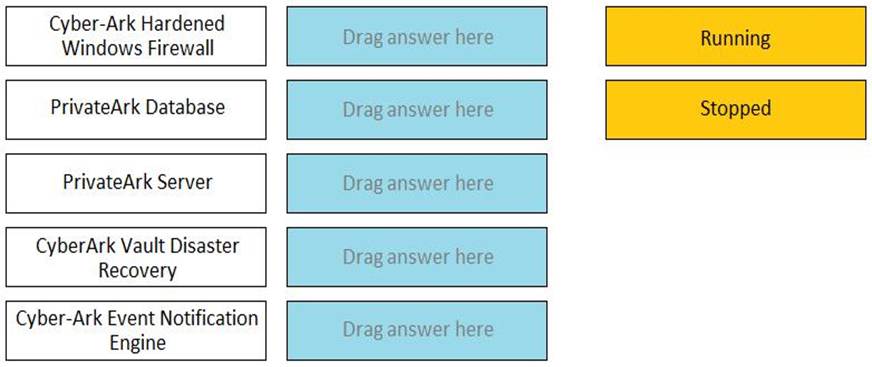
CyberArk Hardened Windows Firewall -> Running
PrivateArk Database -> Running
PrivateArk Server -> Stopped
CyberArk Vault Disaster Recovery -> Running
CyberArk Event Notification Engine -> Stopped
Comprehensive A DR Vault is a Vault that acts as a standby replica of the Primary Vault and is ready to take its place when the Primary Vault is unavailable. The DR Vault operates in Replication mode, which means it continuously replicates the data and metadata from the Primary Vault. In Replication mode, the following services have the following status on the DR Vault: Cyber-Ark Hardened Windows Firewall: This service provides firewall protection for the Vault server.
It should be running on the DR Vault to ensure security.
PrivateArk Database: This service manages the database that stores the metadata of the Vault. It
should be stopped on the DR Vault, because the database is not active in Replication mode. The database is only activated when the DR Vault switches to Production mode.
PrivateArk Server: This service manages the Vault server and its communication with other components. It should be stopped on the DR Vault, because the Vault server is not active in Replication mode. The Vault server is only activated when the DR Vault switches to Production mode. CyberArk Vault Disaster Recovery: This service manages the replication process between the Primary Vault and the DR Vault. It should be running on the DR Vault to ensure data synchronization and readiness for failover.
Cyber-Ark Event Notification Engine: This service manages the event notifications and alerts for the Vault. It should be stopped on the DR Vault, because the event notifications are not relevant in Replication mode. The event notifications are only activated when the DR Vault switches to Production mode.
Reference: Primary-DR environment – CyberArk, Replicate the Primary Vault to the Satellite Vaults – CyberArk
PTA can automatically suspend sessions if suspicious activities are detected in a privileged session, but only if the session is made via the CyberArk PSM.
- A . True
- B . False, the PTA can suspend sessions whether the session is made via the PSM or not
B
Explanation:
The PTA can automatically suspend sessions if suspicious activities are detected in a privileged session, regardless of the session method. The PTA can suspend sessions that are made via the PSM, the PVWA, or directly to the target system. The PTA can also suspend sessions that are made via SSH, RDP, or other protocols.
Reference: Defender PAM Sample Items Study Guide, page 24
PTA User Guide, page 17
During a High Availability node switch you notice an error and the Cluster Vault Manager Utility fails back to the original node.
Which log files should you check to investigate the cause of the issue? (Choose three.)
- A . CyberArk Webconsole.log
- B . VaultDB.log
- C . PM_Error.log
- D . ITALog.log
- E . ClusterVault.console.log
- F . logiccontainer.log
B, C, E
Explanation:
During a High Availability (HA) node switch, if an error occurs and the Cluster Vault Manager Utility fails back to the original node, you should check the following log files to investigate the cause of the issue:
VaultDB.log: This log file contains information related to the database operations within the
CyberArk Vault. It can provide insights into any issues that may have occurred during the database transactions at the time of the node switch1.
PM_Error.log: The PM_Error.log file records errors encountered by the Password Manager (PM) during its operations. This log can help identify any issues related to password management that might have contributed to the failure of the node switch1.
ClusterVault.console.log: The ClusterVault.console.log file includes error, warning, and information messages from the CyberArk Digital Cluster Vault. It is used for advanced troubleshooting and can reveal details about the error that caused the failback to the original node2.
Reference: CyberArk Docs – Troubleshooting High Availability issues1
CyberArk Docs – Monitoring the CyberArk Digital Cluster Vault Server2
In a rule using “Privileged Session Analysis and Response” in PTA, which session options are available to configure as responses to activities?
- A . Suspend, Terminate, None
- B . Suspend, Terminate, Lock Account
- C . Pause, Terminate, None
- D . Suspend, Terminate
A
Explanation:
https://docs.cyberark.com/Product-Doc/OnlineHelp/PAS/Latest/en/Content/PTA/Security-
Configuration.htm?TocPath=End%20User%7CSecurity%20Events%7C_____3
These are the session response options that can be configured in a rule using Privileged Session Analysis and Response in PTA. These options determine how PTA reacts to suspicious activities detected in a privileged session. Suspend means that the session is paused and the user is notified. Terminate means that the session is ended and the user is disconnected. None means that no action is taken on the session, but the event is still recorded and reported. You can find more information about these options and how to configure them in the reference below.
Reference: Configure security events
Which of the following components can be used to create a tape backup of the Vault?
- A . Disaster Recovery
- B . Distributed Vaults
- C . Replicate
- D . High Availability
C
Explanation:
The Replicate component can be used to create a tape backup of the Vault. The Replicate component is a utility that exports the encrypted contents of the Safes and the Vault metadata to a computer outside the Vault environment. A global backup system can then access the replicated files and copy them to a tape or any other backup media. The Replicate component is part of the CyberArk Backup Process, which provides a secure and easy method of backing up and restoring the Vault data12. The other components are not related to the tape backup of the Vault. Disaster Recovery is a feature that enables the Vault to recover from a catastrophic failure by using a standby Vault server3. Distributed Vaults is a feature that enables the Vault to synchronize data with other Vaults in different locations4. High Availability is a feature that enables the Vault to maintain continuous operation by using a primary and a secondary Vault server.
Reference: Use the CyberArk Backup Process – CyberArk, section “Use the CyberArk Backup Process” Install the Vault Backup Utility – CyberArk, section “Backup utilities”
Disaster Recovery – CyberArk, section “Disaster Recovery” Distributed Vaults – CyberArk, section “Distributed Vaults” [High Availability – CyberArk], section “High Availability”
You are configuring a Vault HA cluster.
Which file should you check to confirm the correct drives have been assigned for the location of the Quorum and Safes data disks?
- A . ClusterVault.ini
- B . my.ini
- C . vault.ini
- D . DBParm.ini
A
Explanation:
When configuring a Vault High Availability (HA) cluster, the ClusterVault.ini file is the one you should
check to confirm the correct drives have been assigned for the location of the Quorum and Safes data
disks. This file contains the configuration settings for the cluster, including the drive assignments for
the Quorum disk and the Vault data1.
Reference: CyberArk Community: HA Cluster Vault – How do I configure multiple Storage Drives?
Refer to the exhibit.
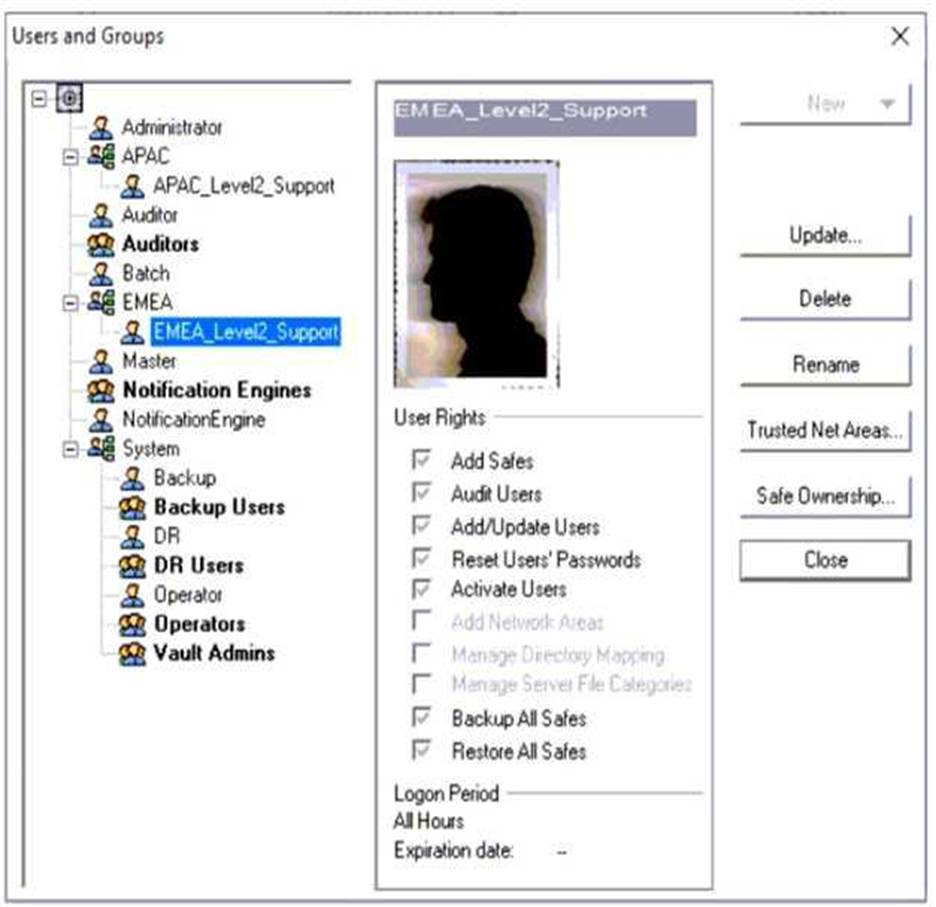
Why is user "EMEALevel2Support" unable to change the password for user "Operator"?
- A . EMEALevel2Support’s hierarchy level is not the same or higher than Operator.
- B . EMEALevel2Support does not have the "Manage Directory Mapping" role.
- C . Operator can only be reset by the Master user.
- D . EMEALevel2Support does not have rights to reset passwords for other users.
D
Explanation:
The image description indicates that “EMEALevel2Support” has the following rights: Add/Update Users, Manage Server File Categories, Manage Directory Mapping, Backup All Files, Restore All Files. Since there is no mention of the right to reset passwords for other users, this suggests that “EMEALevel2Support” lacks the necessary permission to change the password for “Operator”.