
CyberArk PAM-DEF-SEN Practice Exams
Last updated on Oct 21,2026- Exam Code: PAM-DEF-SEN
- Exam Name: CyberArk Defender – PAM & Sentry – PAM
- Certification Provider: CyberArk
- Latest update: Oct 21,2026
You are onboarding an account that is not supported out of the box.
What should you do first to obtain a platform to import?
- A . Create a service ticket in the customer portal explaining the requirements of the custom platform.
- B . Search common community portals like stackoverflow, reddit, github for an existing platform.
- C . From the platforms page, uncheck the “Hide non-supported platforms” checkbox and see if a platform meeting your needs appears.
- D . Visit the CyberArk marketplace and search for a platform that meets your needs.
D
Explanation:
The CyberArk marketplace is a platform that simplifies delivery of privileged access security solutions, such as CyberArk Privileged Account Security Solution. It features the industry’s broadest and deepest portfolio of technology integrations, including platforms for various types of accounts. Customers can find and deploy integrations with CyberArk Marketplace in as little as four clicks. If there is no platform that meets the customer’s needs, they can request a custom platform from
CyberArk or create their own using the Platform Development Kit (PDK).
Reference: CyberArk Marketplace, Platform Development Kit
DRAG DROP
Match each PTA alert category with the PTA sensors that collect the data for it.
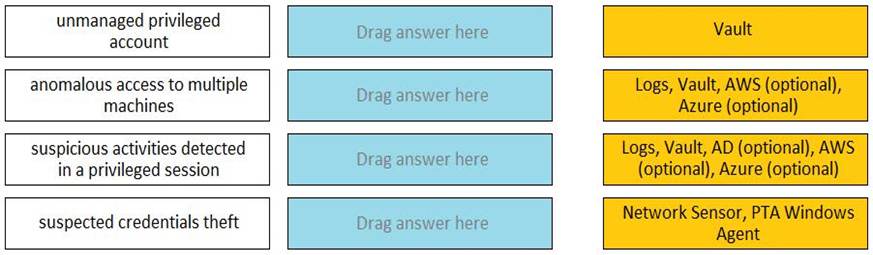
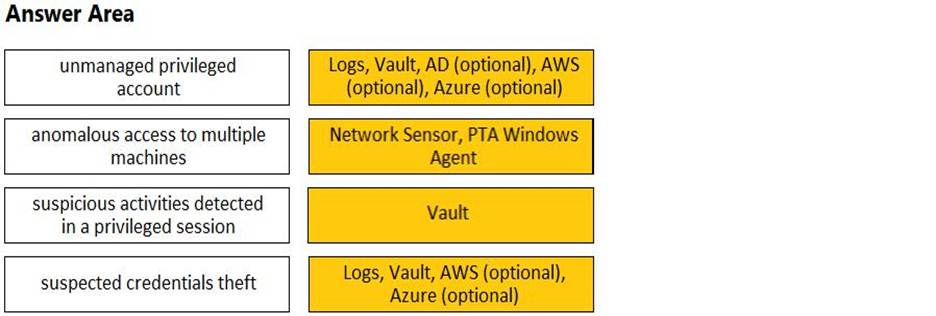
Comprehensive The Privileged Threat Analytics (PTA) sensors are designed to collect specific types of data to detect potential security threats. For the alert category of Unmanaged privileged account, the Network Sensor and PTA Windows Agent are responsible for collecting the relevant dat
a. Similarly, for the alert category of Anomalous access to multiple machines, data is collected from Logs, the Vault, and optionally from AWS and Azure. The Suspicious activities detected in a privileged session category relies on data from Logs, the Vault, and optionally from AD, AWS,
and Azure. Lastly, the Suspected credentials theft category also utilizes the Network Sensor and PTA Windows Agent for data collection.
Reference: CyberArk’s official training materials and documentation provide detailed information on PTA sensors and the types of data they collect for different alert categories.
The Password upload utility can be used to create safes.
- A . TRUE
- B . FALSE
A
Explanation:
The Password Upload utility can be used to create safes, as well as password objects, folders, and platforms. The Password Upload utility works with the CyberArk Password Vault to create password objects from a passwords list and store them in the Vault. This enables you to upload large numbers of passwords automatically and makes the Vault implementation process quicker and more automatic. The Password Upload utility initiates the Vault environment required to store passwords in the safe and start working with them. This includes creating new safes, adding the CPM user as a safe owner, and sharing the safe with the Password Vault Web Access1.
Reference: 1: Password Upload Utility
Where can you assign a Reconcile account? (Choose two.)
- A . in PVWA at the account level
- B . in PVWA in the platform configuration
- C . in the Master policy of the PVWA
- D . at the Safe level
- E . in the CPM settings
A, B
Explanation:
A Reconcile account can be assigned in the Privileged Vault Web Access (PVWA) at both the account level and within the platform configuration. At the account level, a Reconcile account password can be defined which will override the account specified in the platform1. In the platform configuration, you can navigate to Platform Management, select the platform, edit it, and then expand Automatic Password Management to enter the values in the ‘ReconcileAccountSafe’ and ‘ReconcileAccountName’ fields, which will apply to all accounts attached to that specific platform2.
Reference: CyberArk Docs – Reconcile Password1
CyberArk Community – Associate reconcile account with a specific platform
To enable the Automatic response “Add to Pending” within PTA when unmanaged credentials are found, what are the minimum permissions required by PTAUser for the PasswordManager_pending safe?
- A . List Accounts, View Safe members, Add accounts (includes update properties), Update Account content, Update Account properties
- B . List Accounts, Add accounts (includes update properties), Delete Accounts, Manage Safe
- C . Add accounts (includes update properties), Update Account content, Update Account properties, View Audit
- D . View Accounts, Update Account content, Update Account properties, Access Safe without confirmation, Manage Safe, View Audit
A
Explanation:
To enable the automatic response “Add to Pending” within PTA when unmanaged credentials are found, the PTAUser needs to have the minimum permissions for the PasswordManager_pending safe as follows:
List Accounts: This permission allows the PTAUser to view the accounts in the safe and their properties.
View Safe members: This permission allows the PTAUser to view the members of the safe and their authorizations.
Add accounts (includes update properties): This permission allows the PTAUser to add new accounts to the safe and update their properties, such as name, address, platform, and policy.
Update Account content: This permission allows the PTAUser to update the password of the accounts in the safe.
Update Account properties: This permission allows the PTAUser to update the properties of the existing accounts in the safe, such as name, address, platform, and policy.
These permissions are required for the PTAUser to be able to detect unmanaged privileged accounts and add them to the pending accounts queue in the PasswordManager_pending safe. The PTAUser also needs to have the same permissions for the PasswordManager_reconcile safe to enable the automatic response “Reconcile credentials” for suspicious password change events.
Reference: Configure PTA Remediations, Safe Member Authorizations
Vault admins must manually add the auditors’ group to newly created safes so auditors will have sufficient access to run reports.
- A . TRUE
- B . FALSE
B
Explanation:
Vault admins do not need to manually add the auditors’ group to newly created safes, because the auditors’ group is automatically added to every safe in the vault by default. The auditors’ group has the View Audit authorization, which allows its members to view the safe’s activity and run reports.
However, vault admins can remove the auditors’ group from specific safes if they want to restrict the access of the auditors.
Reference: Predefined users and groups – CyberArk
What is required to manage loosely connected devices?
- A . PSM for SSH
- B . EPM
- C . PSM
- D . PTA
B
Explanation:
To manage loosely connected devices, which are not always connected to the network, CyberArk uses the Endpoint Privilege Manager (EPM). EPM is capable of rotating credentials of accounts on Windows and macOS devices that are loosely connected to the enterprise network. It operates over the internet and can communicate with the corporate PVWA to retrieve the new password and change it on the device1.
Reference: The information provided is based on general knowledge of CyberArk PAM best practices and the management of loosely connected devices as outlined in CyberArk’s official documentation1.
To change the safe where recordings are kept for a specific platform, which setting must you update in the platform configuration?
- A . SessionRecorderSafe Most Voted
- B . SessionSafe
- C . RecordingsPath
- D . RecordingLocation
A
Explanation:
To change the safe where recordings are kept for a specific platform, you must update
the SessionRecorderSafe setting in the platform configuration. This setting specifies the name of the safe where the Privileged Session Manager (PSM) recordings will be stored. After updating the SessionRecorderSafe setting, you need to restart the PSM service or wait for the new settings to be applied, which typically takes about 10 minutes. Once the new settings are in effect, any new PSM sessions initiated will have their recordings stored in the newly specified safe1.
Reference: CyberArk Docs – How to Create/Change/Configure PSM Recording Safes
As long as you are a member of the Vault Admins group you can grant any permission on any safe.
- A . TRUE
- B . FALSE
B
Explanation:
The Vault Admins group is a predefined group that is automatically created during the installation or upgrade of the Vault. This group has all possible permissions in the Vault, and can create and manage other users, groups, platforms, policies, safes, and accounts. However, this group is not automatically added to every safe in the Vault, but only to some system safes that are used for administrative purposes. Therefore, being a member of the Vault Admins group does not guarantee that you can grant any permission on any safe, unless you are also a member or an owner of that safe. To grant permissions on a safe, you need to have the Authorize safe members authorization on that safe, which allows you to add or remove users or groups as safe members, and assign or revoke their authorizations. Alternatively, you can use the Administrator user, which is a predefined user that is a member of the Vault Admins group, and has all possible permissions on any safe in the Vault.
Reference: Predefined users and groups
Safe member authorizations
A password compliance audit found:
1) One-time password access of 20 domain accounts that are members of Domain Admins group in Active Directory are not being enforced.
2) All the sessions of connecting to domain controllers are not being recorded by CyberArk PSM.
What should you do to address these findings?
- A . Edit the Master Policy and add two policy exceptions: enable "Enforce one-time password access", enable "Record and save session activity".
- B . Edit safe properties and add two policy exceptions: enable "Enforce one-time password access", enable "Record and save session activity".
- C . Edit CPM Settings and add two policy exceptions: enable "Enforce one-time password access", enable "Record and save session activity".
- D . Contact the Windows Administrators and request them to add two policy exceptions at Active Directory Level: enable "Enforce one-time password access", enable "Record and save session activity".
A
Explanation:
To address the findings of the password compliance audit, you should edit the Master Policy in CyberArk Privileged Access Manager. The Master Policy is where you can enforce one-time password access and record session activity. One-time password access ensures that each password is used only once and then changed, which is a security measure to prevent unauthorized reuse of passwords1. Recording session activity is a feature of the Privileged Session Manager (PSM) that allows all activities during a session to be recorded for auditing purposes2. By enabling these settings in the Master Policy, you ensure that the domain accounts have one-time password access enforced and that all sessions connecting to domain controllers are recorded by CyberArk PSM.
Reference: CyberArk Docs: One-time passwords and exclusive accounts1