
CyberArk PAM-DEF Practice Exams
Last updated on Oct 22,2026- Exam Code: PAM-DEF
- Exam Name: CyberArk Defender – PAM
- Certification Provider: CyberArk
- Latest update: Oct 22,2026
In PVWA, you are attempting to play a recording made of a session by user jsmith, but there is no option to “Fast Forward” within the video. It plays and only allows you to skip between commands instead. You are also unable to download the video.
What could be the cause?
- A . Recording is of a PSM for SSH session.
- B . The browser you are using is out of date and needs an update to be supported.
- C . You do not have the “View Audit” permission on the safe where the account is stored.
- D . You need to update the recorder settings in the platform to enable screen capture every 10000 ms or less.
A
Explanation:
The inability to “Fast Forward” within a video recording in the PVWA and the restriction to only skip
between commands suggests that the recording is of a PSM for SSH session. PSM for SSH sessions
are typically recorded as text-based logs that capture command-level activities, which allows for
skipping between commands but not fast-forwarding through a video timeline. Additionally, the lack
of an option to download the video is consistent with the behavior of text-based session recordings,
which do not provide a video file for download1.
Reference: CyberArk’s official documentation on Recorded Sessions, which explains the playback functionalities and limitations of different types of session recordings1.
Information on configuring video and text recordings in PSM, which details how recordings are managed and the options available for different session types2.
Which Master Policy Setting must be active in order to have an account checked-out by one user for a pre-determined amount of time?
- A . Require dual control password access Approval
- B . Enforce check-in/check-out exclusive access
- C . Enforce one-time password access
- D . Enforce check-in/check-out exclusive access & enforce one-time password access
B
Explanation:
According to the CyberArk Defender PAM documentation, the Master Policy setting that must be
active in order to have an account checked-out by one user for a pre-determined amount of time is Enforce check-in/check-out exclusive access. This setting enables organizations to permit users to check out a ‘one-time’ password and lock it so that no other users can retrieve it at the same time. After the user has used the password, the user checks the password back into the Vault. This ensures exclusive usage of the privileged account, enabling full control and tracking for the password. The duration of the check-out period can be configured in the platform settings for each account.
Reference: Account check-out and check-in – CyberArk
Master Policy – CyberArk
SAFE Authorizations may be granted to____________.
Select all that apply.
- A . Vault Users
- B . Vault Group
- C . LDAP Users
- D . LDAP Groups
A, B, C, D
Explanation:
SAFE Authorizations may be granted to Vault Users, Vault Groups, LDAP Users, and LDAP Groups. These are the four types of users that can be defined in the Vault and assigned permissions to access Safes and manage passwords. Vault Users and Vault Groups are created and managed within the Vault, while LDAP Users and LDAP Groups are imported from an external directory service such as Active Directory.
Reference: Defender PAM Course, Module 4: Managing Safes, Lesson 4.2: Safe Authorizations, slide 4 Defender PAM Sample Items Study Guide, Question 39, page 15
CyberArk Privileged Access Security Documentation, Vault Administration Guide, Chapter 4:
Managing Safes, Section: Safe Authorizations, page 4-12
Which CyberArk utility allows you to create lists of Master Policy Settings, owners and safes for output to text files or MSSQL databases?
- A . Export Vault Data
- B . Export Vault Information
- C . PrivateArk Client
- D . Privileged Threat Analytics
B
Explanation:
The Export Vault Information utility is a CyberArk tool that allows you to create lists of Master Policy settings, owners and safes for output to text files or MSSQL databases. This utility can be used to export various types of information from the Vault, such as accounts, safes, platforms, policies, users, groups, and audit records. The utility can also generate reports based on predefined templates or custom queries. The utility can be run from the command line or the graphical user interface.
Reference: Export Vault Information, Export Vault Information Utility
Which change could CyberArk make to the REST API that could cause existing scripts to fail?
- A . adding optional parameters in the request
- B . adding additional REST methods
- C . removing parameters
- D . returning additional values in the response
C
Explanation:
Changes to the REST API that could cause existing scripts to fail include removing parameters. When parameters are removed from an API, scripts that rely on those parameters being present may no longer function correctly because they expect certain data to be available. This can lead to errors or unexpected behavior in the scripts that use the API1.
Reference: CyberArk Docs: REST APIs1
The password upload utility must run from the CPM server
- A . TRUE
- B . FALSE
A
Explanation:
According to the CyberArk documentation1, the Password Upload utility must run from the Central Policy Manager (CPM) server. This utility works by uploading passwords and their properties into the Password Vault from a pre-prepared file, creating the required environment, when necessary. It is run from a command line whenever a password upload is required1.
Which user(s) can access all passwords in the Vault?
- A . Administrator
- B . Any member of Vault administrators
- C . Any member of auditors
- D . Master
D
Explanation:
According to the CyberArk Defender PAM documentation1, the Master user is the only user that can access all passwords in the Vault. The Master user is a special user that is created during the initial installation of the Vault and has full permissions on all Safes and accounts in the Vault. The Master user can also perform administrative tasks, such as backup and restore the Vault, change the Vault license, and manage the recovery key. The Master user is the only user that can log on to the Vault in case of a disaster using the recovery key. The Master user’s password is not stored in the Vault and cannot be changed or retrieved by any other user.
The Administrator user is a predefined user that is created during the initial installation of the Vault and has the Vault Admin authorization. The Administrator user can perform administrative tasks, such as create and manage users and groups, define platforms and policies, and monitor Vault activity. However, the Administrator user cannot access any passwords in the Vault unless they are explicitly added as a member of a Safe that contains the passwords2.
The Vault administrators group is a predefined group that is created during the initial installation of the Vault and has the Vault Admin authorization. The members of the Vault administrators group can perform the same administrative tasks as the Administrator user, but they cannot access any passwords in the Vault unless they are explicitly added as a member of a Safe that contains the passwords2.
The auditors group is a predefined group that is created during the initial installation of the Vault and has the Audit Users authorization. The members of the auditors group can view and generate reports on the Vault activity, but they cannot access any passwords in the Vault unless they are explicitly added as a member of a Safe that contains the passwords2.
Reference: Master User – CyberArk
Predefined users and groups – CyberArk
DRAG DROP
Arrange the steps to restore a Vault using PARestore for a Backup in the correct sequence.
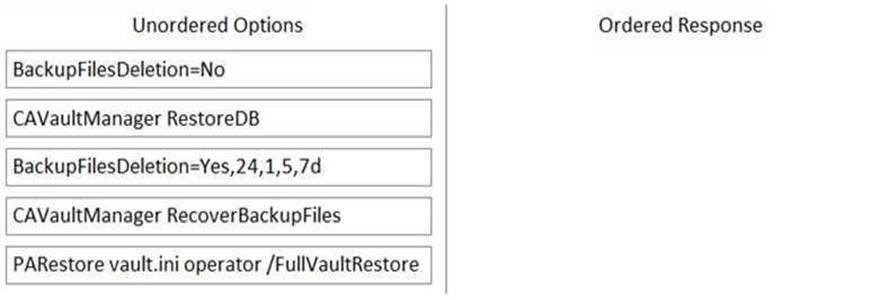
BackupFilesDeletion=No
PARestore vault.ini operator /FullVaultRestore
CAVaultManager RecoverBackupFiles
CAVaultManager RestoreDB
BackupFilesDeletion=Yes,24,1,5,7d
https://docs.cyberark.com/Product-Doc/OnlineHelp/PAS/Latest/en/Content/PASIMP/Restoring-Safes-or-the-Vault.htm
It is possible to control the hours of the day during which a user may log into the vault.
- A . TRUE
- B . FALSE
A
Explanation:
It is possible to control the hours of the day during which a user may log into the vault by using the Time Restrictions feature. This feature allows administrators to define the days and times that users can access the vault. Users who try to log in outside the permitted hours will be denied access and receive a message informing them of the restriction. Time restrictions can be applied to individual users or groups of users.
Reference: [Defender PAM eLearning Course], Module 3: Safes and Permissions, Lesson 3.3: User Management,
Slide 7: Time Restrictions
[Defender PAM Sample Items Study Guide], Question 2: Time Restrictions
[CyberArk Documentation Portal], CyberArk Privileged Access Security Implementation Guide, Chapter 4: Managing Users and Groups, Section: Time Restrictions
A new colleague created a directory mapping between the Active Directory groups and the Vault. Where can the newly Configured directory mapping be tested?
- A . Connect to the Active Directory and ensure the organizational unit exists.
- B . Connect to Sailpoint (or similar tool) to ensure the organizational unit is correctly named; log in to the PVWA with "Administrator" and confirm authentication succeeds.
- C . Search for members that exist only in the mapping group to grant them safe permissions through the PVWA.
- D . Connect to the PrivateArk Client with the Administrator Account to see if there is a user in the Vault Admin Group.
C
Explanation:
The newly configured directory mapping can be tested by searching for members that exist only in the mapping group to grant them safe permissions through the PVWA (Privileged Vault Web Access). This process allows you to verify that the directory mapping is functioning correctly by ensuring that only the intended users, who are part of the specific Active Directory group, are granted access to the safes in the CyberArk Vault12.
Reference: CyberArk Docs – Create directory mapping1
CyberArk Docs – Edit directory mapping3
CyberArk Docs – LDAP Integration in PVWA