
CompTIA 220-1201 Practice Exams
Last updated on Nov 16,2026- Exam Code: 220-1201
- Exam Name: CompTIA A+ Certification Exam: Core 1
- Certification Provider: CompTIA
- Latest update: Nov 16,2026
A third-party contractor recently installed a new switch, router, and cabling for a small corporate office. After the installation, users started experiencing issues connecting to resources over the network.
INSTRUCTIONS
Click on each PC and server to review outputs. From the remediation section on the right, select an issue and solution for each device.
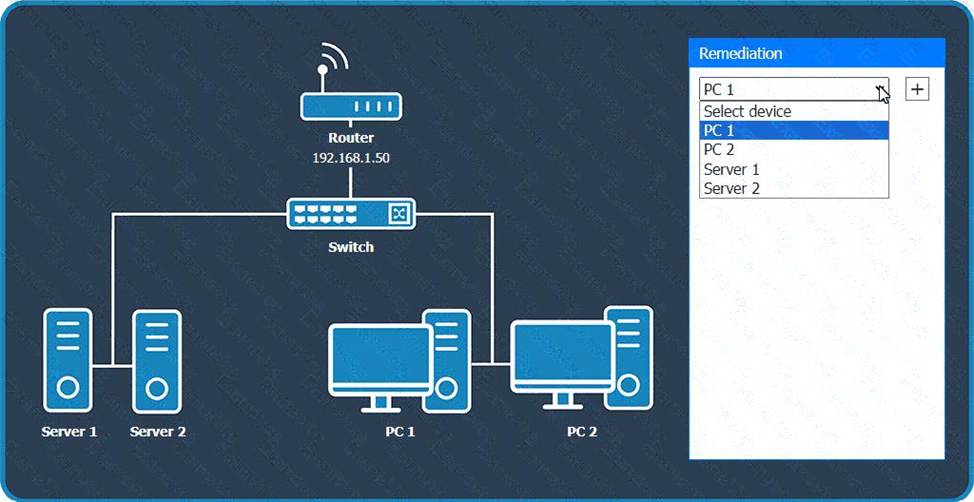
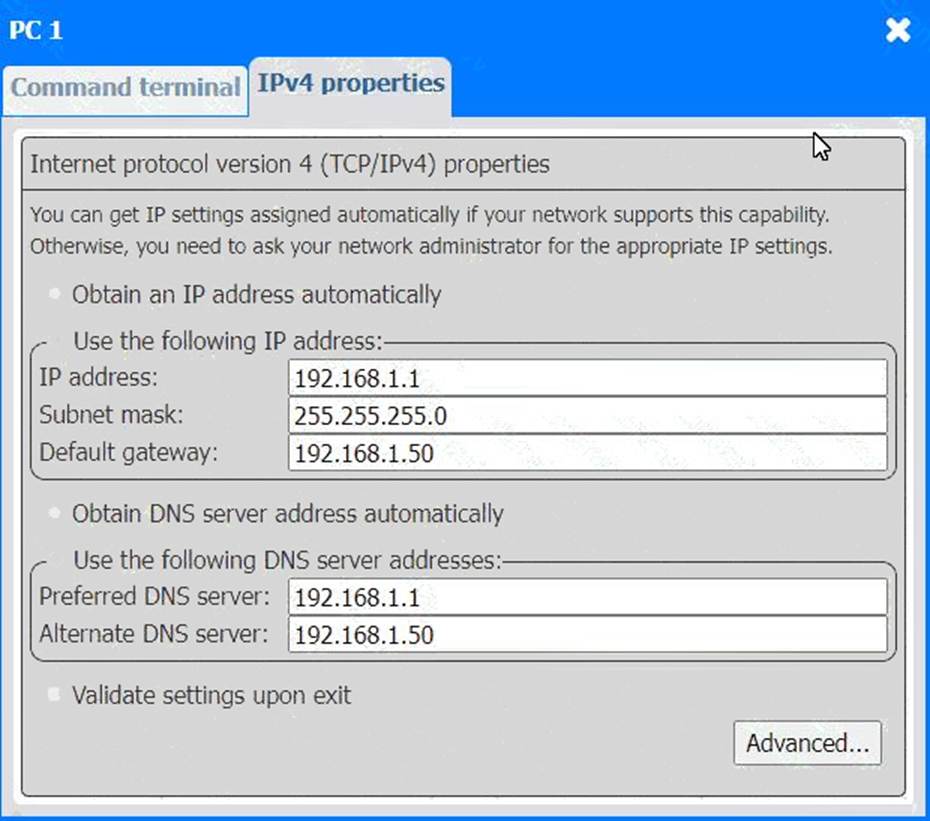
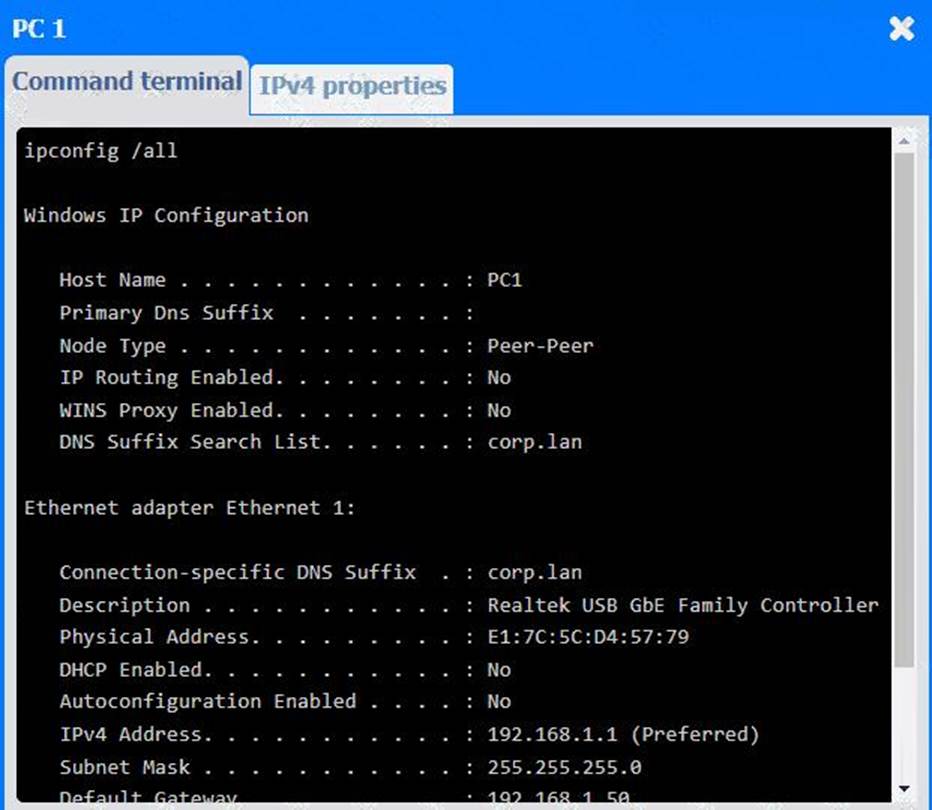
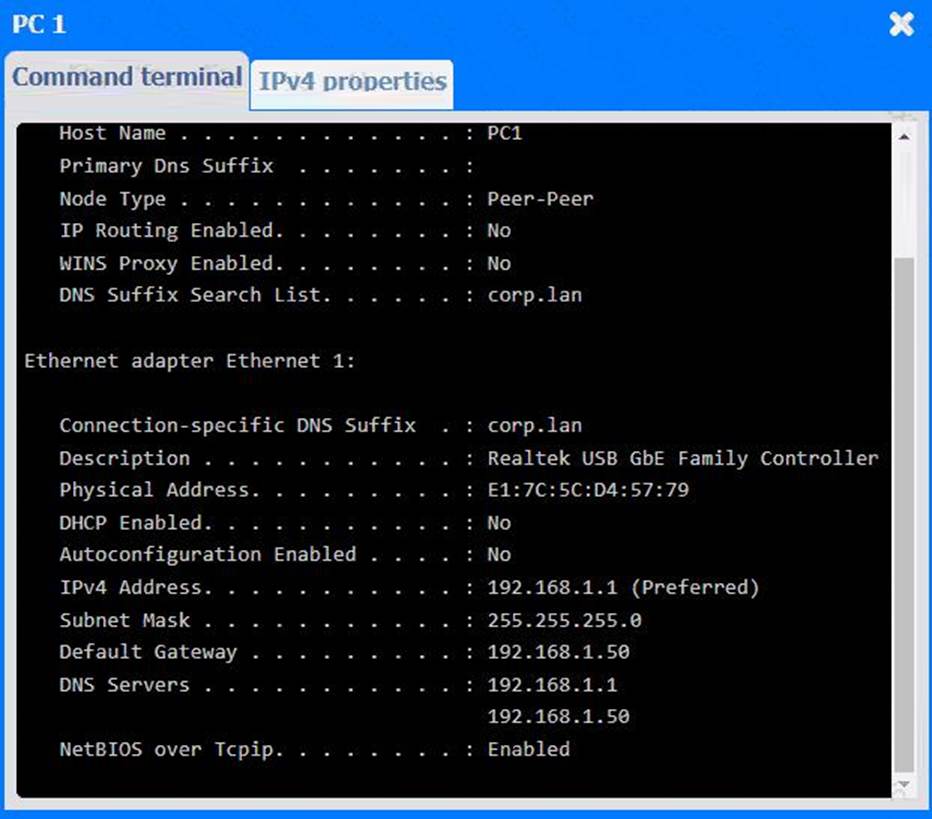
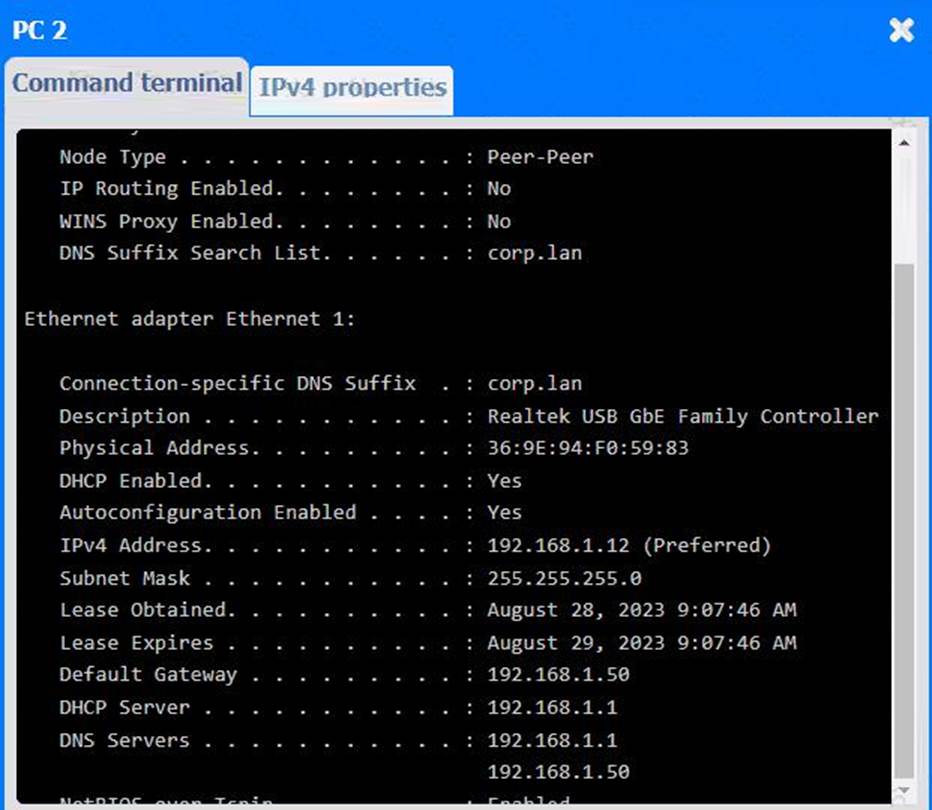
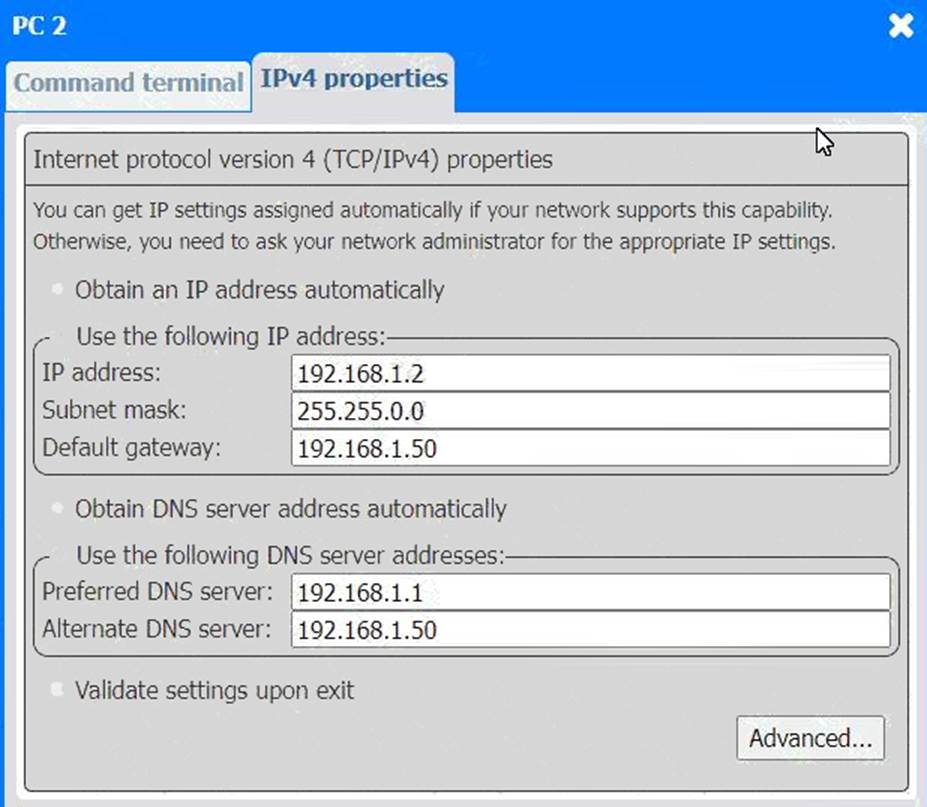
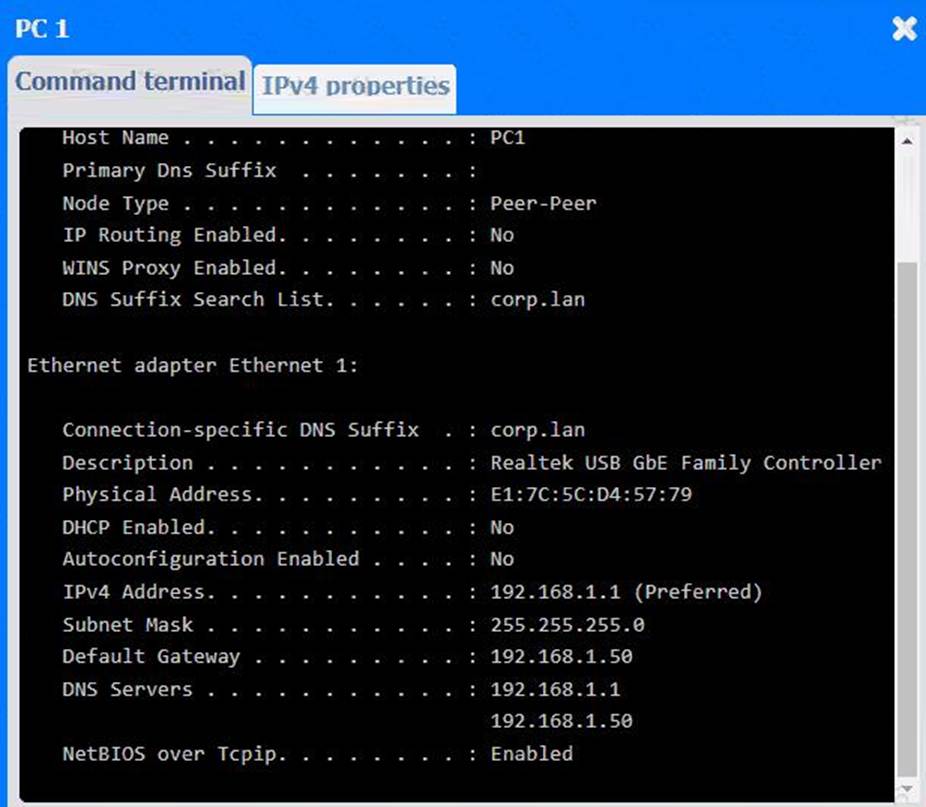
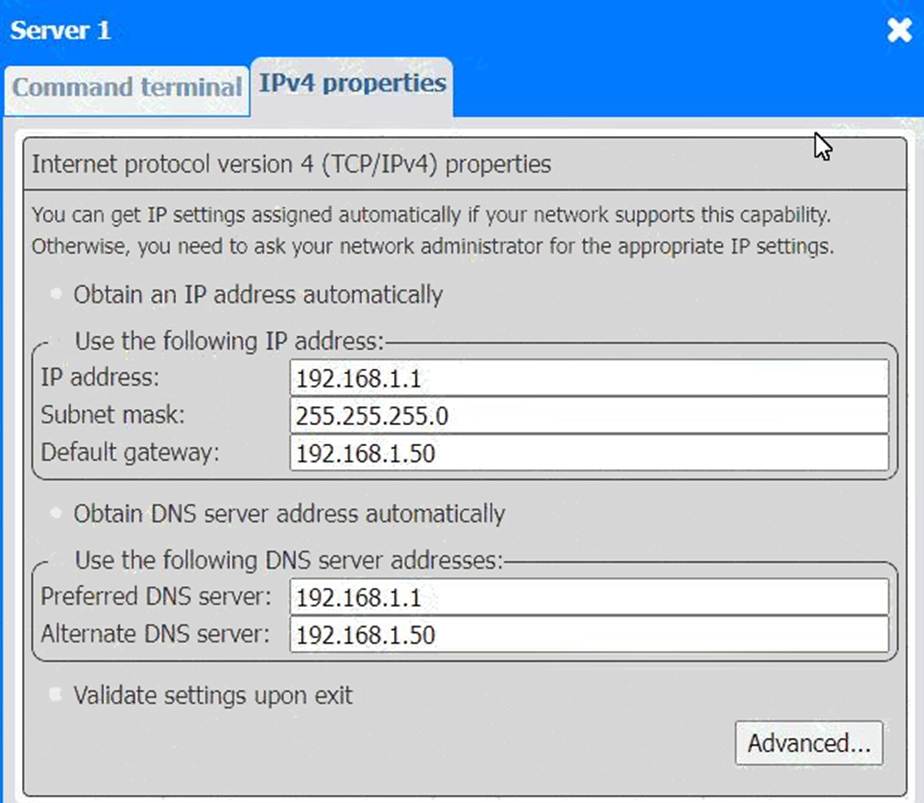
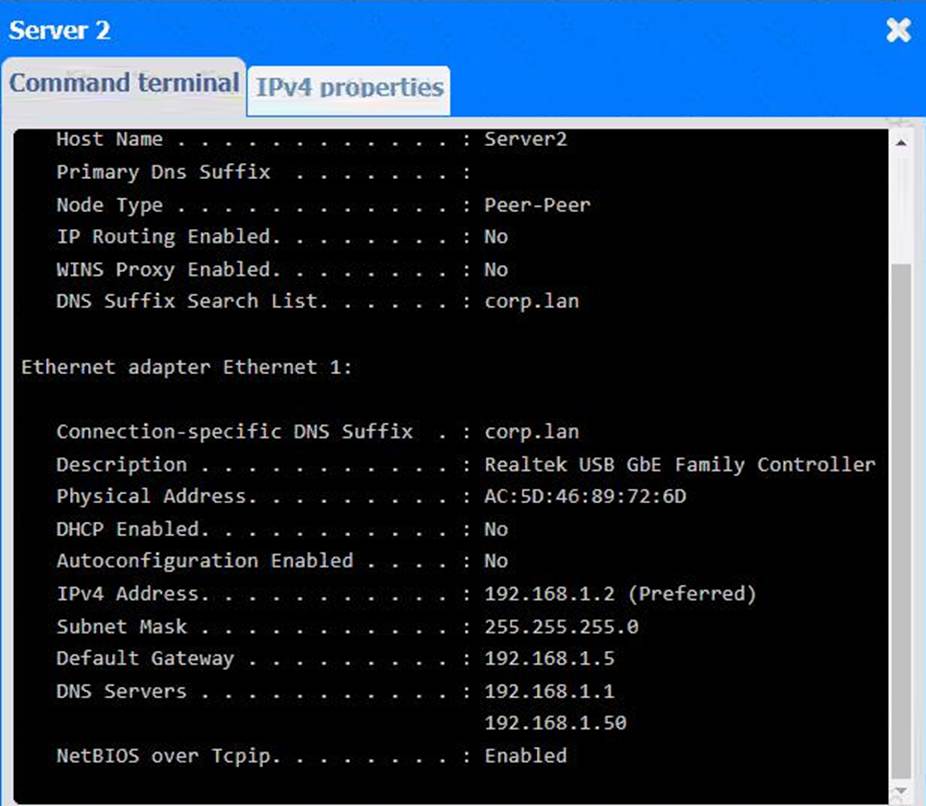
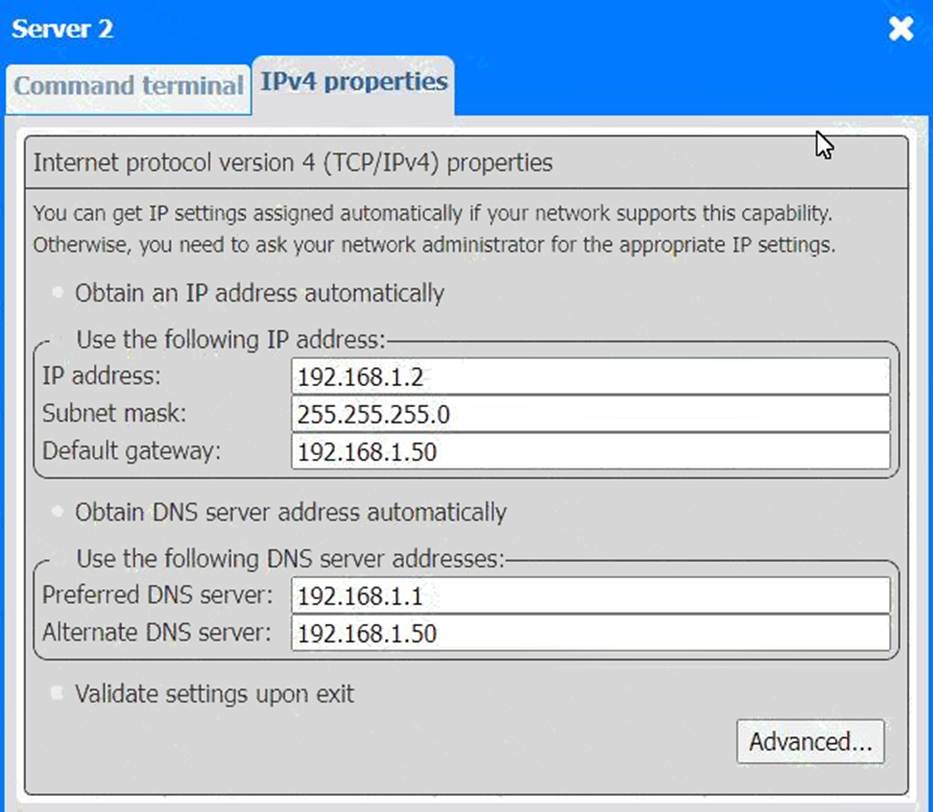
Looking at the network configurations and outputs from both PCs and servers, here are the possible issues and solutions:
A customer reports a problem connecting to network resources. After asking open-ended questions, the technician determines the issue likely exists on the remote server.
Which of the following should the technician do next?
- A . Document the findings.
- B . Test the theory
- C . Gather information
- D . Establish a plan of action
B
Explanation:
After determining the issue is likely on the remote server, the technician should test the theory to confirm the root cause before proceeding.
Why Not A (Document the findings): Documentation comes after confirming the issue.
Why Not C (Gather information): Information gathering is already completed.
Why Not D (Establish a plan of action): This is done after confirming the issue.
CompTIA A+ Exam
Reference: Core 2 (220-1102), Section 3.1, troubleshooting methodology.
Which of the following cable types can be used to transfer data and video?
- A . USB-C
- B . HDMI
- C . DisplayPort
- D . VGA
A
Explanation:
USB-Cis a versatile connector capable oftransmitting data, video, audio, and power. With standards likeDisplayPort over USB-C or Thunderbolt 3/4, it can be used for external displays, file transfers, charging, and more ― all through one cable.
Option B (HDMI): Supports video and audio but not general data transfer.
Option C (DisplayPort): Similar to HDMI ― supports video/audio but not general file transfer.
Option D (VGA): Legacy analog video only ― no data or audio support.
CompTIA A+ Core 1 Exam Objective
Reference: Objective 3.1: Identify common connector types.
A computer is experiencing random shutdowns. A technician notices that the fans on the computer work but are noisy. The CPU temperature is about 122°F (50°C) when the computer is started but rises to 208°F (98°C) when applications are opened.
Which of the following would most likely fix this issue?
- A . Replacing the power supply
- B . Installing a high-performance heat sink
- C . Adjusting the fan settings
- D . Adding more RAM to the computer
B
Explanation:
Excessive heat buildup due to insufficient cooling is a primary cause of unexpected shutdowns. A high-performance heat sink improves thermal transfer, dissipates more heat, and helps maintain CPU temperature within safe limits. When CPU temperatures reach levels like 208°F (98°C), the system may shut down to prevent damage.
#Reference: "CompTIA A+ Complete Study Guide" by Quentin Docter C Chapter 1, pages 68C71, discusses CPU cooling and heat sink improvements.
A technician is troubleshooting internet connectivity issues after a firewall update. Users report that they can access local network resources, such as printers and shares, but cannot access the internet.
Which of the following settings is most likely causing the issue?
- A . Static IP assignments
- B . Default gateway
- C . Subnet mask
- D . VLANs
B
Explanation:
If users can access local network resources but not the internet, the most likely culprit is a misconfigured or missing default gateway. The default gateway routes traffic from the local network to external networks (i.e., the internet). If it’s not properly set or was altered during a firewall update, internet traffic won’t be forwarded correctly.
Option A: Static IPs could cause conflict, but wouldn’t affect only external access if configured correctly.
Option C: An incorrect subnet mask could isolate devices, but local communication would likely be impacted too.
Option D: VLANs segment networks; while misconfigured VLANs could cause access issues, they’d more likely isolate local traffic as well.
CompTIA A+ Core 1 Exam Objective
Reference:
Objective 2.6: Given a scenario, configure and troubleshoot network connectivity.
A customer is able to print most documents with their USB inkjet printer, but the system is unresponsive when printing a certain report from a custom application. Nothing will print until the computer is restarted and the printer is power cycled. A technician remotes into the PC and confirms that the spooler stops working when this report is sent. After cleaning the spooler and reinstalling the drivers from the manufacturer’s website, the issue persists. No other sites using the application report similar issues.
Which of the following is most likely causing the issue?
- A . The manufacturer is curating content before it reaches the device to preserve ink.
- B . The application has a bug that the developer needs to address.
- C . The system is using the PostScript language instead of the PCL.
- D . Personal preferences have changed and documents with graphics are now online-only
B
Explanation:
If a print spooler crashes specifically with one application and no issue occurs on other systems, the most likely root cause is a bug within that specific application. Restarting the spooler and reinstalling drivers resolves system-wide or hardware-related issues―not app-specific failures. This indicates the application may be sending malformed print data.
#Reference: "CompTIA A+ Certification All-in-One Exam Guide" by Mike Meyers C Chapter 26, page 1144.
A salesperson is unable to reach the internet from a home office PC A support technician wants to verify the router is receiving a valid public IP address.
Which of the Wowing is a valid public IP address in this scenario?
- A . 10.254.128.11
- B . 66.157.195.20
- C . 172.16.0.30
- D . 192.168 1.50
B
Explanation:
A valid public IP address must fall outside the private IP address ranges:
A user routinely connects and disconnects multiple devices from a laptop.
Which of the following options should a technician recommend to facilitate ease of user mobility?
- A . Serial interfaces
- B . Docking station
- C . Network switch
- D . USB hub
B
Explanation:
Reasoning: A docking station is designed to provide a central connection point for multiple peripherals, such as monitors, keyboards, mice, and network cables. It allows users to quickly connect or disconnect all devices by simply docking or undocking their laptop, improving mobility and reducing wear and tear on individual ports.
Why the Other Options Are Incorrect:
A user routinely connects and disconnects multiple devices from a laptop.
Which of the following options should a technician recommend to facilitate ease of user mobility?
- A . Serial interfaces
- B . Docking station
- C . Network switch
- D . USB hub
B
Explanation:
Reasoning: A docking station is designed to provide a central connection point for multiple peripherals, such as monitors, keyboards, mice, and network cables. It allows users to quickly connect or disconnect all devices by simply docking or undocking their laptop, improving mobility and reducing wear and tear on individual ports.
Why the Other Options Are Incorrect:
Which of the following should a technician use to terminate a Cat 6 cable to a patch panel?
- A . Punchdown tool
- B . Crimper
- C . Toner probe
- D . Network tap
A
Explanation:
A punchdown tool is specifically used to insert wires into a punchdown block in patch panels, which is typical for Cat 6 and similar cabling. It ensures a secure and correct connection by pushing the wire into a metal groove that slices the insulation.
#Reference: "CompTIA A+ Certification All-in-One Exam Guide" by Mike Meyers C Chapter 18, page 758.