
Check Point 156-315.81.20 Practice Exams
Last updated on Oct 23,2026- Exam Code: 156-315.81.20
- Exam Name: Check Point Certified Security Expert - R81.20
- Certification Provider: Check Point
- Latest update: Oct 23,2026
What are the three SecureXL Templates available in R81.20?
- A . PEP Templates. QoS Templates. VPN Templates
- B . Accept Templates. Drop Templates. NAT Templates
- C . Accept Templates. Drop Templates. Reject Templates
- D . Accept Templates. PDP Templates. PEP Templates
B
Explanation:
SecureXL is a technology that improves the performance of the Security Gateway by offloading CPU-intensive operations to a dedicated hardware or software module. SecureXL uses templates to accelerate traffic processing based on predefined patterns and conditions. SecureXL supports three types of templates: Accept Templates, Drop Templates, and NAT Templates3.
Accept Templates are used to accelerate traffic that matches an Accept rule in the Security Policy. Accept Templates bypass most of the inspection stages and send packets directly to the network interface.
Drop Templates are used to accelerate traffic that matches a Drop rule in the Security Policy. Drop Templates drop packets without sending them to the firewall kernel for inspection.
NAT Templates are used to accelerate traffic that requires Network Address Translation (NAT). NAT Templates perform NAT operations without sending packets to the firewall kernel. Therefore, the correct answer is B)
Reference: 3: SecureXL for R80.20 and higher
What are types of Check Point APIs available currently as part of R81.20 code?
- A . Security Gateway API Management API, Threat Prevention API and Identity Awareness Web Services API
- B . Management API, Threat Prevention API, Identity Awareness Web Services API and OPSEC SDK API
- C . OSE API, OPSEC SDK API, Threat Extraction API and Policy Editor API
- D . CPMI API, Management API, Threat Prevention API and Identity Awareness Web Services API
B
Explanation:
What are types of Check Point APIs available currently as part of R81.20 code?
The types of Check Point APIs available currently as part of R81.20 code are:
Management API: This API allows you to automate and orchestrate various management tasks, such as creating and modifying objects, installing policies, generating reports, etc. The Management API can be accessed via CLI, Web Services, or GUI clients.
Threat Prevention API: This API allows you to interact with the Threat Prevention software blades, such as Anti-Virus, Anti-Bot, Threat Emulation, etc. The Threat Prevention API can be used to query and update indicators, upload files for emulation, retrieve verdicts and reports, etc.
Identity Awareness Web Services API: This API allows you to integrate external identity sources with the Identity Awareness software blade, which provides identity-based access control for network traffic. The Identity Awareness Web Services API can be used to send identity and session information to the Security Gateway, query identity information from the Security Gateway, etc. OPSEC SDK API: This API allows you to develop custom applications that can communicate with Check Point products using the OPSEC protocol. The OPSEC SDK API supports various OPSEC services, such as LEA, CPMI, SAM, ELA, UFP, etc.
Reference: R81 Management API Reference Guide, page 7; [R81 Threat Prevention API Reference Guide], page 7; [R81 Identity Awareness Administration Guide], page 105; [OPSEC SDK R81 Documentation Package].
What are types of Check Point APIs available currently as part of R81.20 code?
- A . Security Gateway API Management API, Threat Prevention API and Identity Awareness Web Services API
- B . Management API, Threat Prevention API, Identity Awareness Web Services API and OPSEC SDK API
- C . OSE API, OPSEC SDK API, Threat Extraction API and Policy Editor API
- D . CPMI API, Management API, Threat Prevention API and Identity Awareness Web Services API
B
Explanation:
What are types of Check Point APIs available currently as part of R81.20 code?
The types of Check Point APIs available currently as part of R81.20 code are:
Management API: This API allows you to automate and orchestrate various management tasks, such as creating and modifying objects, installing policies, generating reports, etc. The Management API can be accessed via CLI, Web Services, or GUI clients.
Threat Prevention API: This API allows you to interact with the Threat Prevention software blades, such as Anti-Virus, Anti-Bot, Threat Emulation, etc. The Threat Prevention API can be used to query and update indicators, upload files for emulation, retrieve verdicts and reports, etc.
Identity Awareness Web Services API: This API allows you to integrate external identity sources with the Identity Awareness software blade, which provides identity-based access control for network traffic. The Identity Awareness Web Services API can be used to send identity and session information to the Security Gateway, query identity information from the Security Gateway, etc. OPSEC SDK API: This API allows you to develop custom applications that can communicate with Check Point products using the OPSEC protocol. The OPSEC SDK API supports various OPSEC services, such as LEA, CPMI, SAM, ELA, UFP, etc.
Reference: R81 Management API Reference Guide, page 7; [R81 Threat Prevention API Reference Guide], page 7; [R81 Identity Awareness Administration Guide], page 105; [OPSEC SDK R81 Documentation Package].
Which statement is WRONG regarding the usage of the Central Deployment in SmartConsole?
- A . You can install Hotfixes with the Central Deployment in SmartConsole
- B . You can install Jumbo Hotfix accumulators with the Central Deployment in SmartConsole.
- C . Only be installed Hotfixes can with the Central Deployment in SmartConsole
- D . You can upgrade your cluster without user intervention with the Central Deployment in SmartConsole from R80.40 to R81.20.
C
Explanation:
The statement that is wrong regarding the usage of the Central Deployment in SmartConsole is that only be installed Hotfixes can with the Central Deployment in SmartConsole. This is wrong because Central Deployment can also be used to install Jumbo Hotfix accumulators, upgrade clusters, and perform other operations on multiple gateways simultaneously. Central Deployment simplifies and automates the deployment process and reduces human errors and downtime.
Reference: [Check Point Security Expert R81 Administration Guide], page 23.
Automation and Orchestration differ in that:
- A . Automation relates to codifying tasks, whereas orchestration relates to codifying processes.
- B . Automation involves the process of coordinating an exchange of information through web service interactions such as XML and JSON, but orchestration does not involve processes.
- C . Orchestration is concerned with executing a single task, whereas automation takes a series of tasks and puts them all together into a process workflow.
- D . Orchestration relates to codifying tasks, whereas automation relates to codifying processes.
A
Explanation:
Automation and Orchestration differ in that automation relates to codifying tasks, whereas orchestration relates to codifying processes. Automation is the process of converting manual tasks into executable scripts or programs that can be run by machines or software agents. Orchestration is the process of coordinating multiple automated tasks into a coherent workflow that achieves a desired outcome or goal. Orchestration can also involve integrating different systems, tools, and services through web service interactions such as XML and JSON.
Reference: Check Point Security Expert R81 Course, Automation & Orchestration Administration Guide
SmartEvent does NOT use which of the following procedures to identify events:
- A . Matching a log against each event definition
- B . Create an event candidate
- C . Matching a log against local exclusions
- D . Matching a log against global exclusions
C
Explanation:
SmartEvent does not use matching a log against local exclusions to identify events. Local exclusions are filters that are applied to logs before they are sent to the SmartEvent server. They are used to reduce the amount of logs that are forwarded by the Security Gateways or Log Servers, and to avoid sending irrelevant or sensitive logs. Local exclusions do not affect the event detection process, which is performed by the SmartEvent Correlation Unit on the SmartEvent server.
Reference: Check Point Security Expert R81 Course, SmartEvent Administration Guide, SK120193 – How to configure Local Log Filtering on Security Gateway / Cluster / VSX
What is the port used for SmartConsole to connect to the Security Management Server?
- A . CPMI port 18191/TCP
- B . CPM port/TCP port 19009
- C . SIC port 18191/TCP
- D . https port 4434/TCP
A
Explanation:
The port used for SmartConsole to connect to the Security Management Server is CPMI port 18191/TCP. CPMI stands for Check Point Management Interface, which is a proprietary protocol that enables secure communication between the SmartConsole and the Security Management Server. CPMI uses SSL encryption and authentication to protect the data exchange.
Reference: Check Point Security Expert R81 Course, SK52421 – Ports used by Check Point software
Which command shows only the table names of all kernel tables?
- A . fwtab-t
- B . fw tab -s
- C . fw tab -n
- D . fw tab -k
B
Explanation:
The command fw tab is used to display the contents of the kernel tables1. The command has several options that can modify the output. The option -s shows only the table names and the number of entries in each table1.
For example:
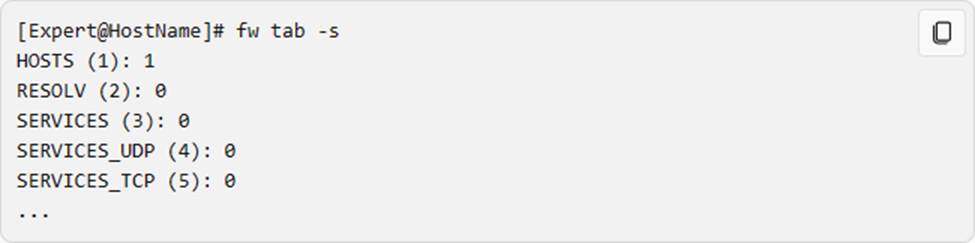
The option -t shows the contents of a specific table, given by its name or ID1. For example:

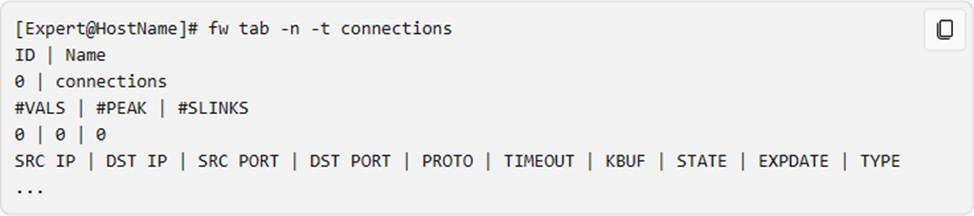
The option -n shows the numeric values of the fields in the tables, instead of resolving them to names1.
For example:
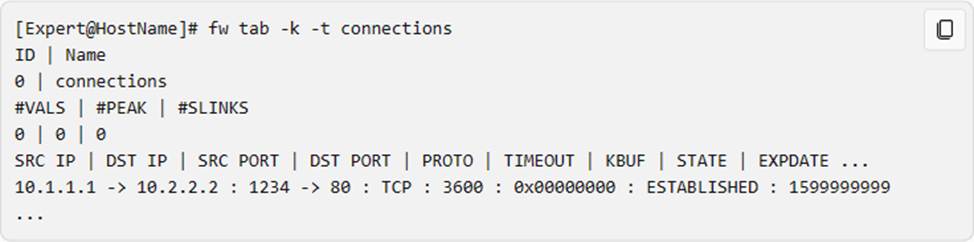
The option -k shows the kernel references for each entry in the table1. For example:
Therefore, the correct answer is B, as it shows only the table names of all kernel tables.
Reference: 1: CLI R81.20 Reference Guide – Check Point Software
UserCheck objects in the Application Control and URL Filtering rules allow the gateway to communicate with the users.
Which action is not supported in UserCheck objects?
- A . Ask
- B . Drop
- C . Inform
- D . Reject
D
Explanation:
The action that is not supported in UserCheck objects is Reject. UserCheck objects in the Application
Control and URL Filtering rules allow the gateway to communicate with the users and display messages or requests on their browsers. The supported actions in UserCheck objects are Ask, Inform, Block, and Continue. The Ask action prompts the user to confirm or cancel an action. The Inform action notifies the user about an event or a policy. The Block action prevents the user from accessing a resource or performing an action. The Continue action allows the user to access a resource or perform an action after displaying a message.
Reference: [UserCheck]
UserCheck objects in the Application Control and URL Filtering rules allow the gateway to communicate with the users.
Which action is not supported in UserCheck objects?
- A . Ask
- B . Drop
- C . Inform
- D . Reject
D
Explanation:
The action that is not supported in UserCheck objects is Reject. UserCheck objects in the Application
Control and URL Filtering rules allow the gateway to communicate with the users and display messages or requests on their browsers. The supported actions in UserCheck objects are Ask, Inform, Block, and Continue. The Ask action prompts the user to confirm or cancel an action. The Inform action notifies the user about an event or a policy. The Block action prevents the user from accessing a resource or performing an action. The Continue action allows the user to access a resource or perform an action after displaying a message.
Reference: [UserCheck]