
Check Point 156-315.81.20 Practice Exams
Last updated on Oct 23,2026- Exam Code: 156-315.81.20
- Exam Name: Check Point Certified Security Expert - R81.20
- Certification Provider: Check Point
- Latest update: Oct 23,2026
What command is used to manually failover a cluster during a zero-downtime upgrade?
- A . set cluster member down
- B . cpstop
- C . clusterXL_admin down
- D . set clusterXL down
C
Explanation:
To manually failover a cluster during a zero-downtime upgrade, you can use the command clusterXL_admin down on the active cluster member. This command will gracefully change the state of the cluster member to down and trigger a failover to the standby cluster member. This way, you can upgrade the cluster member that is now down without affecting the traffic processed by the other cluster member. You can then use the command clusterXL_admin up to bring the upgraded cluster member back online and repeat the process for the other cluster member. This command is useful for testing and debugging purposes and does not survive reboot unless you add the -p option or use the set cluster member admin down/up permanent command in clish1. The other commands are not valid for initiating a manual failover. The set cluster member down command is used to remove a cluster member from a cluster. The cpstop command is used to stop all Check Point services on a gateway. The set clusterXL down command does not exist.
What scenario indicates that SecureXL is enabled?
- A . Dynamic objects are available in the Object Explorer
- B . SecureXL can be disabled in cpconfig
- C . fwaccel commands can be used in clish
- D . Only one packet in a stream is seen in a fw monitor packet capture
C
Explanation:
SecureXL is a technology that accelerates the performance of the Check Point Security Gateway by offloading CPU-intensive operations from the Firewall kernel to the SecureXL device. SecureXL can handle various types of traffic, such as TCP, UDP, ICMP, non-IP, VPN, NAT, etc. SecureXL can also work with various features, such as CoreXL, ClusterXL, QoS, etc.
One way to indicate that SecureXL is enabled is to use the fwaccel commands in clish. Clish is a command-line shell that provides a user-friendly interface for configuring and managing Check Point products. The fwaccel commands are used to control and monitor SecureXL operations, such as enabling or disabling SecureXL, viewing SecureXL statistics, managing SecureXL templates, etc. For example, the command fwaccel stat shows the status of SecureXL, such as whether it is on or off, how many packets are accelerated or not accelerated, etc.
The other options are not valid indicators of SecureXL being enabled:
A) Dynamic objects are available in the Object Explorer: Dynamic objects are objects that represent IP addresses that change over time, such as VPN clients, DHCP clients, etc. Dynamic objects are available in the Object Explorer regardless of whether SecureXL is enabled or not.
B) SecureXL can be disabled in cpconfig: Cpconfig is a command-line tool that allows you to configure various settings of Check Point products, such as administrator password, GUI clients, SNMP extension, etc. SecureXL can be disabled in cpconfig only if it was enabled before. Therefore, this option does not indicate that SecureXL is enabled.
D) Only one packet in a stream is seen in a fw monitor packet capture: Fw monitor is a command-line tool that allows you to capture and analyze network traffic passing through the Security Gateway. Fw monitor shows the traffic at different inspection points in the Firewall kernel. If SecureXL is enabled, some packets may be accelerated by SecureXL and bypass the Firewall kernel inspection. Therefore, fw monitor may not see all packets in a stream. However, this does not mean that only one packet in a stream will be seen by fw monitor. Some packets may still go through the Firewall kernel inspection and be seen by fw monitor. Therefore, this option does not indicate that SecureXL is enabled.
Therefore, the correct answer is C.
Reference: How to enable/disable Check Point SecureXL via CLI, Part 3 – SecureXL, What is SecureXL?, Clish – Command Line Interface Shell, sk30583: What is FW Monitor?
Which of the following links will take you to the SmartView web application?
- A . https://<Security Management Server host name>/smartviewweb/
- B . https://<Security Management Server IP Address>/smartview/
- C . https://<Security Management Server host name>smartviewweb
- D . https://<Security Management Server IP Address>/smartview
B
Explanation:
The SmartView web application is a web-based interface that allows you to view and analyze logs and events from your Security Gateways and Management Servers1. To access the SmartView web application, you need to use the following link: https://<Security Management Server IP Address>/smartview/. This link will prompt you to enter your credentials and then take you to the SmartView dashboard. The other options are not correct because:
A) The link https://<Security Management Server host name>/smartviewweb/ is missing a slash (/) between the host name and smartviewweb.
C) The link https://<Security Management Server host name>smartviewweb is missing a slash (/) after the host name and before smartviewweb.
D) The link https://<Security Management Server IP Address>/smartview is missing a slash (/) at the end.
Reference: Views and Reports Tutorial R80
What is the most recommended way to install patches and hotfixes?
- A . CPUSE Check Point Update Service Engine
- B . rpm -Uv
- C . Software Update Service
- D . UnixinstallScript
A
Explanation:
The most recommended way to install patches and hotfixes is CPUSE (Check Point Update Service Engine). CPUSE is a tool that automates the process of upgrading and installing software packages on Check Point devices. CPUSE can work in online mode or offline mode. Online mode requires an Internet connection to download the packages from Check Point servers. Offline mode allows you to download the packages manually from another device and transfer them to the target device using a USB drive or SCP.
Reference: Check Point Security Expert R81 Course, CPUSE Administration Guide
Using AD Query, the security gateway connections to the Active Directory Domain Controllers using what protocol?
- A . Windows Management Instrumentation (WMI)
- B . Hypertext Transfer Protocol Secure (HTTPS)
- C . Lightweight Directory Access Protocol (LDAP)
- D . Remote Desktop Protocol (RDP)
A
Explanation:
Windows Management Instrumentation (WMI) is a protocol that allows remote management and monitoring of Windows systems. It is used by AD Query to connect to the Active Directory Domain Controllers and query them for user and computer information. AD Query uses WMI to get real-time updates on user logon events, group membership changes, and computer status changes. WMI is not the same as LDAP, which is a protocol for accessing and modifying directory services. HTTPS and RDP are also different protocols that are not used by AD Query.
Reference: Check Point R81 Identity Awareness Administration Guide, page 17
What should the admin do in case the Primary Management Server is temporary down?
- A . Use the VIP in SmartConsole you always reach the active Management Server.
- B . The Secondary will take over automatically Change the IP in SmartConsole to logon to the private IP of the Secondary Management Server.
- C . Run the ‘promote_util’ to activate the Secondary Management server
- D . Logon with SmartConsole to the Secondary Management Server and choose "Make Active’ under Actions in the HA Management Menu
A
Explanation:
High Availability (HA) is a deployment scenario where two or more Security Management Servers are configured to work together as a cluster. One server acts as the Primary server and handles all management operations, while another server acts as the Secondary server and serves as a backup. If the Primary server fails, the Secondary server takes over and becomes active. The cluster members communicate using a Virtual IP (VIP) address, which is used by SmartConsole to connect to the active server. If the Primary server is temporarily down, the administrator does not need to do anything, as SmartConsole will automatically connect to the VIP address and reach the Secondary server that has become active. Therefore, the correct answer is A.
Reference: 6: High Availability Administration Guide
Why would an administrator see the message below?
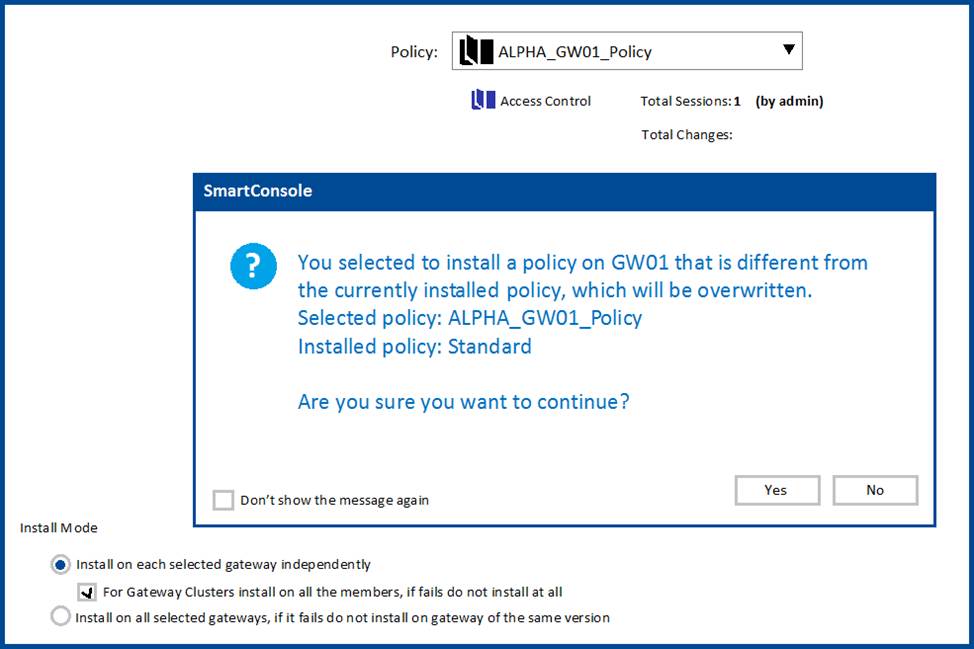
- A . A new Policy Package created on both the Management and Gateway will be deleted and must be backed up first before proceeding.
- B . A new Policy Package created on the Management is going to be installed to the existing Gateway.
- C . A new Policy Package created on the Gateway is going to be installed on the existing Management.
- D . A new Policy Package created on the Gateway and transferred to the Management will be overwritten by the Policy Package currently on the Gateway but can be restored from a periodic backup on the Gateway.
B
Explanation:
A Policy Package is a set of rules and settings that define how a Security Gateway enforces security on traffic that passes through it. A Policy Package can be created on either the Management Server or the Security Gateway, but it must be installed on both to take effect. When a new Policy Package is created on the Management Server, it must be installed on an existing Security Gateway that has a different Policy Package installed. The message below warns the administrator that installing a new Policy Package will overwrite the existing one on the Security Gateway. https://www.bing.com/images/blob?bcid=qMoRhR0dzSkGmg
The message also advises the administrator to back up their existing configuration before proceeding with the installation.
The admin is connected via ssh lo the management server. He wants to run a mgmt_dl command but got a Error 404 message. To check the listening ports on the management he runs netstat with the results shown below.
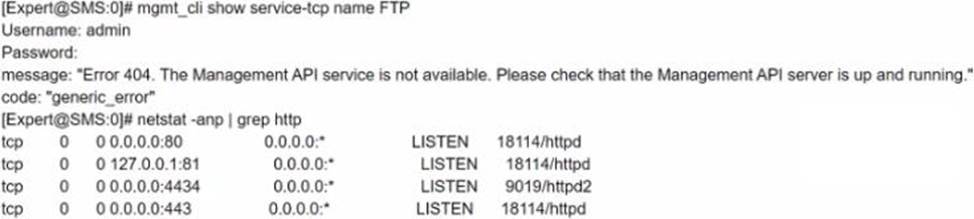
What can be the cause for the issue?
- A . Wrong Management API Access setting^for Ihe client IP To correct it go to SmartConsole / Management & Settings / Blades / Management API and press "Advanced Settings..’ and choose GUI clients or ALL IP’s.
- B . The API didn’t run on the default port check it with api status’ and add ‘-port 4434’ to the mgmt_clt command.
- C . The management permission in the user profile is mrssing. Go to SmartConsole / Management & Settings I Permissions & Administrators / Permission Profiles. Select the profile of the user and enable ‘Management API Login’ under Management Permissions
- D . The API is not running, the services shown by netstat are the gaia services. To start the API run ‘api start’
D
Explanation:
The error message “Error 404. The Management API server is not available. Please check that the Management API server is up and running.” indicates that the API is not running on the Management Server. The netstat command shows that there is no process listening on port 4434, which is the default port for the API. To start the API, the command ‘api start’ should be used. The other options are not relevant to this issue.
Reference: Check Point R81 Installation and Upgrade Guide, page 18.
As a valid Mobile Access Method, what feature provides Capsule Connect/VPN?
- A . That is used to deploy the mobile device as a generator of one-time passwords for authenticating to an RSA Authentication Manager.
- B . Fill Layer4 VPN CSSL VPN that gives users network access to all mobile applications.
- C . Full Layer3 VPN CIPSec VPN that gives users network access to all mobile applications.
- D . You can make sure that documents are sent to the intended recipients only.
C
Explanation:
The feature that provides Full Layer3 VPN CIPSec VPN, giving users network access to all mobile applications, is the correct answer.
Capsule Connect/VPN is used to establish secure VPN connections for mobile devices, and the Full Layer3 VPN (IPSec VPN) option provides comprehensive network access.
Reference: Check Point documentation or training materials related to Mobile Access Methods and VPN configurations.
Which of the following blades is NOT subscription-based and therefore does not have to be renewed on a regular basis?
- A . Application Control
- B . Threat Emulation
- C . Anti-Virus
- D . Advanced Networking Blade
D
Explanation:
The Advanced Networking Blade is not subscription-based and therefore does not have to be renewed on a regular basis. The Advanced Networking Blade is a software blade that provides advanced routing capabilities for Check Point Security Gateways. It supports dynamic routing protocols such as OSPF, BGP, RIP, and PIM, as well as features such as Policy-Based Routing (PBR), Multicast Routing, and IPv6 support. The Advanced Networking Blade is included in the Next Generation Firewall (NGFW) package and does not require a separate license.