
Check Point 156-315.81.20 Practice Exams
Last updated on Oct 22,2026- Exam Code: 156-315.81.20
- Exam Name: Check Point Certified Security Expert - R81.20
- Certification Provider: Check Point
- Latest update: Oct 22,2026
You want to allow your Mobile Access Users to connect to an internal file share. Adding the Mobile Application ‘File Share’ to your Access Control Policy in the SmartConsole didn’t work. You will be only allowed to select Services for the ‘Service & Application’ column
How to fix it?
- A . A Quantum Spark Appliance is selected as Installation Target for the policy packet.
- B . The Mobile Access Blade is not enabled for the Access Control Layer of the policy.
- C . The Mobile Access Policy Source under Gateway properties Is set to Legacy Policy and not to Unified Access Policy.
- D . The Mobile Access Blade is not enabled under Gateway properties.
What are the types of Software Containers?
- A . Three; security management, Security Gateway, and endpoint security
- B . Three; Security Gateway, endpoint security, and gateway management
- C . Two; security management and endpoint security
- D . Two; endpoint security and Security Gateway
A
Explanation:
Reference: The Software Container is a logical component in the Software Blade Architecture. There are three types of Software Containers: Security Management, Security Gateway, and Endpoint Security. The container enables the server functionality, and defines its purpose C e.g, management or gateway. https://downloads.checkpoint.com/dc/download.htm?ID=11608
You need to change the number of firewall Instances used by CoreXL.
How can you achieve this goal?
- A . edit fwaffinity.conf; reboot required
- B . cpconfig; reboot required
- C . edit fwaffinity.conf; reboot not required
- D . cpconfig; reboot not required
B
Explanation:
To change the number of firewall instances used by CoreXL, the cpconfig command must be used, followed by a reboot. CoreXL is a technology that improves the performance of the Security Gateway by using multiple cores to handle concurrent connections. The number of firewall instances determines how many cores are dedicated to CoreXL. The cpconfig command allows the administrator to configure various settings on the Security Gateway, including the number of firewall instances. After changing this setting, a reboot is required for the changes to take effect. The other commands are either incorrect or do not require a reboot.
Which Mobile Access Application allows a secure container on Mobile devices to give users access to internal website, file share and emails?
- A . Check Point Remote User
- B . Check Point Capsule Workspace
- C . Check Point Mobile Web Portal
- D . Check Point Capsule Remote
C
Explanation:
Check Point Mobile Web Portal is a Mobile Access Application that allows a secure container on mobile devices to give users access to internal websites, file shares and emails. The Mobile Web Portal is a web-based application that can be accessed from any browser on any device. It provides a user-friendly interface to access various resources on the corporate network without requiring a VPN client or additional software installation. The Mobile Web Portal supports authentication methods such as user name and password, certificate, one-time password (OTP), etc. The Mobile Web Portal also supports security features such as encryption, data leakage prevention (DLP), threat prevention, etc.
Reference: R81 Mobile Access Administration Guide
By default, which port does the WebUI listen on?
- A . 80
- B . 4434
- C . 443
- D . 8080
C
Explanation:
The default port for the Gaia WebUI Portal is HTTPS 443. This is the standard port for secure web communication over SSL/TLS. Changing the port may cause inconsistency with the settings on the SmartConsole and is not recommended unless necessary. To change the port, you can use the CLISH command set web ssl-port <port number> and save the configuration.
Reference: 13
What are not possible commands to acquire the lock in order to make changes in Clish or Web GUI?
- A . set config-lock on override
- B . Click the Lock icon in the WebUI
- C . "set rbac rw = 1”
- D . lock database override
Which Check Point feature enables application scanning and the detection?
- A . Application Dictionary
- B . AppWiki
- C . Application Library
- D . CPApp
B
Explanation:
AppWiki is the Check Point feature that enables application scanning and the detection. AppWiki is an easy to use tool that lets you search and filter Check Point’s Web 2.0 Applications Database to find out information about internet applications, including social network widgets; filter by a category, tag, or risk level; and search for a keyword or application1. AppWiki helps you to identify and control the applications on your network, and to apply granular policies based on the application type, risk, and characteristics1. AppWiki is integrated with the Check Point Application Control Software Blade, which provides the industry’s strongest application security and identity control to organizations of all sizes1.
Reference: 1: AppWiki | Check Point Software
You are the administrator for ABC Corp. You have logged into your R81 Management server. You are making some changes in the Rule Base and notice that rule No.6 has a pencil icon next to it.
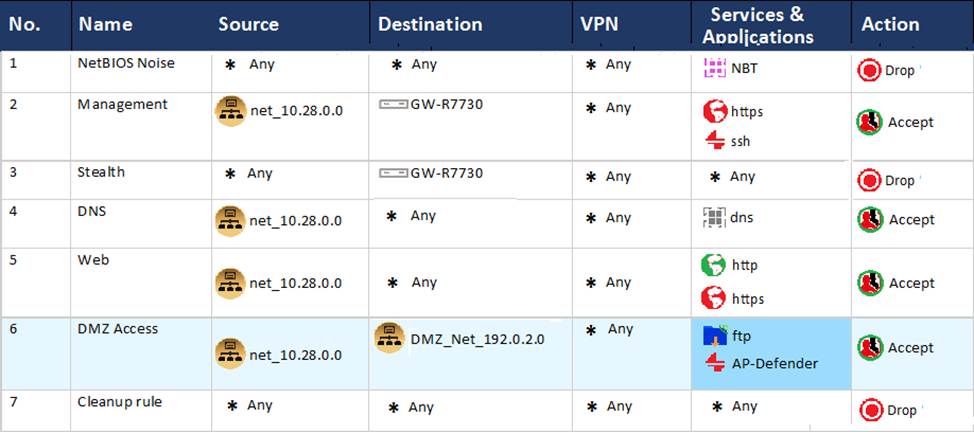
What does this mean?
- A . This rule No. 6 has been marked for deletion in your Management session.
- B . This rule No. 6 has been marked for deletion in another Management session.
- C . This rule No. 6 has been marked for editing in your Management session.
- D . This rule No. 6 has been marked for editing in another Management session.
C
Explanation:
You are the administrator for ABC Corp. You have logged into your R81 Management server. You are making some changes in the Rule Base and notice that rule No.6 has a pencil icon next to it.
This means that rule No.6 has been marked for editing in your Management session. In R81, every administrator works in a session that is independent of other administrators. Changes made by one administrator are not visible to others until they are published. When you edit a rule, it is marked with a pencil icon to indicate that it has been modified in your session. You can also lock a rule to prevent other administrators from editing it until you unlock it or publish your session.
Reference: R81 Security Management Administration Guide, page 43.
Which statements below are CORRECT regarding Threat Prevention profiles in Smart Dashboard?
- A . You can assign only one profile per gateway and a profile can be assigned to one rule Only.
- B . You can assign multiple profiles per gateway and a profile can be assigned to one rule only.
- C . You can assign multiple profiles per gateway and a profile can be assigned to one or more rules.
- D . You can assign only one profile per gateway and a profile can be assigned to one or more rules.
C
Explanation:
In SmartDashboard, Threat Prevention profiles can be assigned to one or more rules. This means that you can have multiple profiles assigned to a single gateway, and each of these profiles can be associated with one or more rules. This allows for granular control over threat prevention settings for different rules or scenarios.
Reference: Check Point Certified Security Expert R81 documentation and learning resources.
Which of the following is NOT an alert option?
- A . SNMP
- B . High alert
- C . Mail
- D . User defined alert
B
Explanation:
High alert is not an alert option in Check Point. Alert options are ways to notify the administrator or other parties when a security event occurs. The available alert options are SNMP, Mail, User defined alert, Log, Popup alert, and User alert.
Reference: Training & Certification | Check Point Software, Check Point Resource Library