
Check Point 156-315.81.20 Practice Exams
Last updated on Oct 22,2026- Exam Code: 156-315.81.20
- Exam Name: Check Point Certified Security Expert - R81.20
- Certification Provider: Check Point
- Latest update: Oct 22,2026
Fill in the blank: The “fw monitor” tool can be best used to troubleshoot ____________________.
- A . AV issues
- B . VPN errors
- C . Network traffic issues
- D . Authentication issues
C
Explanation:
The “fw monitor” tool can be best used to troubleshoot network traffic issues. Fw monitor is a tool that allows administrators to capture packets at different inspection points in the Firewall kernel, and apply filters and flags to analyze the traffic. Fw monitor can help troubleshoot network connectivity problems, packet drops, NAT issues, VPN issues, and more. The other options are either not related or less suitable for fw monitor.
Where you can see and search records of action done by R81 SmartConsole administrators?
- A . In SmartView Tracker, open active log
- B . In the Logs & Monitor view, select “Open Audit Log View”
- C . In SmartAuditLog View
- D . In Smartlog, all logs
B
Explanation:
The Audit Log is a feature that records all the actions performed by R81 SmartConsole administrators, such as logging in, logging out, publishing, installing policy, creating objects, modifying rules, etc. You can see and search records of action done by R81 SmartConsole administrators by following these steps:
In SmartConsole, go to Logs & Monitor view.
In the left pane, select Open Audit Log View.
In the right pane, you will see a table that shows all the audit log records. You can filter, sort, group, or search the records by using the toolbar options.
You can also double-click on a record to see more details in a pop-up window.
Reference: R81 Logging and Monitoring Administration Guide
By default, the R81 web API uses which content-type in its response?
- A . Java Script
- B . XML
- C . Text
- D . JSON
D
Explanation:
By default, the R81 web API uses JSON as the content-type in its response. JSON stands for JavaScript Object Notation and is a lightweight data-interchange format that is easy to read and write. XML, Java Script, and Text are not the default content-types for the R81 web API.
Reference: Check Point Software, Getting Started, Web API;: JSON.org, Introducing JSON.
Which of the following is true regarding the Proxy ARP feature for Manual NAT?
- A . The local.arp file must always be configured
- B . Automatic proxy ARP configuration can be enabled
- C . fw ctl proxy should be configured
- D . Translate Destination on Client Side should be configured
B
Explanation:
The verified answer is B) Automatic proxy ARP configuration can be enabled.
Proxy ARP is a feature that allows a gateway to respond to ARP requests on behalf of another IP address that is not on the same network segment. Proxy ARP is required for manual NAT rules when the NATed IP addresses are not routed to the gateway1.
By default, proxy ARP for manual NAT rules has to be configured manually by editing the local.arp file or using the CLISH commands on the gateway2. However, since R80.10, there is an option to enable automatic proxy ARP configuration for manual NAT rules by modifying the files $CPDIR/tmp/.CPprofile.sh and $CPDIR/tmp/.CPprofile.csh on the gateway3.
fw ctl proxy is a command that displays the proxy ARP table on the gateway, but it does not configure proxy ARP4.
Translate Destination on Client Side is a NAT option that determines whether the destination IP address is translated before or after the routing decision. It does not affect proxy ARP.
Reference: Configuring Proxy ARP for Manual NAT – Check Point Software1
R80.10: Automatic Proxy ARP with Manual NAT rules – checkpoint<dot>engineer2
Automatic creation of Proxy ARP for Manual NAT rules on Security Gateway R80.103
fw ctl proxy – Check Point Software
NAT Properties – Check Point Software
Where is the license for Check Point Mobile users installed?
- A . The Primary Gateway
- B . The Standby Gateway
- C . The Endpoint Server
- D . The Security Management Server
D
Explanation:
The license for Check Point Mobile users is installed on the Security Management Server. Check Point Mobile is a client application that allows remote users to securely access corporate resources from their mobile devices. To use Check Point Mobile, you need to have a valid license for the Mobile Access Software Blade on the Security Management Server. The license determines the number of concurrent users that can connect to the Security Gateway using Check Point Mobile. You can view and manage the license from the SmartConsole or the CPUSE WebUI. For more information, you can refer to the Check Point R81 Mobile Access Blade Administration Guide1 or the Check Point Cybersecurity BootCamp R81.20 C CCSA & CCSE Training2.
What is the purpose of Priority Delta in VRRP?
- A . When a box up, Effective Priority = Priority + Priority Delta
- B . When an Interface is up, Effective Priority = Priority + Priority Delta
- C . When an Interface fail, Effective Priority = Priority C Priority Delta
- D . When a box fail, Effective Priority = Priority C Priority Delta
C
Explanation:
Each instance of VRRP running on a supported interface may monitor the link state of other interfaces. The monitored interfaces do not have to be running VRRP.
If a monitored interface loses its link state, then VRRP will decrement its priority over a VRID by the specified delta value and then will send out a new VRRP HELLO packet. If the new effective priority is less than the priority a backup platform has, then the backup platform will begin to send out its own HELLO packet.
Once the master sees this packet with a priority greater than its own, then it releases the VIP.
On the following picture an administrator configures Identity Awareness:
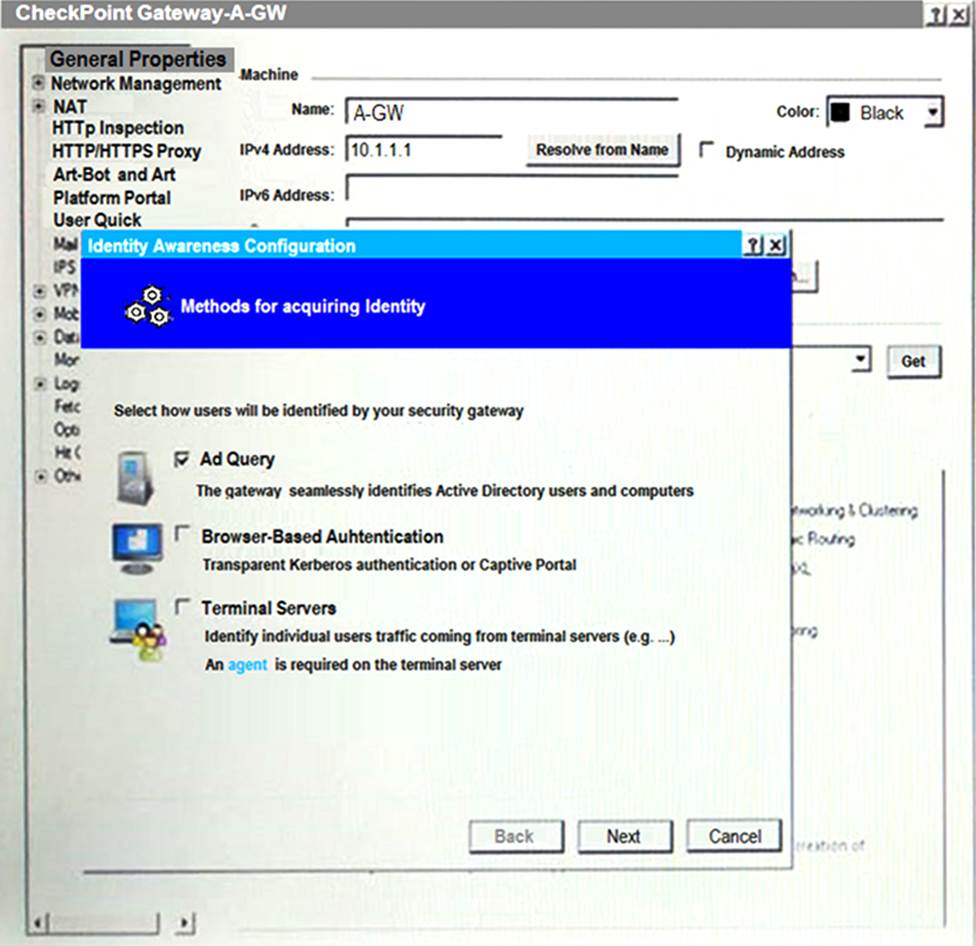
After clicking “Next” the above configuration is supported by:
- A . Kerberos SSO which will be working for Active Directory integration
- B . Based on Active Directory integration which allows the Security Gateway to correlate Active Directory users and machines to IP addresses in a method that is completely transparent to the user.
- C . Obligatory usage of Captive Portal.
- D . The ports 443 or 80 what will be used by Browser-Based and configured Authentication.
B
Explanation:
After clicking “Next”, the above configuration is supported by Active Directory integration which allows the Security Gateway to correlate Active Directory users and machines to IP addresses in a method that is completely transparent to the user. This is a feature of Identity Awareness that allows the Security Gateway to identify users and machines on the network and enforce security policies based on their identity. The administrator can configure Identity Awareness to use various methods for acquiring identity, including Active Directory integration, browser-based authentication, terminal servers, and transparent authentication1.
Reference: Check Point Resource Library, page 3.
An established connection is going to www.google.com. The Application Control Blade Is inspecting the traffic. If SecureXL and CoreXL are both enabled, which path is handling the traffic?
- A . Slow Path
- B . Fast Path
- C . Medium Path
- D . Accelerated Path
D
Explanation:
The traffic is handled by the Accelerated Path. According to the R81.x Security Gateway Architecture (Logical Packet Flow)1, the Accelerated Path is the fastest path for processing packets, as it bypasses most of the inspection and uses SecureXL to accelerate the traffic. The Accelerated Path is used for connections that are established, compliant with the security policy, and do not require any content inspection or NAT1.
The Application Control blade inspects the traffic based on the application identity, which is determined by the Application Control Software Blade in the Medium Path1. However, once the application identity is established, the connection can be offloaded to SecureXL and handled by the Accelerated Path2. This way, the Application Control blade can improve performance and reduce CPU consumption2.
The other paths are not used for this traffic because:
The Slow Path is used for packets that are not compliant with the security policy, require stateful inspection or NAT, or are not supported by SecureXL1. This path involves the most inspection and processing, and is therefore the slowest3.
The Fast Path is used for packets that are trusted and do not require any inspection or NAT. This path bypasses both SecureXL and the Firewall kernel, and uses a kernel module called simfast to forward the packets directly to the network interface driver4. This path is not enabled by default, and requires manual configuration of rules to define which traffic can use it4.
The Medium Path is used for packets that require content inspection, such as IPS, Anti-Virus, Anti-Bot, URL Filtering, or Application Control1. This path uses SecureXL to accelerate some parts of the inspection, but still involves some processing by the Firewall kernel3. This path is only used for the first few packets of a connection until the application identity is established, and then the connection can be offloaded to the Accelerated Path2.
Reference: Control SecureXL / CoreXL Paths – Check Point CheckMates: What is CoreXL & SecureXL
C jermsmit.com: R81.x Security Gateway Architecture (Logical Packet Flow): SecureXL and Application Control Layer – Check Point CheckMates
When attempting to start a VPN tunnel, in the logs the error “no proposal chosen” is seen numerous times. No other VPN-related entries are present.
Which phase of the VPN negotiations has failed?
- A . IKE Phase 1
- B . IPSEC Phase 2
- C . IPSEC Phase 1
- D . IKE Phase 2
A
Explanation:
The error “no proposal chosen” indicates that the VPN gateway did not find a matching proposal for the IKE Phase 1 negotiation. This phase is responsible for establishing a secure channel between the VPN peers, using a pre-shared secret or a certificate. The proposal consists of parameters such as encryption algorithm, hash algorithm, Diffie-Hellman group, and lifetime. If the VPN gateway does not receive a proposal that matches its own configuration, it will reject the connection attempt and log the error “no proposal chosen” 1.
To troubleshoot this issue, one should verify that the VPN peers have the same IKE Phase 1 settings, such as:
The same pre-shared secret or certificate
The same encryption algorithm (e.g., AES-256)
The same hash algorithm (e.g., SHA-256)
The same Diffie-Hellman group (e.g., Group 14)
The same lifetime (e.g., 86400 seconds)
One can use the command vpn tu on the VPN gateway to view the current IKE Phase 1 settings and compare them with the other peer. Alternatively, one can use the SmartConsole to check the VPN community properties and the gateway object properties for the IKE Phase 1 settings 2.
Reference: 1: Troubleshooting the “no proposal chosen” error – Check Point Software 2: Support, Support Requests, Training … – Check Point Software
Which command is used to set the CCP protocol to Multicast?
- A . cphaprob set_ccp multicast
- B . cphaconf set_ccp multicast
- C . cphaconf set_ccp no_broadcast
- D . cphaprob set_ccp no_broadcast
B
Explanation:
The cphaconf set_ccp multicast command is used to set the Cluster Control Protocol (CCP) to Multicast mode. This mode allows cluster members to communicate with each other using multicast packets. The other commands are either incorrect or set the CCP to Broadcast mode.
Reference: ClusterXL Administration Guide