
Check Point 156-315.81.20 Practice Exams
Last updated on Oct 22,2026- Exam Code: 156-315.81.20
- Exam Name: Check Point Certified Security Expert - R81.20
- Certification Provider: Check Point
- Latest update: Oct 22,2026
What is the least amount of CPU cores required to enable CoreXL?
- A . 2
- B . 1
- C . 4
- D . 6
A
Explanation:
The least amount of CPU cores required to enable CoreXL is 2. CoreXL is a technology that improves the performance of Security Gateways by using multiple CPU cores to process traffic in parallel. CoreXL requires at least two CPU cores, one for SND (Secure Network Distributor) and one for a Firewall instance. The other options are either too few or too many CPU cores for enabling CoreXL.
Reference: [Check Point R81 SecureXL Administration Guide], [Check Point R81 Performance Tuning Administration Guide]
SandBlast offers flexibility in implementation based on their individual business needs.
What is an option for deployment of Check Point SandBlast Zero-Day Protection?
- A . Smart Cloud Services
- B . Load Sharing Mode Services
- C . Threat Agent Solution
- D . Public Cloud Services
A
Explanation:
Check Point SandBlast Zero-Day Protection offers flexibility in implementation to meet individual business needs. One of the deployment options for Check Point SandBlast Zero-Day Protection is:
Smart Cloud Services (Option A): Smart Cloud Services allow organizations to leverage cloud-based threat intelligence and protection services provided by Check Point.
The other options, Load Sharing Mode Services (Option B), Threat Agent Solution (Option C), and Public Cloud Services (Option D), may also be components of a security strategy, but they are not specific deployment options for Check Point SandBlast Zero-Day Protection.
Reference: Check Point Certified Security Expert (CCSE) R81 training materials and documentation.
CoreXL is supported when one of the following features is enabled:
- A . Route-based VPN
- B . IPS
- C . IPv6
- D . Overlapping NAT
B
Explanation:
CoreXL is supported when one of the following features is enabled: IPS. CoreXL does not support Check Point Suite with these features: Route-based VPN, IPv6, Overlapping NAT, QoS, Content Awareness, Application Control, URL Filtering, Identity Awareness, HTTPS Inspection, DLP, Anti-Bot, Anti-Virus, Threat Emulation.
Reference: CoreXL
What does the "unknown" SIC status shown on SmartConsole mean?
- A . SIC activation key requires a reset
- B . Administrator input the wrong SIC key
- C . The management can contact the Security Gateway but cannot establish Secure Internal Communication
- D . There is no connection between the Security Gateway and Security Management Server
D
Explanation:
The “unknown” SIC status shown on SmartConsole means that there is no connection between the Security Gateway and Security Management Server. SIC stands for Secure Internal Communication, which is a mechanism that ensures secure communication between Check Point components using certificates and encryption. SIC status can be one of the following: Trust established, Trust expired, Uninitialized, or Unknown. Trust established means that SIC is working properly and the components can communicate securely. Trust expired means that the SIC certificate has expired and needs to be renewed. Uninitialized means that SIC has not been configured yet and needs to be initialized with an activation key. Unknown means that the Security Management Server cannot reach the Security Gateway or vice versa, and therefore cannot verify the SIC status. This could be due to network issues, firewall rules, routing problems, or other causes that prevent connectivity between the components.
Reference: Check Point R81 Security Management Administration Guide, page 32-33
Session unique identifiers are passed to the web api using which http header option?
- A . X-chkp-sid
- B . Accept-Charset
- C . Proxy-Authorization
- D . Application
A
Explanation:
Session unique identifiers are passed to the web API using the X-chkp-sid HTTP header option. The web API is a service that runs on the Security Management Server and enables external applications to communicate with the Check Point management database using REST APIs. To use the web API, you need to create a session with the management server by sending a login request with your credentials. The management server will respond with a session unique identifier (SID) that represents your session. You need to pass this SID in every subsequent request to the web API using the X-chkp-sid HTTP header option. This way, the management server can identify and authenticate your session and perform the requested operations.
Reference: Check Point R81 REST API Reference Guide
Main Mode in IKEv1 uses how many packages for negotiation?
- A . 4
- B . depends on the make of the peer gateway
- C . 3
- D . 6
D
Explanation:
Main Mode in IKEv1 uses six packets for negotiation1. Main Mode is the default mode for IKE phase
I, which establishes a secure channel between the peers. Main Mode performs the following steps2:
The peers exchange their security policies and agree on a common set of parameters.
The peers generate a shared secret key using the Diffie-Hellman algorithm.
The peers authenticate each other using pre-shared keys, digital signatures, or public key encryption. Main Mode is partially encrypted, from the point at which the shared DH key is known to both peers2. Main Mode provides more security than Aggressive Mode, which uses only three packets for negotiation, but is faster and simpler2.
Reference: Check Point gateways always send main IP address as IKE Main Mode ID – Check Point Software, IPsec and IKE – Check Point Software
What can we infer about the recent changes made to the Rule Base?
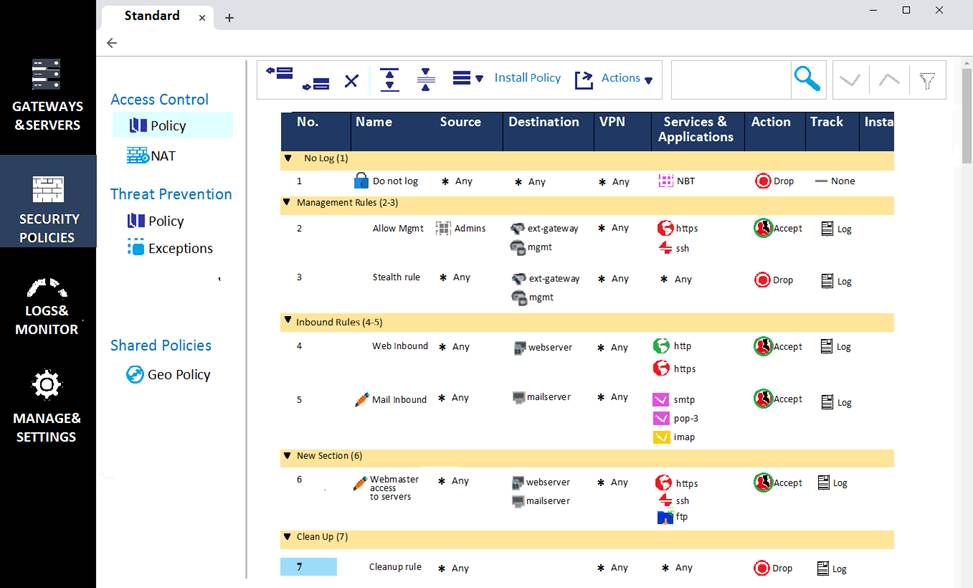
- A . Rule 7 was created by the ‘admin’ administrator in the current session
- B . 8 changes have been made by administrators since the last policy installation
- C . The rules 1, 5 and 6 cannot be edited by the ‘admin’ administrator
- D . Rule 1 and object webserver are locked by another administrator
D
Explanation:
Based on the image provided by the user, we can infer that rule 1 and object webserver are locked by another administrator. This is because they have red lock icons next to them, which indicate that they are being edited by another administrator in another session. The lock icons prevent other administrators from modifying these objects until the changes are published or discarded by the original administrator. The lock icons also show the name of the administrator who locked the objects when hovered over with the mouse cursor.
The other options are incorrect because:
Rule 7 was not created by the ‘admin’ administrator in the current session, but by another administrator in another session. This is because it has a blue lock icon next to it, which indicates that it was added by another administrator in another session. The blue lock icon prevents other administrators from deleting this rule until the changes are published or discarded by the original administrator.
8 changes have not been made by administrators since the last policy installation, but in the current session by the ‘admin’ administrator. This is because there is a yellow number 8 next to the Install Policy button, which indicates that there are 8 unpublished changes in the current session by the ‘admin’ administrator. These changes will be published or discarded when the ‘admin’ administrator clicks on Publish or Discard buttons.
The rules 1, 5 and 6 can be edited by the ‘admin’ administrator, but only after unlocking them from another administrator who locked them in another session. This is because they have red lock icons next to them, which indicate that they are being edited by another administrator in another session. The ‘admin’ administrator can unlock these rules by right-clicking on them and selecting Unlock from the menu. However, this will discard the changes made by the original administrator who locked them.
What is the benefit of Manual NAT over Automatic NAT?
- A . If you create a new Security Policy, the Manual NAT rules will be transferred to this new policy.
- B . There is no benefit since Automatic NAT has in any case higher priority over Manual NAT
- C . You have the full control about the priority of the NAT rules
- D . On IPSO and GAIA Gateways, it is handled in a stateful manner
C
Explanation:
The benefit of Manual NAT over Automatic NAT is that you have full control over the priority of the NAT rules. Manual NAT allows you to create NAT rules that are independent of the security policy and specify the order in which they are applied. Automatic NAT creates NAT rules based on the objects’ NAT properties and places them according to predefined criteria. The other options are not benefits of Manual NAT over Automatic NAT.
Reference: Check Point Software, Getting Started, NAT Rule Base.
In order for changes made to policy to be enforced by a Security Gateway, what action must an administrator perform?
- A . Publish changes
- B . Save changes
- C . Install policy
- D . Install database
C
Explanation:
In order for changes made to policy to be enforced by a Security Gateway, an administrator must perform the action of installing policy. Installing policy is the process of transferring the policy package from the Security Management Server to the Security Gateway. Publishing changes is the process of saving changes to the database and making them available to other administrators. Saving changes is the process of saving changes to a session without publishing them2.
Reference: Check Point R81 Security Management Guide
Name the file that is an electronically signed file used by Check Point to translate the features in the license into a code?
- A . Both License (.lic) and Contract (.xml) files
- B . cp.macro
- C . Contract file (.xml)
- D . license File (.lic)
B
Explanation:
cp.macro is an electronically signed file used by Check Point to translate the features in the license into a code. It is located in the $FWDIR/conf directory on the Security Management Server. The cp.macro file contains a list of features and their corresponding codes, which are used to generate the license file (.lic) based on the contract file (.xml). The license file (.lic) is then installed on the Security Gateway or Security Management Server to activate the licensed features.
Reference: Check Point R81 Licensing and Contract Administration Guide, page 10