
Check Point 156-215.81.20 Practice Exams
Last updated on Oct 22,2026- Exam Code: 156-215.81.20
- Exam Name: Check Point Certified Security Administrator R81.20
- Certification Provider: Check Point
- Latest update: Oct 22,2026
What default layers are included when creating a new policy layer?
- A . Application Control, URL Filtering and Threat Prevention
- B . Access Control, Threat Prevention and HTTPS Inspection
- C . Firewall, Application Control and IPSec VPN
- D . Firewall, Application Control and IPS
B
Explanation:
The default layers that are included when creating a new policy layer are Access Control, Threat Prevention, and HTTPS Inspection. Access Control is the layer that defines the basic firewall rules. Threat Prevention is the layer that enables the protection against various types of attacks, such as IPS, Anti-Virus, Anti-Bot, etc. HTTPS Inspection is the layer that allows the inspection of encrypted traffic1. The other options are not the default layers that are included when creating a new policy layer.
Which of the following is NOT a valid application navigation tab in the R80 SmartConsole?
- A . Manage and Command Line
- B . Logs and Monitor
- C . Security Policies
- D . Gateway and Servers
A
Explanation:
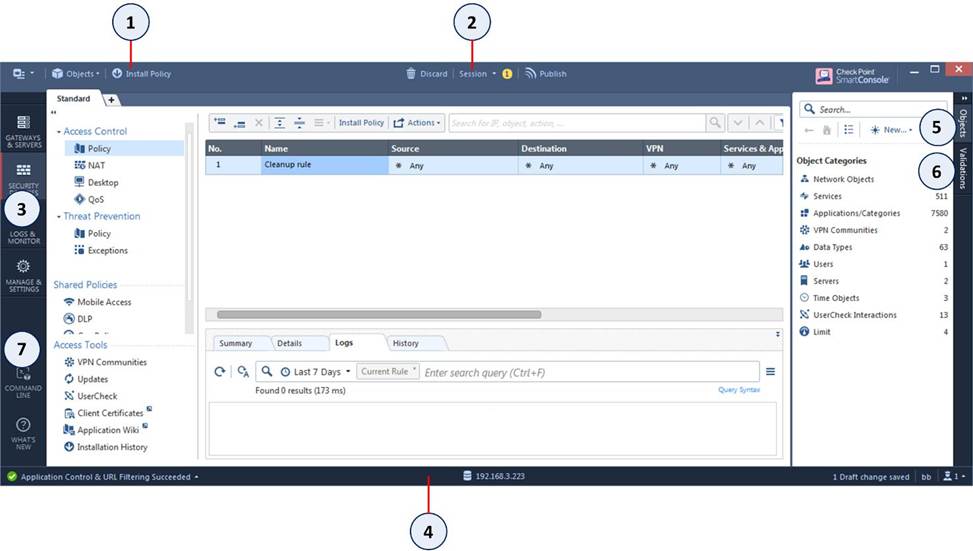
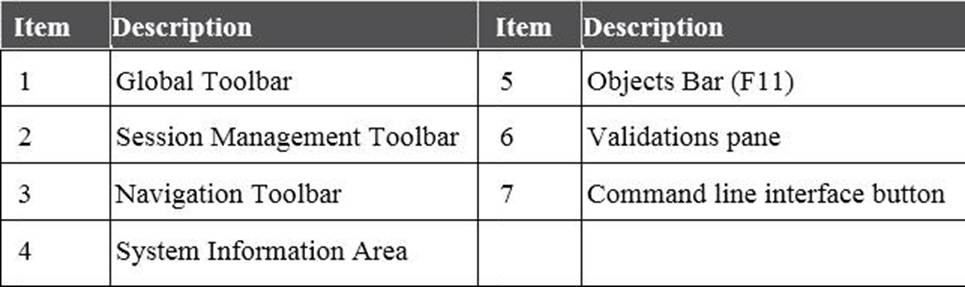
Manage and Command Line is not a valid application navigation tab in the R80 SmartConsole, as it does not exist in the interface. The image shows the navigation toolbar of the R80 SmartConsole, which has four tabs: Security Policies, Logs & Monitor, Gateways & Servers, and Manage & Settings1. The Command Line Interface button is located in the system information area, not in the navigation toolbar1.
Reference: Application Control and URL Filtering – Check Point Software
Fill in the blank: A(n)_____rule is created by an administrator and configured to allow or block traffic
based on specified criteria.
- A . Inline
- B . Explicit
- C . Implicit drop
- D . Implicit accept
B
Explanation:
An explicit rule is created by an administrator and configured to allow or block traffic based on specified criteria. Explicit rules are displayed in the Rule Base and can be modified by the administrator.
Reference: Certified Security Administrator (CCSA) R81.20 Course Overview, page 12.
While enabling the Identity Awareness blade the Identity Awareness wizard does not automatically detect the windows domain.
Why does it not detect the windows domain?
- A . SmartConsole machine is not part of the domain
- B . Security Gateway is not part of the Domain
- C . Identity Awareness is not enabled on Global properties
- D . Security Management Server is not part of the domain
A
Explanation:
While enabling the Identity Awareness blade, the Identity Awareness wizard does not automatically detect the Windows domain because the SmartConsole machine is not part of the domain. The SmartConsole machine needs to be a member of the Windows domain or have access to a domain controller in order to detect the domain automatically2.
Reference: 2: Check Point R81 Identity Awareness Administration Guide, page 10.
Fill in the bank: In Office mode, a Security Gateway assigns a remote client to an IP address once___________.
- A . the user connects and authenticates
- B . office mode is initiated
- C . the user requests a connection
- D . the user connects
A
Explanation:
In Office mode, a Security Gateway assigns a remote client to an IP address once the user connects and authenticates. Office mode allows a remote client to get an IP address from the internal network of the organization. The IP address is assigned during the IKE negotiation, after the user has successfully authenticated with the Security Gateway3. The other options are not correct timings for assigning an IP address in Office mode.
Reference: Office Mode
True or False: The destination server for Security Gateway logs depends on a Security Management Server configuration.
- A . False, log servers are configured on the Log Server General Properties
- B . True, all Security Gateways will only forward logs with a SmartCenter Server configuration
- C . True, all Security Gateways forward logs automatically to the Security Management Server
- D . False, log servers are enabled on the Security Gateway General Properties
B
Explanation:
The destination server for Security Gateway logs depends on a Security Management Server configuration. This is true because the Security Management Server defines the log servers that receive logs from the Security Gateways. The log servers can be either the Security Management Server itself or a dedicated Log Server12.
Reference: Check Point R81 Logging and Monitoring
Administration Guide, Check Point R81 Quantum Security Gateway Guide
Which of the following is a valid deployment option?
- A . CloudSec deployment
- B . Disliked deployment
- C . Router only deployment
- D . Standalone deployment
D
Explanation:
This answer is correct because a standalone deployment is a valid option for installing a Check Point Security Gateway and a Security Management Server on the same machine1. This option is suitable for small or medium-sized networks that do not require high availability or load balancing1.
The other answers are not correct because they are either invalid or irrelevant options for deployment. CloudSec deployment is not a valid option, but it might be confused with CloudGuard,
which is a Check Point solution for securing cloud environments2. Disliked deployment is not a valid option, but it might be a typo for Distributed deployment, which is a valid option for installing a Check Point Security Gateway and a Security Management Server on separate machines1. Router only deployment is not a valid option, but it might be confused with Router mode, which is a configuration option for a Check Point Security Gateway that enables it to act as a router and forward packets between interfaces3.
Gaia R81.20 Administration Guide
CloudGuard Network Security
Configuring Router Mode in Gaia Clish
If the Active Security Management Server fails or if it becomes necessary to change the Active to Standby, the following steps must be taken to prevent data loss. Providing the Active Security Management Server is responsible, which of these steps should NOT be performed:
- A . Rename the hostname of the Standby member to match exactly the hostname of the Active member.
- B . Change the Standby Security Management Server to Active.
- C . Change the Active Security Management Server to Standby.
- D . Manually synchronize the Active and Standby Security Management Servers.
A
Explanation:
The correct answer is A because renaming the hostname of the Standby member to match exactly the hostname of the Active member is not a recommended step to prevent data loss. The hostname of the Standby member should be different from the hostname of the Active member1. The other steps are necessary to ensure a smooth failover and synchronization between the Active and Standby Security Management Servers2.
Reference: Check Point R81.20 Administration Guide, 156-315.81 Checkpoint Exam Info and Free Practice Test
What is true about the IPS-Blade?
- A . in R80, IPS is managed by the Threat Prevention Policy
- B . in R80, in the IPS Layer, the only three possible actions are Basic, Optimized and Strict
- C . in R80, IPS Exceptions cannot be attached to “all rules”
- D . in R80, the GeoPolicy Exceptions and the Threat Prevention Exceptions are the same
A
Explanation:
In R80, IPS is managed by the Threat Prevention Policy567. The Threat Prevention Policy defines how to protect the network from malicious traffic using IPS, Anti-Bot, Anti-Virus, and Threat Emulation software blades5. The IPS layer in the Threat Prevention Policy allows configuring IPS protections and actions for different network segments5. The other options are not true about the IPS-Blade.
Reference: Check Point IPS Datasheet, Check Point IPS Software Blade, Quantum Intrusion Prevention System (IPS)
Which Identity Source(s) should be selected in Identity Awareness for when there is a requirement for a higher level of security for sensitive servers?
- A . AD Query
- B . Terminal Servers Endpoint Identity Agent
- C . Endpoint Identity Agent and Browser-Based Authentication
- D . RADIUS and Account Logon
C
Explanation:
Endpoint Identity Agent and Browser-Based Authentication are the identity sources that provide the highest level of security for sensitive servers, as they require user authentication and can enforce granular access rules based on user identity. AD Query, Terminal Servers Endpoint Identity Agent, and RADIUS and Account Logon are less secure, as they rely on passive methods of identity acquisition or do not support identity-based access control12.
Reference: Identity Awareness R81.10 Administration Guide, Identity Awareness AD Query