
Check Point 156-215.81.20 Practice Exams
Last updated on Oct 22,2026- Exam Code: 156-215.81.20
- Exam Name: Check Point Certified Security Administrator R81.20
- Certification Provider: Check Point
- Latest update: Oct 22,2026
John is using Management HA.
Which Smartcenter should be connected to for making changes?
- A . secondary Smartcenter
- B . active Smartcenter
- C . connect virtual IP of Smartcenter HA
- D . primary Smartcenter
B
Explanation:
The SmartCenter that should be connected to for making changes is the active SmartCenter. The active SmartCenter is the one that is currently synchronizing its configuration with the secondary SmartCenter and handling the communication with the gateways. The primary SmartCenter is the one that was initially configured as the main server, but it may become inactive if a failover occurs. The virtual IP of SmartCenter HA is used to access the SmartConsole, not to make changes.
Reference: [Security Management Server High Availability (HA) R81 Administration Guide], [Check Point CCSA – R81: Practice Test & Explanation], [How to configure ClusterXL High Availability on Security Management Server]
Consider the Global Properties following settings:
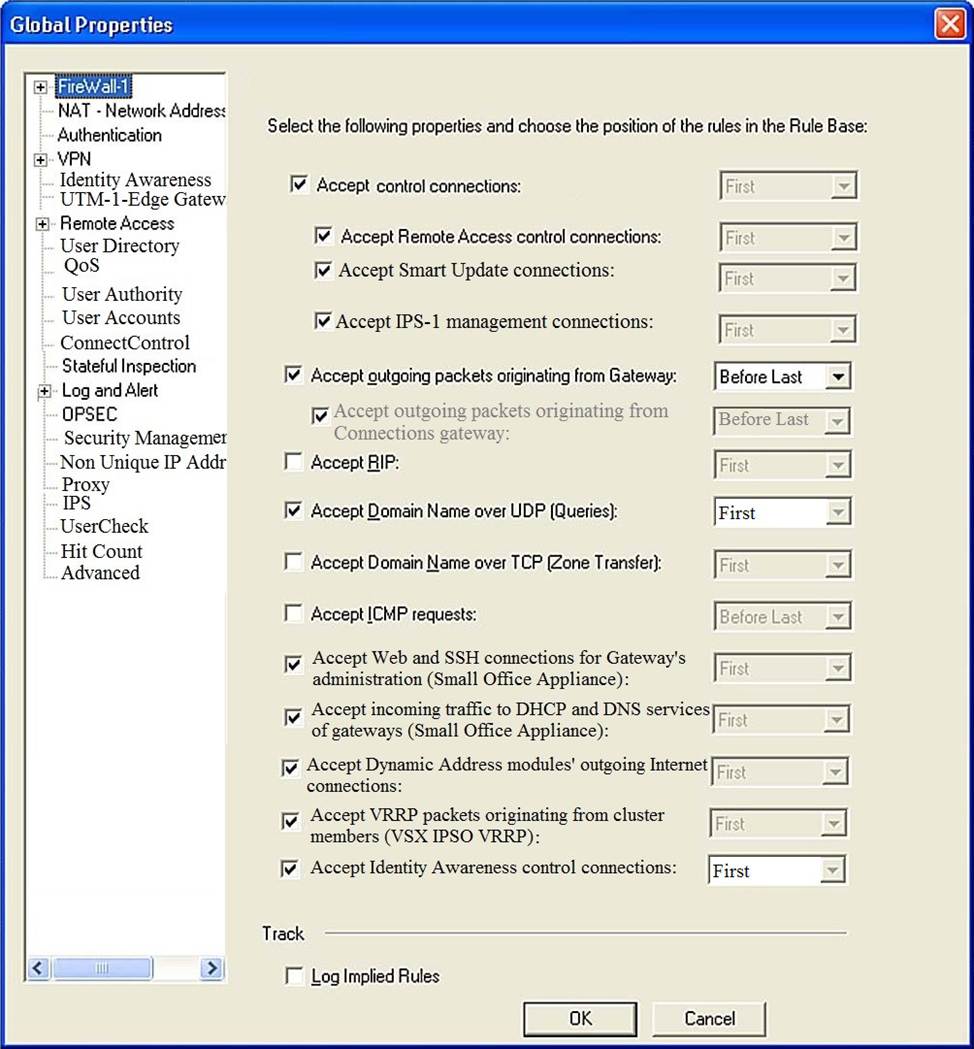
The selected option “Accept Domain Name over UDP (Queries)” means:
- A . UDP Queries will be accepted by the traffic allowed only through interfaces with external anti-spoofing topology and this will be done before first explicit rule written by Administrator in a Security Policy.
- B . All UDP Queries will be accepted by the traffic allowed through all interfaces and this will be done before first explicit rule written by Administrator in a Security Policy.
- C . No UDP Queries will be accepted by the traffic allowed through all interfaces and this will be done before first explicit rule written by Administrator in a Security Policy.
- D . All UDP Queries will be accepted by the traffic allowed by first explicit rule written by Administrator in a Security Policy.
A
Explanation:
The selected option “Accept Domain Name over UDP (Queries)” means that UDP Queries will be accepted by the traffic allowed only through interfaces with external anti-spoofing topology and this will be done before first explicit rule written by Administrator in a Security Policy. This option enables the Security Gateway to accept DNS queries from external hosts and forward them to internal DNS servers. The queries are accepted by an implied rule that is applied before the explicit rules in the Security Policy. The implied rule only allows queries from interfaces that have external anti-spoofing groups defined.
Reference: Check Point R81 Quantum Security Gateway Guide, Implied Rules
Which SmartConsole tab shows logs and detects security threats, providing a centralized display of potential attack patterns from all network devices?
- A . Gateway and Servers
- B . Logs and Monitor
- C . Manage Seeting
- D . Security Policies
B
Explanation:
The SmartConsole tab that shows logs and detects security threats, providing a centralized display of potential attack patterns from all network devices, is Logs and Monitor1, p. 24. The Logs and Monitor tab allows administrators to view logs from various sources, such as Security Gateways, SmartEvent servers, and SmartReporter servers. Gateway and Servers, Manage Setting, and Security Policies are other tabs in SmartConsole that have different functions.
Reference: Check Point CCSA – R81: Practice Test & Explanation, [Check Point SmartConsole R81 Help]
Using R80 Smart Console, what does a “pencil icon” in a rule mean?
- A . I have changed this rule
- B . Someone else has changed this rule
- C . This rule is managed by check point’s SOC
- D . This rule can’t be changed as it’s an implied rule
A
Explanation:
The correct answer is A because a pencil icon in a rule means that you have changed this rule3. The pencil icon indicates that the rule has been modified but not published yet. You can hover over the pencil icon to see who made the change and when3. The other options are not related to the pencil icon.
Reference: Check Point Learning and Training Frequently Asked Questions (FAQs)
Administrator Dave logs into R80 Management Server to review and makes some rule changes. He notices that there is a padlock sign next to the DNS rule in the Rule Base.
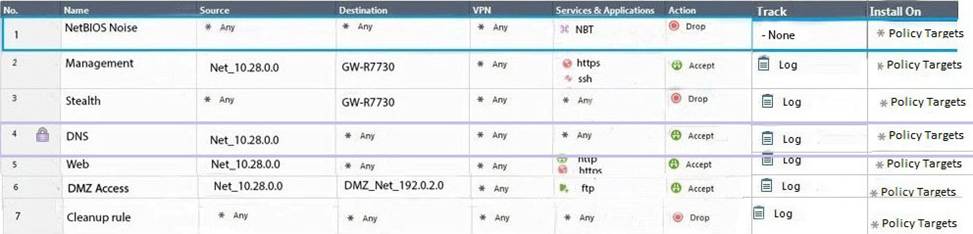
What is the possible explanation for this?
- A . DNS Rule is using one of the new feature of R80 where an administrator can mark a rule with the padlock icon to let other administrators know it is important.
- B . Another administrator is logged into the Management and currently editing the DNS Rule.
- C . DNS Rule is a placeholder rule for a rule that existed in the past but was deleted.
- D . This is normal behavior in R80 when there are duplicate rules in the Rule Base.
B
Explanation:
The padlock sign next to the DNS rule in the Rule Base indicates that another administrator is logged into the Management and currently editing the DNS Rule1. This is a feature of R80 that allows multiple administrators to work on the same policy simultaneously. The padlock sign prevents other administrators from modifying the same rule until the editing administrator publishes or discards the changes2. The other options are not valid explanations for the padlock sign.
Reference: 156-215.80: Check Point Certified Security Administrator (CCSA R80): Part 19, Multi-User Policy Editing
In Unified SmartConsole Gateways and Servers tab you can perform the following functions EXCEPT ________.
- A . Upgrade the software version
- B . Open WebUI
- C . Open SSH
- D . Open service request with Check Point Technical Support
C
Explanation:
The function that can NOT be performed in the Unified SmartConsole Gateways and Servers tab is Open SSH. SSH is a secure shell protocol that allows remote access to a device via command line interface. The Unified SmartConsole does not provide an option to open SSH from the Gateways and Servers tab, as it is not a graphical user interface. The other functions can be performed in the Unified SmartConsole Gateways and Servers tab, such as upgrading the software version, opening WebUI, or opening service request with Check Point Technical Support.
Reference: [SSH (Secure Shell)], [QUANTUM SECURITY MANAGEMENT R81]
Which command shows the installed licenses?
- A . cplic print
- B . print cplic
- C . fwlic print
- D . show licenses
A
Explanation:
The command that shows the installed licenses is cplic print. This command displays the license information on a Check Point server or Security Gateway. It shows the license type, expiration date, attached blades, etc. The other options are incorrect. print cplic is not a valid command. fwlic print is not a valid command. show licenses is not a valid command.
Reference: [How to check license status on SecurePlatform / Gaia from CLI]
Using ClusterXL, what statement is true about the Sticky Decision Function?
- A . Can only be changed for Load Sharing implementations
- B . All connections are processed and synchronized by the pivot
- C . Is configured using cpconfig
- D . Is only relevant when using SecureXL
A
Explanation:
The Sticky Decision Function (SDF) can only be changed for Load Sharing implementations, not for High Availability implementations4.
Reference: Check Point ClusterXL R81 Administration Guide
Which of the following is an authentication method used for Identity Awareness?
- A . SSL
- B . Captive Portal
- C . PKI
- D . RSA
B
Explanation:
Captive Portal is an authentication method used for Identity Awareness4. Captive Portal is a web-based authentication method that redirects users to a browser-based login page when they try to access the network. Users must provide their credentials to access the network resources. Captive Portal can be used for guest users or users who are not identified by other methods4. SSL, PKI, and RSA are not authentication methods used for Identity Awareness, but rather encryption or certificate technologies.
Reference: Identity Awareness Reference Architecture and Best Practices
Name the authentication method that requires token authenticator.
- A . SecureID
- B . Radius
- C . DynamicID
- D . TACACS
A
Explanation:
SecureID is the authentication method that requires token authenticator2. SecureID is a two-factor authentication method that uses a hardware or software token to generate a one-time password. The user must enter the token code along with their username and password to authenticate.
Reference: Check Point R81 Identity Awareness Administration Guide