
Atlassian ACP-610 Practice Exams
Last updated on Oct 21,2026- Exam Code: ACP-610
- Exam Name: Managing Jira Projects for Data Center and Server
- Certification Provider: Atlassian
- Latest update: Oct 21,2026
You need to assign team members to view code commits in the DEV project.
An excerpt of the DEV permission scheme is shown.
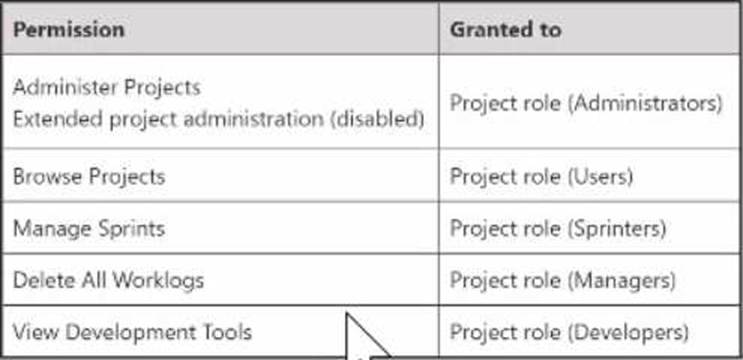
Which two project roles must they be granted? (Choose two.)
- A . Users
- B . Administrators
- C . Developers
- D . Sprinters
- E . Managers
BC
Explanation:
Two project roles that must be granted to view code commits in the DEV project are:
Developers
Administrators
According to the image you sent, the View Development Tools permission determines which users can see development information from tools such as Bitbucket, GitHub, FishEye, and Crucible. This permission is granted to the Project role (Developers) and the Project role (Administrators) in the DEV permission scheme. Therefore, users who are assigned to these roles will be able to view code commits in the DEV project.
The other options are not correct because:
Users do not have the View Development Tools permission in the DEV permission scheme, so they cannot see code commits in the DEV project.
Sprinters do not have the View Development Tools permission in the DEV permission scheme, so they cannot see code commits in the DEV project.
Managers do not have the View Development Tools permission in the DEV permission scheme, so they cannot see code commits in the DEV project.
Auditors group contains only two members; Adam and Eve.
You need to create a quick filter that shows overdue issues assigned to either of them
Which JQL query is always correct?
- A . duedate <= currentLogin() AND assignee in membersOf("auditors")
- B . due – overdueQ AND assignee in membersOfC’auditors")
- C . duedate < startOfDay() AND assignee in (Adam, Eve)
- D . due <= now AND assignee in (Adam. Eve)
- E . due < – "0" AND assignee – Adam OR assignee – Eve
C
Explanation:
This JQL query is always correct because it uses the duedate field, which is a date picker that stores a date value without a time component, and the startOfDay() function, which returns the start of the current day (i.e., midnight). This query will return all issues that have a due date before today and are assigned to either Adam or Eve. The other queries are either incorrect or unreliable because they use different fields or functions that may not work as expected. For example, the due field is a date time picker that stores both a date and a time value, and the currentLogin() function returns the date and time of the current user’s last login, which may vary depending on the user and their timezone.
Reference:
https://support.atlassian.com/jira-software-cloud/docs/advanced-search-reference-jql-fields/#Advancedsearchingfieldsreference-DuedateDuedate
https://support.atlassian.com/jira-software-cloud/docs/advanced-search-reference-jql-functions/#Advancedsearchingfunctionsreference-startOfDaystartOfDay
You need to find all issues that were not competed in some past sprint, and that are now part of an active sprint.
Identify two functions that you need to use in your JQL query. (Choose two.)
- A . closedSprints()
- B . futures prints()
- C . completed()
- D . remaming()
- E . openSprints()
A, E
Explanation:
The two functions that are needed to use in the JQL query to find all issues that were not completed in some past sprint, and that are now part of an active sprint are closedSprints() and openSprints(). The closedSprints() function returns all issues that are assigned to a completed sprint. The openSprints() function returns all issues that are assigned to an incomplete sprint. By combining these two functions with the NOT operator, we can filter out the issues that belong to both a completed sprint and an incomplete sprint, and only get the issues that were not completed in some past sprint, and that are now part of an active sprint. For example, the JQL query could be: project = XYZ AND issuekey NOT IN (closedSprints() AND openSprints())
This query will return all issues in project XYZ that are not in both a closed sprint and an open sprint, meaning they are either in a closed sprint only or an open sprint only. Since we are looking for issues that are now part of an active sprint, we can assume they are in an open sprint only.
Reference: Advanced search reference – JQL functions, Modifying closedSprints() to return previous two Sprints, JQL – Explanation of what closedSprints() does
Anu has access to the DEV project and its Scrum board.
She also needs to plan, start, and complete sprints, and to edit sprint goals and dates.
Where must Anu be added onto?
- A . the group that has Schedule Issues permission
- B . the list of board administrators for the Scrum board
- C . a project role that has Start/Complete Sprints permission
- D . a project role that has Manage Sprints permission
- E . a project role that has Administer Projects permission
D
Explanation:
Anu needs to be added to a project role that has Manage Sprints permission. This permission allows Anu to plan, start, and complete sprints, as well as edit sprint goals and dates on a Scrum board. The other options are not correct for Anu’s needs. The group that has Schedule Issues permission does not allow Anu to manage sprints, but only to rank issues on a Scrum board. The list of board administrators for the Scrum board does not grant Anu any permissions, but only allows Anu to configure the board settings. A project role that has Start/Complete Sprints permission does not allow Anu to edit sprint goals and dates, but only to start and complete sprints on a Scrum board. A project role that has Administer Projects permission does not allow Anu to manage sprints, but only to administer the project settings. For more information on how to manage sprints on a Scrum board, see Manage sprints and Manage project permissions.
Reference: Manage sprints, Manage project permissions
You want to create a new Scrum board with the following requirements:
• Show all issue types from project BERT but do not show sub-tasks in the backlog
• Show only epics from project ERNIE
• Do not show issues from any other projects
Which board filler query meets these requirements?
- A . project in (BERT, ERNIE) AND type in (standardlssueTypesG, Epic)
- B . project in (BERT. ERNIE) AND issuetype – Epic AND type not in subTasklssueTypesO
- C . (project = BERT AND type not in subTasklssueTypesO) OR (project = ERNIE AND issuetype Epic)
- D . project = BERT OR (project – ERNIE AND type = Epic)
- E . (project – BERT AND type in standardlssueTypes(J) OR (project – ERNIE AND issuetype -Epic)
C
Explanation:
The board filter query that meets these requirements is (project = BERT AND type not in subTasklssueTypesO) OR (project = ERNIE AND issuetype Epic). This query will show all issue types from project BERT except sub-tasks, as well as only epics from project ERNIE. It will not show issues from any other projects, as it uses the OR operator to combine two conditions that specify the project names. The other queries do not meet all the requirements, as they either include sub-tasks from project BERT, exclude epics from project ERNIE, or show issues from other projects.
Reference: Configuring filters, Advanced searching – fields reference
The MR manager is unsure whether she wants a Scrum or Kanban board for her project. Identify one difference between the boards.
- A . Only Kanban boards support column constraints.
- B . Only Scrum boards support a card layout for backlog view.
- C . Only Kanban boards can display Days in column
- D . Only Scrum boards have a sub filter
- E . Only Scrum boards support selecting an estimation method.
E
Explanation:
One difference between Scrum and Kanban boards is that only Scrum boards support selecting an estimation method. Estimation is a way of measuring how much work is required to complete an issue or a sprint. Scrum boards allow you to choose between story points, original time estimate, or issue count as estimation methods. Kanban boards do not have estimation methods, as they focus on managing the flow of work rather than planning sprints.
Reference: Configuring estimation and tracking, Estimating an issue
A project administrator wants to modify his project screen.
The project screen meets all the prerequisites for him to be able to edit it.
Which two actions can he perform? (Choose two.}
- A . create a new field
- B . create a new tab
- C . set a default value for a field
- D . make a field required
- E . remove a field
B, E
Explanation:
A project screen is a screen that is used to display or edit issue fields in a project.
A project administrator can modify his project screen if it meets the following prerequisites:
The screen is not shared with other projects or issue types.
The screen does not use the default system fields.
The screen scheme and the issue type screen scheme are not shared with other projects or issue types.
If these conditions are met, the project administrator can perform the following actions on his project screen:
Create a new tab
Rename a tab
Remove a tab
Add an existing field
Remove a field
Reorder fields
The project administrator cannot create a new field, set a default value for a field, or make a field required. These actions require Jira administration permissions.
Reference:
https://support.atlassian.com/jira-software-cloud/docs/configure-field-layouts-in-the-issue-view/
https://support.atlassian.com/jira-software-cloud/docs/what-are-issue-fields/
Currently, the Done column of the Finance board shows all issues ever completed, regardless of age.
Now, the team wants to do a periodic clean-up of the Done column.
• They want to do the clean-up whenever it is needed on an ad-hoc basis.
• They want to be able to report on all the issues that were removed during each clean-up.
Which solution meets their need?
- A . remove issues as needed using the Release link
- B . exclude issues in Done status from the board filter
- C . exclude issues in Done status via a sub-filter
- D . exclude issues where Resolution! = EMPTY from the board filter
A
Explanation:
The team can use the Release link to remove issues as needed from the Done column. This will create a version in the project that contains all the issues that were removed, and the team can use the version report to see the details of each clean-up. Excluding issues in Done status from the board filter or via a sub-filter will not remove them from the Done column, but only hide them from view. Excluding issues where Resolution != EMPTY from the board filter will also hide issues from other columns that have a resolution set, which is not desired.
Reference: [Releasing a version], [Managing Jira Projects Data Center and Server: Certification Bundle]
The head of customer service wants to identity potential bottlenecks in the support workflow of her teams in the last three months.
Which report provides this information?
- A . Created vs. Resolved Issues Report
- B . Time Since Issues Report
- C . Cumulative Flow Diagram
- D . Resolution Time Report
- E . Average Age Report
C
Explanation:
The Cumulative Flow Diagram is the report that provides the information that the head of customer service wants. The Cumulative Flow Diagram is a tool that visualizes the quantity and distribution of work items along different stages of a process. The report shows how many work items are in each stage at any given time, and how they flow from one stage to another. The report can help identify potential bottlenecks in the support workflow by showing where work items accumulate or stagnate over time. For example, if the report shows a sudden increase or a wide band of work items in the “Waiting for Customer” stage, it may indicate that the customers are not responding quickly enough or that the support team is not following up effectively. The report can also help monitor the overall progress and performance of the support teams by showing the total number of work items created, resolved, and remaining over time.
Reference: Managing Jira Projects Data Center and Server: Certification Bundle, Cumulative Flow Diagram
A project uses several issue Types that have different workflows.
Sam can only see some of the issues on the project’s Kanban board but sees all of them in the issue search.
Identify a possible reason.
- A . board permissions
- B . column mapping
- C . issue-level security
- D . workflow conditions
B
Explanation:
A possible reason why Sam can only see some of the issues on the project’s Kanban board but sees all of them in the issue search is that the column mapping of the board does not include all the statuses of the different workflows used by the issue types. Column mapping determines which statuses are mapped to which columns on a board, and only issues with mapped statuses are displayed on the board. If an issue type has a workflow with a status that is not mapped to any column, then it will not appear on the board. Board permissions, issue-level security, and workflow conditions do not affect the visibility of issues on a board, as they apply to both the board and the issue search. Therefore, the correct answer is B.
Reference: [Configuring columns], [Configuring workflows]