
Atlassian ACP-610 Practice Exams
Last updated on Oct 21,2026- Exam Code: ACP-610
- Exam Name: Managing Jira Projects for Data Center and Server
- Certification Provider: Atlassian
- Latest update: Oct 21,2026
Sam and Jo are product managers responsible for two separate products. Each product has its own Jira project and a corresponding Scrum board.
Management requests an integration between the products. Sam and Jo decide to create all the integration-related issues in Sams project and label them integration".
Jo updated his Scrum board’s saved filter to include the relevant integration issues from Sam’s project.
Which statement is definitely true?
- A . All integration issues always appear on top of Jo’s backlog.
- B . Changes to the rank of integration issues on Jo’s board are reflected on Sam’s board.
- C . Jo is unable to rank integration issues created by Sam.
- D . Sam is unable to transition integration issues that were ranked by Jo.
- E . Integration issues can only be ranked on Sam’s board.
B
Explanation:
The statement that is definitely true is that changes to the rank of integration issues on Jo’s board are reflected on Sam’s board. This is because ranking is a global attribute that affects how issues are ordered across projects and boards based on their relative priority. When Jo updates his Scrum board’s saved filter to include integration issues from Sam’s project, he can rank them along with his own issues on his board. These changes will also affect how these issues are ranked on Sam’s board, as they share the same rank field value. The other statements are not necessarily true or false, as they depend on other factors such as permissions, workflow configurations, or board settings. Therefore, the correct answer is B.
Reference: [Ranking an issue], [Configuring filters]
All projects use only a single simplified workflow which has three statuses:
• Open
• In Progress
• Closed
Each status allows all statuses to transition to it
You need to identify oil issues that were in the Closed status at some point in their lifecycle.
Select the correct JQL query.
- A . status CHANGED FROM in Progress" TO Closed
- B . status WAS Closed
- C . status = Closed OR (status WAS Closed AND status – Open)
- D . status CHANGED TO Open
B
Explanation:
The correct JQL query to find all issues that were in the Closed status at some point in their lifecycle is: status WAS Closed. This query uses the WAS operator to check the previous values of the status field. The other options are incorrect because they either use invalid syntax, such as CHANGED FROM or -, or they do not capture all the issues that were ever closed, such as status = Closed or status CHANGED TO Open. For more information on JQL syntax and operators, see Advanced searching – operators reference and Advanced searching – fields reference.
Reference: Advanced searching – operators reference, Advanced searching – fields reference
You want to update a workflow that is not shared.
You are a project administrator and "Extended project administration" is enabled.
Which two actions can you complete? (Choose two.)
- A . Add a field to a transition screen.
- B . Add a condition to limit who can approve issues,
- C . Add new transitions to the workflow.
- D . Delete transitions from the workflow.
- E . Delete the Review status from Jira
The extract of a permission scheme for a project is shown below.
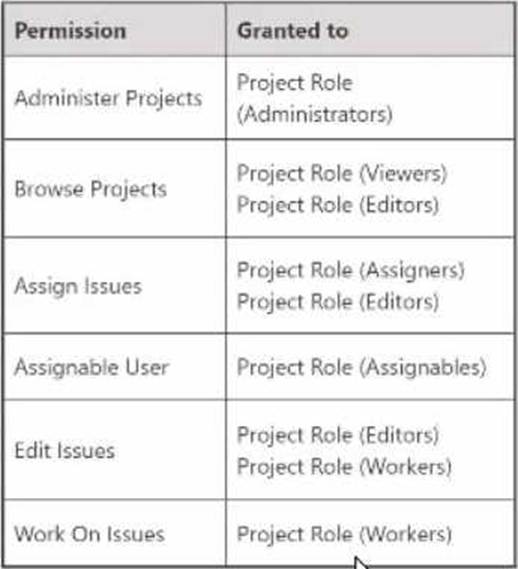
Clare is joining your team and needs to:
• analyze incoming requests with her initials tagged to a label
• re-assign requests to subject matter experts
Which project role does Clare need?
- A . Assigners
- B . Viewers
- C . Administrators
- D . Assignables
- E . Workers
- F . Editors
A
Explanation:
The project role that Clare needs is Assigners. This is because the Assigners role has been granted two permissions that Clare needs: Browse Projects and Assign Issues. The Browse Projects permission allows Clare to see the project and its issues, and the Assign Issues permission allows Clare to re-assign issues to subject matter experts. The other roles do not have both of these permissions. For example, the Viewers role only has the Browse Projects permission, but not the Assign Issues permission. The Administrators role has both permissions, but also has other permissions that Clare does not need, such as Administer Projects and Delete Issues. The Assignables role only has the Assignable User permission, which allows users to be assigned issues, but not to assign issues to others. The Workers role only has the Work On Issues permission, which allows users to log work on issues, but not to assign issues to others. The Editors role only has the Edit Issues permission, which allows users to modify issue details, but not to assign issues to others. For more information on how project permissions and roles work, see Understand project permissions and roles and Manage project permissions.
Reference: Manage project permissions, Understand project permissions and roles
Your team uses Story Points for estimation and tracking.
You performed several actions in the active sprint.
Which two actions are reflected as scope change? (Choose two.)
- A . Added a fix version on a committed story.
- B . Estimated a story in the backlog.
- C . Dragged on estimated story from the backlog to the sprint.
- D . Modified the estimate value on a committed story.
- E . Added another 5ub-task to a committed story.
- F . Logged work on several committed stories.
C, D
Explanation:
The two actions that are reflected as scope change are dragging an estimated story from the backlog to the sprint and modifying the estimate value on a committed story. Scope change is a measure of how much work was added or removed from a sprint after it started. It is calculated by comparing the total story points committed at the start of the sprint and the total story points completed at the end of the sprint. If you add or remove issues from a sprint, or change their estimates, you are changing the scope of the sprint. The other actions mentioned in the question do not affect the scope of the sprint, as they do not change the amount of work planned or done in the sprint.
Reference: Viewing the Velocity Chart, Scope change
You need to display data on a dashboard that shows the correlation between the following:
• the number of days that issues have been open
• the number of comments on the issues
• the number of participants on the issues
Identify the single gadget that meets these requirements.
- A . Heat Map
- B . Bubble Chart
- C . Activity Stream
- D . Issue Statistics
- E . Voted Issues
You are a project administrator of DEV. Omar is a Jira administrator.
Identify two project settings that Omar can update in DEV but you cannot. (Choose two.)
- A . Notification scheme
- B . Project shortcuts
- C . Key
- D . Description
- E . Name
- F . Versions
A, C
Explanation:
As a project administrator of DEV, you can update some project settings such as project shortcuts, description, name, and versions. However, you cannot update the notification scheme or the key of the project, as these are global settings that require Jira administrator permissions. Therefore, the correct answer is A and C.
Reference: Managing project permissions, Managing project notifications, Changing the project key
Analyze the component configuration of a project as shown.
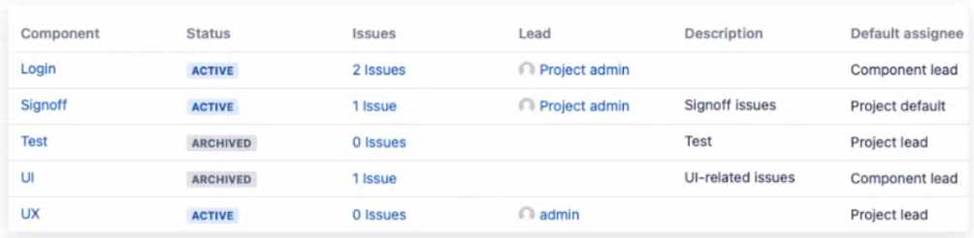
Dave creates an issue and wants to use the auto-assignment feature of Jir a.
Which statement is definitely correct?
- A . If UX is selected, the issue will be assigned to admin.
- B . If Login and Signoff are selected, the issue will be assigned to Project admin.
- C . If Signoff is selected, the issue will be assigned to Project admin.
- D . If Test is selected, the issue will be assigned to Project lead.
C
Explanation:
The component configuration of the project shows that each component has a different default assignee. The default assignee is the user who will be automatically assigned to an issue when that component is selected.
The image shows that the default assignee for the Signoff component is Project admin. Therefore, if Dave creates an issue and selects Signoff as the component, the issue will be assigned to Project admin.
The other options are not correct because:
If UX is selected, the issue will not be assigned to admin, but to Unassigned. The image shows that the default assignee for the UX component is Unassigned, which means that no user will be automatically assigned to an issue with that component.
If Login and Signoff are selected, the issue will not be assigned to Project admin, but to Project lead. The image shows that the default assignee for multiple components is Project lead, which means that if more than one component is selected, the issue will be assigned to Project lead.
If Test is selected, the issue will not be assigned to Project lead, but to Unassigned. The image shows that the default assignee for the Test component is Unassigned, which means that no user will be automatically assigned to an issue with that component.
You are viewing a board that displays stories across multiple projects. You want to see a grouping of stories without epics.
Which swimlane selection will achieve this?
- A . Query: epic is EMPTY
- B . Stories
- C . Query: Type = Epic
- D . Projects
- E . Epics
A
Explanation:
Swimlanes are a way of grouping issues on a board based on certain criteria, such as assignee, priority, query, or epics. If you want to see a grouping of stories without epics, you can use a query swimlane with the condition epic is EMPTY, which will show only issues that are not part of any epic. The other options will either show epics or not group stories at all. Therefore, the correct answer is A.
Reference: [Configuring swimlanes], [Advanced searching – fields reference]
You just started working as a scrum master in the Engine team.
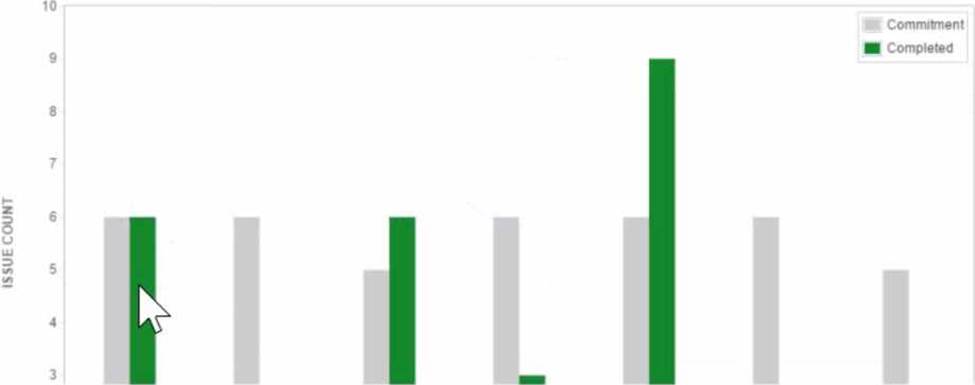
The first thing you do is to analyze the Velocity Chart of the team’s scrum board as shown
- A . Issues not completed in Combo Sprint 3 were completed in Combo Sprint 4.
- B . Combo Sprint 1 has been deleted after it was completed.
- C . There was a scope change during Combo Sprint 4.
- D . The team only completed 2 out of 6 Story Points in Combo Sprint 3.
- E . All issues in Combo Sprint 3 were estimated before the sprint was started.
C
Explanation:
The Velocity Chart shows the amount of work completed by a team in each sprint. The green area represents the completed work, and the gray area represents the estimated work. The difference between the green and gray areas indicates a scope change, which means that issues were added or removed from the sprint after it started. In Combo Sprint 4, we can see that the green area is larger than the gray area, which means that more work was completed than estimated. This implies that some issues were added to the sprint after it started, or that some issues were re-estimated with higher values. Therefore, option C is correct.
Reference: Velocity Chart, Managing Jira Projects Data Center and Server: Certification Bundle