
Amazon SOA-C02 Practice Exams
Last updated on Oct 22,2026- Exam Code: SOA-C02
- Exam Name: AWS Certified SysOps Administrator - Associate
- Certification Provider: Amazon
- Latest update: Oct 22,2026
A company needs to restrict access to an Amazon S3 bucket to Amazon EC2 instances in a VPC only.
All traffic must be over the AWS private network.
What actions should the SysOps administrator take to meet these requirements?
- A . Create a VPC endpoint for the S3 bucket, and create an IAM policy that conditionally limits all S3 actions on the bucket to the VPC endpoint as the source.
- B . Create a VPC endpoint for the S3 bucket, and create an S3 bucket policy that conditionally limits all S3 actions on the bucket to the VPC endpoint as the source.
- C . Create a service-linked role for Amazon EC2 that allows the EC2 instances to interact directly with Amazon S3, and attach an IAM policy to the role that allows the EC2 instances full access to the S3 bucket.
- D . Create a NAT gateway in the VPC, and modify the VPC route table to route all traffic destined for Amazon S3 through the NAT gateway.
B
Explanation:
To restrict access to an Amazon S3 bucket to Amazon EC2 instances in a VPC only, and ensure all traffic is over the AWS private network, the SysOps administrator should create a VPC endpoint for the S3 bucket and create an S3 bucket policy that conditionally limits all S3 actions on the bucket to the VPC endpoint as the source.
Create a VPC Endpoint for S3:
Open the VPC console.
Choose "Endpoints" and then "Create Endpoint."
Select the service name "com.amazonaws.[region].s3."
Choose the VPC and the subnets where the EC2 instances reside.
Configure the route tables to include the VPC endpoint.
Create an S3 Bucket Policy:
Open the S3 console and select the bucket.
Go to the "Permissions" tab and edit the bucket policy.
Add a condition to the policy to allow access only from the VPC endpoint.
Example policy:
{
"Version": "2012-10-17",
"Statement": [
{
"Effect": "Allow",
"Principal": "*",
"Action": "s3:*",
"Resource": [
"arn:aws:s3:::your-bucket-name",
"arn:aws:s3:::your-bucket-name/*"
],
"Condition": {
"StringEquals": {
"aws:sourceVpce": "vpce-12345678"
}
}
}
]
}
Reference: Amazon S3 VPC Endpoints
Amazon S3 Bucket Policies
A company has several business units that want to use Amazon EC2. The company wants to require all business units to provision their EC2 instances by using only approved EC2 instance configurations.
What should a SysOps administrator do to implement this requirement?
- A . Create an EC2 instance launch configuration. Allow the business units to launch EC2 instances by specifying this launch configuration in the AWS Management Console.
- B . Develop an IAM policy that limits the business units to provision EC2 instances only. Instruct the business units to launch instances by using an AWS CloudFormation template.
- C . Publish a product and launch constraint role for EC2 instances by using AWS Service Catalog. Allow the business units to perform actions in AWS Service Catalog only.
- D . Share an AWS CloudFormation template with the business units. Instruct the business units to pass a role to AWS CloudFormation to allow the service to manage EC2 instances.
C
Explanation:
To enforce the use of approved EC2 instance configurations across different business units efficiently:
AWS Service Catalog: Utilize AWS Service Catalog to manage and govern commonly deployed IT services. Create a catalog of pre-approved products (in this case, EC2 instance configurations).
Publish Products: Define and publish EC2 instance configurations as products within the Service Catalog. These products will incorporate all the necessary and approved configurations, options, and software.
Launch Constraints: Assign launch constraints to these products, ensuring that users can only launch EC2 instances as defined by the pre-approved configurations.
Control Access: Grant business units access only to the Service Catalog for provisioning EC2 instances. This ensures they use only those configurations that comply with company policies and standards.
This approach not only standardizes resource deployment but also simplifies management and enhances compliance across the organization.
A company runs hundreds of Amazon EC2 instances in a single AWS Region. Each EC2 instance has two attached 1 GiB General Purpose SSD (gp2) Amazon Elastic Block Store (Amazon EBS) volumes. A critical workload is using all the available IOPS capacity on the EBS volumes.
According to company policy, the company cannot change instance types or EBS volume types without completing lengthy acceptance tests to validate that the company’s applications will function properly. A SysOps administrator needs to increase the I/O performance of the EBS volumes as quickly as possible.
Which action should the SysOps administrator take to meet these requirements?
- A . Increase the size of the 1 GiB EBS volumes.
- B . Add two additional elastic network interfaces on each EC2 instance.
- C . Turn on Transfer Acceleration on the EBS volumes in the Region.
- D . Add all the EC2 instances to a cluster placement group.
A
Explanation:
Increasing the size of the 1 GiB EBS volumes will increase the IOPS capacity of the volumes, which will improve the I/O performance of the EBS volumes. This option does not require any changes to the instance types or EBS volume types, so it can be done quickly without the need for lengthy acceptance tests to validate that the company’s applications will function properly.
https://docs.aws.amazon.com/AWSEC2/latest/UserGuide/requesting-ebs-volume-modifications.html
A company has an application that customers use to search for records on a website. The application’s data is stored in an Amazon Aurora DB cluster. The application’s usage varies by season and by day of the week.
The website’s popularity is increasing, and the website is experiencing slower performance because of increased load on the DB cluster during periods of peak activity. The application logs show that the performance issues occur when users are searching for information. The same search is rarely performed multiple times.
A SysOps administrator must improve the performance of the platform by using a solution that maximizes resource efficiency.
Which solution will meet these requirements?
- A . Deploy an Amazon ElastiCache for Redis cluster in front of the DB cluster. Modify the application to check the cache before the application issues new queries to the database. Add the results of any queries to the cache.
- B . Deploy an Aurora Replica for the DB cluster. Modify the application to use the reader endpoint for
search operations. Use Aurora Auto Scaling to scale the number of replicas based on load. Most Voted - C . Use Provisioned IOPS on the storage volumes that support the DB cluster to improve performance sufficiently to support the peak load on the application.
- D . Increase the instance size in the DB cluster to a size that is sufficient to support the peak load on the application. Use Aurora Auto Scaling to scale the instance size based on load.
A
Explanation:
Step-by-Step
Understand the Problem:
The application experiences slower performance during peak activity due to increased load on the Amazon Aurora DB cluster.
Performance issues occur primarily during search operations.
The goal is to improve performance and maximize resource efficiency.
Analyze the Requirements:
The solution should improve the performance of the platform.
It should maximize resource efficiency, which implies cost-effective and scalable options.
Evaluate the Options:
Option A: Deploy an Amazon ElastiCache for Redis cluster.
ElastiCache for Redis is a managed in-memory caching service that can significantly reduce the load on the database by caching frequently accessed data.
By modifying the application to check the cache before querying the database, repeated searches for the same information will be served from the cache, reducing the number of database reads.
This is efficient and cost-effective as it reduces database load and improves response times.
Option B: Deploy an Aurora Replica and use Auto Scaling.
Adding Aurora Replicas can help distribute read traffic and improve performance.
Aurora Auto Scaling can adjust the number of replicas based on the load.
However, this option may not be as efficient in terms of resource usage compared to caching because it still involves querying the database.
Option C: Use Provisioned IOPS.
Provisioned IOPS can improve performance by providing fast and consistent I/O.
This option focuses on improving the underlying storage performance but doesn’t address the inefficiency of handling repeated searches directly.
Option D: Increase the instance size and use Auto Scaling.
Increasing the instance size can provide more resources to handle peak loads.
Aurora Auto Scaling can adjust instance sizes based on the load.
This option can be costly and may not be as efficient as caching in handling repeated searches.
Select the Best Solution:
Option A is the best solution because it leverages caching to reduce the load on the database, which directly addresses the issue of repeated searches causing performance problems. Caching is generally more resource-efficient and cost-effective compared to scaling database instances or storage.
Reference: Amazon ElastiCache for Redis Documentation
Amazon Aurora Documentation
AWS Auto Scaling
Using ElastiCache for Redis aligns with best practices for improving application performance by offloading repetitive read queries from the database, leading to faster response times and more efficient resource usage.
An application runs on Amazon EC2 instances in an Auto Scaling group. Following the deployment of a new feature on the EC2 instances, some instances were marked as unhealthy and then replaced by the Auto Scaling group. The EC2 instances terminated before a SysOps administrator could determine the cause of the health status changes. To troubleshoot this issue, the SysOps administrator wants to ensure that an AWS Lambda function is invoked in this situation.
How should the SysOps administrator meet these requirements?
- A . Activate the instance scale-in protection setting for the Auto Scaling group. Invoke the Lambda function through Amazon EventBridge (Amazon CloudWatch Events).
- B . Activate the instance scale-in protection setting for the Auto Scaling group. Invoke the Lambda function through Amazon Route 53.
- C . Add a lifecycle hook to the Auto Scaling group to invoke the Lambda function through Amazon EventBridge (Amazon CloudWatch Events).
- D . Add a lifecycle hook to the Auto Scaling group to invoke the Lambda function through Amazon Route 53.
C
Explanation:
To enable troubleshooting of EC2 instances marked as unhealthy before they are terminated by the
Auto Scaling group, you can use lifecycle hooks:
Add a Lifecycle Hook: Configure a lifecycle hook in the Auto Scaling group. This hook will hold the instance in a "wait" state either when it launches or terminates (in this case, when it’s about to be terminated due to health check failure).
Integration with Amazon EventBridge (CloudWatch Events): Set up the lifecycle hook to send an event to EventBridge (formerly CloudWatch Events) when an instance is in the termination lifecycle state.
Invoke Lambda Function: Configure EventBridge to trigger an AWS Lambda function when it receives
the termination lifecycle event from the Auto Scaling group. This Lambda function can then perform necessary diagnostics, logging, or data capture activities on the instance before it’s terminated.
This configuration allows the SysOps administrator to perform necessary investigations on why instances were marked unhealthy before they are automatically replaced, offering a chance to diagnose and potentially correct underlying issues.
A company has a new requirement stating that all resources In AWS must be tagged according to a set policy.
Which AWS service should be used to enforce and continually Identify all resources that are not in compliance with the policy?
- A . AWS CloudTrail
- B . Amazon Inspector
- C . AWS Config
- D . AWS Systems Manager
C
Explanation:
Step-by-Step
Understand the Problem:
Enforce a policy that requires all AWS resources to be tagged according to company policy.
Continuously identify non-compliant resources.
Analyze the Requirements:
Implement a solution to monitor and enforce resource tagging compliance.
Evaluate the Options:
Option A: AWS CloudTrail.
Provides logging and monitoring of API calls but does not enforce tagging policies.
Option B: Amazon Inspector.
Primarily used for security assessments, not resource tagging compliance.
Option C: AWS Config.
Monitors and evaluates the configurations of AWS resources.
Can enforce compliance by using AWS Config rules to check resource tags.
Option D: AWS Systems Manager.
Provides operational insights and management but is not specifically designed for compliance enforcement.
Select the Best Solution:
Option C: AWS Config is designed for compliance and configuration monitoring, making it the ideal service for enforcing and identifying non-compliant resource tags.
Reference: AWS Config
Managing Resource Tag Compliance with AWS Config
AWS Config provides the necessary tools to enforce and monitor resource tagging compliance, ensuring all resources adhere to the set policy.
A company is using AWS to deploy a critical application on a fleet of Amazon EC2 instances The company is rewriting the application because the application failed a security review The application will take 12 months to rewrite While this rewrite happens, the company needs to rotate IAM access keys that the application uses.
A SysOps administrator must implement an automated solution that finds and rotates IAM access Keys that are at least 30 days old. The solution must then continue to rotate the IAM access Keys every 30 days.
Which solution will meet this requirement with the MOST operational efficiency?
- A . Use an AWS Config rule to identify IAM access Keys that are at least 30 days old. Configure AWS Config to invoKe an AWS Systems Manager Automation runbook to rotate the identified IAM access keys.
- B . Use AWS Trusted Advisor to identify IAM access Keys that are at least 30 days old. Configure Trusted Advisor to invoke an AWS Systems Manager Automation runbook to rotate the identified IAM access keys
- C . Create a script that checks the age of IAM access Keys and rotates them if they are at least 30 days old. Launch an EC2 instance. Schedule the script to run as a cron expression on the EC2 instance every day.
- D . Create an AWS Lambda function that checks the age of IAM access keys and rotates them if they are at least 30 days old Use an Amazon EventBridge rule to invoke the Lambda function every time a new IAM access key is created.
D
Explanation:
Lambda Function to Rotate IAM Access Keys:
A Lambda function can be used to automate the rotation of IAM access keys based on their age.
Steps:
Write a Lambda function that checks the age of IAM access keys.
The function should rotate keys that are at least 30 days old.
Deploy the Lambda function.
Amazon EventBridge Rule:
EventBridge can trigger the Lambda function periodically and when a new key is created.
Steps:
Create an EventBridge rule that triggers the Lambda function on a schedule (e.g., daily) and on IAM key creation events.
Reference: Rotating Access Keys for IAM Users, Amazon EventBridge
A SysOps administrator applies the following policy to an AWS CloudFormation stack:
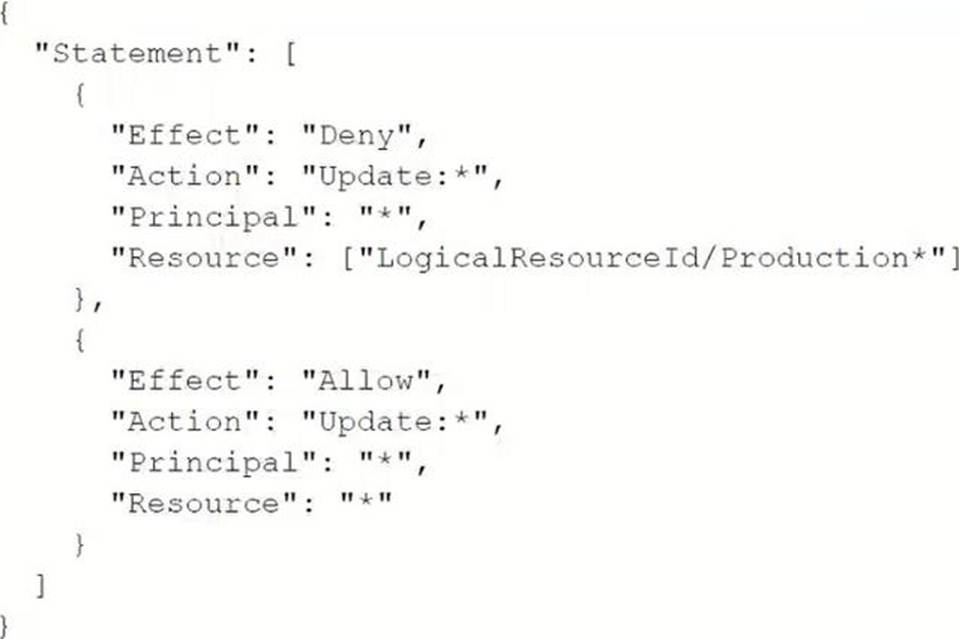
What is the result of this policy?
- A . Users that assume an IAM role with a logical ID that begins with "Production" are prevented from running the update-stack command.
- B . Users can update all resources in the stack except for resources that have a logical ID that begins with "Production".
- C . Users can update all resources in the stack except for resources that have an attribute that begins with "Production".
- D . Users in an IAM group with a logical ID that begins with "Production" are prevented from running the update-stack command.
B
Explanation:
The policy provided includes two statements:
The first statement explicitly denies the Update:* action on resources with a LogicalResourceId that begins with "Production".
The second statement allows the Update:* action on all resources.
In AWS IAM policy evaluation logic, explicit denies always take precedence over allows. Therefore, the effect of this policy is that users can update all resources in the stack except for those with a logical ID that begins with "Production".
Reference: IAM JSON Policy Elements: Effect
Policy Evaluation Logic
A company runs a website from Sydney, Australi
a. Users in the United States (US) and Europe are reporting that images and videos are taking a long time to load. However, local testing in Australia indicates no performance issues. The website has a large amount of static content in the form of images and videos that are stored m Amazon S3.
Which solution will result In the MOST Improvement In the user experience for users In the US and Europe?
- A . Configure AWS PrivateLink for Amazon S3.
- B . Configure S3 Transfer Acceleration.
- C . Create an Amazon CloudFront distribution. Distribute the static content to the CloudFront edge locations
- D . Create an Amazon API Gateway API in each AWS Region. Cache the content locally.
C
Explanation:
Amazon CloudFront is a global content delivery network (CDN) service that delivers your content with low latency and high transfer speeds. By distributing the static content (images and videos) to CloudFront edge locations, users in the United States and Europe can access the content from the nearest edge location, significantly improving the load times.
Create a CloudFront Distribution:
Open the Amazon CloudFront console at Amazon CloudFront Console.
Choose Create Distribution and select Web.
Specify the S3 bucket as the origin where your static content is stored.
Configure Distribution Settings:
Configure the settings, such as cache behaviors and SSL/TLS settings. Optionally, configure additional features like geo-restriction and logging. Update DNS Configuration:
Update your DNS records to point to the CloudFront distribution. This can be done via Amazon Route 53 or your DNS provider.
Monitor Performance:
Use CloudFront reports and logs to monitor the performance and adjust configurations if needed.
Reference: Amazon CloudFront Overview
Creating a CloudFront Distribution
A SysOps administrator wants to manage a web server application with AWS Elastic Beanstalk. The Elastic Beanstalk service must maintain full capacity for new deployments at all times.
Which deployment policies satisfy this requirement? (Select TWO.)
- A . All at once
- B . Immutable
- C . Rebuild
- D . Rolling
- E . Rolling with additional batch
BE
Explanation:
https://docs.aws.amazon.com/elasticbeanstalk/latest/dg/using-features.rolling-version-deploy.html
To maintain full capacity during new deployments in AWS Elastic Beanstalk, you can use the "Immutable" or "Rolling with additional batch" deployment policies.
Immutable Deployment:
This policy ensures that a new set of instances is launched with the new version of the application. The new instances are only promoted to serve traffic if the deployment succeeds. This ensures zero downtime and maintains full capacity during deployment.
Rolling with Additional Batch:
This policy launches a new batch of instances to handle the traffic while the old instances are being updated. This maintains the full capacity during the deployment process, ensuring that the application remains fully operational.
How to Configure Deployment Policies:
Open Elastic Beanstalk Console:
Navigate to the AWS Elastic Beanstalk console at AWS Elastic Beanstalk Console.
Update Environment Configuration:
Select the environment you want to configure.
Go to Configuration and then Rolling updates and deployments.
Choose either Immutable or Rolling with additional batch as the deployment policy.
Reference: AWS Elastic Beanstalk Deployment Policies
Managing and Configuring Environments