
Amazon SOA-C02 Practice Exams
Last updated on Oct 22,2026- Exam Code: SOA-C02
- Exam Name: AWS Certified SysOps Administrator - Associate
- Certification Provider: Amazon
- Latest update: Oct 22,2026
A SysOps administrator has created a VPC that contains a public subnet and a private subnet. Amazon EC2 instances that were launched in the private subnet cannot access the internet. The default network ACL is active on all subnets in the VPC, and all security groups allow all outbound traffic:
Which solution will provide the EC2 instances in the private subnet with access to the internet?
- A . Create a NAT gateway in the public subnet. Create a route from the private subnet to the NAT gateway.
- B . Create a NAT gateway in the public subnet. Create a route from the public subnet to the NAT gateway.
- C . Create a NAT gateway in the private subnet. Create a route from the public subnet to the NAT gateway.
- D . Create a NAT gateway in the private subnet. Create a route from the private subnet to the NAT gateway.
A
Explanation:
NAT Gateway resides in public subnet, and traffic should be routed from private subnet to NAT Gateway: https://docs.aws.amazon.com/vpc/latest/userguide/vpc-nat-gateway.html
A large multinational company has a core application that runs 24 hours a day, 7 days a week on Amazon EC2 and AWS Lambda. The company uses a combination of operating systems across different AWS Regions. The company wants to achieve cost savings and wants to use a pricing model that provides the most flexibility.
What should the company do to MAXIMIZE cost savings while meeting these requirements?
- A . Establish the compute expense by the hour. Purchase a Compute Savings Plan.
- B . Establish the compute expense by the hour. Purchase an EC2 Instance Savings Plan.
- C . Purchase a Reserved Instance for the instance types, operating systems, Region, and tenancy.
- D . Use EC2 Spot Instances to match the instances that run in each Region.
A
Explanation:
To achieve maximum cost savings and flexibility for a 24/7 running application across different AWS regions and operating systems, the best approach is to use a Compute Savings Plan. Compute Savings Plans provide the most flexibility by automatically applying to any EC2 instance usage regardless of instance family, size, OS, tenancy, or AWS Region, and also apply to AWS Fargate and AWS Lambda usage.
Understand Compute Savings Plans:
Compute Savings Plans offer significant savings over On-Demand prices, with the flexibility to use the compute option that best suits your needs.
Purchase a Compute Savings Plan:
Login to the AWS Management Console.
Navigate to the Savings Plans section.
Choose Purchase Savings Plan and select Compute Savings Plan.
Define the hourly commitment amount and the term length (one or three years).
Monitor and Optimize Usage:
Ensure that your usage aligns with the Savings Plan to maximize savings.
Use AWS Cost Explorer and Savings Plans Utilization reports to monitor usage.
Reference: Savings Plans
Compute Savings Plans
Accompany wants to monitor the number of Amazon EC2 instances that it is running. The company also wants to automate a service quota increase when the number of instances reaches a specific threshold.
Which solution meets these requirements?
- A . Create an Amazon CloudWatch alarm to monitor Service Quotas. Configure the alarm to invoke an AWS Lambda function to request a quota increase when the alarm reaches the threshold.
- B . Create an AWS Config rule to monitor Service Quotas. Call an AWS Lambda function to remediate the action and increase the quota.
- C . Create an Amazon CloudWateh alarm to monitor the AWS Health Dashboard. Configure the alarm to invoke an AWS Lambda function to request a quota increase when the alarm reaches the
threshold. - D . Create an Amazon CloudWatch alarm to monitor AWS Trusted Advisor service quotas. Configure the alarm to publish a message to an Amazon Simple Notification Service (Amazon SNS) topic to increase the quota.
A
Explanation:
This approach uses CloudWatch for monitoring and Lambda for automation, allowing for quick and efficient quota management:
Setup CloudWatch Alarm: Monitor the usage of EC2 instances against the service quota using CloudWatch.
Lambda Function: Write a Lambda function that triggers a quota increase request via the Service Quotas API when the threshold is met.
Integration: Configure the CloudWatch alarm to trigger this Lambda function when the instance count approaches the service quota.
AWS Documentation
Reference: Information on monitoring with CloudWatch and automating actions with Lambda can be found in these guides: Amazon CloudWatch Alarms, AWS Lambda.
A development team recently deployed a new version of a web application to production. After the release penetration testing revealed a cross-site scripting vulnerability that could expose user data.
Which AWS service will mitigate this issue?
- A . AWS Shield Standard
- B . AWS WAF
- C . Elastic Load Balancing
- D . Amazon Cognito
B
Explanation:
AWS WAF (Web Application Firewall) helps protect web applications from common web exploits that could affect availability, compromise security, or consume excessive resources. It can be used to mitigate cross-site scripting (XSS) vulnerabilities.
Set Up AWS WAF:
Open the AWS WAF console at AWS WAF Console.
Create a new Web ACL.
Add Rules for Protection:
Add managed rules that include protection against common vulnerabilities, including XSS.
AWS provides managed rule groups, such as the AWS Managed Rules for Common Vulnerabilities and Exposures (CVE) which include protections against XSS.
Associate WAF with the Application:
Associate the Web ACL with the resources you want to protect (e.g., CloudFront distribution, Application Load Balancer).
Reference: AWS WAF
AWS WAF Managed Rules
A company runs an application on Amazon EC2 instances. The EC2 instances are in an Auto Scaling group and run behind an Application Load Balancer (ALB). The application experiences errors when total requests exceed 100 requests per second. A SysOps administrator must collect information about total requests for a 2-week period to determine when requests exceeded this threshold.
What should the SysOps administrator do to collect this data?
- A . Use the ALB’s RequestCount metric. Configure a time range of 2 weeks and a period of 1 minute.
Examine the chart to determine peak traffic times and volumes. - B . Use Amazon CloudWatch metric math to generate a sum of request counts for all the EC2 instances over a 2-week period. Sort by a 1-minute interval.
- C . Create Amazon CloudWatch custom metrics on the EC2 launch configuration templates to create aggregated request metrics across all the EC2 instances.
- D . Create an Amazon EventBridge (Amazon CloudWatch Events) rule. Configure an EC2 event matching pattern that creates a metric that is based on EC2 requests. Display the data in a graph.
A
Explanation:
Using the ALB’s RequestCount metric will allow the SysOps administrator to collect information about total requests for a 2-week period and determine when requests exceeded the threshold of 100 requests per second. Configuring a time range of 2 weeks and a period of 1 minute will ensure that the data can be accurately examined to determine peak traffic times and volumes.
A company has a stateless application that runs on four Amazon EC2 instances. The application requires tour instances at all times to support all traffic. A SysOps administrator must design a highly available, fault-tolerant architecture that continually supports all traffic if one Availability Zone becomes unavailable.
Which configuration meets these requirements?
- A . Deploy two Auto Scaling groups in two Availability Zones with a minimum capacity of two instances in each group.
- B . Deploy an Auto Scaling group across two Availability Zones with a minimum capacity of four instances.
- C . Deploy an Auto Scaling group across three Availability Zones with a minimum capacity of four instances.
- D . Deploy an Auto Scaling group across three Availability Zones with a minimum capacity of six instances.
A SysOps administrator is attempting to download patches from the internet into an instance in a private subnet. An internet gateway exists for the VPC, and a NAT gateway has been deployed on the public subnet; however, the instance has no internet connectivity. The resources deployed into the private subnet must be inaccessible directly from the public internet.
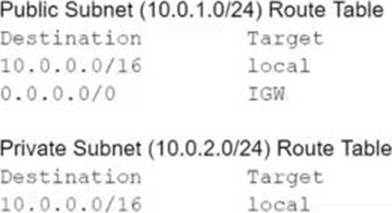
What should be added to the private subnet’s route table in order to address this issue, given the information provided?
- A . 0.0.0.0/0 IGW
- B . 0.0.0.0/0 NAT
- C . 10.0.1.0/24 IGW
- D . 10.0.1.0/24 NAT
B
Explanation:
Understand the Problem:
An instance in a private subnet needs internet access for downloading patches.
There is an existing NAT gateway in the public subnet.
Analyze the Requirements:
Provide internet access to the private subnet instance through the NAT gateway.
Ensure resources in the private subnet remain inaccessible from the public internet.
Evaluate the Options:
Option A: 0.0.0.0/0 IGW.
This would route traffic directly to the internet gateway, exposing the instance to the public internet.
Option B: 0.0.0.0/0 NAT.
This routes traffic destined for the internet through the NAT gateway, allowing outbound connections while keeping the instance protected from inbound internet traffic.
Option C: 10.0.1.0/24 IGW.
This does not provide the necessary route for internet access and incorrectly uses the internet gateway for local traffic.
Option D: 10.0.1.0/24 NAT.
This also incorrectly uses the NAT gateway for local traffic, which is unnecessary.
Select the Best Solution:
Option B: Adding a route for 0.0.0.0/0 with the target set to the NAT gateway ensures that the private subnet instance can access the internet while remaining protected from inbound internet traffic.
Reference: Amazon VPC NAT Gateways
Private Subnet Route Table
Configuring the private subnet route table to use the NAT gateway for 0.0.0.0/0 ensures secure and efficient internet access for instances in the private subnet.
A company has two VPC networks named VPC A and VPC B. The VPC A CIDR block is 10.0.0.0/16 and the VPC B CIDR block is 172.31.0.0/16. The company wants to establish a VPC peering connection named pcx-12345 between both VPCs.
Which rules should appear in the route table of VPC A after configuration? (Select TWO.)
- A . Destination: 10.0.0.0/16, Target: Local
- B . Destination: 172.31.0.0/16, Target: Local
- C . Destination: 10.0.0.0/16, Target: pcx-12345
- D . Destination: 172.31.0.0/16, Target: pcx-12345
- E . Destination: 10.0.0.0/16. Target: 172.31.0.0/16
AD
Explanation:
https://docs.aws.amazon.com/vpc/latest/peering/vpc-peering-routing.html
When establishing a VPC peering connection between two VPCs, you need to update the route tables of both VPCs to allow traffic to flow between them.
Route Table of VPC A (10.0.0.0/16):
Local Route: This route is automatically created to allow traffic within the VPC.
Destination: 10.0.0.0/16, Target: Local
Peering Connection Route: This route directs traffic destined for VPC B (172.31.0.0/16) through the VPC peering connection.
Destination: 172.31.0.0/16, Target: pcx-12345
Route Table of VPC B (172.31.0.0/16):
Local Route: This route is automatically created to allow traffic within the VPC.
Destination: 172.31.0.0/16, Target: Local
Peering Connection Route: This route directs traffic destined for VPC A (10.0.0.0/16) through the VPC peering connection.
Destination: 10.0.0.0/16, Target: pcx-12345
Reference: VPC Peering Routing
A company is managing multiple AWS accounts in AWS Organizations The company is reviewing internal security of Its AWS environment The company’s security administrator has their own AWS account and wants to review the VPC configuration of developer AWS accounts
Which solution will meet these requirements in the MOST secure manner?
- A . Create an IAM policy in each developer account that has read-only access related to VPC resources Assign the policy to an IAM user Share the user credentials with the security administrator
- B . Create an IAM policy in each developer account that has administrator access to all Amazon EC2 actions, including VPC actions Assign the policy to an IAM user Share the user credentials with the security administrator
- C . Create an IAM policy in each developer account that has administrator access related to VPC
resources Assign the policy to a cross-account IAM role Ask the security administrator to assume the role from their account - D . Create an IAM policy m each developer account that has read-only access related to VPC resources Assign the policy to a cross-account IAM role Ask the security administrator to assume the role from their account
D
Explanation:
To review the VPC configuration of developer AWS accounts securely, the best practice is to use cross-account IAM roles with read-only access.
Create an IAM Policy with Read-Only Access:
Navigate to the IAM console in each developer account.
Create a new policy with read-only access to VPC resources. For example:
"Version": "2012-10-17",
"Statement": [
{
"Effect": "Allow",
"Action": [
"ec2:DescribeVpcs",
"ec2:DescribeSubnets",
"ec2:DescribeRouteTables",
"ec2:DescribeSecurityGroups",
"ec2:DescribeNetworkAcls"
],
"Resource": "*"
}
]
}
Save the policy.
Create a Cross-Account IAM Role:
In the IAM console, choose "Roles" and then "Create role".
Select "Another AWS account" and enter the AWS account ID of the security administrator’s account.
Attach the read-only policy created in step 1 to the role.
Save the role and note the role ARN.
Assume the Role from the Security Administrator’s Account:
In the security administrator’s account, navigate to the IAM console.
Use the "Switch Role" option to assume the cross-account role created in the developer account using the role ARN.
The security administrator can now access the VPC configuration of the developer accounts with read-only permissions.
Reference: Cross-Account Access
Creating and Managing IAM Policies
A company uses an Amazon Simple Queue Service (Amazon SQS) standard queue with its application. The application sends messages to the queue with unique message bodies The company decides to switch to an SQS FIFO queue
What must the company do to migrate to an SQS FIFO queue?
- A . Create a new SQS FIFO gueue Turn on content based deduplication on the new FIFO queue Update the application to include a message group ID in the messages
- B . Create a new SQS FIFO queue Update the application to include the DelaySeconds parameter in the messages
- C . Modify the queue type from SQS standard to SQS FIFO Turn off content-based deduplication on the queue Update the application to include a message group ID in the messages
- D . Modify the queue type from SQS standard to SQS FIFO Update the application to send messages with identical message bodies and to include the DelaySeconds parameter in the messages
A
Explanation:
FIFO queues don’t support per-message delays, only per-queue delays. If your application sets the same value of the DelaySeconds parameter on each message, you must modify your application to remove the per-message delay and set DelaySeconds on the entire queue instead.
https://docs.aws.amazon.com/AWSSimpleQueueService/latest/SQSDeveloperGuide/FIFO-queues-moving.html