
Adobe AD0-E725 Practice Exams
Last updated on Oct 24,2026- Exam Code: AD0-E725
- Exam Name: Adobe Commerce Developer Expert
- Certification Provider: Adobe
- Latest update: Oct 24,2026
Which file in Adobe Commerce Cloud is used to configure MariaDB database settings?
- A . env.php
- B . config.yaml
- C . composer.json
- D . system.xml
An Adobe Commerce developer is being tasked with disabling a cron job added by a third-party module.
The developer has already created a new module with a dependency on the third-party module:
<group id="default">
<job name="reminder_email" instance="VendorModuleModelReminderEmail"
method="execute">
<schedule>0 0 * * *</schedule>
</job>
</group>
What would a developer do to disable the cron job?
- A . Create a crontab.xml file and use a referenceJob node to add disable="true" to the the reminder_email cron job.
<?xml version="1.0"?>
<config xmlns:xsi="http://www.w3.org/2001/XMLSchema-instance" xsi:noNamespaceSchemaLocation="urn:magento:module:Magento_Cron:etc/crontab.xsd">
<group id="default">
<referenceJob name="reminder_email" disable="true" />
</group>
</config> - B . Rewrite the reminder_email cron job schedule to run on a date that which will never occur.
<?xml version="1.0"?>
<config xmlns:xsi="http://www.w3.org/2001/XMLSchema-instance" xsi:noNamespaceSchemaLocation="urn:magento:module:Magento_Cron:etc/crontab.xsd">
<group id="default">
<job name="reminder_email" instance="VendorModuleModelReminderEmail" method="execute">
<schedule>0 0 30 2 *</schedule>
</job>
</group>
</config> - C . Rewrite the reminder_email cron job to add disable="true" to the job node.
<?xml version="1.0"?>
<config xmlns:xsi="http://www.w3.org/2001/XMLSchema-instance" xsi:noNamespaceSchemaLocation="urn:magento:module:Magento_Cron:etc/crontab.xsd">
<group id="default">
<job name="reminder_email" instance="VendorModuleModelReminderEmail" method="execute" disable="true">
<schedule>0 0 * * *</schedule>
</job>
</group>
</config> - D . Modify the reminder_email cron job in the database directly and set its status to disabled.
A developer needs to handle multiple store views in Adobe Commerce Cloud with different currencies and shipping options.
What configuration should they update to achieve this?
- A . Modify the core store configuration files.
- B . Use the env.php file to set up different store views and configuration settings.
- C . Configure store views, currencies, and shipping options in the admin panel for each store view.
- D . Add custom shipping rates to the config.yaml file.
An Adobe Commerce developer is tasked with adding the parent order’s increment id to creditmemos fetched through MagentoSalesModelOrderCreditmemoRepository.
To implement this, they choose to create an extension attribute and use the join directive as follows:
<config xmlns:xsi="http://www.w3.org/2001/XMLSchema-instance" xsi:noNamespaceSchemaLocation="urn:magento:framework:Api/etc/extension_attributes.xsd">
<extension_attributes for="MagentoSalesApiDataCreditmemoInterface">
<attribute code="order_increment_id" type="string">
<join reference_table="sales_order" reference_field="entity_id" join_on_field="order_id">
<field>increment_id</field>
</join>
</attribute>
</extension_attributes>
</config>
After a few tests, the developer realizes that the development is not working as expected and that the creditmemos fetched do not contain the increment id.
What is the reason for this?
- A . The join directive for extension attributes does not exist so it is simply ignored by Magento and nothing gets added.
- B . The join directive only works for getList() calls, in this case the creditmemos are fetched using get().
- C . The fields used for the join are inverted reference_field should have contained order_id and join_on_field should have contained entity_id.
- D . The fields used for the join directive should use left join for a successful match.
A developer is customizing the product detail page (PDP) in Adobe Commerce. They need to add a new custom block that will be displayed below the product description.
Which layout XML file should they modify?
- A . catalog_product_view.xml
- B . catalog_category_view.xml
- C . sales_order_view.xml
- D . checkout_index_index.xml
Demonstrate how to configure Adobe Commerce to apply custom security patches through Composer.
- A . Modify the composer.json file to include the patch file and run a composer update.
- B . Upload the patch files directly into the Magento root directory.
- C . Use the Magento admin panel to upload and apply patches.
- D . Patch files should be applied manually by editing the core files.
Which two Adobe Commerce customization techniques should be used to modify entity data programmatically?
- A . Plugins
- B . Preferences
- C . SQL Queries
- D . Direct Table Updates
How can a developer reset environment variables to their default values in Adobe Commerce Cloud?
- A . Modify the env.php file manually to reset the variables.
- B . Use the magento-cloud CLI to reset environment variables.
- C . Remove the config.yaml file and replace it with a default version.
- D . Update the composer.json file to reset variables.
A module contains the VendorModuleCustomValidatorPool class and has an array of validator classes in the constructor.
The following two validators are added in the module etc/di.xml file:
<type name="VendorModuleModelCustomValidatorPool">
<arguments>
<argument name="validators" xsi:type="array">
<item name="validator1" xsi:type="string">VendorModuleModelValidator1</item>
<item name="validator2" xsi:type="string">VendorModuleModelValidator2</item>
</argument>
</arguments>
</type>
There is also one validator added in the etc/adminhtml/di.xml file:
<type name="VendorModuleModelCustomValidatorPool">
<arguments>
<argument name="validators" xsi:type="array">
<item name="validator2" xsi:type="string">VendorModuleModelAdminSpecificValidator2</item>
</argument>
</arguments>
</type>
When VendorModuleCustomValidatorPool gets instantiated in the adminhtml area, what will it contain in the validators property?
- A . An array with exactly two elements containing validator1 item specified in etc/di.xml and validator2 item specified in etc/adminhtml/di.xml:
[
‘validator1’ => {VendorModuleModelValidator1}
‘validator2’ => {VendorModuleModelAdminSpecificValidator2}
] - B . An array with exactly one element containing the validator specified in etc/adminhtml/di.xml:
[
‘validator2’ => {VendorModuleModelAdminSpecificValidator2}
] - C . An array with exactly three elements containing the validator1 and validator2 items specified in etc/di.xml and validator2 items specified in etc/adminhtml/di.xml
[
0 => {VendorModuleModelValidator1},
1 => {VendorModuleModelValidator2},
2 => {VendorModuleModelAdminSpecificValidator2}
] - D . The adminhtml DI file completely overrides the validators array instead of merging it with the base DI file.
Refer to the image of the website hierarchy.
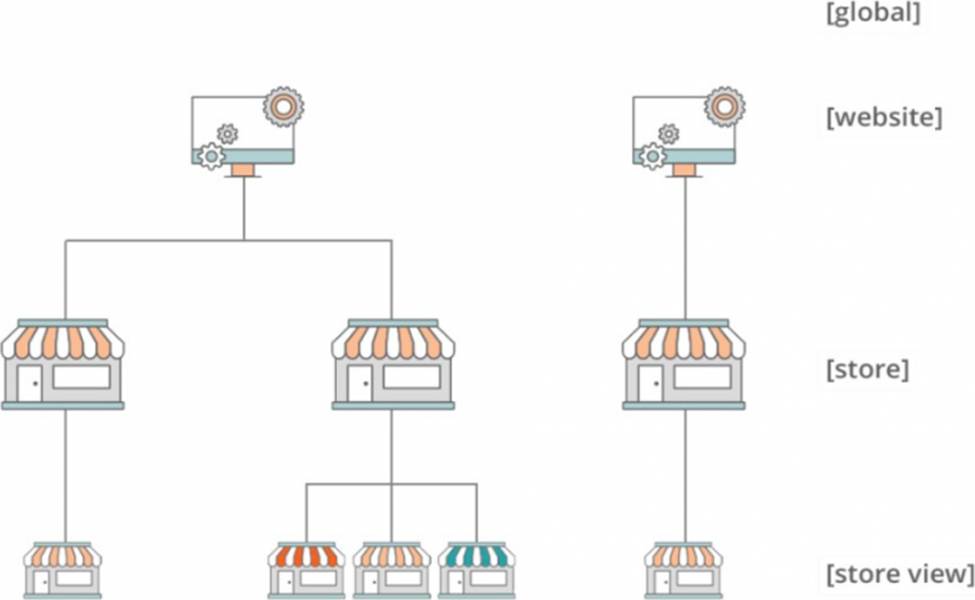
How many different themes can be configured in the shop based on this hierarchy?
- A . One, because only one theme is allowed in a single instance
- B . Two, because themes are applied only per website level
- C . Five, because themes are applied per store view level
- D . Three, because themes are applied per store level