
Microsoft DP-700 Practice Exams
Last updated on Oct 01,2026- Exam Code: DP-700
- Exam Name: Microsoft Fabric Data Engineer
- Certification Provider: Microsoft
- Latest update: Oct 01,2026
You have a Fabric workspace that contains a warehouse named Warehouse1.
You have an on-premises Microsoft SQL Server database named Database1 that is accessed by using an on-premises data gateway.
You need to copy data from Database1 to Warehouse1.
Which item should you use?
- A . a Dataflow Gen1 dataflow
- B . a data pipeline
- C . a KQL queryset
- D . a notebook
B
Explanation:
To copy data from an on-premises Microsoft SQL Server database (Database1) to a warehouse (Warehouse1) in Microsoft Fabric, the best option is to use a data pipeline. A data pipeline in Fabric allows for the orchestration of data movement, from source to destination, using connectors, transformations, and scheduled workflows. Since the data is being transferred from an on-premises database and requires the use of a data gateway, a data pipeline provides the appropriate framework to facilitate this data movement efficiently and reliably.
You have a Fabric F32 capacity that contains a workspace. The workspace contains a warehouse named DW1 that is modelled by using MD5 hash surrogate keys.
DW1 contains a single fact table that has grown from 200 million rows to 500 million rows during the past year.
You have Microsoft Power BI reports that are based on Direct Lake. The reports show year-over-year values.
Users report that the performance of some of the reports has degraded over time and some visuals show errors.
You need to resolve the performance issues.
The solution must meet the following requirements:
Provide the best query performance.
Minimize operational costs.
Which should you do?
- A . Change the MD5 hash to SHA256.
- B . Increase the capacity.C Enable V-Order
- C . Modify the surrogate keys to use a different data type.
- D . Create views.
D
Explanation:
In this case, the key issue causing performance degradation likely stems from the use of MD5 hash surrogate keys. MD5 hashes are 128-bit values, which can be inefficient for large datasets like the 500 million rows in your fact table. Using a more efficient data type for surrogate keys (such as integer or bigint) would reduce the storage and processing overhead, leading to better query performance. This approach will improve performance while minimizing operational costs because it reduces the complexity of querying and indexing, as smaller data types are generally faster and more efficient to process.
You have a Fabric workspace that contains a lakehouse named Lakehouse1.
In an external data source, you have data files that are 500 GB each. A new file is added every day.
You need to ingest the data into Lakehouse1 without applying any transformations.
The solution must meet the following requirements
Trigger the process when a new file is added.
Provide the highest throughput.
Which type of item should you use to ingest the data?
- A . Data pipeline
- B . Environment
- C . KQL queryset
- D . Dataflow Gen2
A
Explanation:
To efficiently ingest large data files (500 GB each) into Lakehouse1 with high throughput and trigger the process when a new file is added, a Data pipeline is the most suitable solution. Data pipelines in Fabric are ideal for orchestrating data movement and can be configured to automatically trigger based on file arrivals or other events. This solution meets both requirements: ingesting the data without transformations (since you just need to copy the data) and triggering the process when new files are added.
You have two Fabric workspaces named Workspace1 and Workspace2.
You have a Fabric deployment pipeline named deployPipeline1 that deploys items from Workspace1 to Workspace2. DeployPipeline1 contains all the items in Workspace1.
You recently modified the items in Workspaces1.
The workspaces currently contain the items shown in the following table.
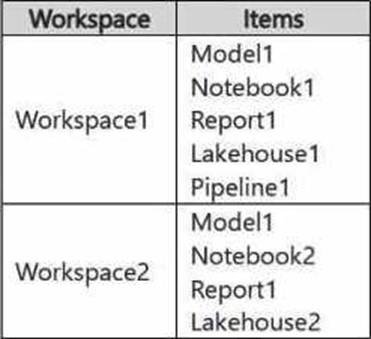
Items in Workspace1 that have the same name as items in Workspace2 are currently paired.
You need to ensure that the items in Workspace1 overwrite the corresponding items in Workspace2.
The solution must minimize effort.
What should you do?
- A . Delete all the items in Workspace2, and then run deployPipeline1.
- B . Rename each item in Workspace2 to have the same name as the items in Workspace1.
- C . Back up the items in Workspace2, and then run deployPipeline1.
- D . Run deployPipeline1 without modifying the items in Workspace2.
D
Explanation:
When running a deployment pipeline in Fabric, if the items in Workspace1 are paired with the corresponding items in Workspace2 (based on the same name), the deployment pipeline will automatically overwrite the existing items in Workspace2 with the modified items from Workspace1. There’s no need to delete, rename, or back up items manually unless you need to keep versions. By simply running deployPipeline1, the pipeline will handle overwriting the existing items in Workspace2 based on the pairing, ensuring the latest version of the items is deployed with minimal effort.
You have a Fabric workspace that contains a warehouse named Warehouse1.
While monitoring Warehouse1, you discover that query performance has degraded during the last 60 minutes.
You need to isolate all the queries that were run during the last 60 minutes. The results must include the username of the users that submitted the queries and the query statements.
What should you use?
- A . the Microsoft Fabric Capacity Metrics app
- B . views from the queryinsights schema
- C . Query activity
- D . the sys.dm_exec_requests dynamic management view
Note: This question is part of a series of questions that present the same scenario. Each question in the series contains a unique solution that might meet the stated goals. Some question sets might have more than one correct solution, while others might not have a correct solution.
After you answer a question in this section, you will NOT be able to return to it. As a result, these questions will not appear in the review screen.
You have a Fabric eventstream that loads data into a table named Bike_Location in a KQL database.
The table contains the following columns:
– BikepointID
– Street
– Neighbourhood
– No_Bikes
– No_Empty_Docks
– Timestamp
You need to apply transformation and filter logic to prepare the data for consumption. The solution must return data for a neighbourhood named Sands End when No_Bikes is at least 15. The results must be ordered by No_Bikes in ascending order.
Solution: You use the following code segment:

Does this meet the goal?
- A . Yes
- B . no
B
Explanation:
This code does not meet the goal because this is an SQL-like query and cannot be executed in KQL, which is required for the database.
Correct code should look like:

You have an Azure key vault named KeyVaultl that contains secrets.
You have a Fabric workspace named Workspace-!. Workspace! contains a notebook named Notebookl that performs the following tasks:
• Loads stage data to the target tables in a lakehouse
• Triggers the refresh of a semantic model
You plan to add functionality to Notebookl that will use the Fabric API to monitor the semantic model refreshes. You need to retrieve the registered application ID and secret from KeyVaultl to generate the authentication token.
Solution: You use the following code segment:
Use notebookutils.credentials.getSecret and specify the key vault URL and key vault secret.
Does this meet the goal?
- A . Yes
- B . No
Note: This question is part of a series of questions that present the same scenario. Each question in the series contains a unique solution that might meet the stated goals. Some question sets might have more than one correct solution, while others might not have a correct solution.
After you answer a question in this section, you will NOT be able to return to it. As a result, these questions will not appear in the review screen.
You have a Fabric eventstream that loads data into a table named Bike_Location in a KQL database.
The table contains the following columns:
– BikepointID
– Street
– Neighbourhood
– No_Bikes
– No_Empty_Docks
– Timestamp
You need to apply transformation and filter logic to prepare the data for consumption. The solution must return data for a neighbourhood named Sands End when No_Bikes is at least 15. The results must be ordered by No_Bikes in ascending order.
Solution: You use the following code segment:

Does this meet the goal?
- A . Yes
- B . no
A
Explanation:
Filter Condition: It correctly filters rows where Neighbourhood is "Sands End" and No_Bikes is greater than or equal to 15.
Sorting: The sorting is explicitly done by No_Bikes in ascending order using sort by No_Bikes asc.
Projection: It projects the required columns (BikepointID, Street, Neighbourhood, No_Bikes, No_Empty_Docks, Timestamp), which minimizes the data returned for consumption.
DRAG DROP
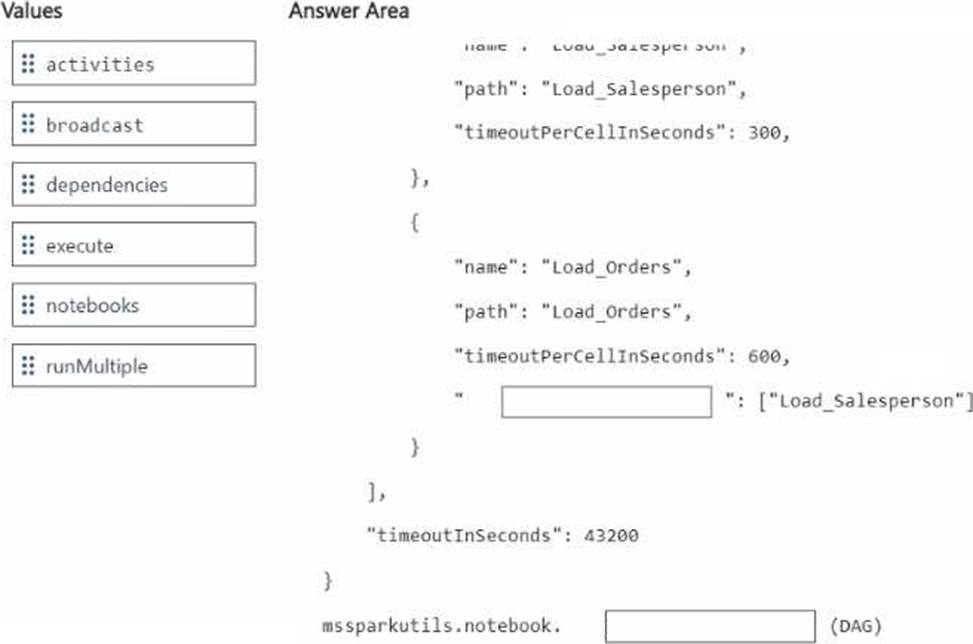
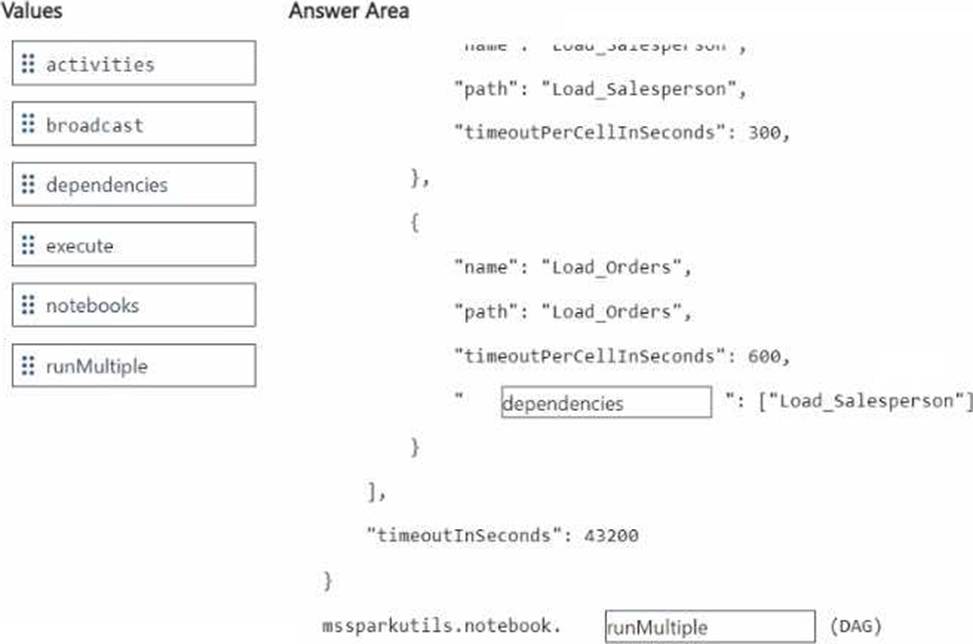
You have two Fabric notebooks named Load_Salesperson and Load_Orders that read data from Parquet files in a lakehouse. Load_Salesperson writes to a Delta table named dim_salesperson. Load.Orders writes to a Delta table named fact_orders and is dependent on the successful execution of Load_Salesperson.
You need to implement a pattern to dynamically execute Load_Salesperson and Load_Orders in the appropriate order by using a notebook.
How should you complete the code? To answer, drag the appropriate values the correct targets. Each value may be used once, more than once, or not at all. You may need to drag the split bar between panes or scroll to view content. NOTE: Each correct selection is worth one point.
You have a Fabric workspace that contains a Real-Time Intelligence solution and an eventhouse.
Users report that from OneLake file explorer, they cannot see the data from the eventhouse.
You enable OneLake availability for the eventhouse.
What will be copied to OneLake?
- A . only data added to new databases that are added to the eventhouse
- B . only the existing data in the eventhouse
- C . no data
- D . both new data and existing data in the eventhouse
- E . only new data added to the eventhouse
D
Explanation:
When you enable OneLake availability for an eventhouse, both new and existing data in the eventhouse will be copied to OneLake. This feature ensures that data, whether newly ingested or already present, becomes available for access through OneLake, making it easier for users to interact with and explore the data directly from OneLake file explorer.