
Netskope NSK101 Practice Exams
Last updated on Oct 21,2026- Exam Code: NSK101
- Exam Name: Netskope Certified Cloud Security Administrator (NCCSA)
- Certification Provider: Netskope
- Latest update: Oct 21,2026
You want to enable Netskope to gain visibility into your users’ cloud application activities in an inline mode.
In this scenario, which two deployment methods would match your inline use case? (Choose two.)
- A . Use a forward proxy.
- B . Use an API connector
- C . Use a log parser.
- D . Use a reverse proxy.
A, D
Explanation:
To enable Netskope to gain visibility into your users’ cloud application activities in an inline mode, you need to use a deployment method that allows Netskope to intercept and inspect the traffic between your users and the cloud applications in real time. Two deployment methods that would match your inline use case are: use a forward proxy and use a reverse proxy. A forward proxy is a deployment method that allows Netskope to act as a proxy server for your users’ outbound traffic to the internet. You can configure your users’ devices or browsers to send their traffic to Netskope’s proxy server, either manually or using PAC files or VPN profiles. A reverse proxy is a deployment method that allows Netskope to act as a proxy server for your users’ inbound traffic from specific cloud applications. You can configure your cloud applications to redirect their traffic to Netskope’s proxy server, either using custom URLs or certificates. Using an API connector or a log parser are not deployment methods that would match your inline use case, as they are more suitable for out-of-band modes that rely on accessing data and events from the cloud applications using APIs or logs, rather than intercepting traffic in real time.
Reference: [Netskope Inline CASB], Netskope Security Cloud Operation & Administration (NSCO&A) – Classroom Course, Module 3: Steering Configuration, Lesson 4: Forward Proxy and Lesson 5: Reverse Proxy.
A new customer is concerned about performance, especially with respect to Microsoft 365. They have offices in 20 countries around the world and their workforce is mostly mobile.
In this scenario, which two statements about NewEdge would align with the customer’s requirements? (Choose two.)
- A . NewEdge accurately identifies Microsoft 365 violations and data risks.
- B . NewEdge provides advanced public cloud infrastructure security.
- C . NewEdge provides direct peering with Microsoft in every data center.
- D . NewEdge delivers a single, unified network with all services available in all locations worldwide.
C, D
Explanation:
NewEdge is Netskope’s security private cloud, offering high-performance, low-latency access to the internet and cloud services.
For a customer concerned about performance, especially with respect to Microsoft 365, NewEdge provides significant benefits:
Direct Peering with Microsoft: NewEdge establishes direct peering connections with Microsoft in every data center. This ensures optimal routing and performance for Microsoft 365 services, which is crucial for customers with a global, mobile workforce.
Unified Global Network: NewEdge delivers a single, unified network with all security services available in all locations worldwide. This ensures consistent security policies and performance regardless of where users are located, providing seamless access and reducing latency.
The Netskope deployment for your organization is deployed in CASB-only mode. You want to view dropbox.com traffic but do not see it when using SkopeIT.
In this scenario, what are two reasons for this problem? (Choose two.)
- A . The Dropbox Web application is certificate pinned and cannot be steered to the Netskope tenant.
- B . The Dropbox domains have not been configured to steer to the Netskope tenant.
- C . The Dropbox desktop application is certificate pinned and cannot be steered to the Netskope tenant.
- D . The Dropbox domains are configured to steer to the Netskope tenant.
A, B
Explanation:
In a CASB-only deployment of Netskope, there could be several reasons why Dropbox.com traffic is not visible in SkopeIT:
Certificate Pinning:
The Dropbox Web application might be using certificate pinning, which means it only accepts specific certificates for its connections. This can prevent the traffic from being steered to the Netskope tenant because the proxy’s certificate might not match the pinned certificate.
Configuration of Dropbox Domains:
If the Dropbox domains are not properly configured to be steered to the Netskope tenant, then the traffic will bypass the Netskope inspection and will not be visible in SkopeIT. Ensuring that the domains are configured correctly is essential for the traffic to be captured and analyzed by Netskope.
Reference: "Certificate pinning prevents the interception of traffic by requiring that the presented certificate matches a known good certificate. This can interfere with traffic steering in CASB deployments.".
"Proper configuration of application domains is necessary to ensure traffic is steered to the Netskope tenant for inspection and visibility.".
A customer asks you to create several real-time policies. Policy A generates alerts when any user downloads, uploads, or shares files on a cloud storage application. Policy B blocks users from downloading files from any operating system (OS) other than Mac or Windows for cloud storage. In this case, policy A is least restrictive and policy B is more restrictive.
Which statement is correct in this scenario?
- A . Policy A is implemented before policy B.
- B . Policy B is implemented before policy A.
- C . The policy order is not important; policies are independent of each other.
- D . These two policies would actually not work together.
B
Explanation:
In this scenario, policy B is more restrictive than policy A, as it blocks users from downloading files from any OS other than Mac or Windows for cloud storage, while policy A only generates alerts when any user downloads, uploads, or shares files on a cloud storage application. Therefore, policy B should be implemented before policy A, as the policy order determines the order of evaluation and enforcement of the policies. If policy A is implemented before policy B, then policy B will never be triggered, as policy A will match all the download activities for cloud storage and generate alerts. The policy order is important; policies are not independent of each other, as they may have overlapping or conflicting conditions and actions. These two policies would actually work together, as long as they are ordered correctly.
Reference: Netskope Security Cloud Operation & Administration (NSCO&A) – Classroom Course, Module 5: Real-Time Policies, Lesson 3: Policy Order.
Which two statements are correct about DLP Incidents in the Netskope platform? (Choose two.)
- A . An incident can be associated to one or more DLP policies.
- B . An incident can have one or more DLP violations.
- C . An incident can be assigned to one or more administrators.
- D . An incident can be associated to one or more DLP rules.
BD
Explanation:
Two statements that are correct about DLP Incidents in the Netskope platform are: An incident can have one or more DLP violations and an incident can be associated to one or more DLP rules. A DLP violation occurs when a file or object matches a DLP rule used in a DLP profile. A DLP rule defines the criteria for detecting sensitive data, such as keywords, regular expressions, fingerprints, machine learning classifiers, etc. A DLP profile is a collection of DLP rules that can be applied to a policy. An incident is a record of a file or object that triggered a DLP policy violation. An incident can have multiple violations if the file or object matches multiple DLP rules from different profiles. An incident can also be associated to multiple DLP rules if the file or object matches more than one rule from the same profile.
Reference: About DLPDLP Profiles
What are two valid use cases for the Cloud Confidence Index (CCI)? (Choose two.)
- A . To recategorize cloud applications in the database
- B . To delete cloud applications from the database
- C . To identify the activities that Netskope supports for cloud applications
- D . To compare similar cloud applications
CD
Explanation:
The Cloud Confidence Index (CCI) has several use cases, including:
To identify the activities that Netskope supports for cloud applications: The CCI helps administrators understand which activities are supported and monitored by Netskope for various cloud applications. This includes knowing the types of data that can be protected and the actions that can be controlled within those applications.
To compare similar cloud applications: The CCI provides a comparative assessment of cloud applications based on their security and compliance postures. This allows organizations to make informed decisions about which applications to approve or restrict based on their confidence levels.
These use cases help organizations enhance their security posture by using the CCI to guide application usage policies and ensure compliance with internal standards.
Reference: Netskope documentation on Cloud Confidence Index and its applications in policy creation and management.
Guides on using CCI to assess and compare cloud applications for better security and compliance.
What are two benefits of creating a policy group as a logical collection of Real-time Protection policies? (Choose two.)
- A . To split up policies by region or business unit.
- B . To enable Alert and Continue policies.
- C . To simplify workflow, allowing exact access to a specific set of policies.
- D . To provide additional actions based on policy match criteria.
AC
Explanation:
Creating a policy group as a logical collection of Real-time Protection policies provides several benefits:
To split up policies by region or business unit: This allows for more granular control and management of policies based on organizational structure. Each region or business unit can have its own set of policies tailored to its specific needs and compliance requirements.
To simplify workflow, allowing exact access to a specific set of policies: Policy groups help streamline the management process by grouping related policies together. This simplifies the workflow for administrators by providing them with access to only the relevant policies they need to manage, reducing complexity and potential for errors.
Reference: Netskope documentation on creating and managing policy groups.
Best practices for organizing policies to enhance manageability and operational efficiency.
What is a benefit that Netskope instance awareness provides?
- A . It prevents movement of corporate sensitive data to a personal Dropbox account.
- B . It prevents the user from copying information from a corporate email and pasting the information into a GitHub repository.
- C . It differentiates between an IT managed Google Drive instance versus a personal Dropbox account.
- D . It differentiates between an IT managed Google Drive instance versus a personal Google Drive instance.
D
Explanation:
A benefit that Netskope instance awareness provides is that it differentiates between an IT managed Google Drive instance versus a personal Google Drive instance. Instance awareness is a feature in the Netskope platform that allows you to define and identify different instances of the same cloud application based on the domain name or URL. For example, you can define an instance for your IT managed Google Drive instance (such as drive.google.com/a/yourcompany.com) and another instance for your personal Google Drive instance (such as drive.google.com). This way, you can differentiate between them and apply different policies and actions based on the instance. This can help you prevent data leakage, enforce compliance, or improve visibility for your cloud application activities. Preventing movement of corporate sensitive data to a personal Dropbox account, preventing the user from copying information from a corporate email and pasting it into a GitHub repository, or differentiating between an IT managed Google Drive instance versus an IT managed Box instance are not benefits that Netskope instance awareness provides, as they are either unrelated or irrelevant to the instance awareness feature.
Reference: Netskope Security Cloud Operation & Administration (NSCO&A) – Classroom Course, Module 5: Real-Time Policies, Lesson 4: App Instances.
Click the Exhibit button.
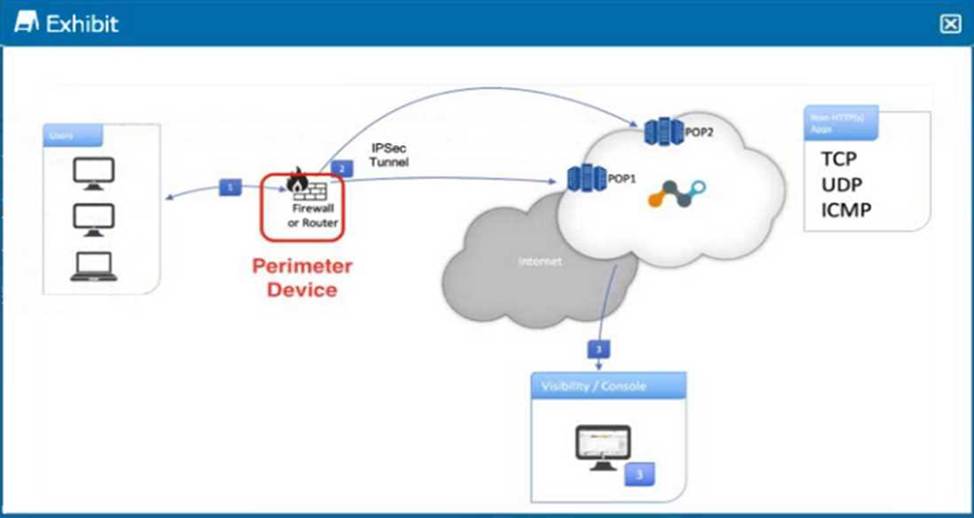
Referring to the exhibit, what are two recommended steps to be set on the perimeter device to monitor IPsec tunnels to a Netskope data plane? (Choose two.)
- A . Enable IKE Dead Peer Detection (DPD) for each tunnel.
- B . Send ICMP requests to the Netskope location’s Probe IP
- C . Send HTTP requests to the Netskope location’s Probe IP.
- D . Send ICMP requests to the Netskope location’s proxy IPs.
A, B
Explanation:
To monitor IPsec tunnels to a Netskope data plane, it is essential to ensure the stability and responsiveness of the tunnels. The recommended steps involve enabling monitoring mechanisms that detect and respond to tunnel failures.
Here’s a detailed explanation of the two recommended steps:
Enable IKE Dead Peer Detection (DPD) for each tunnel:
IKE Dead Peer Detection (DPD) is a method used to detect if the peer (remote endpoint of the tunnel) is no longer available or reachable. By enabling DPD, the device can automatically detect and tear down the IPsec tunnel if the peer does not respond, allowing for quick re-establishment of the tunnel if needed.
Implementation: Configure DPD in the IPsec settings of the perimeter device. This ensures that if the Netskope data plane is unreachable, the tunnel is automatically terminated and re-negotiated. Send ICMP requests to the Netskope location’s Probe IP:
Sending ICMP requests (ping) to the Netskope location’s Probe IP helps in monitoring the availability and latency of the connection to the Netskope data plane. If the ICMP requests fail, it indicates a potential issue with the connectivity.
Implementation: Set up regular ICMP requests (ping) from the perimeter device to the Netskope
Probe IPs. This allows for continuous monitoring of the tunnel’s health and immediate detection of
connectivity issues.
Reference: REST API v2 Overview – Netskope Knowledge Portal
Using the REST API v2 dataexport Iterator Endpoints – Netskope Knowledge Portal Using the REST API v2 UCI Impact Endpoints – Netskope Knowledge Portal
As an administrator, you are asked to monitor the status of your IPsec and GRE tunnels.
In the Netskope Admin UI, which two sections would you use in this scenario? (Choose two.)
- A . Steering Configuration page under Settings
- B . Bandwidth Consumption module of Digital Experience Management
- C . Network Steering page of Digital Experience Management
- D . IPsec Site and GRE Site paqes under Settinqs
A, D
Explanation:
Steering Configuration page under Settings (A):
The Steering Configuration page under Settings is used to configure and manage the steering policies, including IPsec and GRE tunnels. This section provides the necessary tools to configure the network traffic routing and ensures that the configurations are set according to the organization’s requirements.
IPsec Site and GRE Site pages under Settings (D):
These specific pages under the Settings section allow administrators to monitor and manage the status of IPsec and GRE tunnels. They provide detailed information about the tunnel configurations, status, and other metrics that are essential for maintaining the health and performance of the network connections.
These details are confirmed based on the features and configurations available within the Netskope Admin UI settings, as documented in the Netskope Knowledge Portal.