
Nutanix NCP-CI-AWS Practice Exams
Last updated on Oct 06,2026- Exam Code: NCP-CI-AWS
- Exam Name: Nutanix Certified Professional - Cloud Integration - AWS v6.7
- Certification Provider: Nutanix
- Latest update: Oct 06,2026
An administrator has deployed NC2 on AWS. The cluster deployment completed successfully. After deployment, the administrator created a subnet in AWS, added it as a network in Prism Element, deployed Prism Central using the newly-configured network, and registered the cloud cluster with it.
The on-premises network and AWS are connected via a Site-to-Site VPN. Cluster nodes, CVM, and Prism Central can communicate with each other, but cannot be accessed from the on-premises network.
What two issues might be the cause of this problem? (Choose two.)
- A . AWS Direct Connect must be used to establish connection between AWS and on-premises
- B . Traffic from the on-premises network is not permitted by VM and Management security groups.
- C . The AHV firewall is blocking traffic from the on-premises network.
- D . The AWS VPC traffic is blocked by a firewall in the on-premises network.
BD
Explanation:
Traffic from the on-premises network is not permitted by VM and Management security groups: Ensure that the security groups assigned to the VMs and management interfaces in AWS allow inbound traffic from the on-premises network. Without appropriate security group rules, the traffic will be blocked.
The AWS VPC traffic is blocked by a firewall in the on-premises network:
Check if the firewall on the on-premises network is configured to allow traffic from the AWS VPC. Firewalls may have restrictive rules that block incoming traffic, preventing communication.
Reference: Refer to AWS documentation on security groups and firewalls and Nutanix documentation on configuring networking for NC2 clusters.
An administrator is planning an NC2 deployment and wants to connect to AWS Services privately from the corporate VPC without going through the public internet.
Which connectivity solution should the administrator use?
- A . Point-to-Site VPN
- B . Gateway Endpoint
- C . VTEP Gateways
- D . Site-to-Site VPN
B
Explanation:
Gateway Endpoint:
A Gateway Endpoint in AWS allows you to connect to supported AWS services privately without going through the public internet. This setup provides secure and efficient connectivity directly from the corporate VPC to the required AWS services.
Gateway Endpoints support services such as Amazon S3 and DynamoDB and are ideal for scenarios where private connectivity to these services is needed.
Reference: Refer to the AWS documentation on VPC endpoints, specifically Gateway Endpoints, and the Nutanix documentation on configuring private connectivity for NC2 deployments.
An administrator planned to create a new NC2 cluster and chose the existing AWS VPC infrastructure in the workflow. The administrator need two private subnets to complete the configuration.
What are these two private subnets used for..
- A . For user VMs and cluster management
- B . For Prism Element and Prism Central management
- C . For DNS and NTP management
- D . For private NAT and Elastic IP management
A
Explanation:
The requirement for two private subnets in the NC2 cluster configuration workflow serves the same purposes:
One subnet is designated for user VMs, ensuring user workloads are separated from management operations.
The other subnet is designated for cluster management, maintaining the integrity and security of management processes and internal communications.
Reference: Nutanix Clusters on AWS Deployment Guide
Nutanix Cloud Clusters on AWS Administration
19.101.0/24
The following subnet have been configured in the NC2 AWS VPC:
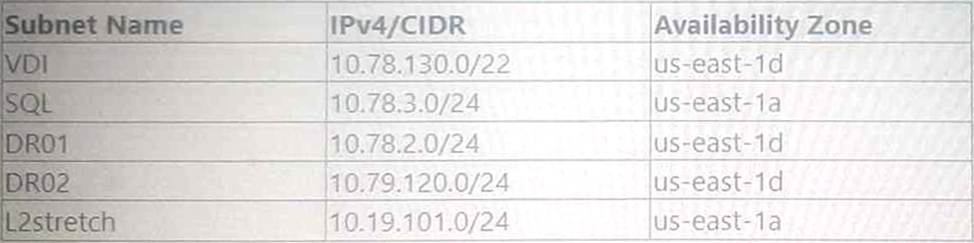
Which two subnet will show up in the Network configuration of the Prism Element Settings page? (Choose two.)
- A . DR01
- B . L2stretch
- C . VDI
- D . DR02
AB
Explanation:
For the NC2 cluster deployed in the North Virginia region (us-east-id), consuming IPs from the 10.78.2.0/24 range, the subnets configured within the same CIDR range of 10.78.0.0/16 will be recognized.
The subnet DR01 (10.78.2.0/24) is directly within the range of the deployed cluster.
The subnet L2stretch (10.19.101.0/24) is also configured in the NC2 AWS VPC, although not in the immediate range of the cluster, it may show up due to broader network configurations for stretched L2 operations.
Subnets VDI (10.78.130.0/22) and DR02 (10.79.120.0/24), although part of the same VPC, are not directly within the immediate CIDR range or may not be recognized in this specific configuration scenario.
Reference: Refer to the Nutanix documentation on NC2 AWS VPC subnet configurations and Prism Element settings for detailed guidelines on network visibility and configuration.
What is an available log module when configuring a syslog server in the Prism Central Admin Center?
- A . API Audit
- B . Prism
- C . Zookeeper
- D . Acropolis
D
Explanation:
When configuring a syslog server in the Prism Central Admin Center for Nutanix, one of the available log modules is Acropolis.
The Acropolis module logs system events related to the Nutanix Acropolis operating system, which is critical for monitoring and auditing system activities and performance.
Configuring syslog with the Acropolis module ensures that important events and issues related to the Acropolis environment are captured and can be forwarded to an external syslog server for centralized logging and analysis.
Reference: Refer to the Nutanix documentation on Prism Central and syslog configuration for the full list of available log modules and detailed steps for configuration.
An administrator needs to allow wide open access to one particular NC2 AWS cluster from an on-premises subnet of 10.19.160.0/24.
What is the proper Custom Security Group formatting to satisfy this task?
A)

B)

C)

D)

- A . Option A
- B . Option B
- C . Option C
- D . Option D
B
Explanation:
To allow wide open access to a particular NC2 AWS cluster from an on-premises subnet (10.19.160.0/24), the proper Custom Security Group formatting needs to include the necessary tags that specify the external cluster UUID and the networks allowed.
Custom Security Group Configuration:
The configuration should include tags to identify the cluster and the networks that should be granted access.
Key: nutanix:clusters
Key: nutanix:clusters:external
Value: <cluster-uuid>
Explanation of Choice:
Option B includes the necessary tags and values, ensuring that the specific cluster UUID is recognized and the on-premises subnet (10.19.160.0/24) can communicate with the NC2 cluster.
Security Group Tags:
nutanix:clusters:external – Identifies the cluster as external.
nutanix:clusters:external:cluster-uuid – Specifies the unique identifier for the cluster, enabling proper traffic routing and access.
Reference: Nutanix Cloud Clusters on AWS Administration Guide
AWS Security Group Documentation
Nutanix Best Practices for Custom Security Group Configuration
An administrator has been tasked with performing a test migrating from an NC2 environment to a Nutanix on-premises environment.
Where should the administrator perform this task?
- A . NC2 Prism Element
- B . NC2 Prism Central
- C . Nutanix Cloud Services Portal
- D . On-premises Prism Central
B
Explanation:
When performing a migration from an NC2 environment to a Nutanix on-premises environment, the task should be performed using the NC2 Prism Central. This is because NC2 Prism Central provides a centralized management interface that allows administrators to manage and migrate workloads between cloud and on-premises environments seamlessly.
Reference: Nutanix Cloud Clusters (NC2) Documentation
Nutanix Community Guide
How many Amazon Elastic Block Store (EBS) volumes are attached to each node within an AWS NC2 cluster upon creation.
- A . 1
- B . 2
- C . 3
- D . 4
C
Explanation:
Upon creation, each node within an AWS NC2 cluster has 3 Amazon Elastic Block Store (EBS) volumes attached.
These volumes are used for different purposes, such as operating system storage, Nutanix services, and user data storage.
The number of EBS volumes is designed to ensure adequate storage performance and capacity for the NC2 cluster’s operations and workload demands.
Reference: Refer to the Nutanix documentation on NC2 cluster setup and AWS EBS volume configurations to confirm the details on the number and purpose of EBS volumes attached to each node.
Exhibit.

An administrator is attempting, but failing to create an NC2 cluster in AWS.
The administrator checks the configuration in the NC and notices the configuration shown in the exhibit.
What action should the administrator take to resolve the issue?
- A . Recreate the AWS CloudFormation stack.
- B . Create a new cloud account in the organization.
- C . Restart Genesis on a Prism Central instance.
- D . Grant the administrator’s account access to the NC2 organization.
B
Explanation:
The exhibit shows two cloud accounts, one for Azure and one for AWS, with their statuses indicated.
The AWS cloud account status is marked as "U" (which likely stands for "Unavailable" or "Unreachable"). This indicates that the AWS cloud account configuration is not properly connected or accessible.
Status Check:
The AWS cloud account is marked with an "U" status, meaning it is not active or accessible.
This status prevents the creation of an NC2 cluster because the necessary cloud resources cannot be allocated or managed without a proper connection.
Action:
The best course of action is to create a new cloud account in the organization. This involves setting up the cloud account details correctly and ensuring it is properly configured to communicate with Nutanix and AWS.
Steps to Create a New Cloud Account:
Log in to the Nutanix console.
Navigate to the "Organizations" section.
Select "Add Cloud Account" and provide the required AWS credentials and permissions.
Ensure the new cloud account is active and correctly configured.
Reference: Nutanix Cloud Clusters on AWS Administration Guide
Nutanix Best Practices for Cloud Account Management
Which service enables the monitoring of key metrics on various AWS services, inducing EC2, EBS, and VPC for an NC2 cluster deployments?
- A . Amazon CloudWatch
- B . AWS CloudTrail
- C . AWS CloudFormation
- D . Amazon inspector
A
Explanation:
Amazon CloudWatch is the service that enables the monitoring of key metrics on various AWS services, including EC2, EBS, and VPC, for NC2 cluster deployments.
Amazon CloudWatch:
Amazon CloudWatch provides monitoring for AWS cloud resources and applications. It collects and tracks metrics, collects and monitors log files, and sets alarms.
Specifically, for NC2 deployments, CloudWatch can be used to monitor key metrics such as CPU utilization, disk I/O, network I/O for EC2 instances, EBS volume performance, and VPC network traffic.
Features:
Metrics Monitoring: Collects and visualizes operational data in the form of metrics, including utilization, performance, and health.
Logs Monitoring: Collects log data, monitors it in real-time, and triggers alarms based on predefined thresholds.
Alarms: Notifies when operational performance thresholds are breached.
Integration with NC2:
By setting up CloudWatch, administrators can ensure they have visibility into the performance and health of their Nutanix clusters on AWS, aiding in proactive management and troubleshooting.
Reference: Amazon CloudWatch Documentation
Nutanix Cloud Clusters on AWS Administration Guide
AWS Monitoring Best Practices